1,547 posts tagged “datasette”
Datasette is an open source tool for exploring and publishing data.
2026
Alec Garcia added support for OpenTelemetry to Datasette in this release.
I've also refactored all of Datasette's modal dialogs to a single Web Component, which is now documented for other plugins to use.
- Explain plans now work on read-only stored-query pages.
I upgraded datasette.simonwillison.net to Datasette 1.0a40, which inspired me to ship a new version of this explain plugin.
I run this GitHub login plugin on the agent.datasette.io demo site and I noticed that my authenticated sessions weren't lasting very long. It turned out that the plugin was setting cookies without a Max-Age parameter, so they were expiring at the end of a browser session (which in Mobile Safari seems to happen pretty often, independently of how you are using the app.)
I fixed that in #80 and, since this plugin has been around for quite a while and is tested against both Datasette 0.65.x and Datasette 1.0ax, I decided to bump it up to a 1.0 release. I'm trying to get better at promoting stable plugins to 1.0.
Same security fix as 0.65.5, plus some neat new features and bug fixes:
- Plugins can now launch and manage background tasks using the new datasette.add_background_task() method. Thanks, Alex Garcia.
- I've migrated Datasette to httpx2 for features like the internal
datasette.client.get()method. - A whole lot of bug fixes, many of them stemming from a recent effort to triage issues for a 1.0 stable release.
Security fix for an issue where a trailing newline in a requested table name could bypass table permissions and expose private rows, reported by dpfkdlemtp in GHSA-h547-rmjf-5m2m.
Datasette 1.0a39 and 0.65.4 security releases. Today we're releasing two new security patch versions of Datasette: 1.0a39 and 0.65.4 - one for the current alpha series and one for the stable 0.65.x family.
These are security fixes which you should apply if you are running a Datasette instance on the public web - in particular if that instance mixes both public and private tables.
Following issues reported by Sevban Dönmez, Alex Garcia and I ran an extensive audit of Datasette using Claude Fable 5.1, GPT-5.6, and GPT-6 Astra. We then spent almost a week collaborating on and reviewing the fixes.
They helped find some very subtle bugs. We'll be incorporating security audits by frontier models into all of our development work going forward.
Alex came up with a way of splitting the work which I found extremely productive:
Alex Garcia and I worked together running and then responding to the audit, working in a shared private repository. For most of the issues we split the work: one of us would create the automated tests highlighting the issue, then the other would implement the fix. This ensured that two separate humans had eyes on each of the issues, in addition to our coding agents running different models.
See Datasette 1.0a39 and 0.65.4 security releases on the Datasette blog.
See Datasette 1.0a39 and 0.65.4 security releases on the Datasette blog.
Creepy crawlies (via) Konstantin Ryabitsev discusses how bad the "background radiation" of abusive crawlers has become from the perspective of git.kernel.org, the official Git repository for the Linux kernel:
TL;DR: we spend more CPU cycles rendering commits for scrapers than we spend on all other kinds of legitimate access, including git clones. At any one time, across 5 geo-distributed nodes, there are 14 CPU cores doing nothing but rendering git commits as html.
I worry about this a lot from the perspective of Datasette, which serves a huge number of crawlable web pages.
"rows"fromexecute_sqlis now an array of objects. Previously it was an array of arrays. This should help weaker models avoid losing track of which positional array element maps to which column. #1- Now depends on
mcp>=2.1.1.
This is the first non-alpha release of the plugin. I'm confident it's ready as I've been using it quite a bit myself.
This plugin has been around for a while - it lets users upload a brand new SQLite database to a hosted Datasette instance, at which point that database will start being served by that instance.
It can also be used to atomically swap a database with a more recent version. The uploaded database is saved to a file, verified, then swapped in so /name starts serving the new one.
The new release adds a formalized API, so you can replace an existing database (or add a new one) like this:
curl -X POST \
  -H "Authorization: Bearer $API_TOKEN" \
  -H "Accept: application/json" \
  -F "db=@content.db" \
  -F "db_name=content" \
  https://your-instance.example.com/-/upload-dbs
This means you can build fresh databases in an environment such as GitHub Actions and swap them in production as soon as that build has completed.
Upgraded for compatibility with `sqlite-utils 4.
This release fixes a SQL injection security issue that affects Datasette instances that serve a mixture of public and private tables in the same database, with access configured using the Datasette permissions system.
Site administrators who serve private tables in this way are advised to disable the execute-sql permission on that database to prevent users from accessing private tables using raw SQL queries. The bug that has been fixed would have allowed users with access to any public table to execute SQL injection attacks despite that restriction, giving them read-only access to data in private tables in the same database.
This fix is also available in Datasette 0.65.3.
Thankfully this particular configuration - private tables and public tables exposed for the same database within the same instance - is likely to be rare. I've not encountered an instance like that myself.
Back-ported the SQL Injection security fix from 1.0a38.
Changes that improve Datasette Apps when created and edited using Datasette Agent:
The app_debug() tool is pretty neat: it works by displaying the app in a opacity: 0 iframe with pointer-events: none (so it can't be seen or interacted with) and then executing agent-provided JavaScript inside that sandboxed iframe. This means the agent can smoke test that the app is working and even do things like measure the dimensions of different elements.
This uses the new context.browser_task() mechanism added in datasette-agent 0.4a0.
Stateless MCP has recaptured my interest (and inspired mcp-explorer and datasette-mcp)
Tuesday was Stateless MCP day—the rollout of MCP 2.0, or the 2026-07-28 Model Context Protocol specification to use the more formal but less memorable name. This is the most significant change to the MCP spec since it first launched, and has also served to reignite my personal interest in the protocol.
[... 1,316 words]
- New
await context.browser_task()mechanism allowing agent tools to run code directly in the user's browser. #33
This is an exciting new capability: it makes it easy for Datasette Agent plugins to provide tools that execute custom JavaScript in the user's browser.
I used this to add a debug loop to Datasette Apps in datasette-apps 0.2a0.
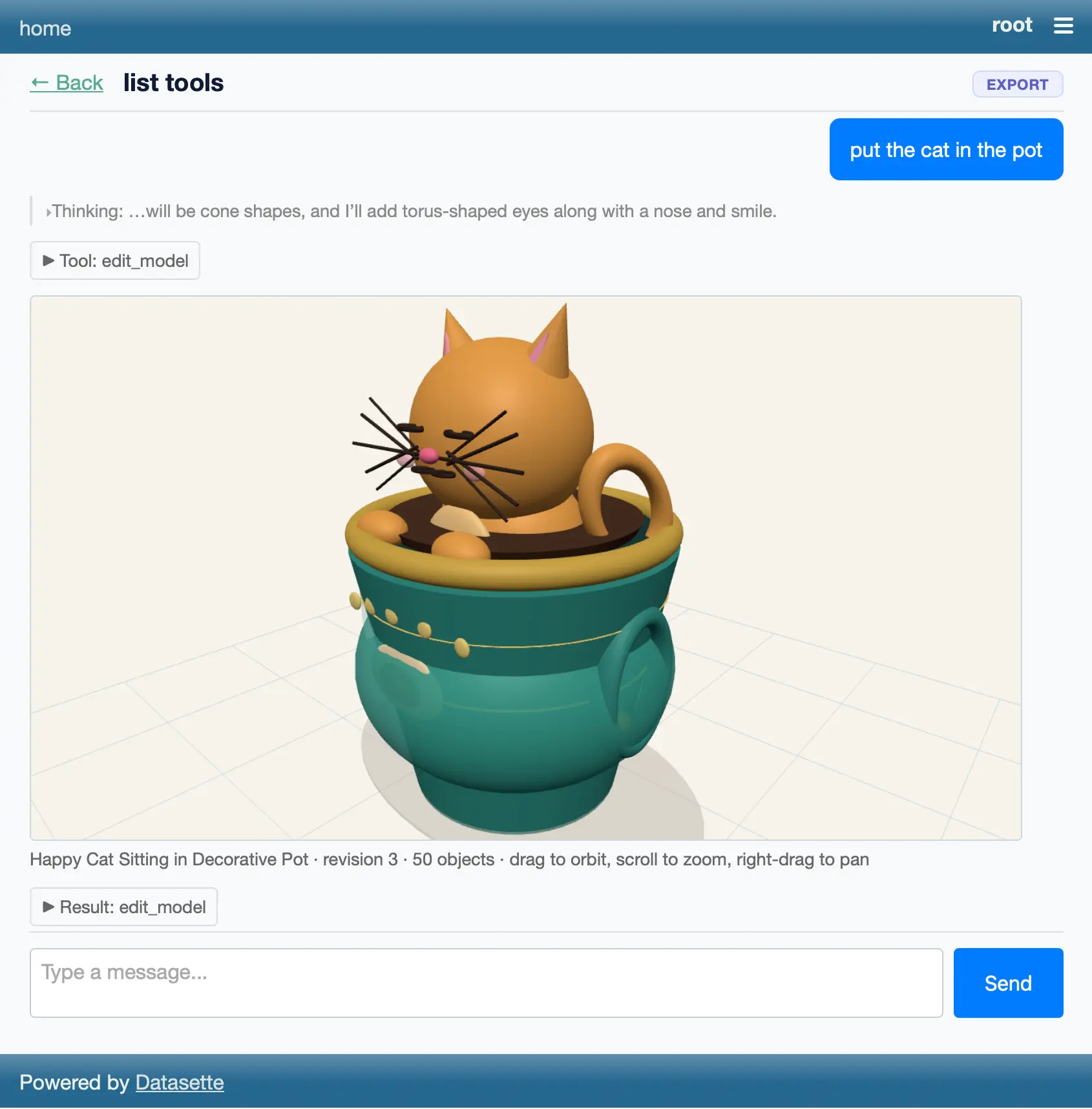
Bit of a wild vibe coding experiment with Claude Fable 5. I told it to "Build a plugin for datasette agent which adds a tool for creating a 3D model and then making edits to that model" (full prompt here) and... it did.
A minor release. Performance and documentation improvements to the permissions system, plus I reverted a cosmetic API change which caused almost every existing plugin test suite to break.
DOOMQL (via) Peter Gostev built this using GPT-5.6 Sol. This is a lot of fun:
DOOMQL started with a deliberately unreasonable question: what if SQLite were the game engine, not merely the place where a game stores data?
The result is a small, original Doom-like game in which SQL owns movement, collision, enemies, combat, progression and every RGB pixel on screen.
It's implemented as a Python terminal script - I tried it out like this:
cd /tmp
git clone https://github.com/petergpt/doomql
cd doomql
uv run host/doomql.py
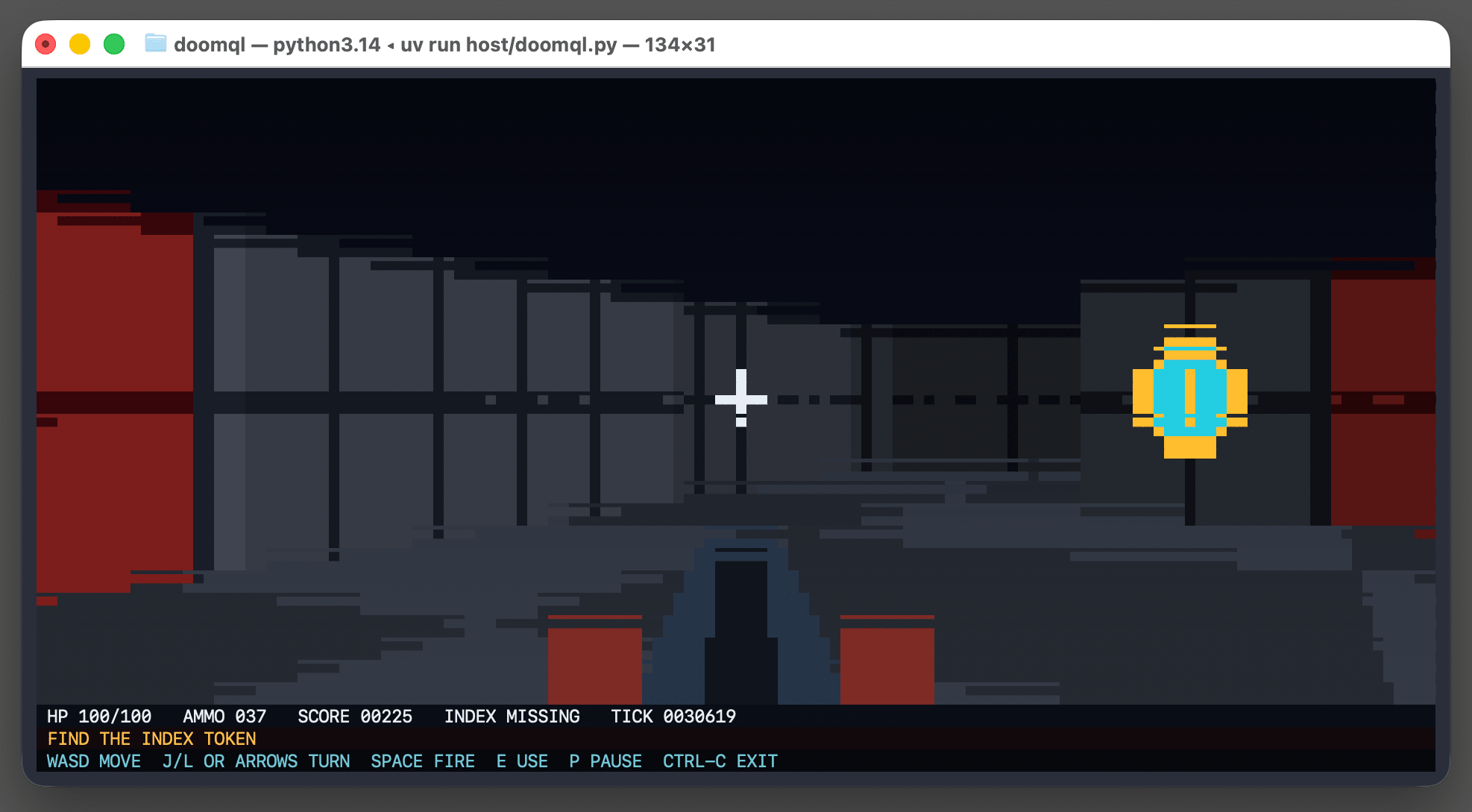
Here's the huge SQL query that implements a full ray tracer in SQLite using a recursive CTE.
Running the above script creates a /tmp/doomql/.doomql/doomql.sqlite SQLite database, which you can explore using Datasette like this:
uvx --prerelease=allow  --with datasette-apps datasette \
  /tmp/doomql/.doomql/doomql.sqlite \
  -p 4444 --root --secret 1 --internal internal.db
The --with datasette-apps option installs the new Datasette Apps plugin, which supports creating custom HTML+JavaScript apps that can run SQL queries directly within the Datasette interface.
I created a new app, pasted the copy-paste prompt into Claude chat (Fable 5) and told it:
Build an app that displays the current state of the screen using the frame_pixels view with its x, y, r, g, b columns. have it refresh once a second.
This got me a working HTML+JavaScript app inside Datasette that could reflect the current state while I played the game in my terminal. Then I added:
add a minimap
And now my Datasette App looks like this:
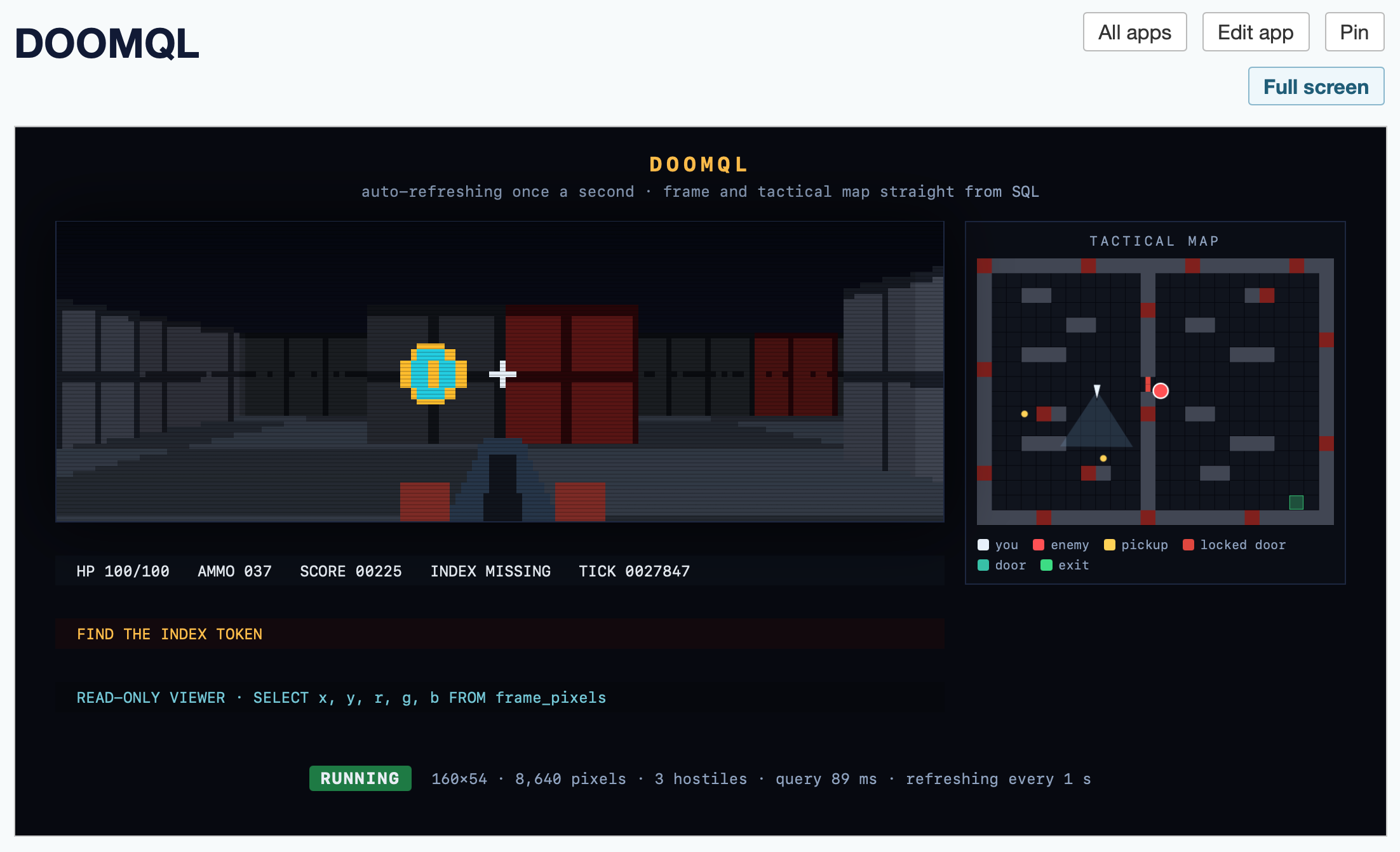
Here's the HTML app code - paste that into your own Datasette instance (using the uvx --with datasette-apps recipe from above) to try it yourself.
datasette code-frequency chart on GitHub. Out of curiosity I decided to see if I could find a useful illustration of the impact of coding agents and Opus 4.5 class models on my own output. The best I've found so far is this GitHub chart of frequency of code changes to my Datasette open source project:
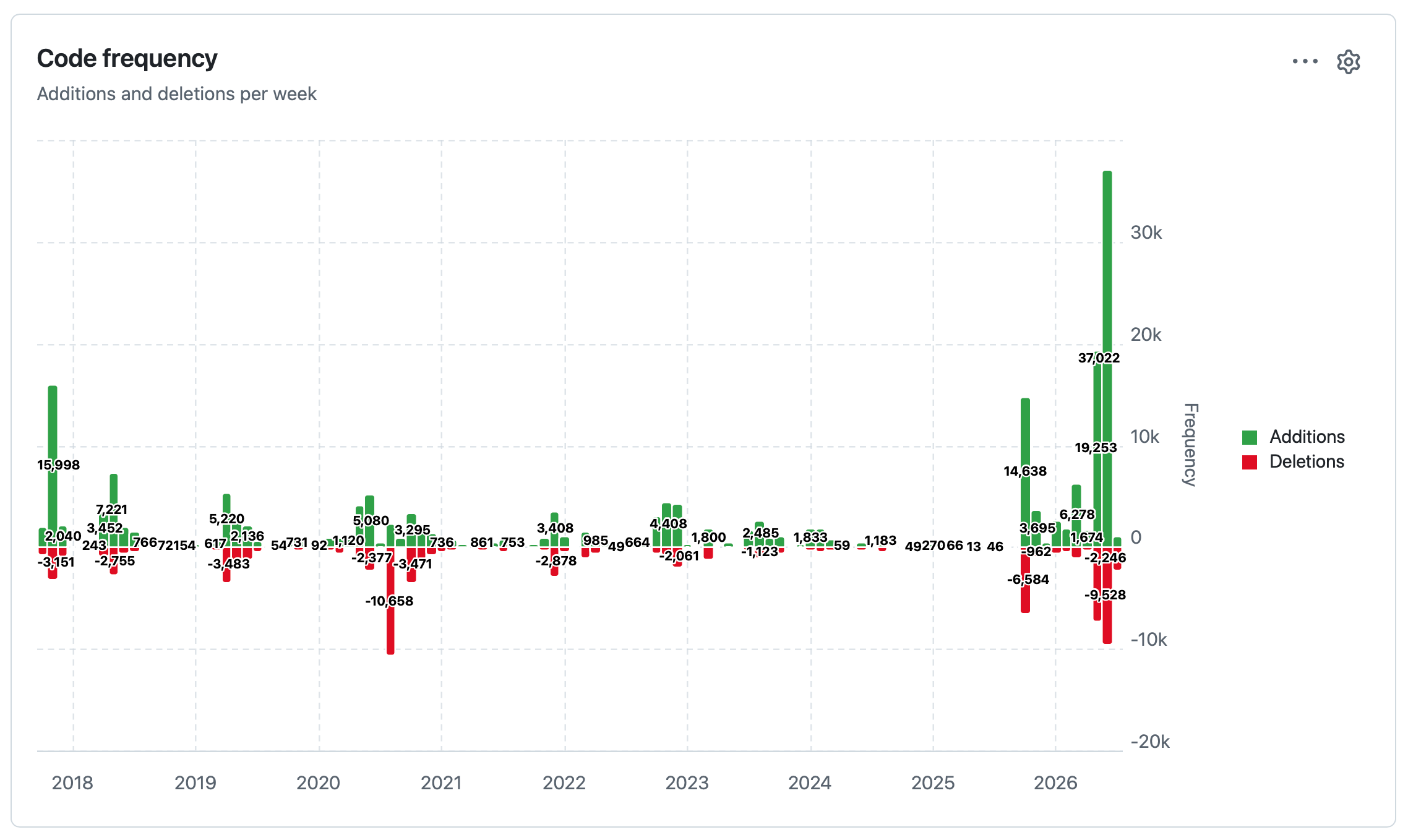
The big spike in activity at the end aligns with Opus 4.8, GPT-5.5, Fable 5 and GPT-5.6 Sol.
The signature features of this alpha are new UIs for inserting multiple rows at once (from TSV, CSV or JSON) and for creating a table from rows, plus a large number of small JSON API consistency fixes in preparation for a 1.0 stable release.
One of this morning's AIE keynotes covered dspy, which reminded me I've been meaning to see if it could help me improve the system prompt used by Datasette Agent - so I fired off an asynchronous research task in Claude Code for web using Claude Fable 5:
Pip install the latest Datasette alpha and datasette-agent and dspy - then figure out how to use dspy to evaluate and improve the main system prompts used by Datasette Agent for the feature where it can execute read only SQL queries to answer user questions about data.
Fable chose to test using GPT 4.1 mini and nano, and identified several promising looking directions for improvements. I particularly like this one:
The schema listing gives only table names; the "don't call describe_table if you already have the information" advice caused column-name guessing (page_count, o.order_id, first_name) and error-retry loops in baseline traces. Either include column names in the prompt's schema listing or soften that advice.
Have your agent record video demos of its work with shot-scraper video
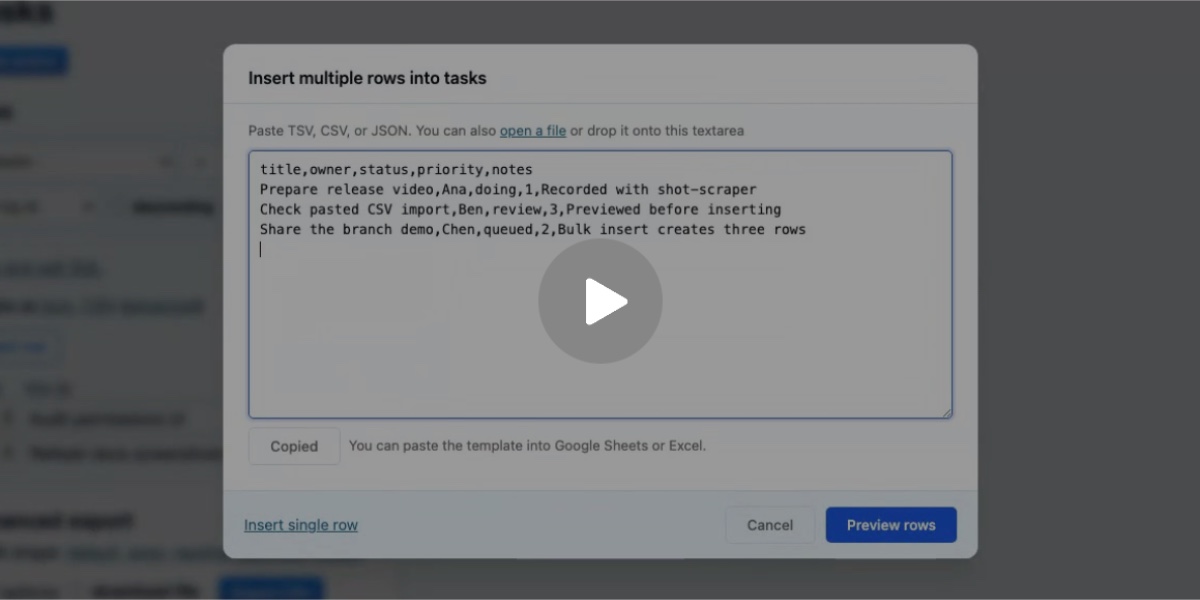
shot-scraper video is a new command introduced in today’s shot-scraper 1.10 release which accepts a storyboard.yml file defining a routine to run against a web application and uses Playwright to record a video of that routine. I’ve written before about the importance of having coding agents produce demos of their work; this is my latest attempt at enabling them to do that.
An embarrassingly tiny release. The pyproject.toml had pinned to datasette==1.0a27, inadvertently making this plugin incompatible with all other Datasette versions. It's now datasette>=1.0a27 instead.
I'll write more about this one soon, but it's a big release. Three highlights from the release notes:
- New "Create table" interface in the database actions menu, backed by the
/<database>/-/createJSON API. It can define columns, primary keys, custom column types,NOT NULLconstraints, literal defaults, expression defaults and single-column foreign keys. (#2787)- New "Alter table" table action and
/<database>/<table>/-/alterJSON API for changing existing tables: add, rename, reorder and drop columns; change column types, defaults,NOT NULLconstraints, primary keys and foreign keys; and rename the table. The alter table dialog also includes a "Drop table" button. (#2788)- New Template context documentation listing the variables available to custom templates for Datasette's core pages. Variables documented there are treated as a stable API for custom templates until Datasette 2.0. The documentation is generated from dataclass definitions next to the view code, with tests that compare the documented fields against the actual contexts rendered by the database, table, query and row pages. (#1510, #2127, #1477, #2803)
Here's a rough video demo I made of the new create/alter table feature as part of reviewing the PR:
Datasette Apps: Host custom HTML applications inside Datasette
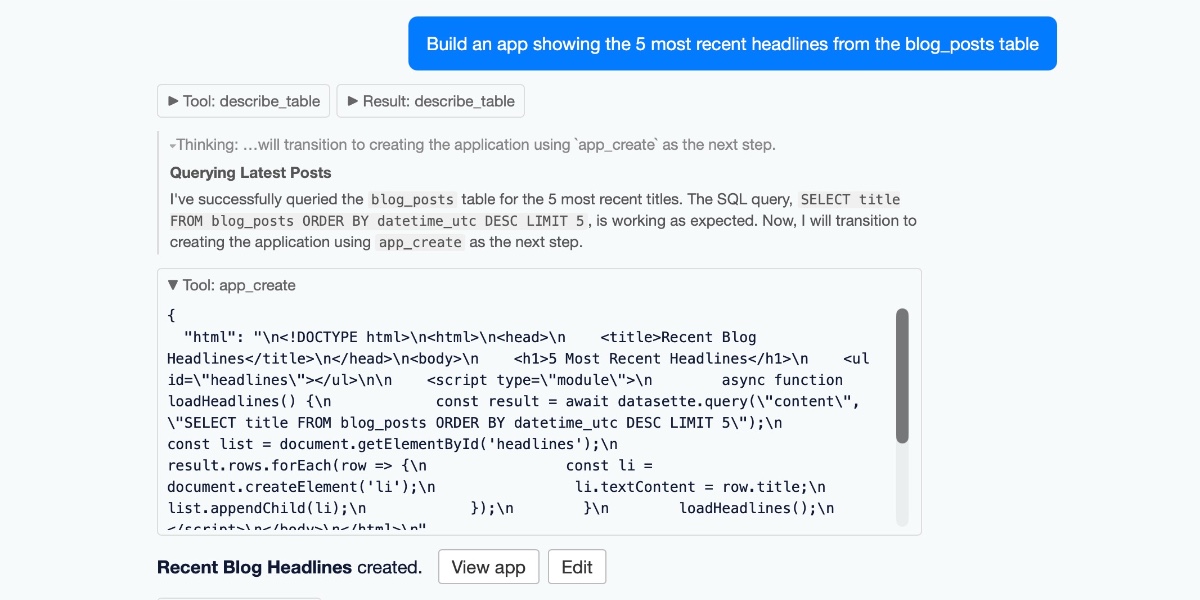
Today we launched a new plugin for Datasette, datasette-apps, with this launch announcement post on the Datasette project blog. That post has the what, but I’m going to expand on that a little bit here to provide the why.
[... 2,301 words]This release expands
datasette-aclfrom table-only permissions toward a general resource-sharing system.
Alex Garcia did most of the work for this release - we're fleshing out the plugin that will allow multi-user Datasette instances finely grained control over who can access which resources within Datasette.