Entries Links Quotes Notes Guides Elsewhere
Monday, 26th October 2026
GPT-6.1 Terra (via) It's always interesting to note which aspects of a new model are emphasized in the release announcement.
In the case of GPT-6.1 Terra, OpenAI went with visual reasoning and computer use:
We’re introducing GPT-6.1 Terra, a fast, efficient model that combines detailed visual reasoning and precise computer use alongside clearer, more natural writing. A significant step up from GPT‑5.6 Terra, it excels at the communication and computer-based tasks that fill the workday, from drafting proposals and interpreting technical drawings to filling out forms and editing videos.
Terra sits in the same position as Sonnet in the Anthropic model collection - not the cheapest or the most expensive, making it harder to decide when to use it.
Computer use is a good example of a task that benefits from a less expensive model, since you might put it to work on automated, repetitive tasks.
OpenAI's Ted Sanders provided some useful advice in a comment on Hacker News:
In the case of GPT-6.1 Terra, I'd say Terra is probably better than Astra and Sol at technical communication, similar on vision and computer use (but much faster!), and a bit worse on most other things. For API developers, it's a nice midrange option if you want something cheaper than Sol but a lot smarter than Luna (especially for vision / computer use / communication). For subscribers, it's not a bombshell release - if you're hitting usage limits, maybe it helps you go a bit further, and if you want clearer communication or faster computer use, it can be a nice option to select.
Here are the pelicans for the different reasoning levels. This pelican for "max" cost 11.3161 cents and took 4 minutes and 11 seconds:

Here's a new comparison grid showing pelicans for every reasoning level of OpenAI's current frontier lineup: GPT-6 Astra, GPT-6.1 Sol, GPT-6.1 Terra, and GPT-6 Luna.
GPT-6.1 Terra is priced at $1/million input tokens and $5/million output - almost half the price of GPT-5.6 Terra and GPT-6.1 Sol, and around 10x the price of GPT-6 Luna.


Because big tech platforms essentially do not have customer support and make it impossible for their users to contact a human, many people experiencing run-of-the-mill tech problems have turned to ChatGPT. And, increasingly, ChatGPT is telling people that have normal tech support problems that they have discovered something journalistically notable and that 404 Media, specifically, can help them.
— Jason Koebler, ChatGPT Keeps Telling People 404 Media Can Solve Their Tech Support Problems
webframe is a neat little project from Jeff Lindsay which lets you "run a web page like a program" - you point it at a URL or file and it executes it in a hidden headless web view and outputs console.log() to standard output and any exceptions to standard error.
It's written in Go on top of the glaze library, which provides access to a system browser ("WKWebView on macOS, WebKitGTK on Linux, WebView2 on Windows") so it doesn't need to bundle its own browser engine.
It reminds me of my own shot-scraper javascript tool, albeit in a much smaller package that doesn't depend on Playwright.
I had Claude Opus 5.5 put it through its paces and prepare a research report for me. Here's the prompt I used:
Explore https://github.com/tractordev/webframe try running it and put it though its paces, build a few exploratory prototypes, then evaluate it as a potential sandboxing tool and as a tool for scraping web pages using the same patterns encouraged by the "shot-scraper JavaScript" command (see simonw/shot-scraper on GitHub, docs directory)
Sunday, 25th October 2026
I built this weird and very specific cropping tool - it lets you create a horizontal or vertical cut across an image, then slide the two sides relative to each other. Effectively it lets you crop out a section in the middle of an image.
I wanted this because I often use Tailor on my iPhone to stitch several screenshots together into lot long image, but sometimes I find myself wanting to crop out a section in the middle - to redact an irrelevant prompt from a transcript, for example.
Saturday, 24th October 2026
I added four player online mode to Battledrones - previous maps were limited to two.
Here's the initial prompt I used:
Add a new map for a four player battle - four way rotational symmetry, up to four AI players, works with the WebSocket non-audio based multiplayer mode so up to four human players can join (any spare slots use AI)
Claude Opus 5.5 added a new map called "Compass Rose" and modified the WebSockets multiplayer network code to support up to four players for that map, joining via share links or QR codes.
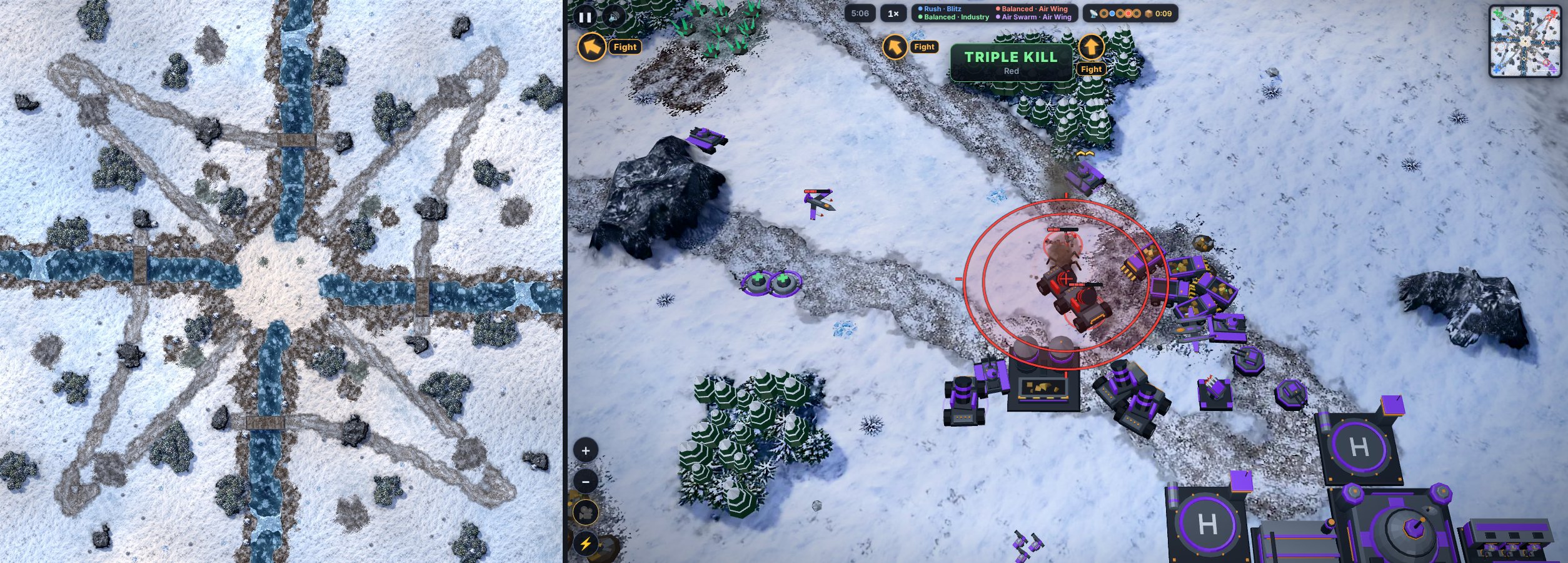
The new teams use robots themed in purple and green, joining the existing blue and red designs. You can preview those colors in the updated model browser.
Here's a replay link to watch a four way AI battle with the "Goliath Armada" mutator turned on, where each side starts with four giant Goliath mech units.
Friday, 23rd October 2026
Prompt to Claude Opus 5.5 High:
Build an artifact where you open a photo and it rapidly (in a few seconds) paints a version of that photo using a canvas element and simulated paintbrush
See also my previous experiment getting Claude Fable to simulate a watercolor illustration with P5.js.

Quick Study uses Sobel edge detection, with no external libraries beyond Google Fonts.
Introducing Kimi K3.1 Pro (via) Kimi K3.1 Pro landed on the Kimi API today - it's not yet open weights, but Moonshot promise "Full model weights will be released by Nov 4, 2026".
They're also offering a "Highspeed" version that's 2-3x faster, at twice the price (except for input token cache hits, which are priced the same).
The US dollar pricing is $2.00/million tokens for input and $10/million for output - the same as GPT-6.1 Sol and half the price of Claude Opus 5.5.
Moonshot's own benchmarks show Kimi as approximately level with Opus 5.5 and GPT-6 Astra - beating them on a few benchmarks, coming close on others.
Artificial Analysis scored Kimi at 55 - ahead of Claude Fable 5.1, GPT-6 Astra, and Gemini 4 Argon (all at 53) and behind only Claude Opus 5.5 (58).
This is the first time a (soon-to-be) open weight model has scored this highly against the frontier.
I tried it out via the Moonshot API using the llm openai endpoint command I added to LLM 0.32 back in August:
llm openai endpoint \
  https://api.moonshot.ai/v1 \
  --key kimi \
  -m kimi-k3.1-pro \
  "Generate an SVG of a pelican riding a bicycle" \
  --responses \
  -o reasoning_effort low \
  > kimi-k3.1-pro-pelican-low.stdout.txt \
  2> kimi-k3.1-pro-pelican-low.stderr.txt
llm openai endpoint can run prompts against any OpenAI-compatible endpoint but doesn't log the results, hence the extra options to save stdout and stderr (the reasoning trace).
Here are the pelicans I got for Kimi K3.1 Pro on the three reasoning levels it supports - low, medium, and max. This is max:

For comparison, I ran fresh pelicans against Kimi K3 on those three reasoning levels.
Thursday, 22nd October 2026
DE STAAT—FREEDOM (Official Music Video) (via) OK well this is a first for me... at 00:44 in this new music video by Dutch alternative rock band De Staat:
The visual effects are credited to Matties Grooten of Fake it or Leave it.
Donating Agent Skills to the Agentic AI Foundation. News today from Anthropic:
We’re committed to keeping Agent Skills open, community-driven, and vendor-neutral. Today, we are donating the standard to the Agentic AI Foundation (AAIF) under the Linux Foundation, which we co-founded with Block and OpenAI last year, and to which we donated the Model Context Protocol (MCP).
I'm pleased to note I called this one last December, when Anthropic first declared skills to be an "open standard":
I wouldn't be surprised to see this end up in the AAIF, recently the new home of the MCP specification.
Fun side note: since my blog content is available to Claude via the datasette-mcp
plugin I found that post by prompting Claude to "Use simonwillison.net MCP to find if I ever talked about how I want skills to be donated to a standards body".
As fun as AI is, we built so much bad software over the last 30 years, and now the universe is punishing us for our sins.
Wednesday, 21st October 2026
Today’s PHP Security Release, and How We’re Strengthening PHP Security (via) If you're running anything on PHP it's vital you upgrade - today's updates (across the entire PHP 8.x line) address two remote code execution holes, and there have been exploits circulating since last night, thanks to a leak in the coordinated disclosure process.
This post from the PHP Foundation explain what went so wrong:
On Tuesday, October 20th, at around 15:00 UTC, the two CVE IDs began circulating on online forums and social media. They came with a wrong release time and a wrong CVSS score of 10.0 (the actual score is 9.2). No technical details leaked. In response, the PHP project brought its pre-announcement forward and published it at 19:30 UTC. It also moved the release from October 22nd, 14:00 UTC, to October 21st, 14:00 UTC [...]
As a result of the leak and pre-announcement around 20:00 UTC, Calif, one of the security firms that had reported the issues mistakenly published a video. It showed their proof of concept working against a number of targets and revealed a few additional, though limited, details about the vulnerabilities. Copies of the deleted video started circulating on social media soon after. The video contributed to accelerated development of various PoCs (exploitation proof of concepts), which then increased circulation on October 21st.
This article from the team that discovered the original vulnerability includes a more detailed timeline of the original intended responsible disclosure:
- August 19, 2026: Wiz Research discovers the first PHP vulnerability using Wiz Atlas, Gemini 4 Argon, and GPT-5.6 Sol.
- August 20, 2026: Unauthenticated RCE is confirmed against Drupal.
- August 21, 2026: Unauthenticated RCE is confirmed against WordPress.
- August 24, 2026: Wiz Research reports the vulnerabilities to the PHP security team.
- September 21, 2026: PHP acknowledges the reports and begins developing a coordinated fix.
- October 21, 2026: Patched PHP releases become available.
- October 21, 2026: Public disclosure.
Panache — RTS Belle Époque pour mobile (via) Well this is delightful: I released Battle Drones yesterday under an Apache 2.0 License and there's already a French language fork which reskins the game to take place in steampunk 1900s France and adds an animated intro!
Panache est un jeu de stratégie en temps réel pour mobile et navigateur, dans la France de la Belle Époque (vers 1900) : dirigeables, Fardiers à vapeur, Creusot cuirassés, automates en képi, Gargantua la forteresse marchante — et beaucoup de panache.
You can play Panache here - it's worth clicking that link just to experience the new intro video.
So far it's mostly just aesthetic updates as opposed to gameplay changes. The music has had a French twist added to it as well.
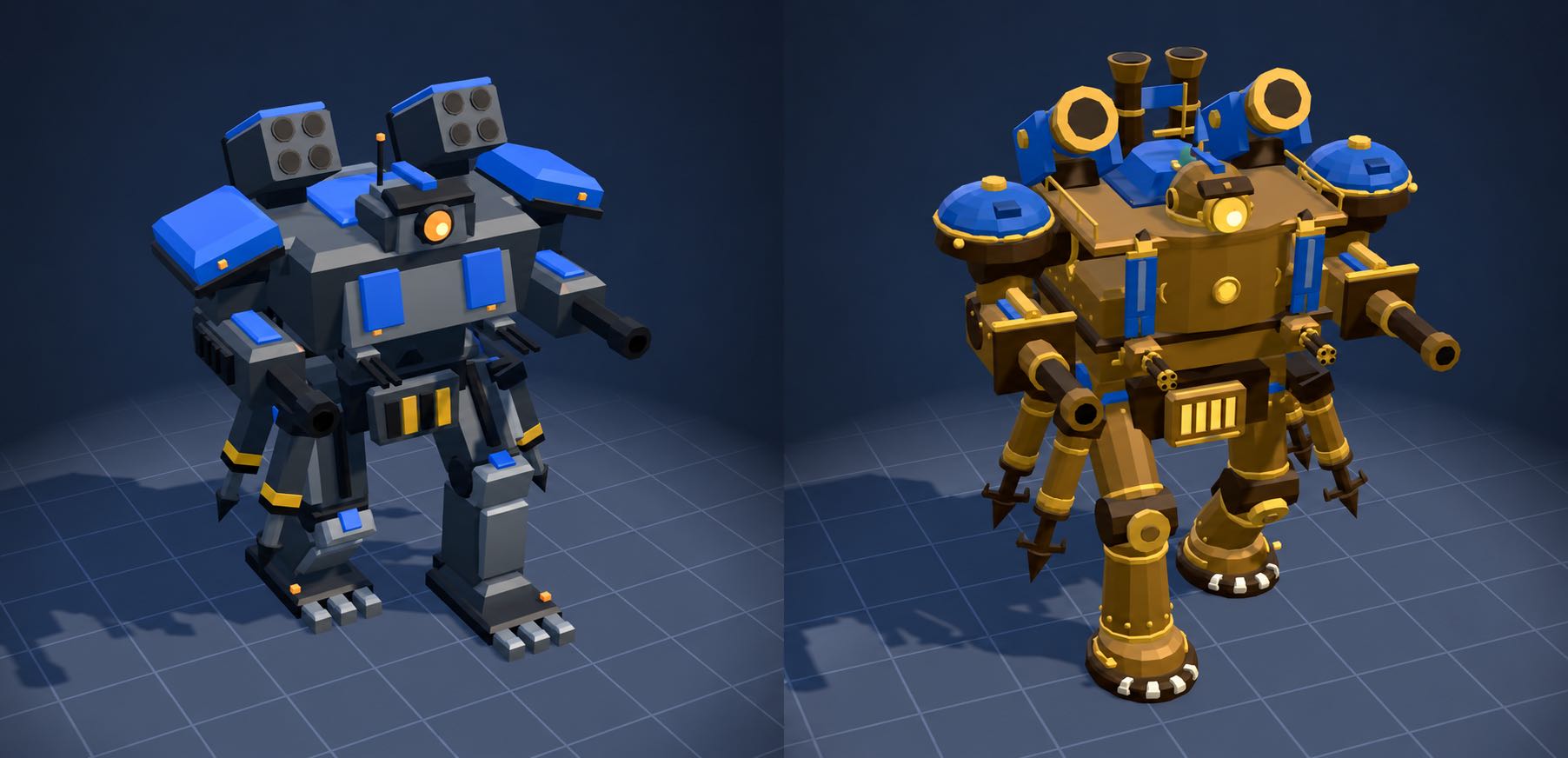
The new steampunk models are so cool!
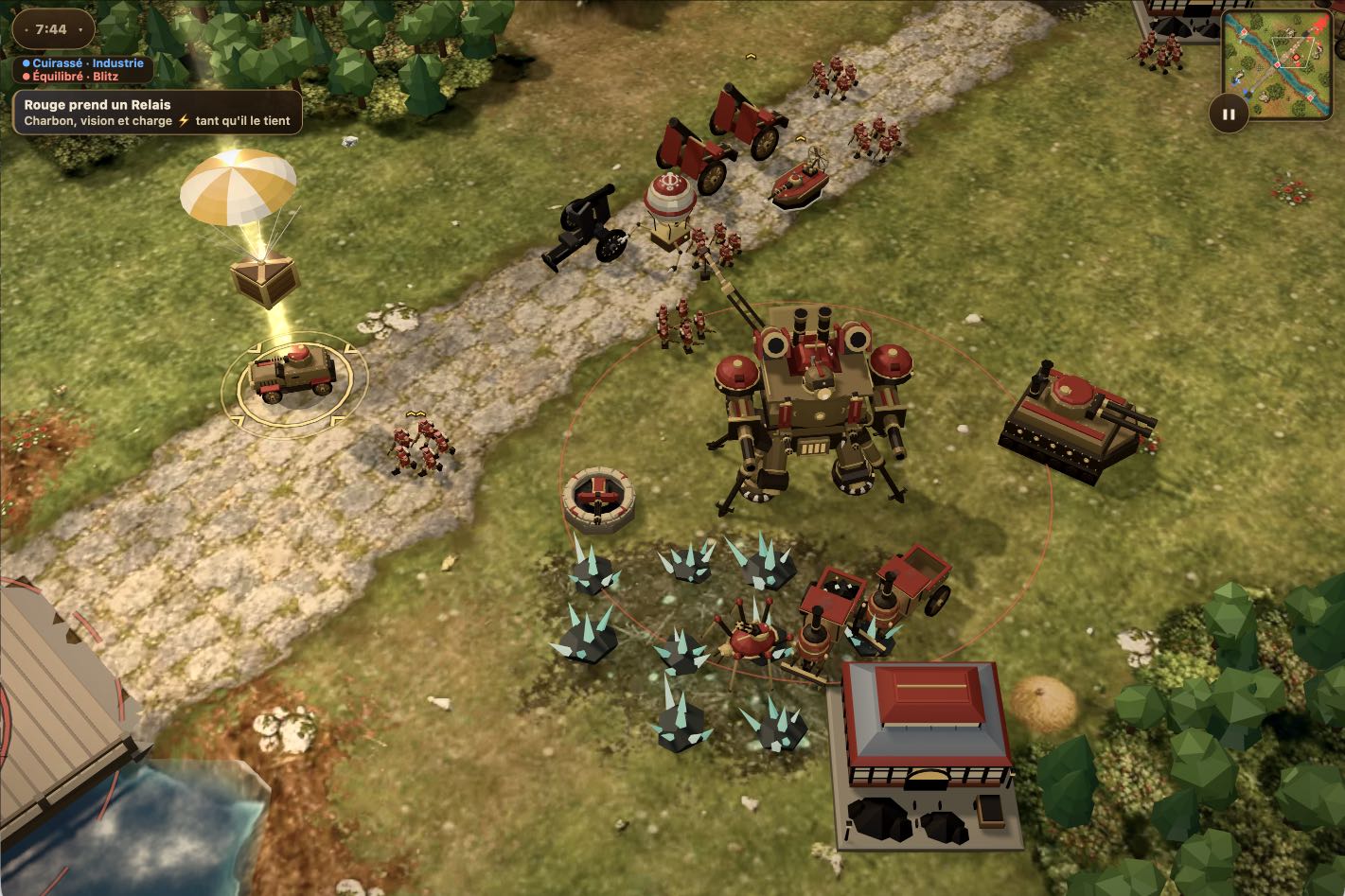
Here's a page with the original Battle Drones models and that same page with the new Panache alternatives.
This is a comparison of the original and the new design for the Goliath:


Tuesday, 20th October 2026
eMudhra Intermediate CA Compromise. This is very, very bad news:
The private keys of eight eMudhra intermediate CA certificates have been compromised. They chain to roots trusted by the Mozilla, Microsoft, Apple and Chrome root programs and by many downstream trust stores.
Any software that bundles a list of trusted certificates needs to be updated. This site is tracking software updates via this GitHub repository - Linux distros need to update their ca-certificates packages.
In Python world uv 0.13.4 and pip 26.2.2 and certifi 2026.10.19 have been released with upgraded certificate lists.
There's a very informative thread about this on the official Python forum.
Battle Drones—a vibe coded RTS with audio-based multiplayer
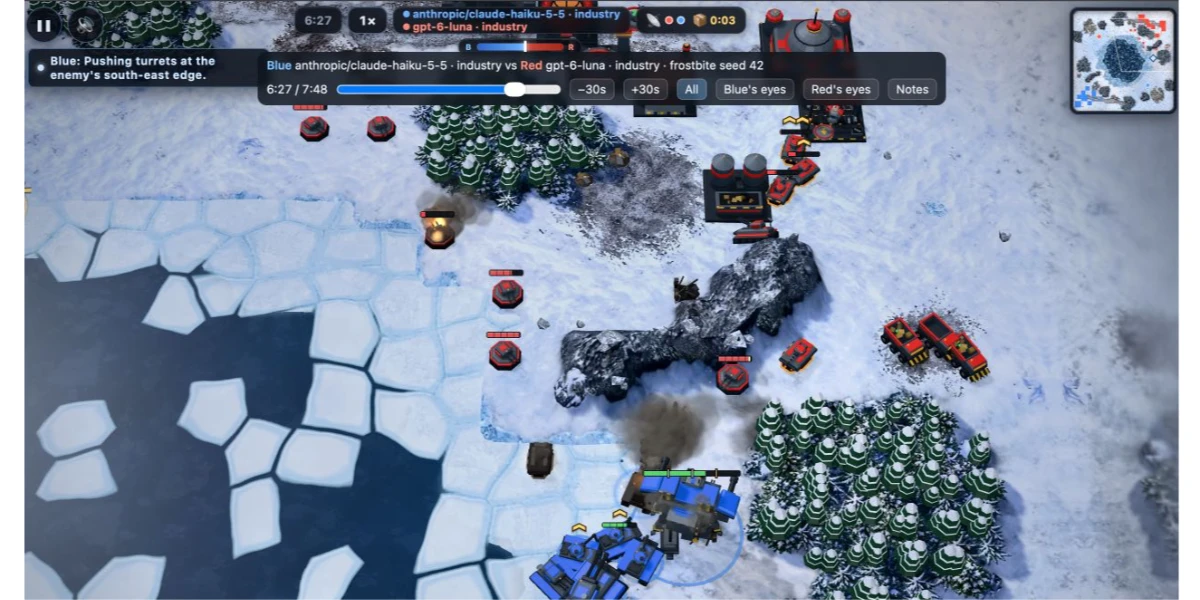
My latest vibe coded game experiment is a Command & Conquer style RTS (Real Time Strategy) game called Battle Drones (play it here). Unlike my previous experiments, this one is actually fun to play. I’m somewhat embarrassed to admit that I got there by telling Claude to “Make it a LOT more fun”. It also supports multiplayer between nearby devices using audio to synchronize game state! Here’s what I’ve built so far, and some of the things I learned along the way.
[... 4,288 words]Monday, 19th October 2026
My obituary for programming (via) Jeremy Scheff poignantly captures the key loss caused by coding agents for career programmers who enjoyed the puzzle of developing code:
Programming turned into one of the greatest jobs you could imagine. You got paid to work on tricky little logic puzzles. The trickier the puzzle, the more you got paid. But even pretty simple puzzles were worth a lot of money because regular people just couldn't do it! No, they needed us. They would give us a problem and we would solve it the way we wanted. We set the strategy, we made the timeline, we defined what was and was not possible.
If you're a programmer who thrives on building working systems and doesn't care too deeply about the problems solved along the way, LLMs are the gift that keeps on giving.
If directly solving those problems was a big part of your enjoyment, the loss is very real.
Sunday, 18th October 2026
I'm working towards a new LLM release, and testing PRs caused me to revisit the llm-echo debug plugin. This plugin provides a "model" which doesn't involve an LLM at all - it just repeats back the prompts that have been fed to it. The new release now updates the simulated token usage counts to take tool calls, system prompts, and reasoning tokens into account.
Example usage:
uvx --with llm-echo llm -m echo 'hi there' -o thinking 1 --usage
Outputs:
First I consider the prompt, then I decide what to say.
{
  "prompt": "hi there",
  "system": "",
  "attachments": [],
  "stream": true,
  "previous": []
}
Token usage: 2 input, 24 output
Saturday, 17th October 2026
Inline rendering with document.currentScript.
Lean Rada describes a neat trick that takes advantage of the document.currentScript property. You can use that to drop in a tiny inline <script> element that replaces itself when the page loads:
The year is <script>
document.currentScript.replaceWith(
  new Date().getFullYear())</script>
If you define a shortcut function like this:
$=(...n)=>document.currentScript.replaceWith(...n)
You get a tiny template language:
The year is <script>$(new Date().getFullYear())</script>


web-edit (previously) is my tiny web app for browsing and editing files in a folder. I mainly built it for editing files on different machines via Tailscale.
I added a "copy to clipboard" option for both text and image data. I needed this because I was running pelican prompts on a laptop from my phone (here's DeepSeek 4.1 Flash 1017) and I wanted an easy way to copy the resulting logs into a Gist.
Friday, 16th October 2026
We think "did a human read the code?" is an imprecise proxy for "what could go wrong with this change, and which check—automated or human—is the right one to catch it?"
Asking that question also changed when review happens. Before, review was a gate at the end of the road: write the code, open a PR, wait for your colleague.
Now, review runs continuously, more like spellcheck while you write. Most changes have been reviewed and fixed by Claude at least once before a human is asked to look. This catches most routine mistakes, and saves team attention for higher-level questions and scrutiny.
— Addy Osmani, Morgan Westlee Lunt, and Qing Wang, How the Claude Code team does code review
This research task is really an experiment in running Claude Code for web in "Ultracode" mode, as described in Orchestrate subagents at scale with dynamic workflows in the Claude Code documentation.
With Ultracode turned on, Claude Code makes aggressive use of dynamic workflows - it generates JavaScript that defines and coordinates a network of subagents to take on complex problems.
My initial prompt was this - I meant "hit the rows directly", the word "delete" was an accidental typo on my phone:
Write a SQLite extension in Rust that implants SPARQL and runs really fast because it can hit the delete rows directly
This caused Claude Code for web to churn for over 12 hours. I checked in on its progress the next day and sent a single follow-up prompt when I noticed how many Rust crates it had built:
Every folder in the crates/ directory needs a README
Include a tutorial.md teaching users how to install the extension and how to run it in the SQLite CLI and then teaching them SPARQL in addition to how to use the SQLite extension
Include a script with the tutorial for populating a SQLite database with useful and realistic example data for that tutorial
This project feels like next-level vibe coding - it's not remotely feasible to review the code that was produced here, and even following the documentation is a significant investment in work. I'm not entirely sure what to do with this - I appear to have a full SPARQL implementation in Rust inside SQLite now, but how valuable is that if I created it on a whim and can't (or won't) invest the necessary time to understand what it can do?
Thursday, 15th October 2026
Another game experiment - I wanted to see if it was feasible to have a two player game on two separate phones running in static HTML where the networking code uses chirps sent via the microphone. It seems to work!
Build a two player competitive pong like game where two players use their phones close to each other and the game state is sent via audio noises which the web microphone API can interpret - but add graphical and gameplay twists to make it a lot more fun and intertwine than pong
Claude Opus 5.5 Extra in Claude Code.
Anthropic tells investors quarterly revenue up nearly 50% to $16.8bn ahead of IPO. The phrase "told investors" appears four times in this FT article, which reports on Anthropic's day of hosting investors on Wednesday. Lots of details in here from "people with knowledge of the matter".
Key things I learned from the article:
- Q1 revenue (Jan/Feb/Mar) was "about $4.8bn"
- Q2 (Apr/May/Jun) was $11.5bn
- Q3 (Jul/Aug/Sep) was $16.8bn
- In Q3: $1.70 in revenue for every $1 spent on "computing power"
- Adjusted operating margins (excluding stock-based compensation) were 11%
This point about distillation is worth quoting in full (highlight mine):
The start-up has also clamped down on “distillation” — a controversial practice whereby rival AI labs train their models on the outputs of more advanced ones.
When rival companies “distil” their models from Anthropic’s models, that involves heavy usage and spending.
Anthropic told investors on Wednesday distillation accounted for 5 per cent to 7 per cent of revenue and that they had cut it back “materially” in the third quarter of the year, said four people with direct knowledge of the matter.
Napkin maths says that if distillation was 5% of their Q2 revenue (before they cut it back in Q3) then unnamed "other labs" spent over half a billion dollars distilling Anthropic's models in that quarter!
Also notable: Anthropic appear to no longer be leaning on "annualized run-rate revenue" (previously) in these communications to their investors.
Inspired by Paul Ford and Aboard Foundary's new web app Tiny Little Office, which provides a suite of web app content editors (a Word Processor, Outliner, Presentation Builder, Spreadsheet, Calculator, Drawing Tool, Diagram Maker, Animator, Calendar, and Trip Planner).
Tiny Little Office's signature trick is to store all of the document data in the #fragment section of the URL, so every document created using it becomes a bookmarkable and shareable link.
It also has an llms.txt file telling agents how to construct URLs that will render as documents. Claude used that file to generate this link to a deck that explains how the URL format works:
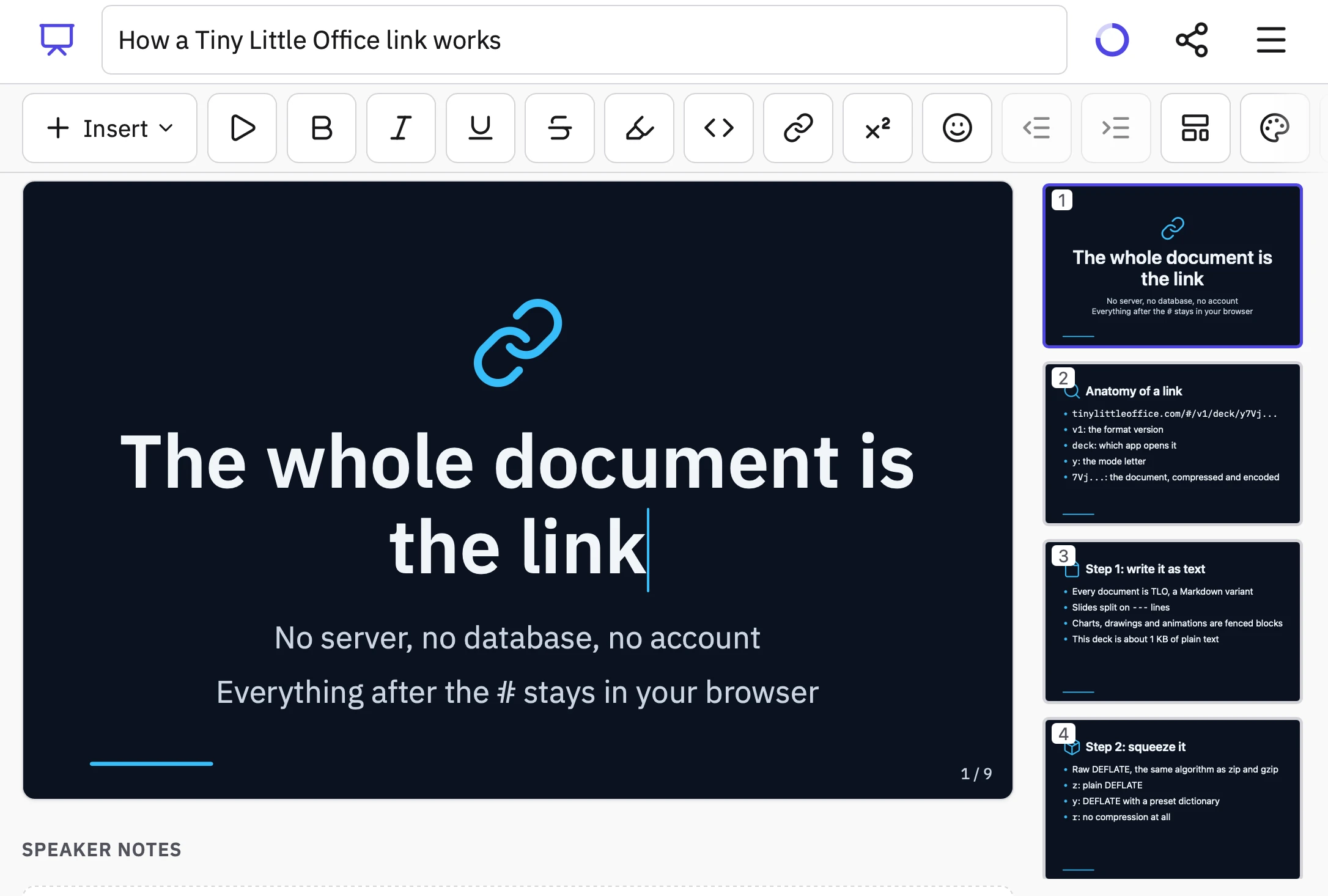
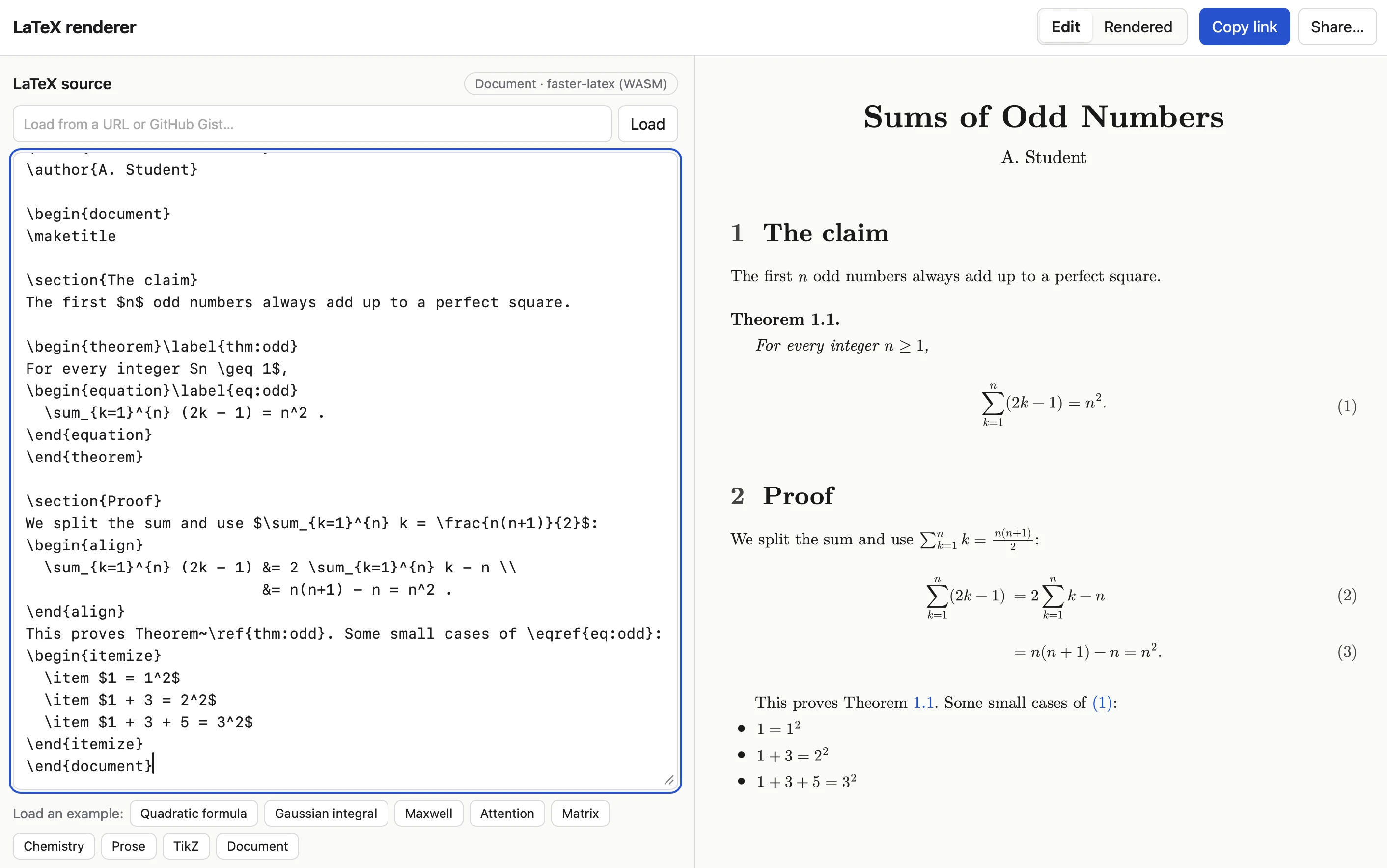
Tiny Little Office inspired me to have Claude Code (Opus 5.5 Extra) build a similar tool that works with LaTeX. Here's the sequence of prompts I used:
I want a tool where you can link to it with a fragment hash #code-here and it treats that code as LaTeX and renders it really effectively. It should also support a prefix which means the latex is compressed with a custom compression dictionary optimized for latex. Use the best available latex render library from a CDN (consider WebAssembly too). If loaded without a fragment hash show an editor you can paste latex into and then toggle to a "rendered" view. That rendered view should be bookmarkable. The #fragment view should let you switch to edit source too.
Since it was working in my tools repo I told it to take inspiration from the <iframe sandbox="..."> mechanism used by my existing SVG in Markdown tool as protection against XSS risks:
Safe from XSS? We could run in an iframe sandbox like we do on the SVG markdown render project
I had it copy the Gist/URL loading feature from that tool as well:
We should have an option to load latex from a URL (or gist) similar to the markdown SVG tool
Here's an example link. The tool uses Pako 2.1.0, MathJax 4.1.3, faster-latex 0.3.1, and DOMPurify 3.4.16.
Wednesday, 14th October 2026
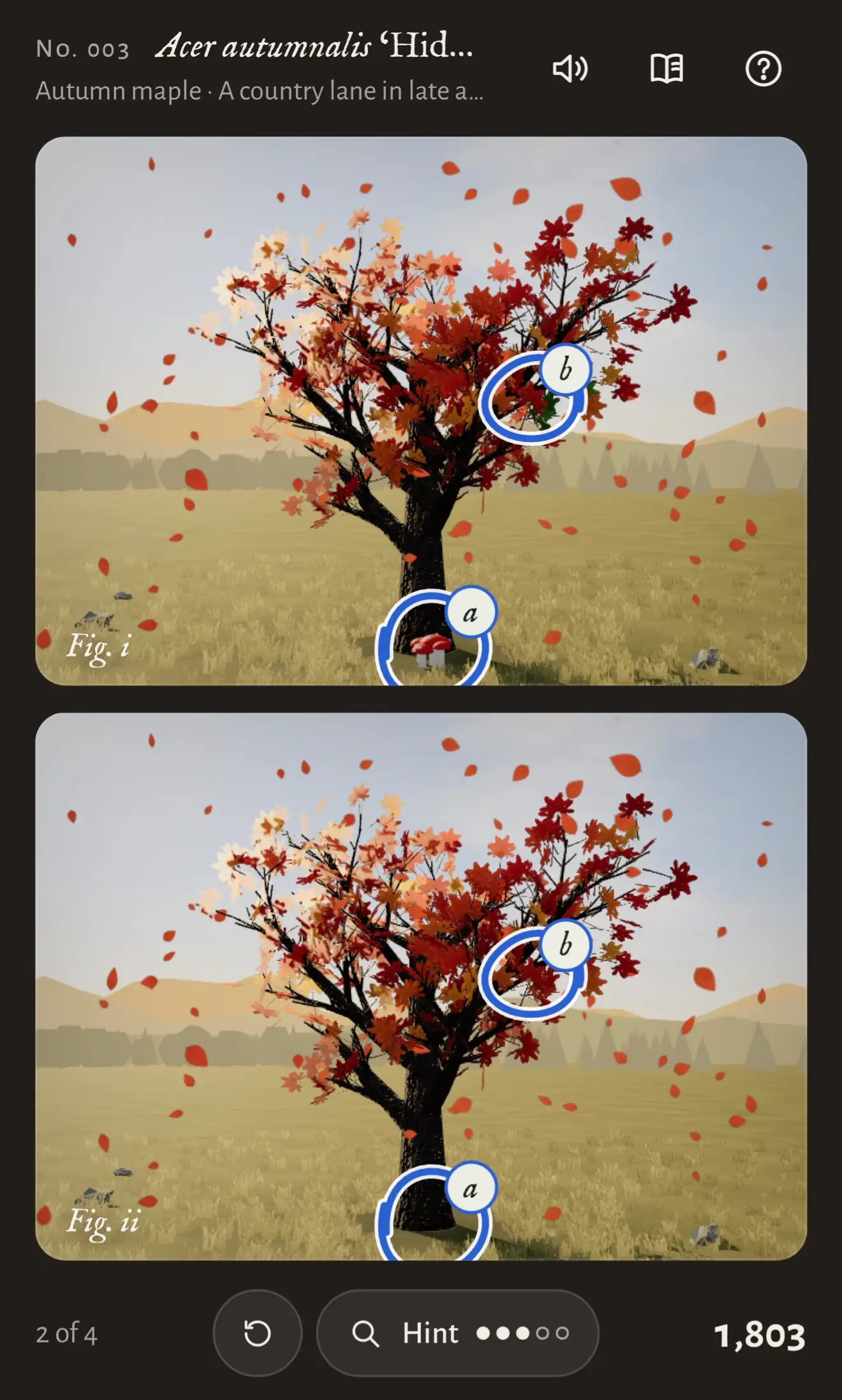
Another game experiment with Claude. This one used the default Claude iPhone app (chat mode, not Claude Code mode), where I prompted Claude Opus 5.5 Max with:
Build a three js game called "Tree appreciator" - it shows you two algorithmically generated trees and the game mechanics is about appreciating the differences between them. Think hard about how to make sure it is both fun and beautiful.
Somewhat embarrassingly given my recent talk, I've found that telling Opus 5.5 "make sure it is fun" works uncomfortably well. In this case Claude crunched for 3 hours and 7 minutes before retuning a cosy little spot-the-difference game with music and animation and achievements that's quite compelling to play.

AI is mass decompiling games. That’s both awesome and scary. (via) Indie game developer Popcar talks about the recent wave of AI-powered decompilation of existing games, enabling weird mashups between existing games, and producing a boom in game preservation projects to get old games working on new hardware (often in a browser using WebAssembly).
I like how this piece captures both the positives and the negatives of this new development:
Most people already realized the scary part by now. If AI can decompile games and software, then the entire tech industry is about to explode. Anybody can decompile other software and use it any way they'd like, and nobody can stop them. Companies can steal from competitors. Your paid game or app can be open-sourced against your will. This isn't exclusive to old video games, we can apply this to any software. [...]
This is also a big win for preservation. Old games can be ported, modified, enhanced, and made much more easily accessible than before. [...[
With console makers going all in on digital and games becoming entirely unplayable due to servers shutting down, this is fantastic news. We could own software we bought regardless of what the company thinks.
Tuesday, 13th October 2026
Redesigning source control at Anthropic (via) Interesting piece from Anthropic describing why and how they built their own custom alternative to Git, based on the dramatic increase in rate of changes to their code after the past six months.
In May 2026, Anthropic averaged around 2,500 code changes merged per day; as of September, we merged over 30,000 per day.
They included a chart showing those changes. I had Claude modify their chart (code here) to add markers for the public releases of each of their models in 2026:
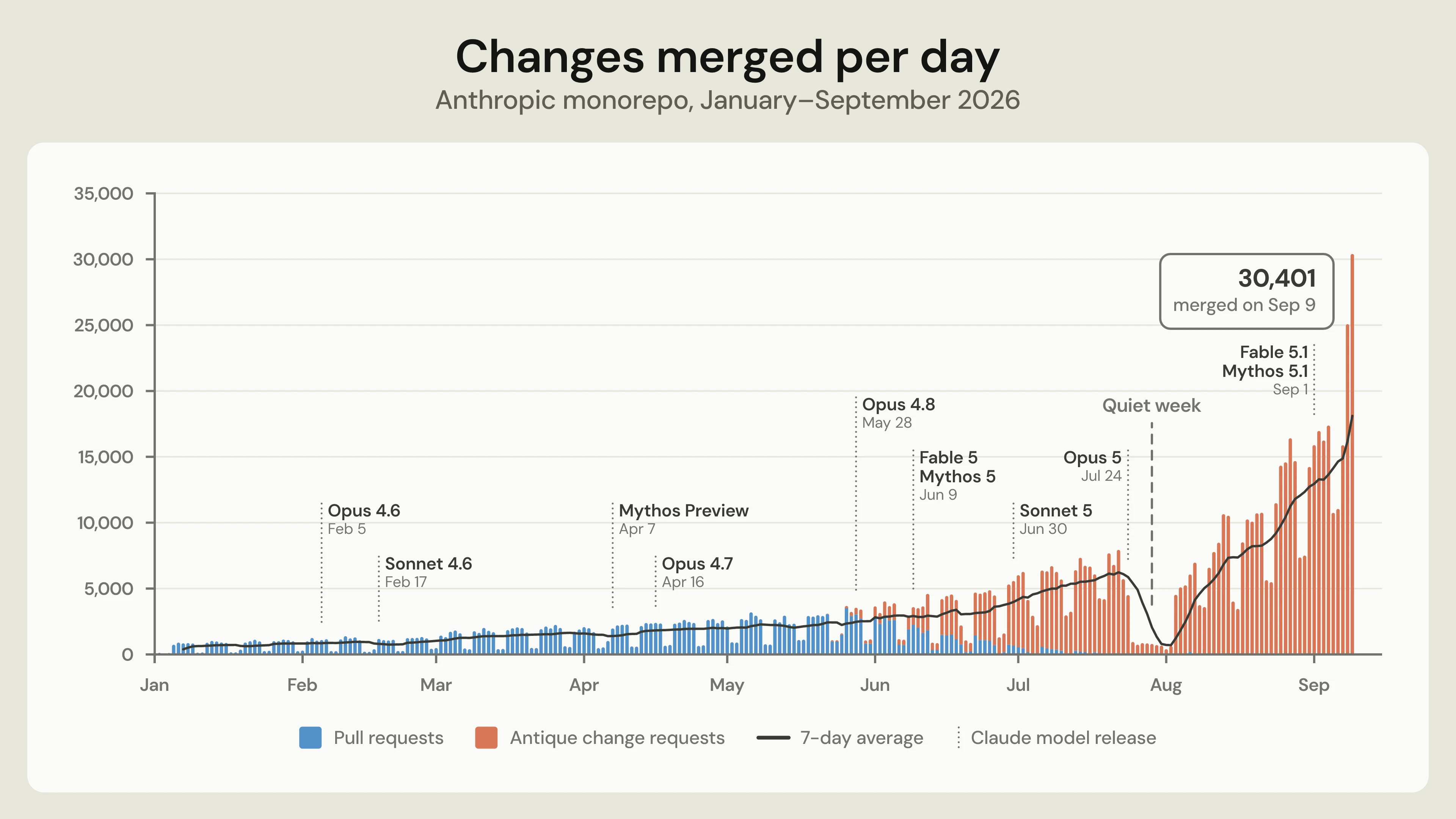
This shows public release dates, not the date when models became available for Anthropic's internal use. My guess is that the introduction of Fable/Mythos class models is a key factor in the increased coding velocity.
"Antique" is their new code review system. The source control system is called Scion, and sounds to me like a reinvention of centralized source control along the lines of Subversion.
(Update: Anthropic credit Google's Piper and Meta's Sapling as "prior art" - it looks like the core concept of "derived data" was heavily inspired by Mononoke, the server component of Sapling.)
They had some pretty extreme requirements:
The history of our main branch alone is almost 100 GB, and a compressed working copy is over 25 GB. We perform on the order of 25 million code checkouts per day for CI, before counting developer environments, agent sandboxes, and research jobs. Fetched naively, that would be over 600 PB of git traffic per day.
The new system was built by a team of seven people, and the migration from Git was completed in five months.
When asked on Hacker News about the lack of offline support, Scion engineer Nick G replied:
Since Claude is by far the heaviest user of Scion and is necessarily online, this just wasn't important to do.
As an aside, I've been trying adversarial review in my own projects recently, where you have a model try and find flaws (I often play Claude and GPT off against each other). This note from the article reflected my own experience with that:
Anthropic also makes extensive use of adversarial review, and, while this is incredibly effective in many ways, it can also be myopic, so skilled engineers needed to steer Claude away from over-engineering parts of the system in response to hypothetical concerns.
I added support to llm-gemini for the new Gemini 4 Argon model, made available today via the Gemini API and for customers of their $100/month subscription plan.
Here are the low, medium and high pelicans. As expected, they are all excellent: Gemini has a track record of producing great SVGs, and are the only lab where I know their staff have invested in SVG specifically (and who have boasted about their pelicans before.)
Here's the "high" illustration, which cost me 17.166 cents:

The pricing is interesting. At launch, Argon is $2/million input and $10/million output - the same price as GPT-6 Sol, half the price of Claude Opus 5.5 and 1/5th the price of Claude Fable 5.1 and GPT-6 Astra.
But on December 1st Argon is set to double in price - so it will be the same price as Opus 5.5.
Prices like this aren't really comparable these days since what really matters is how many tokens a model takes to achieve a goal within an agentic harness.
One useful clue for that comes from Artificial Analysis, who publish the total cost to run their benchmark using each model. Argon is looking very good there - costing $2,407 to run the benchmark, putting it close to GLM-5.3 and significantly cheaper than OpenAI, Anthropic, and Meta's latest models.
When the price doubles it will still be a little cheaper than GPT-6 Astra.
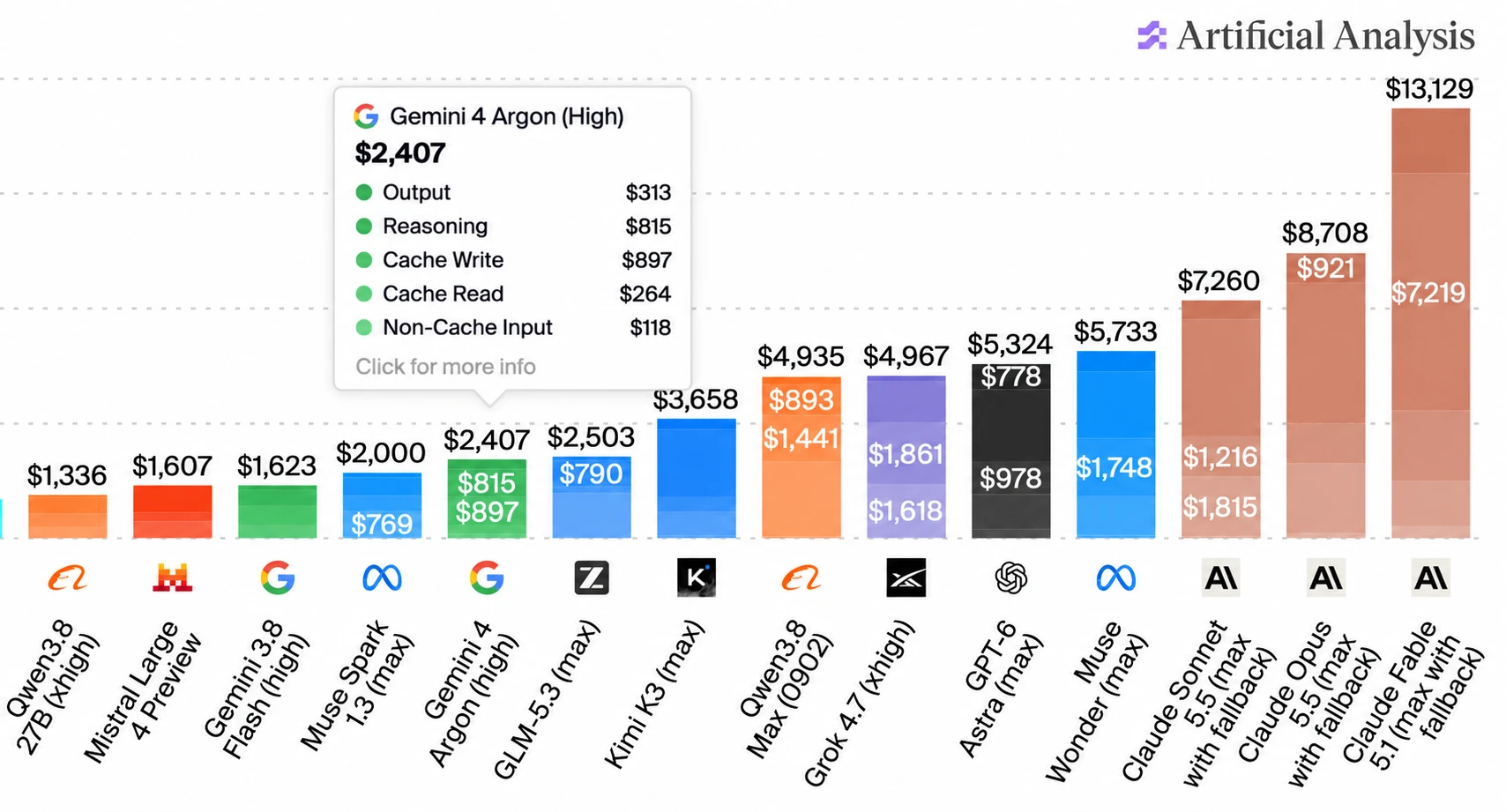
(I used ChatGPT to edit that chart! The data is all correct, I checked - I needed to get that Gemini 4 Argon info box to display without overlapping the other numbers.)
Some bonus examples using Gemini 4 Argon: here's Generate an SVG of an armadillo in fishnet tights jaywalking on Mars, here's a Fabergé egg it created for me using Blender, and DeepMind staffer @fofrAI shared a video of a pelican riding a bike, using fourier epicycles. That's a fun new twist!
If the agent isn't using my diagnostics library, I could introspect and update AGENTS.md, but there's still a delta, and it'll drift. Instead, I write a pre-commit hook that checks the git diff for direct calls to observability modules that bypass my diagnostics module. Boom: fail the commit, inject a prompt telling the agent to use the diagnostics library. All of a sudden it's ten out of ten.
— Geoffrey Huntley, nobody should type code by hand anymore. here's what's left.
Includes performance optimizations written by Claude Opus 5.5 after I fed it this Python 3.15 profiling report generated by GPT-6 Astra.
Monday, 12th October 2026
Meta AI release Muse Wonder (and Muse Wonder Full), their new "most capable models". These look like they may be Meta's first Fable class models - Artificial Analysis scores Muse Wonder (Max) as equivalent to GPT-6.1 Sol.

I updated my llm-meta-ai plugin for the new model. Here are pelicans for Muse Wonder for the six reasoning levels: minimal, low, medium, high, xhigh, max. This is the max one:

For comparison, here are pelicans for Muse 1.3 (released September 2nd) and Muse 1.2 (released August 5th). Meta AI are putting out a new model a month, and the improvements between each model (at least in terms of drawing pelicans) are material.


