Blogmarks
Filters: Sorted by date
New in NotebookLM: Customizing your Audio Overviews. The most requested feature for Google's NotebookLM "audio overviews" (aka automatically generated podcast conversations) has been the ability to provide direction to those artificial podcast hosts - setting their expertise level or asking them to focus on specific topics.
Today's update adds exactly that:
Now you can provide instructions before you generate a "Deep Dive" Audio Overview. For example, you can focus on specific topics or adjust the expertise level to suit your audience. Think of it like slipping the AI hosts a quick note right before they go on the air, which will change how they cover your material.
I pasted in a link to my post about video scraping and prompted it like this:
You are both pelicans who work as data journalist at a pelican news service. Discuss this from the perspective of pelican data journalists, being sure to inject as many pelican related anecdotes as possible
Here's the resulting 7m40s MP3, and the transcript.
It starts off strong!
You ever find yourself wading through mountains of data trying to pluck out the juicy bits? It's like hunting for a single shrimp in a whole kelp forest, am I right?
Then later:
Think of those facial recognition systems they have for humans. We could have something similar for our finned friends. Although, gotta say, the ethical implications of that kind of tech are a whole other kettle of fish. We pelicans gotta use these tools responsibly and be transparent about it.
And when brainstorming some potential use-cases:
Imagine a pelican citizen journalist being able to analyze footage of a local council meeting, you know, really hold those pelicans in power accountable, or a pelican historian using video scraping to analyze old film reels, uncovering lost details about our pelican ancestors.
Plus this delightful conclusion:
The future of data journalism is looking brighter than a school of silversides reflecting the morning sun. Until next time, keep those wings spread, those eyes sharp, and those minds open. There's a whole ocean of data out there just waiting to be explored.
And yes, people on Reddit have got them to swear.
Gemini API Additional Terms of Service. I've been trying to figure out what Google's policy is on using data submitted to their Google Gemini LLM for further training. It turns out it's clearly spelled out in their terms of service, but it differs for the paid v.s. free tiers.
The paid APIs do not train on your inputs:
When you're using Paid Services, Google doesn't use your prompts (including associated system instructions, cached content, and files such as images, videos, or documents) or responses to improve our products [...] This data may be stored transiently or cached in any country in which Google or its agents maintain facilities.
The Gemini API free tier does:
The terms in this section apply solely to your use of Unpaid Services. [...] Google uses this data, consistent with our Privacy Policy, to provide, improve, and develop Google products and services and machine learning technologies, including Google’s enterprise features, products, and services. To help with quality and improve our products, human reviewers may read, annotate, and process your API input and output.
But watch out! It looks like the AI Studio tool, since it's offered for free (even if you have a paid account setup) is treated as "free" for the purposes of these terms. There's also an interesting note about the EU:
The terms in this "Paid Services" section apply solely to your use of paid Services ("Paid Services"), as opposed to any Services that are offered free of charge like direct interactions with Google AI Studio or unpaid quota in Gemini API ("Unpaid Services"). [...] If you're in the European Economic Area, Switzerland, or the United Kingdom, the terms applicable to Paid Services apply to all Services including AI Studio even though it's offered free of charge.
Confusingly, the following paragraph about data used to fine-tune your own custom models appears in that same "Data Use for Unpaid Services" section:
Google only uses content that you import or upload to our model tuning feature for that express purpose. Tuning content may be retained in connection with your tuned models for purposes of re-tuning when supported models change. When you delete a tuned model, the related tuning content is also deleted.
It turns out their tuning service is "free of charge" on both pay-as-you-go and free plans according to the Gemini pricing page, though you still pay for input/output tokens at inference time (on the paid tier - it looks like the free tier remains free even for those fine-tuned models).
files-to-prompt 0.4. New release of my files-to-prompt tool adding an option for filtering just for files with a specific extension.
The following command will output Claude XML-style markup for all Python and Markdown files in the current directory, and copy that to the macOS clipboard ready to be pasted into an LLM:
files-to-prompt . -e py -e md -c | pbcopy
2025 DSF Board Nominations. The Django Software Foundation board elections are coming up. There are four positions open, seven directors total. Terms last two years, and the deadline for submitting a nomination is October 25th (the date of the election has not yet been decided).
Several community members have shared "DSF initiatives I'd like to see" documents to inspire people who may be considering running for the board:
- Sarah Boyce (current Django Fellow) wants a marketing strategy, better community docs, more automation and a refresh of the Django survey.
- Tim Schilling wants one big sponsor, more community recognition and a focus on working groups.
- Carlton Gibson wants an Executive Director, an updated website and better integration of the community into that website.
- Jacob Kaplan-Moss wants effectively all of the above.
There's also a useful FAQ on the Django forum by Thibaud Colas.
Supercharge the One Person Framework with SQLite: Rails World 2024 (via) Stephen Margheim shares an annotated transcript of the YouTube video of his recent talk at this year's Rails World conference in Toronto.
The Rails community is leaning hard into SQLite right now. Stephen's talk is some of the most effective evangelism I've seen anywhere for SQLite as a production database for web applications, highlighting several new changes in Rails 8:
... there are two additions coming with Rails 8 that merit closer consideration. Because these changes make Rails 8 the first version of Rails (and, as far as I know, the first version of any web framework) that provides a fully production-ready SQLite experience out-of-the-box.
Those changes: Ensure SQLite transaction default to IMMEDIATE mode to avoid "database is locked" errors when a deferred transaction attempts to upgrade itself with a write lock (discussed here previously, and added to Datasette 1.0a14 in August) and SQLite non-GVL-blocking, fair retry interval busy handler - a lower-level change that ensures SQLite's busy handler doesn't hold Ruby's Global VM Lock (the Ruby version of Python's GIL) while a thread is waiting on a SQLite lock.
The rest of the talk makes a passionate and convincing case for SQLite as an option for production deployments, in line with the Rails goal of being a One Person Framework - "a toolkit so powerful that it allows a single individual to create modern applications upon which they might build a competitive business".
Back in April Stephen published SQLite on Rails: The how and why of optimal performance describing some of these challenges in more detail (including the best explanation I've seen anywhere of BEGIN IMMEDIATE TRANSACTION) and promising:
Unfortunately, running SQLite on Rails out-of-the-box isn’t viable today. But, with a bit of tweaking and fine-tuning, you can ship a very performant, resilient Rails application with SQLite. And my personal goal for Rails 8 is to make the out-of-the-box experience fully production-ready.
It looks like he achieved that goal!
[red-knot] type inference/checking test framework (via) Ruff maintainer Carl Meyer recently landed an interesting new design for a testing framework. It's based on Markdown, and could be described as a form of "literate testing" - the testing equivalent of Donald Knuth's literate programming.
A markdown test file is a suite of tests, each test can contain one or more Python files, with optionally specified path/name. The test writes all files to an in-memory file system, runs red-knot, and matches the resulting diagnostics against
Type:andError:assertions embedded in the Python source as comments.
Test suites are Markdown documents with embedded fenced blocks that look like this:
```py
reveal_type(1.0) # revealed: float
```
Tests can optionally include a path= specifier, which can provide neater messages when reporting test failures:
```py path=branches_unify_to_non_union_type.py
def could_raise_returns_str() -> str:
    return 'foo'
...
```
A larger example test suite can be browsed in the red_knot_python_semantic/resources/mdtest directory.
This document on control flow for exception handlers (from this PR) is the best example I've found of detailed prose documentation to accompany the tests.
The system is implemented in Rust, but it's easy to imagine an alternative version of this idea written in Python as a pytest plugin. This feels like an evolution of the old Python doctest idea, except that tests are embedded directly in Markdown rather than being embedded in Python code docstrings.
... and it looks like such plugins exist already. Here are two that I've found so far:
- pytest-markdown-docs by Elias Freider and Modal Labs.
- sphinx.ext.doctest is a core Sphinx extension for running test snippets in documentation.
- pytest-doctestplus from the Scientific Python community, first released in 2011.
I tried pytest-markdown-docs by creating a doc.md file like this:
# Hello test doc

```py
assert 1 + 2 == 3
```

But this fails:

```py
assert 1 + 2 == 4
```
And then running it with uvx like this:
uvx --with pytest-markdown-docs pytest --markdown-docs
I got one pass and one fail:
_______ docstring for /private/tmp/doc.md __________
Error in code block:
```
10   assert 1 + 2 == 4
11
```
Traceback (most recent call last):
  File "/private/tmp/tt/doc.md", line 10, in <module>
    assert 1 + 2 == 4
AssertionError

============= short test summary info ==============
FAILED doc.md::/private/tmp/doc.md
=========== 1 failed, 1 passed in 0.02s ============
I also just learned that the venerable Python doctest standard library module has the ability to run tests in documentation files too, with doctest.testfile("example.txt"): "The file content is treated as if it were a single giant docstring; the file doesn’t need to contain a Python program!"
Un Ministral, des Ministraux (via) Two new models from Mistral: Ministral 3B and Ministral 8B - joining Mixtral, Pixtral, Codestral and Mathstral as weird naming variants on the Mistral theme.
These models set a new frontier in knowledge, commonsense, reasoning, function-calling, and efficiency in the sub-10B category, and can be used or tuned to a variety of uses, from orchestrating agentic workflows to creating specialist task workers. Both models support up to 128k context length (currently 32k on vLLM) and Ministral 8B has a special interleaved sliding-window attention pattern for faster and memory-efficient inference.
Mistral's own benchmarks look impressive, but it's hard to get excited about small on-device models with a non-commercial Mistral Research License (for the 8B) and a contact-us-for-pricing Mistral Commercial License (for the 8B and 3B), given the existence of the extremely high quality Llama 3.1 and 3.2 series of models.
These new models are also available through Mistral's la Plateforme API, priced at $0.1/million tokens (input and output) for the 8B and $0.04/million tokens for the 3B.
The latest release of my llm-mistral plugin for LLM adds aliases for the new models. Previously you could access them like this:
llm mistral refresh # To fetch new models
llm -m mistral/ministral-3b-latest "a poem about pelicans at the park"
llm -m mistral/ministral-8b-latest "a poem about a pelican in french"
With the latest plugin version you can do this:
llm install -U llm-mistral
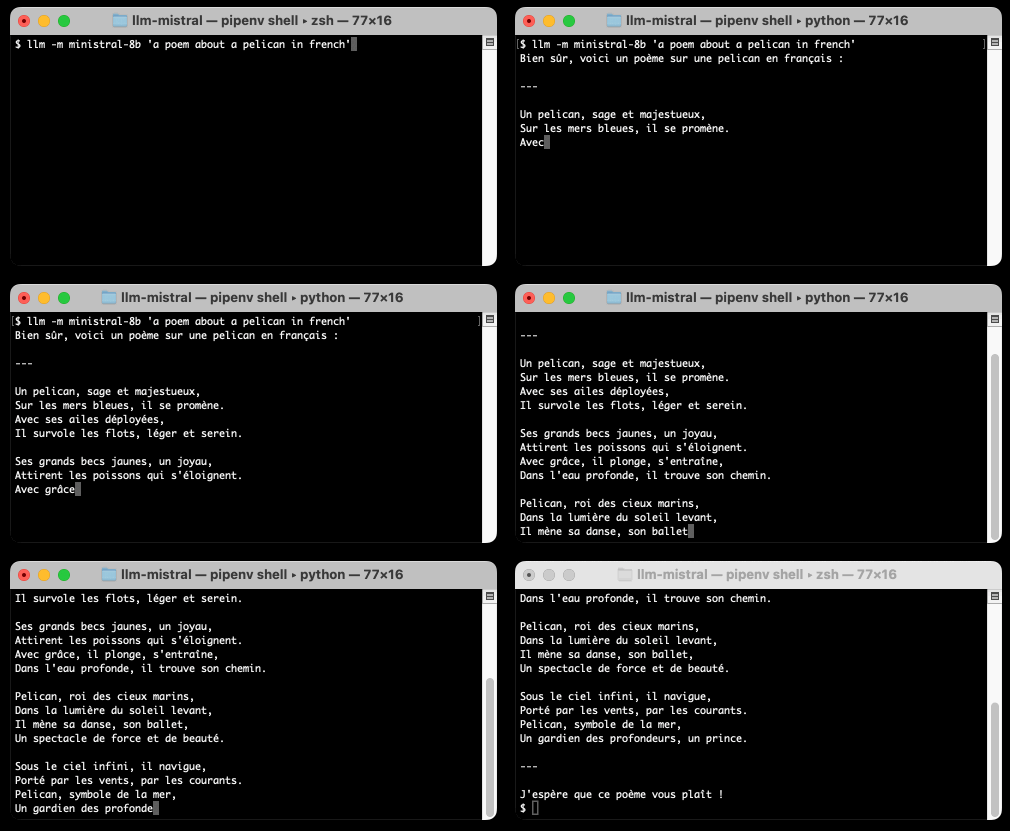
llm -m ministral-8b "a poem about a pelican in french"
The XOXO 2024 Talks. I missed attending the last XOXO in person, but I've been catching up on the videos of the talks over the past few days and they have been absolutely worth spending time with.
This year was a single day with ten speakers. Andy Baio explains the intended formula:
I usually explain that the conference is about, more than anything, the emotional experience of being an artist or creator on the internet, often covering the dark, difficult, painful challenges that they’ve dealt with, or are still struggling with, as a creator. “Big idea” TED-style talks don’t work well, and we avoid anything practical or industry-specific because the audience is so interdisciplinary.
PATH tips on wizard zines
(via)
New Julia Evans comic, from which I learned that the which -a X command shows you all of the versions of that command that are available in the directories on your current PATH.
This is so useful! I used it to explore my currently available Python versions:
$ which -a python
/opt/homebrew/Caskroom/miniconda/base/bin/python
$ which -a python3
/opt/homebrew/Caskroom/miniconda/base/bin/python3
/Library/Frameworks/Python.framework/Versions/3.13/bin/python3
/Library/Frameworks/Python.framework/Versions/3.12/bin/python3
/opt/homebrew/bin/python3
/usr/local/bin/python3
/usr/bin/python3
/Users/simon/Library/Application Support/hatch/pythons/3.12/python/bin/python3
/Users/simon/Library/Application Support/hatch/pythons/3.12/python/bin/python3
$ which -a python3.10
/opt/homebrew/Caskroom/miniconda/base/bin/python3.10
/opt/homebrew/bin/python3.10
$ which -a python3.11
/opt/homebrew/bin/python3.11
$ which -a python3.12
/Library/Frameworks/Python.framework/Versions/3.12/bin/python3.12
/opt/homebrew/bin/python3.12
/usr/local/bin/python3.12
/Users/simon/Library/Application Support/hatch/pythons/3.12/python/bin/python3.12
/Users/simon/Library/Application Support/hatch/pythons/3.12/python/bin/python3.12
$ which -a python3.13
/Library/Frameworks/Python.framework/Versions/3.13/bin/python3.13
/opt/homebrew/bin/python3.13
/usr/local/bin/python3.13
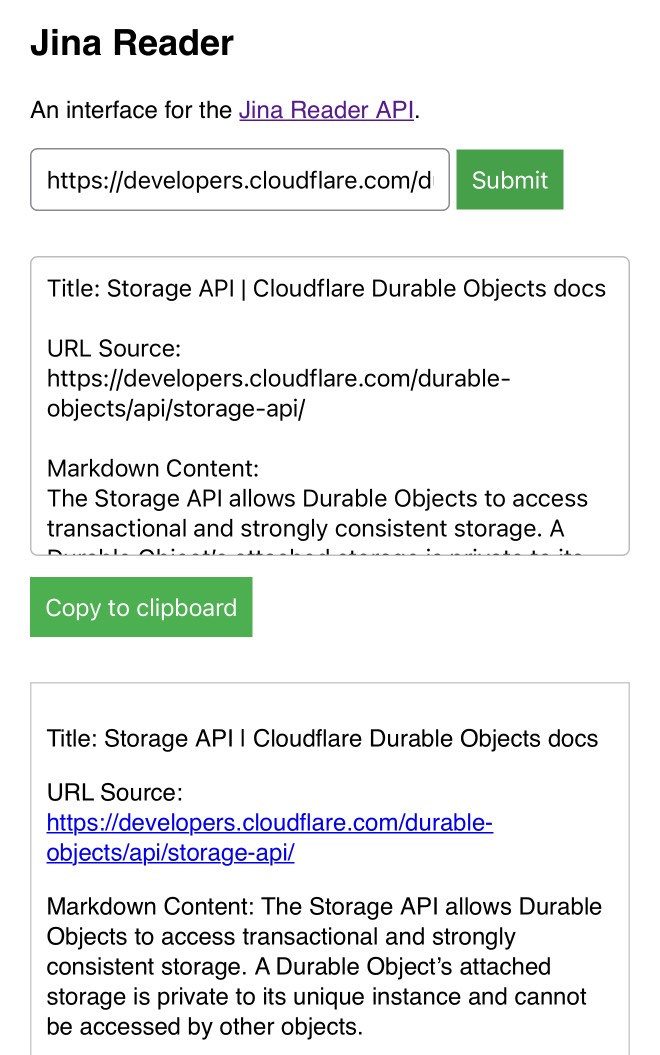
My Jina Reader tool. I wanted to feed the Cloudflare Durable Objects SQLite documentation into Claude, but I was on my iPhone so copying and pasting was inconvenient. Jina offer a Reader API which can turn any URL into LLM-friendly Markdown and it turns out it supports CORS, so I got Claude to build me this tool (second iteration, third iteration, final source code).
Paste in a URL to get the Jina Markdown version, along with an all important "Copy to clipboard" button.
Grant Negotiation and Authorization Protocol (GNAP) (via) RFC 9635 was published a few days ago. GNAP is effectively OAuth 3 - it's a newly standardized design for a protocol for delegating authorization so an application can access data on your behalf.
The most interesting difference between GNAP and OAuth 2 is that GNAP no longer requires clients to be registered in advance. With OAuth the client_id and client_secret need to be configured for each application, which means applications need to register with their targets - creating a new application on GitHub or Twitter before implementing the authorization flow, for example.
With GNAP that's no longer necessary. The protocol allows a client to provide a key as part of the first request to the server which is then used in later stages of the interaction.
GNAP has been brewing for a long time. The IETF working group was chartered in 2020, and two of the example implementations (gnap-client-js and oauth-xyz-nodejs) last saw commits more than four years ago.
I Was A Teenage Foot Clan Ninja.
My name is Danny Pennington, I am 48 years old, and between 1988 in 1995 I was a ninja in the Foot Clan.
I enjoyed this TMNT parody a lot.
Zero-latency SQLite storage in every Durable Object (via) Kenton Varda introduces the next iteration of Cloudflare's Durable Object platform, which recently upgraded from a key/value store to a full relational system based on SQLite.
For useful background on the first version of Durable Objects take a look at Cloudflare's durable multiplayer moat by Paul Butler, who digs into its popularity for building WebSocket-based realtime collaborative applications.
The new SQLite-backed Durable Objects is a fascinating piece of distributed system design, which advocates for a really interesting way to architect a large scale application.
The key idea behind Durable Objects is to colocate application logic with the data it operates on. A Durable Object comprises code that executes on the same physical host as the SQLite database that it uses, resulting in blazingly fast read and write performance.
How could this work at scale?
A single object is inherently limited in throughput since it runs on a single thread of a single machine. To handle more traffic, you create more objects. This is easiest when different objects can handle different logical units of state (like different documents, different users, or different "shards" of a database), where each unit of state has low enough traffic to be handled by a single object
Kenton presents the example of a flight booking system, where each flight can map to a dedicated Durable Object with its own SQLite database - thousands of fresh databases per airline per day.
Each DO has a unique name, and Cloudflare's network then handles routing requests to that object wherever it might live on their global network.
The technical details are fascinating. Inspired by Litestream, each DO constantly streams a sequence of WAL entries to object storage - batched every 16MB or every ten seconds. This also enables point-in-time recovery for up to 30 days through replaying those logged transactions.
To ensure durability within that ten second window, writes are also forwarded to five replicas in separate nearby data centers as soon as they commit, and the write is only acknowledged once three of them have confirmed it.
The JavaScript API design is interesting too: it's blocking rather than async, because the whole point of the design is to provide fast single threaded persistence operations:
let docs = sql.exec(`
  SELECT title, authorId FROM documents
  ORDER BY lastModified DESC
  LIMIT 100
`).toArray();

for (let doc of docs) {
  doc.authorName = sql.exec(
    "SELECT name FROM users WHERE id = ?",
    doc.authorId).one().name;
}
This one of their examples deliberately exhibits the N+1 query pattern, because that's something SQLite is uniquely well suited to handling.
The system underlying Durable Objects is called Storage Relay Service, and it's been powering Cloudflare's existing-but-different D1 SQLite system for over a year.
I was curious as to where the objects are created. According to this (via Hacker News):
Durable Objects do not currently change locations after they are created. By default, a Durable Object is instantiated in a data center close to where the initial
get()request is made. [...] To manually create Durable Objects in another location, provide an optionallocationHintparameter toget().
And in a footnote:
Dynamic relocation of existing Durable Objects is planned for the future.
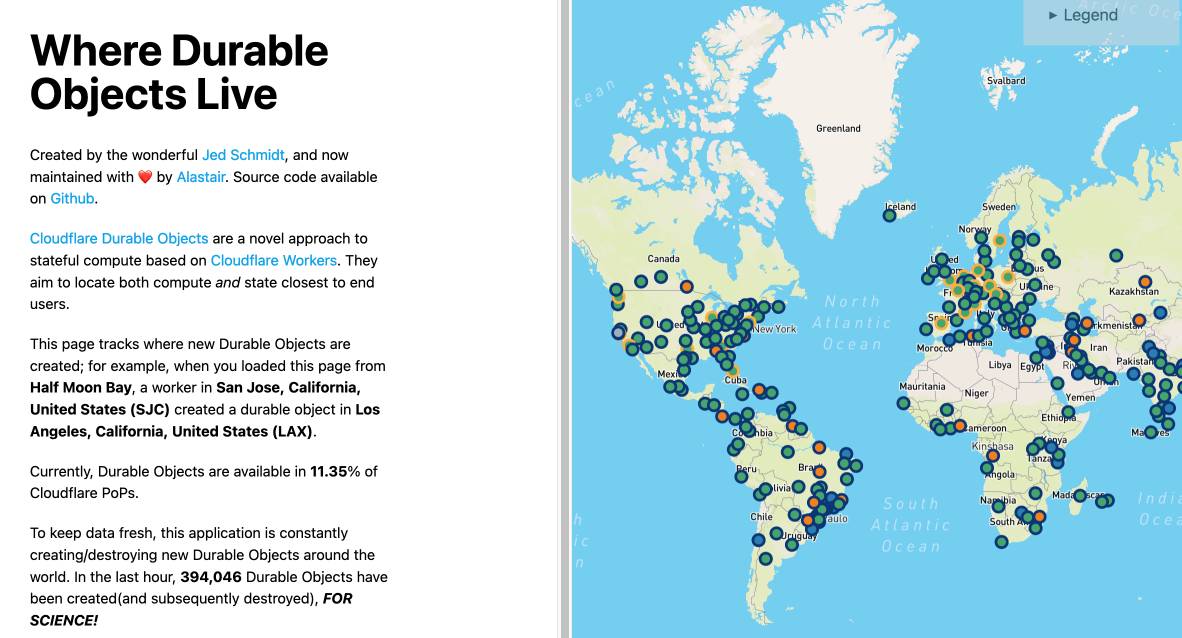
where.durableobjects.live is a neat site that tracks where in the Cloudflare network DOs are created - I just visited it and it said:
This page tracks where new Durable Objects are created; for example, when you loaded this page from Half Moon Bay, a worker in San Jose, California, United States (SJC) created a durable object in San Jose, California, United States (SJC).
An LLM TDD loop (via) Super neat demo by David Winterbottom, who wrapped my LLM and files-to-prompt tools in a short Bash script that can be fed a file full of Python unit tests and an empty implementation file and will then iterate on that file in a loop until the tests pass.
PostgreSQL 17: SQL/JSON is here! (via) Hubert Lubaczewski dives into the new JSON features added in PostgreSQL 17, released a few weeks ago on the 26th of September. This is the latest in his long series of similar posts about new PostgreSQL features.
The features are based on the new SQL:2023 standard from June 2023. If you want to actually read the specification for SQL:2023 it looks like you have to buy a PDF from ISO for 194 Swiss Francs (currently $226). Here's a handy summary by Peter Eisentraut: SQL:2023 is finished: Here is what's new.
There's a lot of neat stuff in here. I'm particularly interested in the json_table() table-valued function, which can convert a JSON string into a table with quite a lot of flexibility. You can even specify a full table schema as part of the function call:
SELECT * FROM json_table(
    '[{"a":10,"b":20},{"a":30,"b":40}]'::jsonb,
    '$[*]'
    COLUMNS (
        id FOR ORDINALITY,
        column_a int4 path '$.a',
        column_b int4 path '$.b',
        a int4,
        b int4,
        c text
    )
);
SQLite has solid JSON support already and often imitates PostgreSQL features, so I wonder if we'll see an update to SQLite that reflects some aspects of this new syntax.
jefftriplett/django-startproject
(via)
Django's django-admin startproject and startapp commands include a --template option which can be used to specify an alternative template for generating the initial code.
Jeff Triplett actively maintains his own template for new projects, which includes the pattern that I personally prefer of keeping settings and URLs in a config/ folder. It also configures the development environment to run using Docker Compose.
The latest update adds support for Python 3.13, Django 5.1 and uv. It's neat how you can get started without even installing Django using uv run like this:
uv run --with=django django-admin startproject \
  --extension=ini,py,toml,yaml,yml \
  --template=https://github.com/jefftriplett/django-startproject/archive/main.zip \
  example_project
Perks of Being a Python Core Developer
(via)
Mariatta Wijaya provides a detailed breakdown of the exact capabilities and privileges that are granted to Python core developers - including commit access to the Python main, the ability to write or sponsor PEPs, the ability to vote on new core developers and for the steering council election and financial support from the PSF for travel expenses related to PyCon and core development sprints.
Not to be under-estimated is that you also gain respect:
Everyone’s always looking for ways to stand out in resumes, right? So do I. I’ve been an engineer for longer than I’ve been a core developer, and I do notice that having the extra title like open source maintainer and public speaker really make a difference. As a woman, as someone with foreign last name that nobody knows how to pronounce, as someone who looks foreign, and speaks in a foreign accent, having these extra “credentials” helped me be seen as more or less equal compared to other people.
Python 3.13’s best new features (via) Trey Hunner highlights some Python 3.13 usability improvements I had missed, mainly around the new REPL.
Pasting a block of code like a class or function that includes blank lines no longer breaks in the REPL - particularly useful if you frequently have LLMs write code for you to try out.
Hitting F2 in the REPL toggles "history mode" which gives you your Python code without the REPL's >>> and ... prefixes - great for copying code back out again.
Creating a virtual environment with python3.13 -m venv .venv now adds a .venv/.gitignore file containing * so you don't need to explicitly ignore that directory. I just checked and it looks like uv venv implements the same trick.
And my favourite:
Historically, any line in the Python debugger prompt that started with a PDB command would usually trigger the PDB command, instead of PDB interpreting the line as Python code. [...]
But now, if the command looks like Python code,
pdbwill run it as Python code!
Which means I can finally call list(iterable) in my pdb seesions, where previously I've had to use [i for i in iterable] instead.
(Tip from Trey: !list(iterable) and [*iterable] are good alternatives for pre-Python 3.13.)
Trey's post is also available as a YouTube video.
Cabel Sasser at XOXO (via) I cannot recommend this talk highly enough for the way it ends. After watching the video dive into this new site that accompanies the talk - an online archive of the works of commercial artist Wes Cook. I too would very much love to see a full scan of The Lost McDonalds Satire Triptych.
lm.rs: run inference on Language Models locally on the CPU with Rust (via) Impressive new LLM inference implementation in Rust by Samuel Vitorino. I tried it just now on an M2 Mac with 64GB of RAM and got very snappy performance for this Q8 Llama 3.2 1B, with Activity Monitor reporting 980% CPU usage over 13 threads.
Here's how I compiled the library and ran the model:
cd /tmp
git clone https://github.com/samuel-vitorino/lm.rs
cd lm.rs
RUSTFLAGS="-C target-cpu=native" cargo build --release --bin chat
curl -LO 'https://huggingface.co/samuel-vitorino/Llama-3.2-1B-Instruct-Q8_0-LMRS/resolve/main/tokenizer.bin?download=true'
curl -LO 'https://huggingface.co/samuel-vitorino/Llama-3.2-1B-Instruct-Q8_0-LMRS/resolve/main/llama3.2-1b-it-q80.lmrs?download=true'
./target/release/chat --model llama3.2-1b-it-q80.lmrs --show-metrics
That --show-metrics option added this at the end of a response:
Speed: 26.41 tok/s
It looks like the performance is helped by two key dependencies: wide, which provides data types optimized for SIMD operations and rayon for running parallel iterators across multiple cores (used for matrix multiplication).
(I used LLM and files-to-prompt to help figure this out.)
$2 H100s: How the GPU Bubble Burst. Fascinating analysis from Eugene Cheah, founder of LLM hosting provider Featherless, discussing GPU economics over the past 12 months.
TLDR: Don’t buy H100s. The market has flipped from shortage ($8/hr) to oversupplied ($2/hr), because of reserved compute resales, open model finetuning, and decline in new foundation model co’s. Rent instead.
HTML for People (via) Blake Watson's brand new HTML tutorial, presented as a free online book (CC BY-NC-SA 4.0, on GitHub). This seems very modern and well thought-out to me. It focuses exclusively on HTML, skipping JavaScript entirely and teaching with Simple.css to avoid needing to dig into CSS while still producing sites that are pleasing to look at. It even touches on Web Components (described as Custom HTML tags) towards the end.
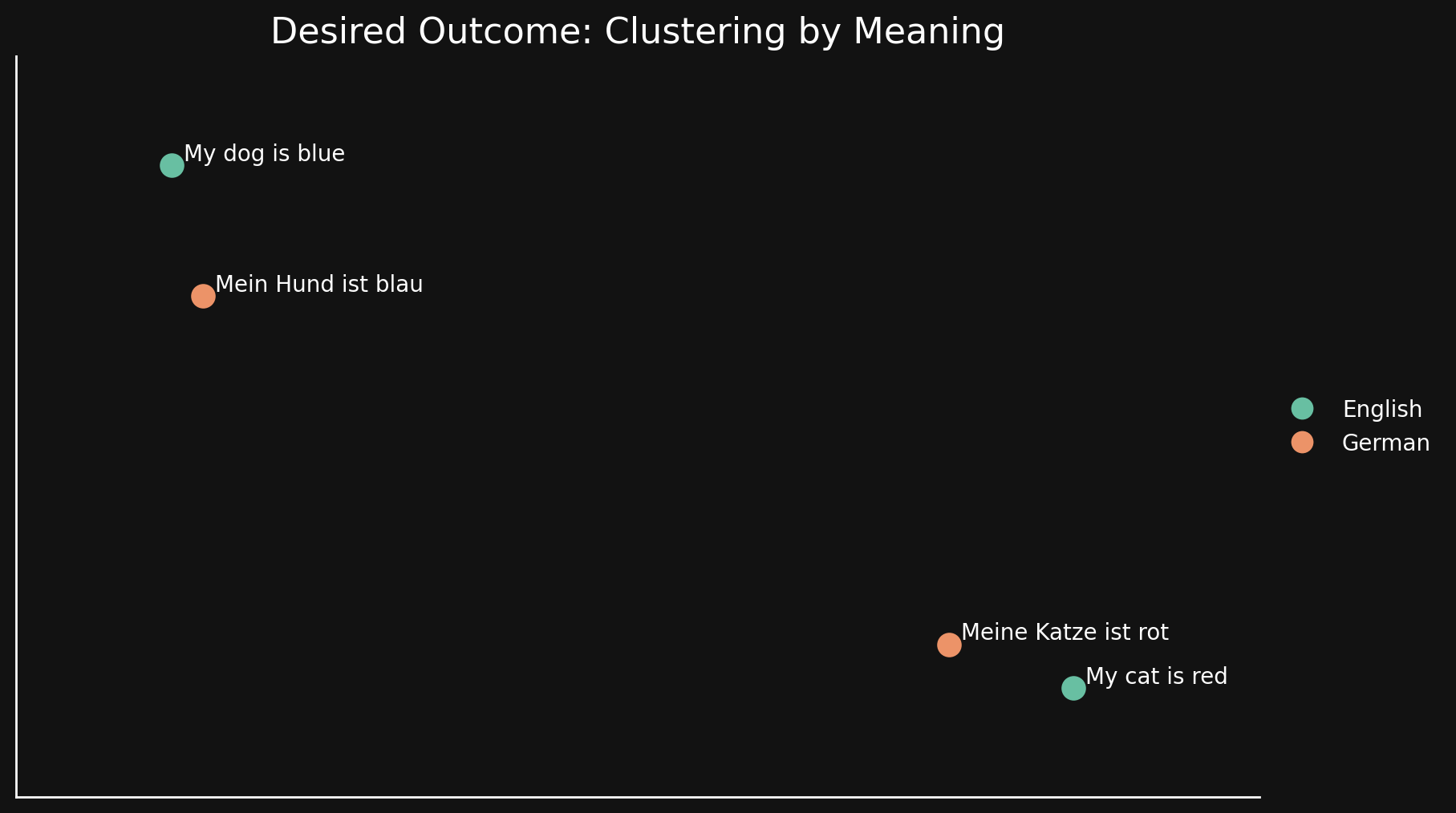
Bridging Language Gaps in Multilingual Embeddings via Contrastive Learning (via) Most text embeddings models suffer from a "language gap", where phrases in different languages with the same semantic meaning end up with embedding vectors that aren't clustered together.
Jina claim their new jina-embeddings-v3 (CC BY-NC 4.0, which means you need to license it for commercial use if you're not using their API) is much better on this front, thanks to a training technique called "contrastive learning".
There are 30 languages represented in our contrastive learning dataset, but 97% of pairs and triplets are in just one language, with only 3% involving cross-language pairs or triplets. But this 3% is enough to produce a dramatic result: Embeddings show very little language clustering and semantically similar texts produce close embeddings regardless of their language
Announcing Deno 2. The big focus of Deno 2 is compatibility with the existing Node.js and npm ecosystem:
Deno 2 takes all of the features developers love about Deno 1.x — zero-config, all-in-one toolchain for JavaScript and TypeScript development, web standard API support, secure by default — and makes it fully backwards compatible with Node and npm (in ESM).
The npm support is documented here. You can write a script like this:
import * as emoji from "npm:node-emoji";
console.log(emoji.emojify(`:sauropod: :heart:  npm`));
And when you run it Deno will automatically fetch and cache the required dependencies:
deno run main.js
Another new feature that caught my eye was this:
deno jupyternow supports outputting images, graphs, and HTML
Deno has apparently shipped with a Jupyter notebook kernel for a while, and it's had a major upgrade in this release.
Here's Ryan Dahl's demo of the new notebook support in his Deno 2 release video.
I tried this out myself, and it's really neat. First you need to install the kernel:
deno juptyer --install
I was curious to find out what this actually did, so I dug around in the code and then further in the Rust runtimed dependency. It turns out installing Jupyter kernels, at least on macOS, involves creating a directory in ~/Library/Jupyter/kernels/deno and writing a kernel.json file containing the following:
{
  "argv": [
    "/opt/homebrew/bin/deno",
    "jupyter",
    "--kernel",
    "--conn",
    "{connection_file}"
  ],
  "display_name": "Deno",
  "language": "typescript"
}
That file is picked up by any Jupyter servers running on your machine, and tells them to run deno jupyter --kernel ... to start a kernel.
I started Jupyter like this:
jupyter-notebook /tmp
Then started a new notebook, selected the Deno kernel and it worked as advertised:
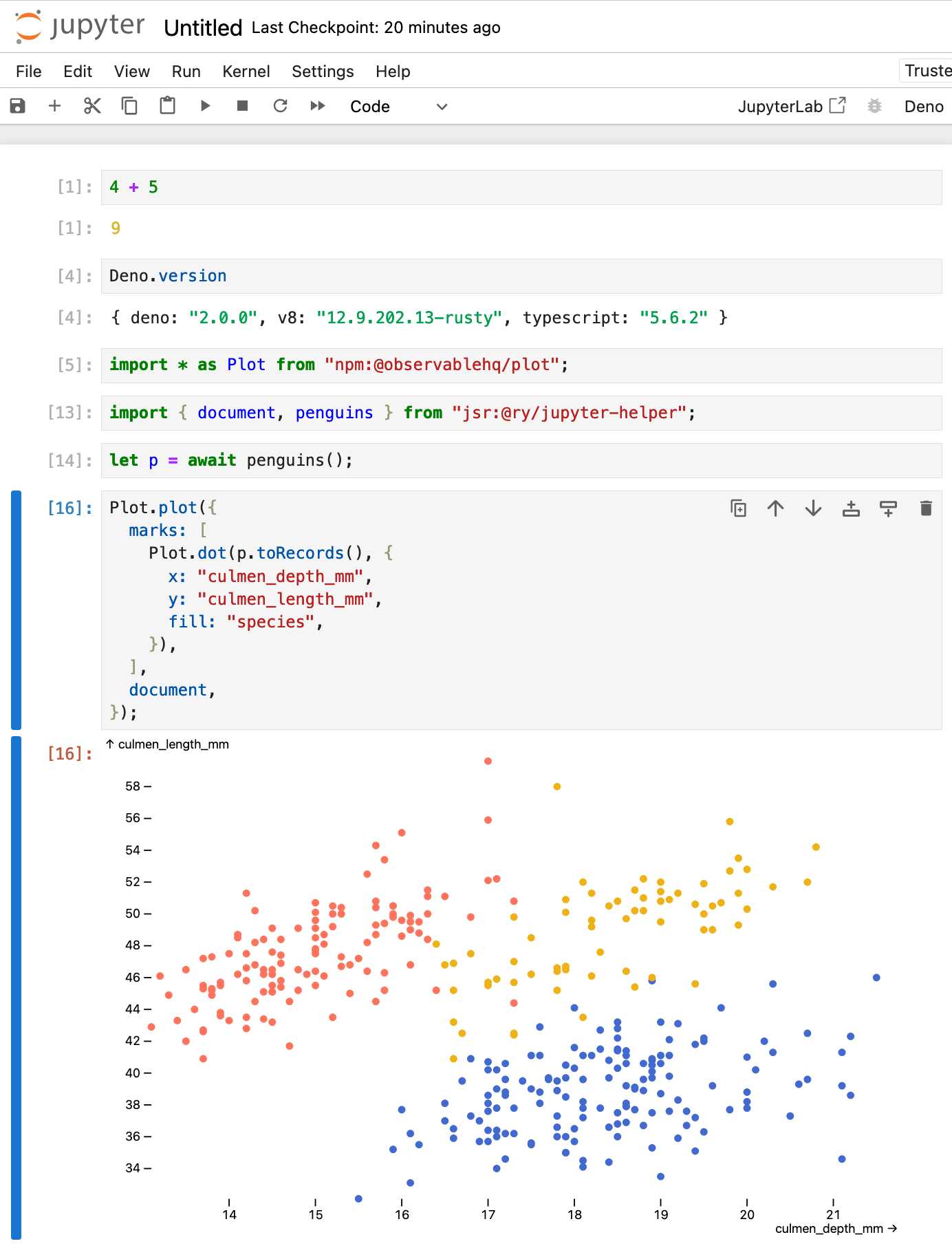
import * as Plot from "npm:@observablehq/plot";
import { document, penguins } from "jsr:@ry/jupyter-helper";
let p = await penguins();

Plot.plot({
  marks: [
    Plot.dot(p.toRecords(), {
      x: "culmen_depth_mm",
      y: "culmen_length_mm",
      fill: "species",
    }),
  ],
  document,
});RISD BFA Industrial Design: AI Software Design Studio. Fascinating syllabus for a course on digital product design taught at the Rhode Island School of Design by Kelin Carolyn Zhang.
Designers must adapt and shape the frontier of AI-driven computing — while navigating the opportunities, risks, and ethical responsibilities of working with this new technology.
In this new world, creation is cheap, craft is automatable, and everyone is a beginner. The ultimate differentiator will be the creator’s perspective, taste, and judgment. The software design education for our current moment must prioritize this above all else.
By course's end, students will have hands-on experience with an end-to-end digital product design process, culminating in a physical or digital product that takes advantage of the unique properties of generative AI models. Prior coding experience is not required, but students will learn using AI coding assistants like ChatGPT and Claude.
From Kelin's Twitter thread about the course so far:
these are juniors in industrial design. about half of them don't have past experience even designing software or using figma [...]
to me, they're doing great because they're moving super quickly
what my 4th yr interaction design students in 2019 could make in half a semester, these 3rd year industrial design students are doing in a few days with no past experience [...]
they very quickly realized the limits of LLM code in week 1, especially in styling & creating unconventional behavior
AI can help them make a functional prototype with js in minutes, but it doesn't look good
Forums are still alive, active, and a treasure trove of information (via) Chris Person:
When I want information, like the real stuff, I go to forums. Over the years, forums did not really get smaller, so much as the rest of the internet just got bigger. Reddit, Discord and Facebook groups have filled a lot of that space, but there is just certain information that requires the dedication of adults who have specifically signed up to be in one kind of community.
This is a very comprehensive directory of active forums.
Free Threaded Python With Asyncio.
Jamie Chang expanded my free-threaded Python experiment from a few months ago to explore the interaction between Python's asyncio and the new GIL-free build of Python 3.13.
The results look really promising. Jamie says:
Generally when it comes to Asyncio, the discussion around it is always about the performance or lack there of. Whilst peroformance is certain important, the ability to reason about concurrency is the biggest benefit. [...]
Depending on your familiarity with AsyncIO, it might actually be the simplest way to start a thread.
This code for running a Python function in a thread really is very pleasant to look at:
result = await asyncio.to_thread(some_function, *args, **kwargs)
Jamie also demonstrates asyncio.TaskGroup, which makes it easy to execute a whole bunch of threads and wait for them all to finish:
async with TaskGroup() as tg:
    for _ in range(args.tasks):
        tg.create_task(to_thread(cpu_bound_task, args.size))
The Fair Source Definition (via) Fair Source (fair.io) is the new-ish initiative from Chad Whitacre and Sentry aimed at providing an alternative licensing philosophy that provides additional protection for the business models of companies that release their code.
I like that they're establishing a new brand for this and making it clear that it's a separate concept from Open Source. Here's their definition:
Fair Source is an alternative to closed source, allowing you to safely share access to your core products. Fair Source Software (FSS):
- is publicly available to read;
- allows use, modification, and redistribution with minimal restrictions to protect the producer’s business model; and
- undergoes delayed Open Source publication (DOSP).
They link to the Delayed Open Source Publication research paper published by OSI in January. (I was frustrated that this is only available as a PDF, so I converted it to Markdown using Gemini 1.5 Pro so I could read it on my phone.)
The most interesting background I could find on Fair Source was this GitHub issues thread, started in May, where Chad and other contributors fleshed out the initial launch plan over the course of several months.
otterwiki (via) It's been a while since I've seen a new-ish Wiki implementation, and this one by Ralph Thesen is really nice. It's written in Python (Flask + SQLAlchemy + mistune for Markdown + GitPython) and keeps all of the actual wiki content as Markdown files in a local Git repository.
The installation instructions are a little in-depth as they assume a production installation with Docker or systemd - I figured out this recipe for trying it locally using uv:
git clone https://github.com/redimp/otterwiki.git
cd otterwiki

mkdir -p app-data/repository
git init app-data/repository

echo "REPOSITORY='${PWD}/app-data/repository'" >> settings.cfg
echo "SQLALCHEMY_DATABASE_URI='sqlite:///${PWD}/app-data/db.sqlite'" >> settings.cfg
echo "SECRET_KEY='$(echo $RANDOM | md5sum | head -c 16)'" >> settings.cfg

export OTTERWIKI_SETTINGS=$PWD/settings.cfg
uv run --with gunicorn gunicorn --bind 127.0.0.1:8080 otterwiki.server:app
openai/openai-realtime-console. I got this OpenAI demo repository working today - it's an extremely easy way to get started playing around with the new Realtime voice API they announced at DevDay last week:
cd /tmp
git clone https://github.com/openai/openai-realtime-console
cd openai-realtime-console
npm i
npm start
That starts a localhost:3000 server running the demo React application. It asks for an API key, you paste one in and you can start talking to the web page.
The demo handles voice input, voice output and basic tool support - it has a tool that can show you the weather anywhere in the world, including panning a map to that location. I tried adding a show_map() tool so I could pan to a location just by saying "Show me a map of the capital of Morocco" - all it took was editing the src/pages/ConsolePage.tsx file and hitting save, then refreshing the page in my browser to pick up the new function.
Be warned, it can be quite expensive to play around with. I was testing the application intermittently for only about 15 minutes and racked up $3.87 in API charges.