Blogmarks
Filters: Sorted by date
QwQ: Reflect Deeply on the Boundaries of the Unknown. Brand new openly licensed (Apache 2) model from Alibaba Cloud's Qwen team, this time clearly inspired by OpenAI's work on reasoning in o1.
I love the flowery language they use to introduce the new model:
Through deep exploration and countless trials, we discovered something profound: when given time to ponder, to question, and to reflect, the model’s understanding of mathematics and programming blossoms like a flower opening to the sun. Just as a student grows wiser by carefully examining their work and learning from mistakes, our model achieves deeper insight through patient, thoughtful analysis.
It's already available through Ollama as a 20GB download. I initially ran it like this:
ollama run qwq
This downloaded the model and started an interactive chat session. I tried the classic "how many rs in strawberry?" and got this lengthy but correct answer, which concluded:
Wait, but maybe I miscounted. Let's list them: 1. s 2. t 3. r 4. a 5. w 6. b 7. e 8. r 9. r 10. y Yes, definitely three "r"s. So, the word "strawberry" contains three "r"s.
Then I switched to using LLM and the llm-ollama plugin. I tried prompting it for Python that imports CSV into SQLite:
Write a Python function import_csv(conn, url, table_name) which acceopts a connection to a SQLite databse and a URL to a CSV file and the name of a table - it then creates that table with the right columns and imports the CSV data from that URL
It thought through the different steps in detail and produced some decent looking code.
Finally, I tried this:
llm -m qwq 'Generate an SVG of a pelican riding a bicycle'
For some reason it answered in Simplified Chinese. It opened with this:
生成一个SVG图像,内容是一只鹈鹕骑着一辆自行车。这听起来挺有趣的!我需要先了解一下什么是SVG,以及如何创建这样的图像。
Which translates (using Google Translate) to:
Generate an SVG image of a pelican riding a bicycle. This sounds interesting! I need to first understand what SVG is and how to create an image like this.
It then produced a lengthy essay discussing the many aspects that go into constructing a pelican on a bicycle - full transcript here. After a full 227 seconds of constant output it produced this as the final result.

I think that's pretty good!
Amazon S3 adds new functionality for conditional writes (via)
Amazon S3 can now perform conditional writes that evaluate if an object is unmodified before updating it. This helps you coordinate simultaneous writes to the same object and prevents multiple concurrent writers from unintentionally overwriting the object without knowing the state of its content. You can use this capability by providing the ETag of an object [...]
This new conditional header can help improve the efficiency of your large-scale analytics, distributed machine learning, and other highly parallelized workloads by reliably offloading compare and swap operations to S3.
(Both Azure Blob Storage and Google Cloud have this feature already.)
When AWS added conditional write support just for if an object with that key exists or not back in August I wrote about Gunnar Morling's trick for Leader Election With S3 Conditional Writes. This new capability opens up a whole set of new patterns for implementing distributed locking systems along those lines.
Here's a useful illustrative example by lxgr on Hacker News:
As a (horribly inefficient, in case of non-trivial write contention) toy example, you could use S3 as a lock-free concurrent SQLite storage backend: Reads work as expected by fetching the entire database and satisfying the operation locally; writes work like this:
- Download the current database copy
- Perform your write locally
- Upload it back using "Put-If-Match" and the pre-edit copy as the matched object.
- If you get success, consider the transaction successful.
- If you get failure, go back to step 1 and try again.
AWS also just added the ability to enforce conditional writes in bucket policies:
To enforce conditional write operations, you can now use s3:if-none-match or s3:if-match condition keys to write a bucket policy that mandates the use of HTTP if-none-match or HTTP if-match conditional headers in S3 PutObject and CompleteMultipartUpload API requests. With this bucket policy in place, any attempt to write an object to your bucket without the required conditional header will be rejected.
Leaked system prompts from Vercel v0. v0 is Vercel's entry in the increasingly crowded LLM-assisted development market - chat with a bot and have that bot build a full application for you.
They've been iterating on it since launching in October last year, making it one of the most mature products in this space.
Somebody leaked the system prompts recently. Vercel CTO Malte Ubl said this:
When @v0 first came out we were paranoid about protecting the prompt with all kinds of pre and post processing complexity.
We completely pivoted to let it rip. A prompt without the evals, models, and especially UX is like getting a broken ASML machine without a manual
OpenStreetMap embed URL.
I just found out OpenStreetMap have a "share" button which produces HTML for an iframe targetting https://www.openstreetmap.org/export/embed.html, making it easy to drop an OpenStreetMap map onto any web page that allows iframes.
As far as I can tell the supported parameters are:
bbox=then min longitude, min latitude, max longitude, max latitudemarker=optional latitude, longitude coordinate for a marker (only a single marker is supported)layer=mapnik- other values I've found that work arecyclosm,cyclemap,transportmapandhot(for humanitarian)
Here's HTML for embedding this on a page using a sandboxed iframe - the allow-scripts is necessary for the map to display.
<iframe
sandbox="allow-scripts"
style="border: none; width: 100%; height: 20em;"
src="https://www.openstreetmap.org/export/embed.html?bbox=-122.613%2C37.431%2C-122.382%2C37.559&layer=mapnik&marker=37.495%2C-122.497"
></iframe>
Thanks to this post I learned that iframes are rendered correctly in NetNewsWire, NewsExplorer, NewsBlur and Feedly on Android.
Introducing the Model Context Protocol (via) Interesting new initiative from Anthropic. The Model Context Protocol aims to provide a standard interface for LLMs to interact with other applications, allowing applications to expose tools, resources (contant that you might want to dump into your context) and parameterized prompts that can be used by the models.
Their first working version of this involves the Claude Desktop app (for macOS and Windows). You can now configure that app to run additional "servers" - processes that the app runs and then communicates with via JSON-RPC over standard input and standard output.
Each server can present a list of tools, resources and prompts to the model. The model can then make further calls to the server to request information or execute one of those tools.
(For full transparency: I got a preview of this last week, so I've had a few days to try it out.)
The best way to understand this all is to dig into the examples. There are 13 of these in the modelcontextprotocol/servers GitHub repository so far, some using the Typesscript SDK and some with the Python SDK (mcp on PyPI).
My favourite so far, unsurprisingly, is the sqlite one. This implements methods for Claude to execute read and write queries and create tables in a SQLite database file on your local computer.
This is clearly an early release: the process for enabling servers in Claude Desktop - which involves hand-editing a JSON configuration file - is pretty clunky, and currently the desktop app and running extra servers on your own machine is the only way to try this out.
The specification already describes the next step for this: an HTTP SSE protocol which will allow Claude (and any other software that implements the protocol) to communicate with external HTTP servers. Hopefully this means that MCP will come to the Claude web and mobile apps soon as well.
A couple of early preview partners have announced their MCP implementations already:
- Cody supports additional context through Anthropic's Model Context Protocol
- The Context Outside the Code is the Zed editor's announcement of their MCP extensions.
follow_theirs.py. Hamel Husain wrote this Python script on top of the atproto Python library for interacting with Bluesky, which lets you specify another user and then follows every account that user is following.
I forked it and added two improvements: inline PEP 723 dependencies and input() and getpass.getpass() to interactively ask for the credentials needed to run the script.
This means you can run my version using uv run like this:
uv run https://gist.githubusercontent.com/simonw/848a3b91169a789bc084a459aa7ecf83/raw/397ad07c8be0601eaf272d9d5ab7675c7fd3c0cf/follow_theirs.py
I really like this pattern of being able to create standalone Python scripts with dependencies that can be run from a URL as a one-liner. Here's the comment section at the top of the script that makes it work:
# /// script
# dependencies = [
#   "atproto"
# ]
# ///
open-interpreter (via) This "natural language interface for computers" open source ChatGPT Code Interpreter alternative has been around for a while, but today I finally got around to trying it out.
Here's how I ran it (without first installing anything) using uv:
uvx --from open-interpreter interpreter
The default mode asks you for an OpenAI API key so it can use gpt-4o - there are a multitude of other options, including the ability to use local models with interpreter --local.
It runs in your terminal and works by generating Python code to help answer your questions, asking your permission to run it and then executing it directly on your computer.
I pasted in an API key and then prompted it with this:
find largest files on my desktop
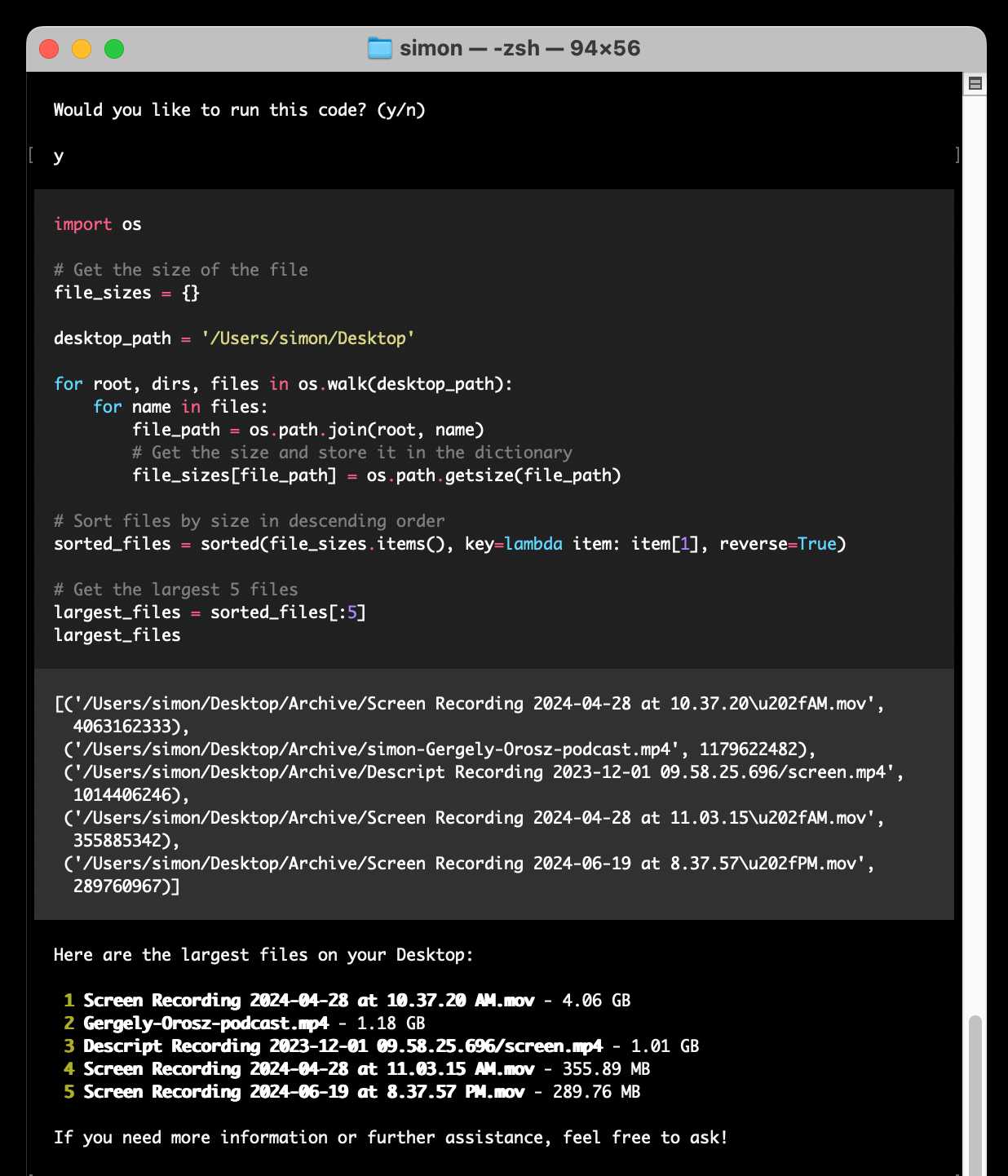
Here's the full transcript.
Since code is run directly on your machine there are all sorts of ways things could go wrong if you don't carefully review the generated code before hitting "y". The team have an experimental safe mode in development which works by scanning generated code with semgrep. I'm not convinced by that approach, I think executing code in a sandbox would be a much more robust solution here - but sandboxing Python is still a very difficult problem.
They do at least have an experimental Docker integration.
Is async Django ready for prime time? (via) Jonathan Adly reports on his experience using Django to build ColiVara, a hosted RAG API that uses ColQwen2 visual embeddings, inspired by the ColPali paper.
In a breach of Betteridge's law of headlines the answer to the question posed by this headline is “yes”.
We believe async Django is ready for production. In theory, there should be no performance loss when using async Django instead of FastAPI for the same tasks.
The ColiVara application is itself open source, and you can see how it makes use of Django’s relatively new asynchronous ORM features in the api/views.py module.
I also picked up a useful trick from their Dockerfile: if you want uv in a container you can install it with this one-liner:
COPY --from=ghcr.io/astral-sh/uv:latest /uv /bin/uv
Importing a frontend Javascript library without a build system.
I sometimes think the hardest problem in computer science right now is taking an NPM library and figuring out how to download it and use it from a <script> tag without needing to involve some sort of convoluted build system.
Julia Evans shares my preference for build-free JavaScript, and has shared notes about figuring out how to turn an arbitrary NPM package into something that can be loaded in a browser.
It's so complicated! This is the best exploration I've seen yet of the topic but wow, this really needs to be easier.
My download-esm tool gets a mention, but I have to admit I'm not 100% confident in that as a robust solution. I don't know nearly enough about the full scope of the problem here to confidently recommend my own tool!
Right now my ideal solution would turn almost anything from NPM into an ES module that I can self-host and then load using import ... from in a <script type="module"> block, maybe with an importmap as long as I don't have to think too hard about what to put in it.
I'm intrigued by esm.sh (mentioned by Julia as a new solution worth exploring). The length of the documentation on that page further reinforces quite how much there is that I need to understand here.
Quantization matters (via) What impact does quantization have on the performance of an LLM? been wondering about this for quite a while, now here are numbers from Paul Gauthier.
He ran differently quantized versions of Qwen 2.5 32B Instruct through his Aider code editing benchmark and saw a range of scores.
The original released weights (BF16) scored highest at 71.4%, with Ollama's qwen2.5-coder:32b-instruct-fp16 (a 66GB download) achieving the same score.
The quantized Ollama qwen2.5-coder:32b-instruct-q4_K_M (a 20GB download) saw a massive drop in quality, scoring just 53.4% on the same benchmark.
How decentralized is Bluesky really? (via) Lots of technical depth in this comparison of the Bluesky (ATProto) and Fediverse/Mastodon/ActivityPub approach to decentralization, from ActivityPub spec author Christine Lemmer-Webber.
One key theme: many of the features of Bluesky that aren't present in the rest of the Fediverse are the result of centralization: Bluesky follows a "shared heap" architecture where participating nodes are expected to maintain a full copy of the entire network - more than 5TB of data already. ActivityPub instead uses a "message passing" architecture where only a subset of the overall network data - messages from accounts followed by that node's users - are imported into the node.
This enables features like comprehensive search and the ability to browse all messages in a conversation even if some come from accounts that are not followed by any of the current node's users (a problem I've faced in the past).
This is also part of the "credible exit" mechanism where users can theoretically switch to a different host while keeping all of their existing content - though that also takes advantage of content addressed storage, a feature that could be added to ActivityPub.
Also of note: direct messages on Bluesky are currently entirely dependent on the single central node run by Bluesky themselves, and are not end-to-end encrypted. Furthermore, signing keys that are used by ATProto are currently held custodially by Bluesky on behalf of their users.
Private School Labeler on Bluesky. I am utterly delighted by this subversive use of Bluesky's labels feature, which allows you to subscribe to a custom application that then adds visible labels to profiles.
The feature was designed for moderation, but this labeler subverts it by displaying labels on accounts belonging to British public figures showing which expensive private school they went to and what the current fees are for that school.
Here's what it looks like on an account - tapping the label brings up the information about the fees:
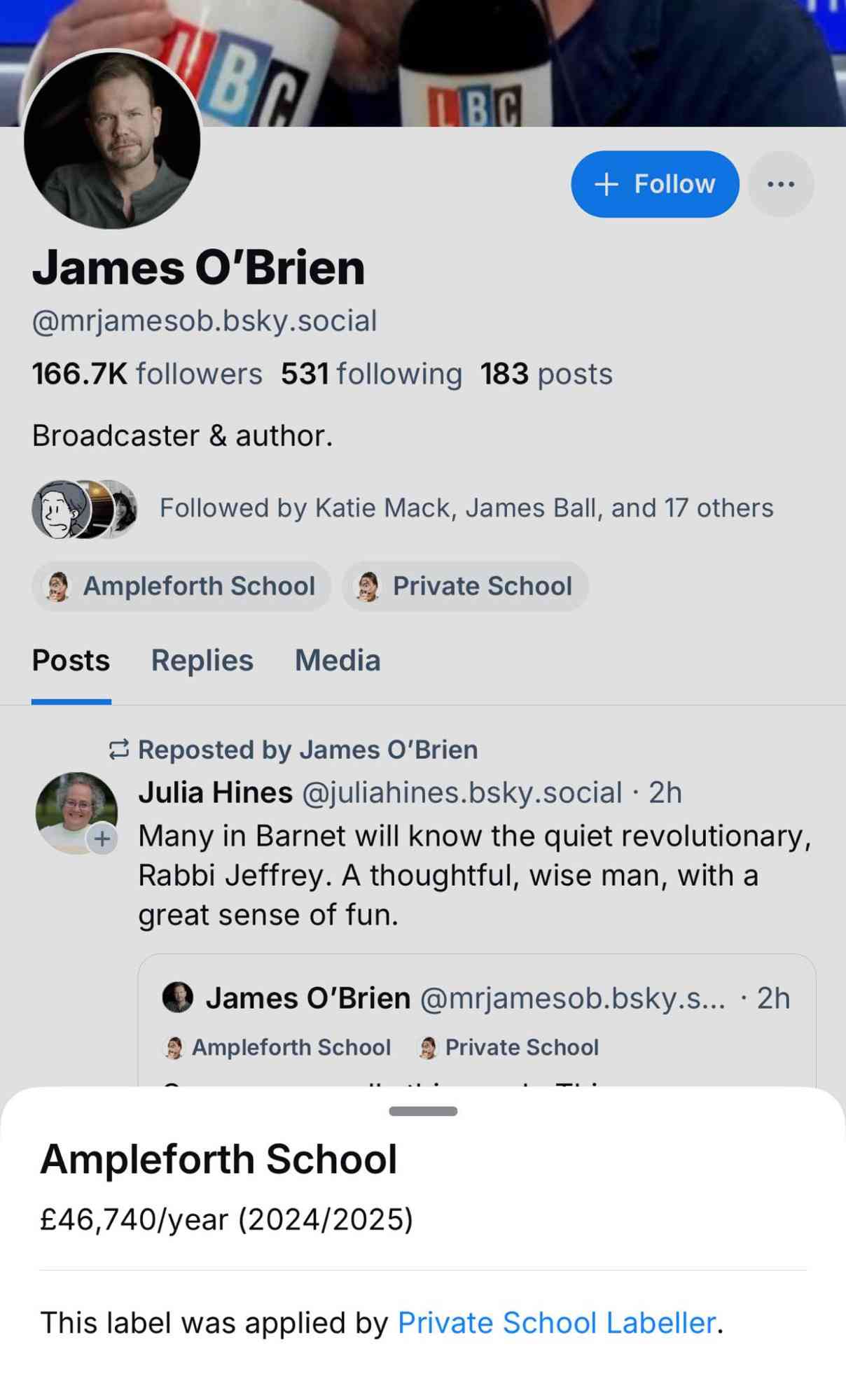
These labels are only visible to users who have deliberately subscribed to the labeler. Unsurprisingly, some of those labeled aren't too happy about it!
In response to a comment about attending on a scholarship, the label creator said:
I'm explicit with the labeller that scholarship pupils, grant pupils, etc, are still included - because it's the later effects that are useful context - students from these schools get a leg up and a degree of privilege, which contributes eg to the overrepresentation in British media/politics
On the one hand, there are clearly opportunities for abuse here. But given the opt-in nature of the labelers, this doesn't feel hugely different to someone creating a separate webpage full of information about Bluesky profiles.
I'm intrigued by the possibilities of labelers. There's a list of others on bluesky-labelers.io, including another brilliant hack: Bookmarks, which lets you "report" a post to the labeler and then displays those reported posts in a custom feed - providing a private bookmarks feature that Bluesky itself currently lacks.
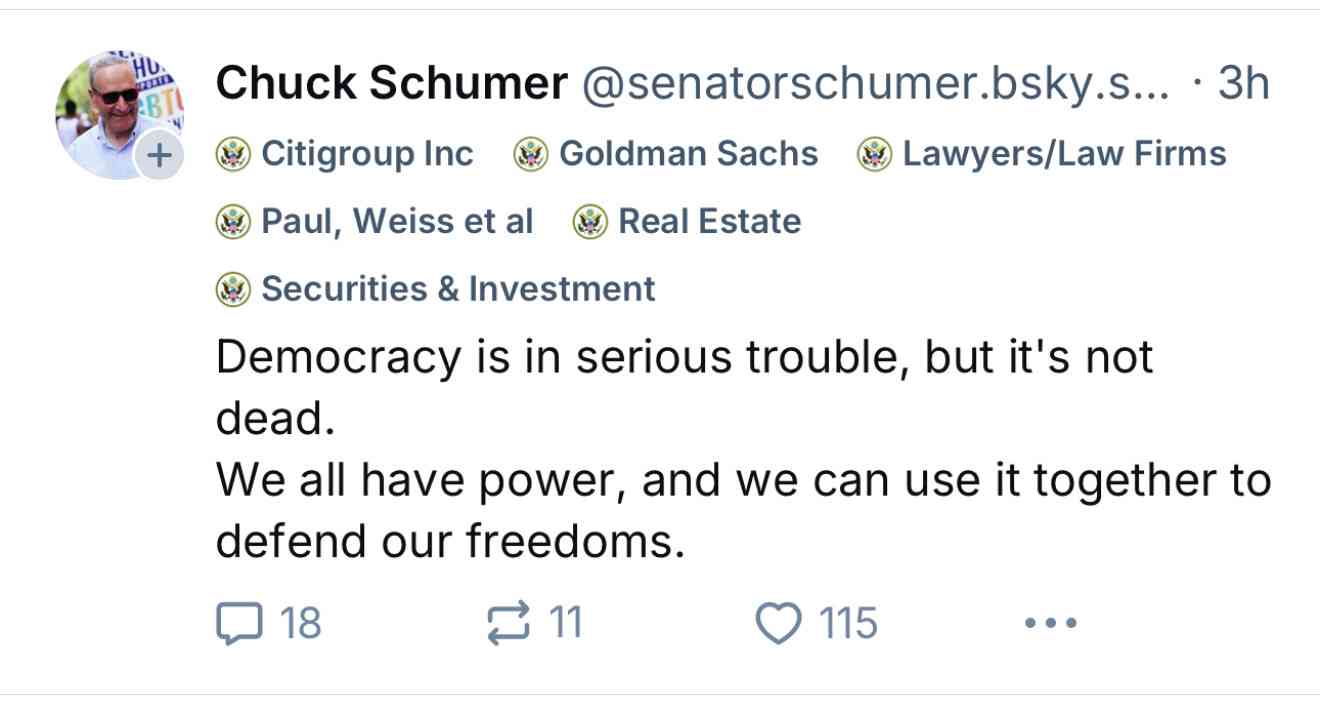
Update: @us-gov-funding.bsky.social is the inevitable labeler for US politicians showing which companies and industries are their top donors, built by Andrew Lisowski (source code here) using data sourced from OpenScrets. Here's what it looks like on this post:
Say hello to gemini-exp-1121. Google Gemini's Logan Kilpatrick on Twitter:
Say hello to gemini-exp-1121! Our latest experimental gemini model, with:
- significant gains on coding performance
- stronger reasoning capabilities
- improved visual understanding
Available on Google AI Studio and the Gemini API right now
The 1121 in the name is a release date of the 21st November. This comes fast on the heels of last week's gemini-exp-1114.
Both of these new experimental Gemini models have seen moments at the top of the Chatbot Arena. gemini-exp-1114 took the top spot a few days ago, and then lost it to a new OpenAI model called "ChatGPT-4o-latest (2024-11-20)"... only for the new gemini-exp-1121 to hold the top spot right now.
(These model names are all so, so bad.)
I released llm-gemini 0.4.2 with support for the new model - this should have been 0.5 but I already have a 0.5a0 alpha that depends on an unreleased feature in LLM core.
I tried my pelican benchmark:
llm -m gemini-exp-1121 'Generate an SVG of a pelican riding a bicycle'

Since Gemini is a multi-modal vision model, I had it describe the image it had created back to me (by feeding it a PNG render):
llm -m gemini-exp-1121 describe -a pelican.png
And got this description, which is pretty great:
The image shows a simple, stylized drawing of an insect, possibly a bee or an ant, on a vehicle. The insect is composed of a large yellow circle for the body and a smaller yellow circle for the head. It has a black dot for an eye, a small orange oval for a beak or mouth, and thin black lines for antennae and legs. The insect is positioned on top of a simple black and white vehicle with two black wheels. The drawing is abstract and geometric, using basic shapes and a limited color palette of black, white, yellow, and orange.
Update: Logan confirmed on Twitter that these models currently only have a 32,000 token input, significantly less than the rest of the Gemini family.
Amazon S3 Express One Zone now supports the ability to append data to an object. This is a first for Amazon S3: it is now possible to append data to an existing object in a bucket, where previously the only supported operation was to atomically replace the object with an updated version.
This is only available for S3 Express One Zone, a bucket class introduced a year ago which provides storage in just a single availability zone, providing significantly lower latency at the cost of reduced redundancy and a much higher price (16c/GB/month compared to 2.3c for S3 standard tier).
The fact that appends have never been supported for multi-availability zone S3 provides an interesting clue as to the underlying architecture. Guaranteeing that every copy of an object has received and applied an append is significantly harder than doing a distributed atomic swap to a new version.
More details from the documentation:
There is no minimum size requirement for the data you can append to an object. However, the maximum size of the data that you can append to an object in a single request is 5GB. This is the same limit as the largest request size when uploading data using any Amazon S3 API.
With each successful append operation, you create a part of the object and each object can have up to 10,000 parts. This means you can append data to an object up to 10,000 times. If an object is created using S3 multipart upload, each uploaded part is counted towards the total maximum of 10,000 parts. For example, you can append up to 9,000 times to an object created by multipart upload comprising of 1,000 parts.
That 10,000 limit means this won't quite work for constantly appending to a log file in a bucket.
Presumably it will be possible to "tail" an object that is receiving appended updates using the HTTP Range header.
OK, I can partly explain the LLM chess weirdness now
(via)
Last week Dynomight published Something weird is happening with LLMs and chess pointing out that most LLMs are terrible chess players with the exception of gpt-3.5-turbo-instruct (OpenAI's last remaining completion as opposed to chat model, which they describe as "Similar capabilities as GPT-3 era models").
After diving deep into this, Dynomight now has a theory. It's mainly about completion models v.s. chat models - a completion model like gpt-3.5-turbo-instruct naturally outputs good next-turn suggestions, but something about reformatting that challenge as a chat conversation dramatically reduces the quality of the results.
Through extensive prompt engineering Dynomight got results out of GPT-4o that were almost as good as the 3.5 instruct model. The two tricks that had the biggest impact:
- Examples. Including just three examples of inputs (with valid chess moves) and expected outputs gave a huge boost in performance.
- "Regurgitation" - encouraging the model to repeat the entire sequence of previous moves before outputting the next move, as a way to help it reconstruct its context regarding the state of the board.
They experimented a bit with fine-tuning too, but I found their results from prompt engineering more convincing.
No non-OpenAI models have exhibited any talents for chess at all yet. I think that's explained by the A.2 Chess Puzzles section of OpenAI's December 2023 paper Weak-to-Strong Generalization: Eliciting Strong Capabilities With Weak Supervision:
The GPT-4 pretraining dataset included chess games in the format of move sequence known as Portable Game Notation (PGN). We note that only games with players of Elo 1800 or higher were included in pretraining.
llm-gguf 0.2, now with embeddings. This new release of my llm-gguf plugin - which provides support for locally hosted GGUF LLMs - adds a new feature: it now supports embedding models distributed as GGUFs as well.
This means you can use models like the bafflingly small (30.8MB in its smallest quantization) mxbai-embed-xsmall-v1 with LLM like this:
llm install llm-gguf
llm gguf download-embed-model \
  'https://huggingface.co/mixedbread-ai/mxbai-embed-xsmall-v1/resolve/main/gguf/mxbai-embed-xsmall-v1-q8_0.gguf'
Then to embed a string:
llm embed -m gguf/mxbai-embed-xsmall-v1-q8_0 -c 'hello'
The LLM docs have extensive coverage of things you can then do with this model, like embedding every row in a CSV file / file in a directory / record in a SQLite database table and running similarity and semantic search against them.
Under the hood this takes advantage of the create_embedding() method provided by the llama-cpp-python wrapper around llama.cpp.
A warning about tiktoken, BPE, and OpenAI models.
Tom MacWright warns that OpenAI's tiktoken Python library has a surprising performance profile: it's superlinear with the length of input, meaning someone could potentially denial-of-service you by sending you a 100,000 character string if you're passing that directly to tiktoken.encode().
There's an open issue about this (now over a year old), so for safety today it's best to truncate on characters before attempting to count or truncate using tiktoken.
How some of the world’s most brilliant computer scientists got password policies so wrong (via) Stuart Schechter blames Robert Morris and Ken Thompson for the dire state of passwords today:
The story of why password rules were recommended and enforced without scientific evidence since their invention in 1979 is a story of brilliant people, at the very top of their field, whose well-intentioned recommendations led to decades of ignorance.
As Stuart describes it, their first mistake was inventing password policies (the ones about having at least one special character in a password) without testing that these would genuinely help the average user create a more secure password. Their second mistake was introducing one-way password hashing, which made the terrible password choices of users invisible to administrators of these systems!
As a result of Morris and Thompson’s recommendations, and those who believed their assumptions without evidence, it was not until well into the 21st century that the scientific community learned just how ineffective password policies were. This period of ignorance finally came to an end, in part, because hackers started stealing password databases from large websites and publishing them.
Stuart suggests using public-private key cryptography for passwords instead, which would allow passwords to be securely stored while still allowing researchers holding the private key the ability to analyze the passwords. He notes that this is a tough proposal to pitch today:
Alas, to my knowledge, nobody has ever used this approach, because after Morris and Thompson’s paper storing passwords in any form that can be reversed became taboo.
TextSynth Server (via) I'd missed this: Fabrice Bellard (yes, that Fabrice Bellard) has a project called TextSynth Server which he describes like this:
ts_server is a web server proposing a REST API to large language models. They can be used for example for text completion, question answering, classification, chat, translation, image generation, ...
It has the following characteristics:
- All is included in a single binary. Very few external dependencies (Python is not needed) so installation is easy.
- Supports many Transformer variants (GPT-J, GPT-NeoX, GPT-Neo, OPT, Fairseq GPT, M2M100, CodeGen, GPT2, T5, RWKV, LLAMA, Falcon, MPT, Llama 3.2, Mistral, Mixtral, Qwen2, Phi3, Whisper) and Stable Diffusion.
- [...]
Unlike many of his other notable projects (such as FFmpeg, QEMU, QuickJS) this isn't open source - in fact it's not even source available, you instead can download compiled binaries for Linux or Windows that are available for non-commercial use only.
Commercial terms are available, or you can visit textsynth.com and pre-pay for API credits which can then be used with the hosted REST API there.
This is not a new project: the earliest evidence I could find of it was this July 2019 page in the Internet Archive, which said:
Text Synth is build using the GPT-2 language model released by OpenAI. [...] This implementation is original because instead of using a GPU, it runs using only 4 cores of a Xeon E5-2640 v3 CPU at 2.60GHz. With a single user, it generates 40 words per second. It is programmed in plain C using the LibNC library.
Foursquare Open Source Places: A new foundational dataset for the geospatial community (via) I did not expect this!
[...] we are announcing today the general availability of a foundational open data set, Foursquare Open Source Places ("FSQ OS Places"). This base layer of 100mm+ global places of interest ("POI") includes 22 core attributes (see schema here) that will be updated monthly and available for commercial use under the Apache 2.0 license framework.
The data is available as Parquet files hosted on Amazon S3.
Here's how to list the available files:
aws s3 ls s3://fsq-os-places-us-east-1/release/dt=2024-11-19/places/parquet/
I got back places-00000.snappy.parquet through places-00024.snappy.parquet, each file around 455MB for a total of 10.6GB of data.
I ran duckdb and then used DuckDB's ability to remotely query Parquet on S3 to explore the data a bit more without downloading it to my laptop first:
select count(*) from 's3://fsq-os-places-us-east-1/release/dt=2024-11-19/places/parquet/places-00000.snappy.parquet';
This got back 4,180,424 - that number is similar for each file, suggesting around 104,000,000 records total.
Update: DuckDB can use wildcards in S3 paths (thanks, Paul) so this query provides an exact count:
select count(*) from 's3://fsq-os-places-us-east-1/release/dt=2024-11-19/places/parquet/places-*.snappy.parquet';
That returned 104,511,073 - and Activity Monitor on my Mac confirmed that DuckDB only needed to fetch 1.2MB of data to answer that query.
I ran this query to retrieve 1,000 places from that first file as newline-delimited JSON:
copy (
    select * from 's3://fsq-os-places-us-east-1/release/dt=2024-11-19/places/parquet/places-00000.snappy.parquet'
    limit 1000
) to '/tmp/places.json';
Here's that places.json file, and here it is imported into Datasette Lite.
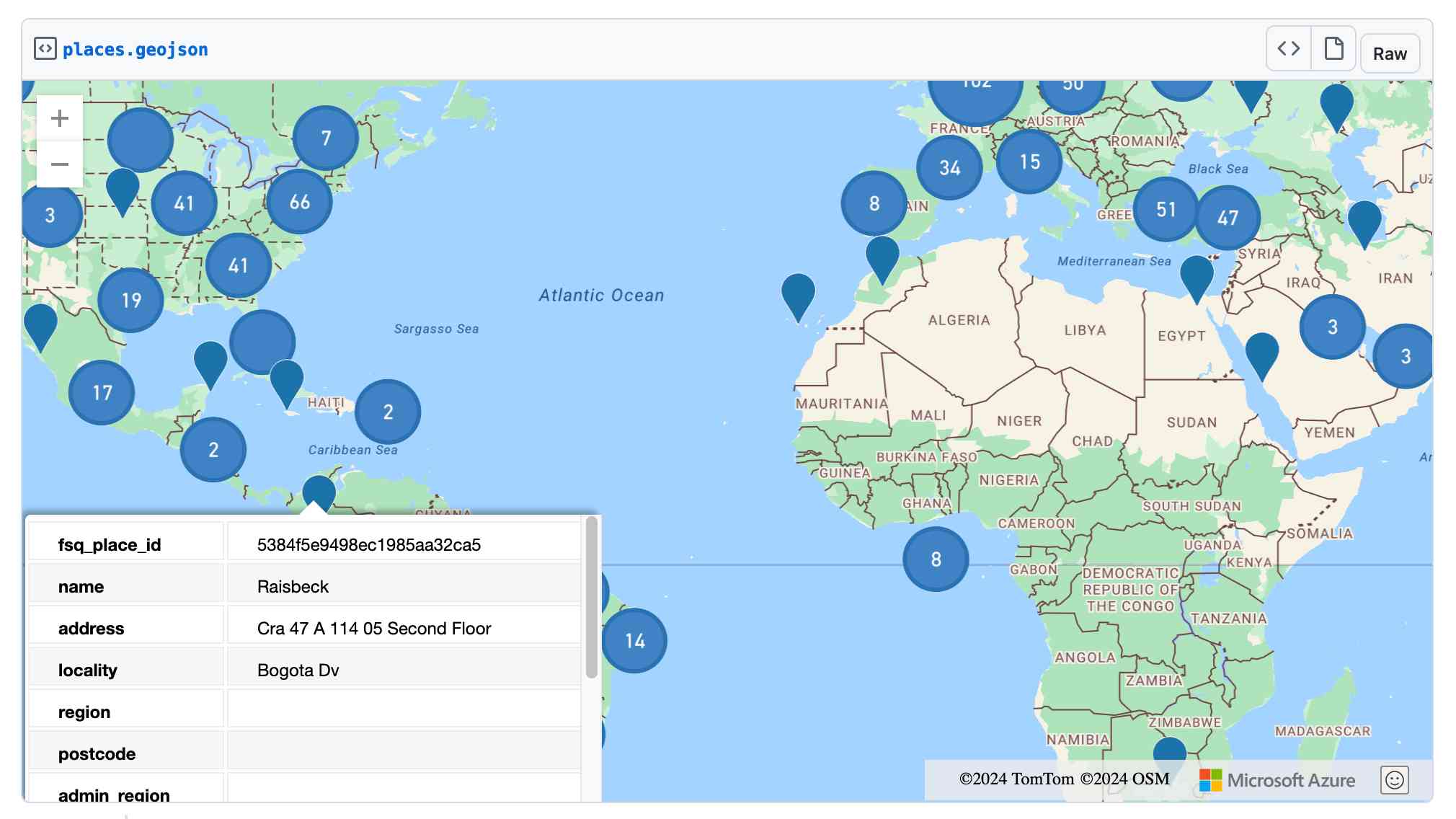
Finally, I got ChatGPT Code Interpreter to convert that file to GeoJSON and pasted the result into this Gist, giving me a map of those thousand places (because Gists automatically render GeoJSON):
Bluesky WebSocket Firehose. Very quick (10 seconds of Claude hacking) prototype of a web page that attaches to the public Bluesky WebSocket firehose and displays the results directly in your browser.
Here's the code - there's very little to it, it's basically opening a connection to wss://jetstream2.us-east.bsky.network/subscribe?wantedCollections=app.bsky.feed.post and logging out the results to a <textarea readonly> element.
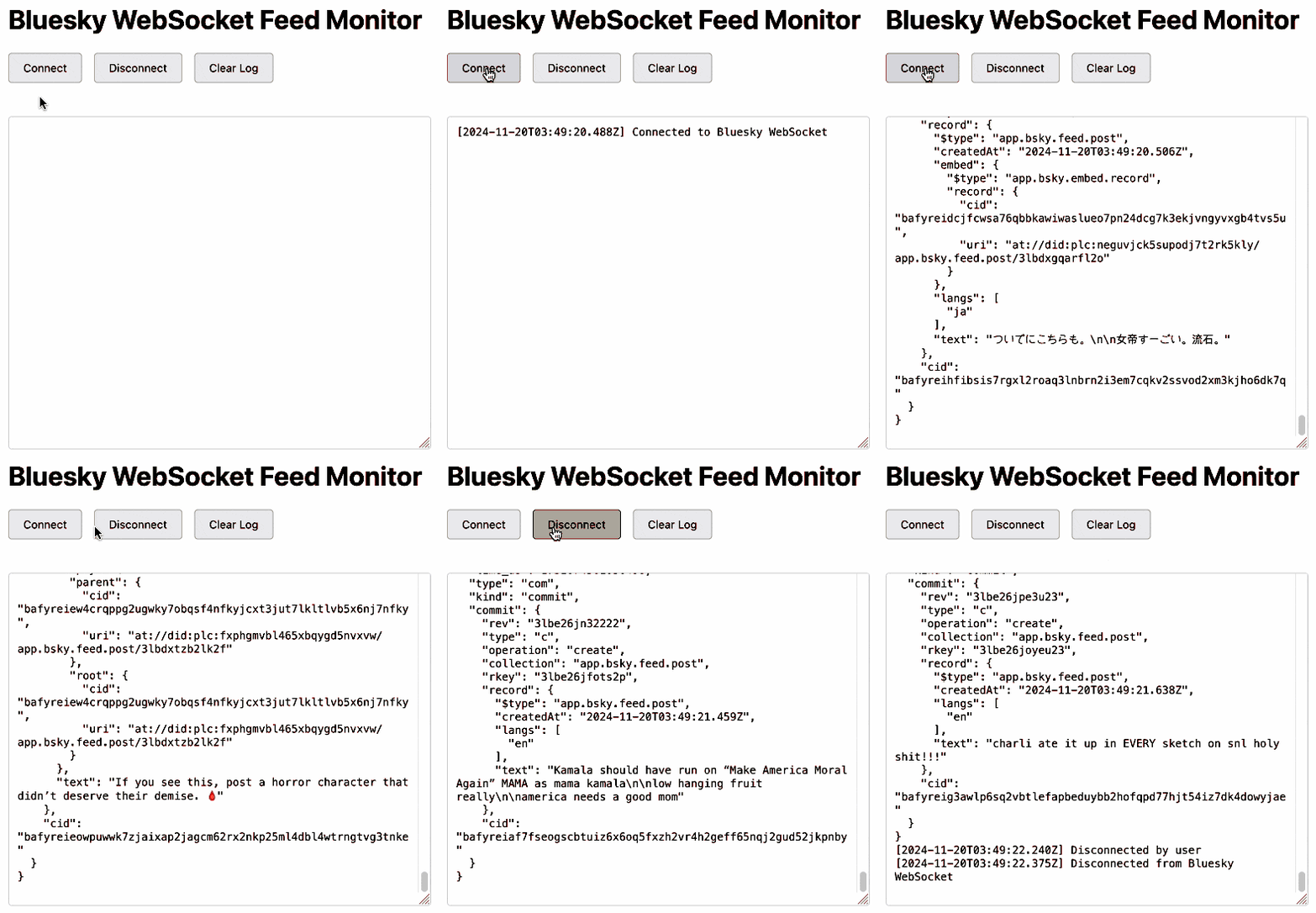
Bluesky's Jetstream isn't their main atproto firehose - that's a more complicated protocol involving CBOR data and CAR files. Jetstream is a new Go proxy (source code here) that provides a subset of that firehose over WebSocket.
Jetstream was built by Bluesky developer Jaz, initially as a side-project, in response to the surge of traffic they received back in September when Brazil banned Twitter. See Jetstream: Shrinking the AT Proto Firehose by >99% for their description of the project when it first launched.
The API scene growing around Bluesky is really exciting right now. Twitter's API is so expensive it may as well not exist, and Mastodon's community have pushed back against many potential uses of the Mastodon API as incompatible with that community's value system.
Hacking on Bluesky feels reminiscent of the massive diversity of innovation we saw around Twitter back in the late 2000s and early 2010s.
Here's a much more fun Bluesky demo by Theo Sanderson: firehose3d.theo.io (source code here) which displays the firehose from that same WebSocket endpoint in the style of a Windows XP screensaver.
OpenStreetMap vector tiles demo
(via)
Long-time OpenStreetMap developer Paul Norman has been working on adding vector tile support to OpenStreetMap for quite a while. Paul recently announced that vector.openstreetmap.org is now serving vector tiles (in Mapbox Vector Tiles (MVT) format) - here's his interactive demo for seeing what they look like.
Using uv with PyTorch (via) PyTorch is a notoriously tricky piece of Python software to install, due to the need to provide separate wheels for different combinations of Python version and GPU accelerator (e.g. different CUDA versions).
uv now has dedicated documentation for PyTorch which I'm finding really useful - it clearly explains the challenge and then shows exactly how to configure a pyproject.toml such that uv knows which version of each package it should install from where.
Understanding the BM25 full text search algorithm (via) Evan Schwartz provides a deep dive explanation of how the classic BM25 search relevance scoring function works, including a very useful breakdown of the mathematics it uses.
Preview: Gemini API Additional Terms of Service. Google sent out an email last week linking to this preview of upcoming changes to the Gemini API terms. Key paragraph from that email:
To maintain a safe and responsible environment for all users, we're enhancing our abuse monitoring practices for Google AI Studio and Gemini API. Starting December 13, 2024, Gemini API will log prompts and responses for Paid Services, as described in the terms. These logs are only retained for a limited time (55 days) and are used solely to detect abuse and for required legal or regulatory disclosures. These logs are not used for model training. Logging for abuse monitoring is standard practice across the global AI industry. You can preview the updated Gemini API Additional Terms of Service, effective December 13, 2024.
That "for required legal or regulatory disclosures" piece makes it sound like somebody could subpoena Google to gain access to your logged Gemini API calls.
It's not clear to me if this is a change from their current policy though, other than the number of days of log retention increasing from 30 to 55 (and I'm having trouble finding that 30 day number written down anywhere.)
That same email also announced the deprecation of the older Gemini 1.0 Pro model:
Gemini 1.0 Pro will be discontinued on February 15, 2025.
Security means securing people where they are (via) William Woodruff is an Engineering Director at Trail of Bits who worked on the recent PyPI digital attestations project.
That feature is based around open standards but launched with an implementation against GitHub, which resulted in push back (and even some conspiracy theories) that PyPI were deliberately favoring GitHub over other platforms.
William argues here for pragmatism over ideology:
Being serious about security at scale means meeting users where they are. In practice, this means deciding how to divide a limited pool of engineering resources such that the largest demographic of users benefits from a security initiative. This results in a fundamental bias towards institutional and pre-existing services, since the average user belongs to these institutional services and does not personally particularly care about security. Participants in open source can and should work to counteract this institutional bias, but doing so as a matter of ideological purity undermines our shared security interests.
Pixtral Large (via) New today from Mistral:
Today we announce Pixtral Large, a 124B open-weights multimodal model built on top of Mistral Large 2. Pixtral Large is the second model in our multimodal family and demonstrates frontier-level image understanding.
The weights are out on Hugging Face (over 200GB to download, and you'll need a hefty GPU rig to run them). The license is free for academic research but you'll need to pay for commercial usage.
The new Pixtral Large model is available through their API, as models called pixtral-large-2411 and pixtral-large-latest.
Here's how to run it using LLM and the llm-mistral plugin:
llm install -U llm-mistral
llm keys set mistral
# paste in API key
llm mistral refresh
llm -m mistral/pixtral-large-latest describe -a https://static.simonwillison.net/static/2024/pelicans.jpg
The image shows a large group of birds, specifically pelicans, congregated together on a rocky area near a body of water. These pelicans are densely packed together, some looking directly at the camera while others are engaging in various activities such as preening or resting. Pelicans are known for their large bills with a distinctive pouch, which they use for catching fish. The rocky terrain and the proximity to water suggest this could be a coastal area or an island where pelicans commonly gather in large numbers. The scene reflects a common natural behavior of these birds, often seen in their nesting or feeding grounds.

Update: I released llm-mistral 0.8 which adds async model support for the full Mistral line, plus a new llm -m mistral-large shortcut alias for the Mistral Large model.
Qwen: Extending the Context Length to 1M Tokens (via) The new Qwen2.5-Turbo boasts a million token context window (up from 128,000 for Qwen 2.5) and faster performance:
Using sparse attention mechanisms, we successfully reduced the time to first token for processing a context of 1M tokens from 4.9 minutes to 68 seconds, achieving a 4.3x speedup.
The benchmarks they've published look impressive, including a 100% score on the 1M-token passkey retrieval task (not the first model to achieve this).
There's a catch: unlike previous models in the Qwen 2.5 series it looks like this one hasn't been released as open weights: it's available exclusively via their (inexpensive) paid API - for which it looks like you may need a +86 Chinese phone number.
llm-gemini 0.4.
New release of my llm-gemini plugin, adding support for asynchronous models (see LLM 0.18), plus the new gemini-exp-1114 model (currently at the top of the Chatbot Arena) and a -o json_object 1 option to force JSON output.
I also released llm-claude-3 0.9 which adds asynchronous support for the Claude family of models.
LLM 0.18. New release of LLM. The big new feature is asynchronous model support - you can now use supported models in async Python code like this:
import llm

model = llm.get_async_model("gpt-4o")
async for chunk in model.prompt(
    "Five surprising names for a pet pelican"
):
    print(chunk, end="", flush=True)
Also new in this release: support for sending audio attachments to OpenAI's gpt-4o-audio-preview model.