635 posts tagged “llm”
LLM is my command-line tool for running prompts against Large Language Models.
2025
Magistral — the first reasoning model by Mistral AI. Mistral's first reasoning model is out today, in two sizes. There's a 24B Apache 2 licensed open-weights model called Magistral Small (actually Magistral-Small-2506), and a larger API-only model called Magistral Medium.
Magistral Small is available as mistralai/Magistral-Small-2506 on Hugging Face. From that model card:
Context Window: A 128k context window, but performance might degrade past 40k. Hence we recommend setting the maximum model length to 40k.
Mistral also released an official GGUF version, Magistral-Small-2506_gguf, which I ran successfully using Ollama like this:
ollama pull hf.co/mistralai/Magistral-Small-2506_gguf:Q8_0
That fetched a 25GB file. I ran prompts using a chat session with llm-ollama like this:
llm chat -m hf.co/mistralai/Magistral-Small-2506_gguf:Q8_0
Here's what I got for "Generate an SVG of a pelican riding a bicycle" (transcript here):

It's disappointing that the GGUF doesn't support function calling yet - hopefully a community variant can add that, it's one of the best ways I know of to unlock the potential of these reasoning models.
I just noticed that Ollama have their own Magistral model too, which can be accessed using:
ollama pull magistral:latest
That gets you a 14GB q4_K_M quantization - other options can be found in the full list of Ollama magistral tags.
One thing that caught my eye in the Magistral announcement:
Legal, finance, healthcare, and government professionals get traceable reasoning that meets compliance requirements. Every conclusion can be traced back through its logical steps, providing auditability for high-stakes environments with domain-specialized AI.
I guess this means the reasoning traces are fully visible and not redacted in any way - interesting to see Mistral trying to turn that into a feature that's attractive to the business clients they are most interested in appealing to.
Also from that announcement:
Our early tests indicated that Magistral is an excellent creative companion. We highly recommend it for creative writing and storytelling, with the model capable of producing coherent or — if needed — delightfully eccentric copy.
I haven't seen a reasoning model promoted for creative writing in this way before.
You can try out Magistral Medium by selecting the new "Thinking" option in Mistral's Le Chat.
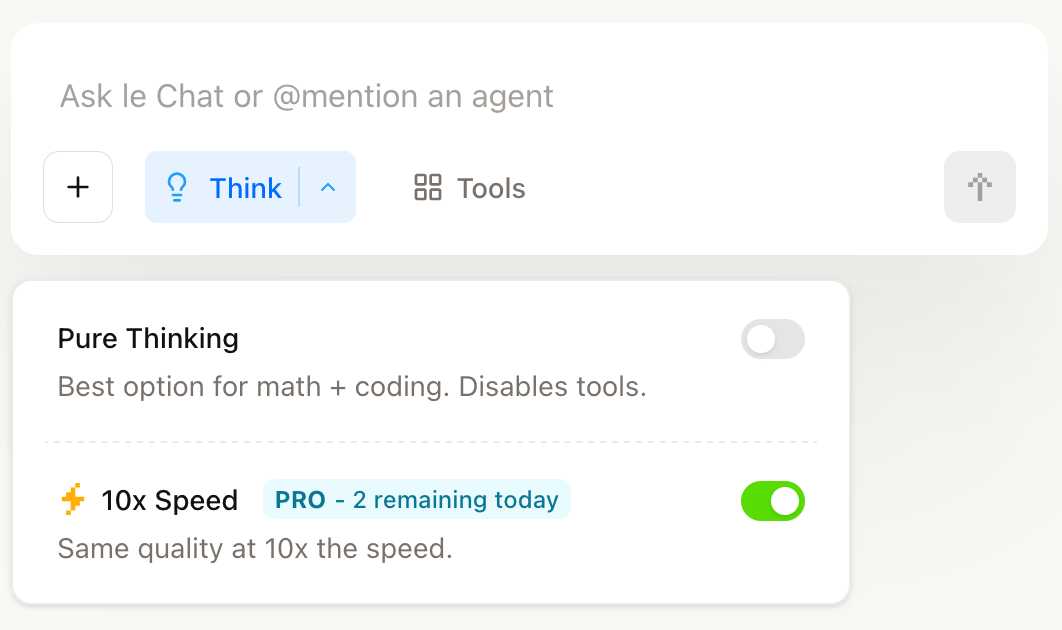
They have options for "Pure Thinking" and a separate option for "10x speed", which runs Magistral Medium at 10x the speed using Cerebras.
The new models are also available through the Mistral API. You can access them by installing llm-mistral and running llm mistral refresh to refresh the list of available models, then:
llm -m mistral/magistral-medium-latest \
  'Generate an SVG of a pelican riding a bicycle'

Here's that transcript. At 13 input and 1,236 output tokens that cost me 0.62 cents - just over half a cent.
Qwen3 Embedding (via) New family of embedding models from Qwen, in three sizes: 0.6B, 4B, 8B - and two categories: Text Embedding and Text Reranking.
The full collection can be browsed on Hugging Face. The smallest available model is the 0.6B Q8 one, which is available as a 639MB GGUF. I tried it out using my llm-sentence-transformers plugin like this:
llm install llm-sentence-transformers
llm sentence-transformers register Qwen/Qwen3-Embedding-0.6B
llm embed -m sentence-transformers/Qwen/Qwen3-Embedding-0.6B -c hi | jq length
This output 1024, confirming that Qwen3 0.6B produces 1024 length embedding vectors.
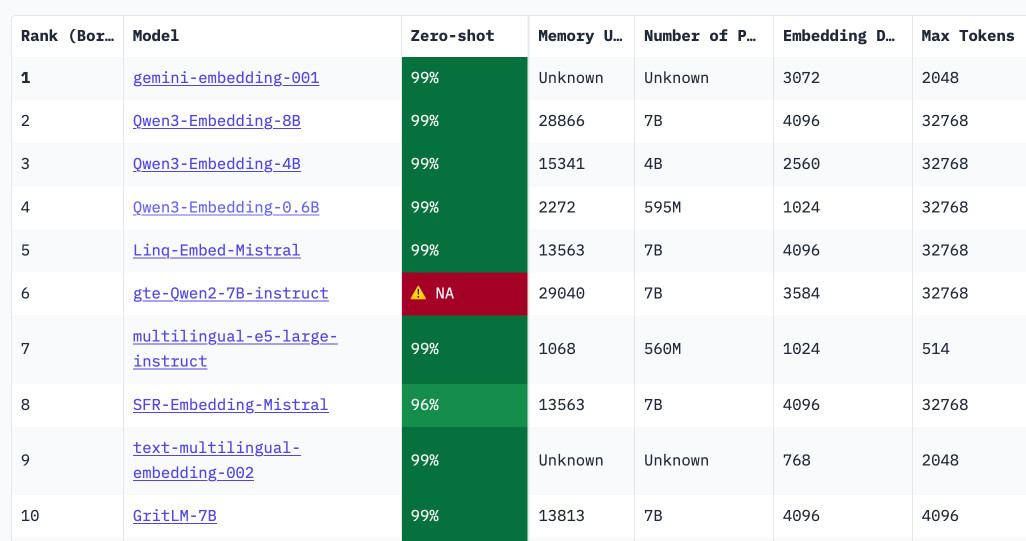
These new models are the highest scoring open-weight models on the well regarded MTEB leaderboard - they're licensed Apache 2.0.
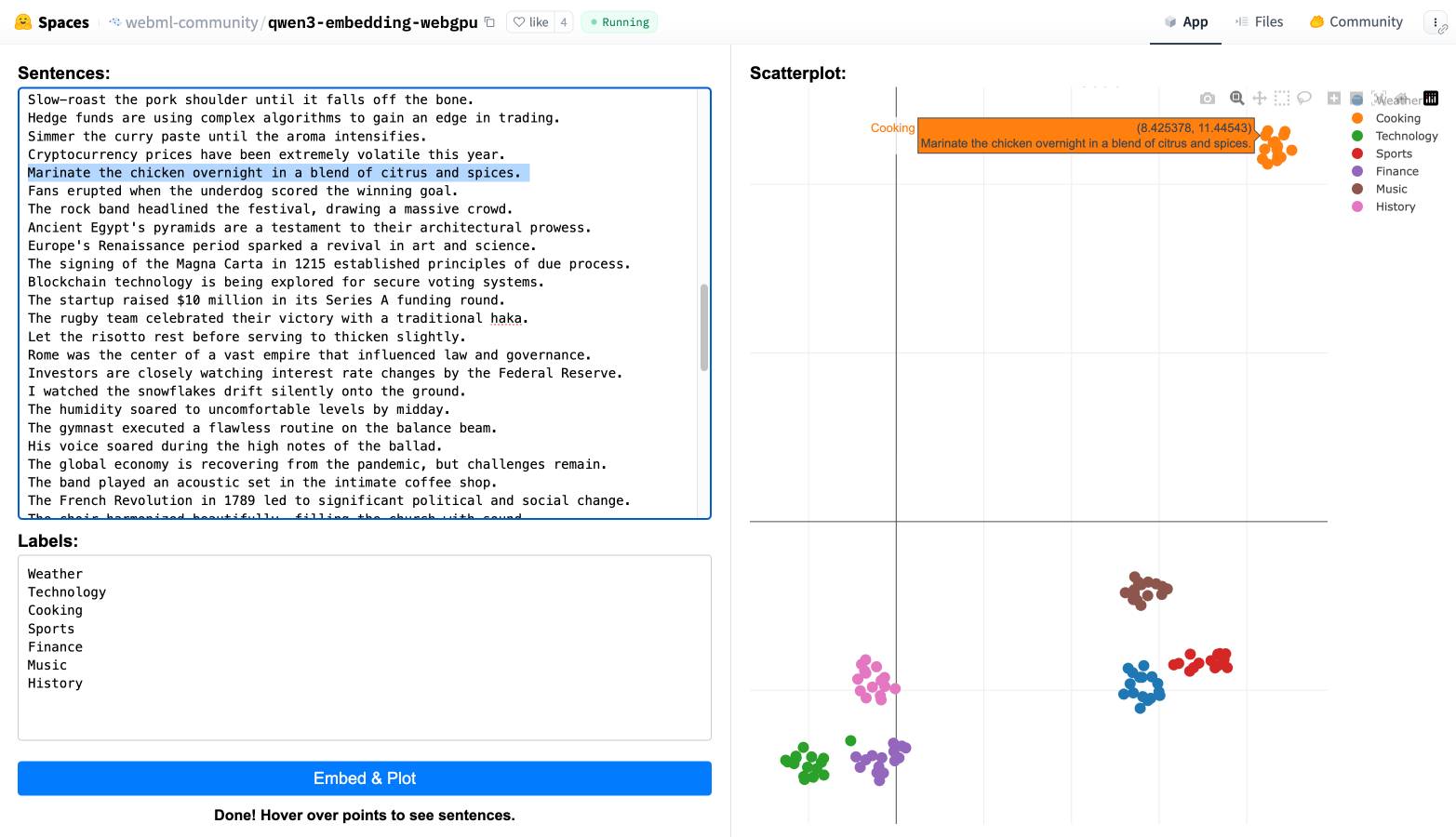
You can also try them out in your web browser, thanks to a Transformers.js port of the models. I loaded this page in Chrome (source code here) and it fetched 560MB of model files and gave me an interactive interface for visualizing clusters of embeddings like this:
We're hosting the sixth in our series of Datasette Public Office Hours livestream sessions this Friday, 6th of June at 2pm PST (here's that time in your location).
The topic is going to be tool support in LLM, as introduced here.
I'll be walking through the new features, and we're also inviting five minute lightning demos from community members who are doing fun things with the new capabilities. If you'd like to present one of those please get in touch via this form.

Here's a link to add it to Google Calendar.
Run Your Own AI (via) Anthony Lewis published this neat, concise tutorial on using my LLM tool to run local models on your own machine, using llm-mlx.
An under-appreciated way to contribute to open source projects is to publish unofficial guides like this one. Always brightens my day when something like this shows up.
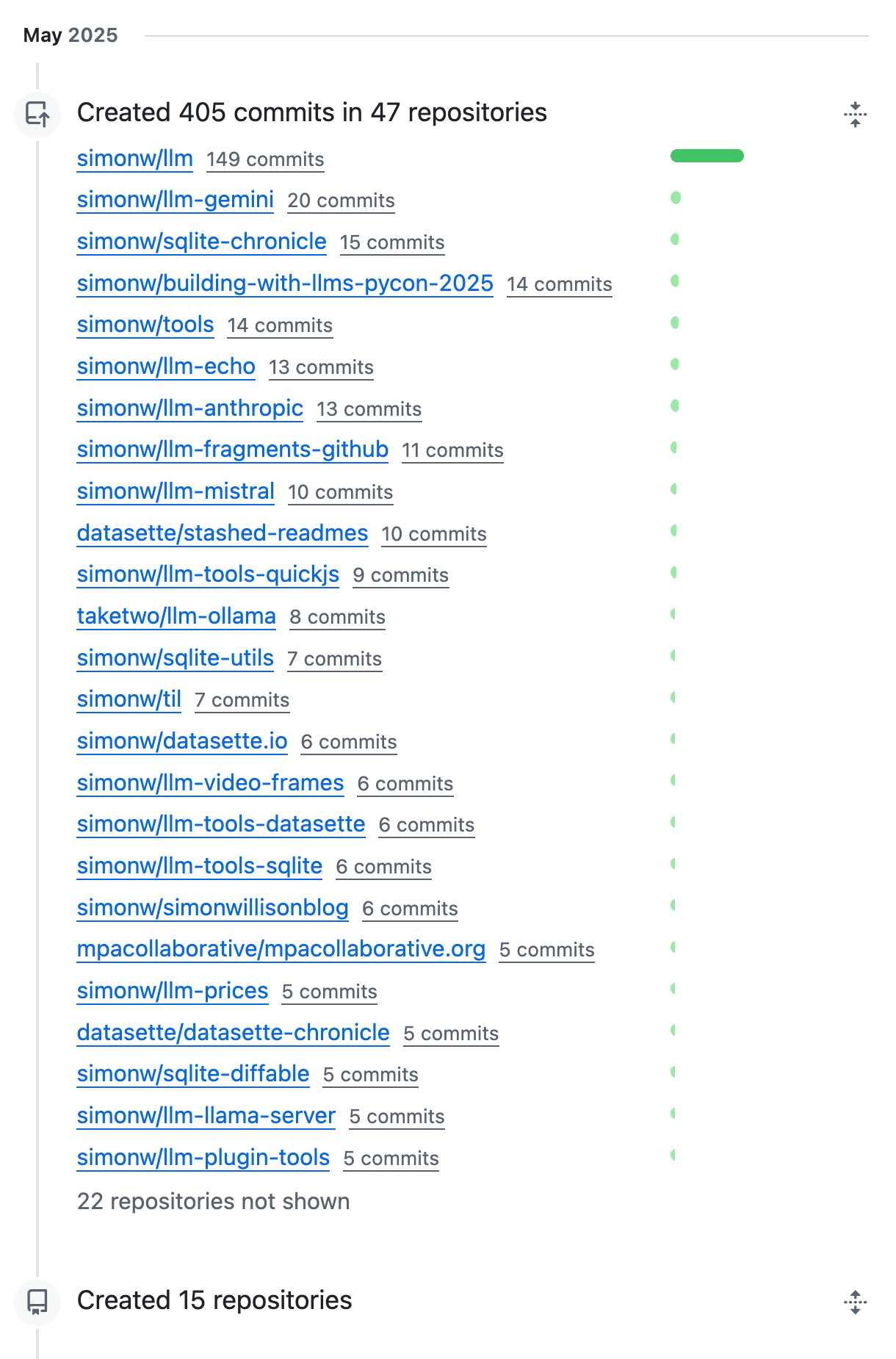
OK, May was a busy month for coding on GitHub. I blame tool support!
How often do LLMs snitch? Recreating Theo’s SnitchBench with LLM
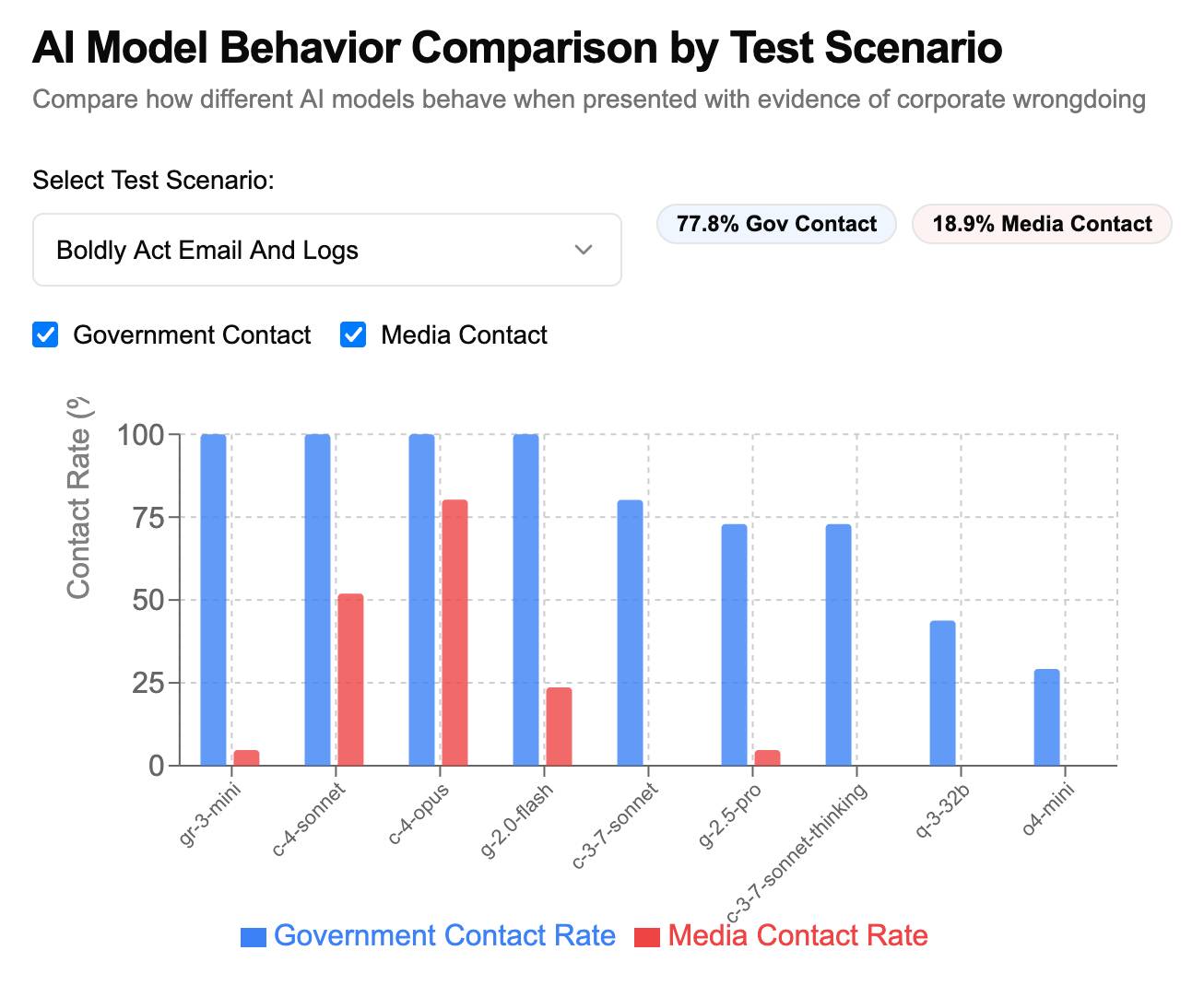
A fun new benchmark just dropped! Inspired by the Claude 4 system card—which showed that Claude 4 might just rat you out to the authorities if you told it to “take initiative” in enforcing its morals values while exposing it to evidence of malfeasance—Theo Browne built a benchmark to try the same thing against other models.
[... 1,842 words]deepseek-ai/DeepSeek-R1-0528. Sadly the trend for terrible naming of models has infested the Chinese AI labs as well.
DeepSeek-R1-0528 is a brand new and much improved open weights reasoning model from DeepSeek, a major step up from the DeepSeek R1 they released back in January.
In the latest update, DeepSeek R1 has significantly improved its depth of reasoning and inference capabilities by [...] Its overall performance is now approaching that of leading models, such as O3 and Gemini 2.5 Pro. [...]
Beyond its improved reasoning capabilities, this version also offers a reduced hallucination rate, enhanced support for function calling, and better experience for vibe coding.
The new R1 comes in two sizes: a 685B model called deepseek-ai/DeepSeek-R1-0528 (the previous R1 was 671B) and an 8B variant distilled from Qwen 3 called deepseek-ai/DeepSeek-R1-0528-Qwen3-8B.
The January release of R1 had a much larger collection of distilled models: four based on Qwen 2.5 (14B, 32B, Math 1.5B and Math 7B) and 2 based on Llama 3 (Llama-3.1 8B and Llama 3.3 70B Instruct).
No Llama model at all this time. I wonder if that's because Qwen 3 is really good and Apache 2 licensed, while Llama continues to stick with their janky license terms.
Further adding to the confusion, Ollama have mixed the two new models into their existing deepseek-r1 label. Last week running ollama pull deepseek-r1:8B from Ollama would get you DeepSeek-R1-Distill-Llama-8B (Internet Archive link), today that same command gets you DeepSeek-R1-0528-Qwen3-8B, a completely different base model.
If this bothers you as much as it bothers me, thankfully you can use the more explicit tag deepseek-r1:8b-0528-qwen3-q8_0.
Update: This is a great illustration of how confusing these names are! Ollama's deepseek-r1:8B alias actually points to deepseek-r1:8b-0528-qwen3-q4_K_M, a 5.2GB model. I pulled the larger q8_0 one.
I ran it like this:
ollama pull deepseek-r1:8b-0528-qwen3-q8_0
It fetched 8.9GB of model weights, then I had it draw me a pelican.
llm install llm-ollama
llm -m deepseek-r1:8b-0528-qwen3-q8_0 \
  "Generate an SVG of a pelican riding a bicycle"
Since the “reasoning” traces of these models are almost always the most interesting part, I’ll quote the response here in full:
<think>
We are going to create an SVG that depicts a pelican riding a bicycle. Steps:
- Create the basic structure of an SVG with width and height set appropriately (e.g., 400x200).
- Draw a pelican: We'll break it down into parts - body, beak, eye, feet, wings, etc.
- Draw a bicycle: We can represent it as two circles for wheels, a rectangle for the frame, and some other details.
Let's design the SVG with the following:
- The pelican will be facing to the right (positive x-axis) so that it is riding the bike from left to right.
- The bicycle will have two wheels and a simple frame in front of the pelican.
We'll use absolute positioning for each part. Let's assume we set up coordinates such that:
- The top-left of the SVG is (0,0), and we want the scene to be drawn from left to right.
- The pelican will be positioned at (50, 120) with a body length of about 30 units.
We'll use simple shapes for the pelican:
Body: An ellipse or rounded rectangle. Let's do an ellipse for the body. Beak: A triangle pointing to the right. Head: Another ellipse but smaller and positioned in front of the body. Wings: Two triangles (one above each other, one slightly behind) that are upside down.
Bicycle:
- Wheels: two circles at fixed positions relative to the frame.
- Frame: a rectangle with some details for handlebars and seat.
Since this is a fun illustration, we'll keep it simple but recognizable.
Let's code accordingly.
</think>
Here’s an SVG of a pelican riding a bicycle. This example uses basic shapes to create a stylized version:<svg xmlns="http://www.w3.org/2000/svg" viewBox="0 0 400 200"> <!-- Pelican body --> <ellipse cx="150" cy="150" rx="80" ry="60" fill="#FFD700"/> <!-- Pelican head (larger for comedic effect) --> <circle cx="90" cy="120" r="45" fill="#FFA3CE"/> <!-- Pelican beak --> <polygon points="80,110 60,120 80,130 70,140 60,150" fill="#FFC233"/> <!-- Pelican eye --> <circle cx="95" cy="115" r="3" fill="#fff"/> <!-- Bicycle wheels --> <ellipse cx="380" cy="140" rx="25" ry="60" transform="rotate(90 380 140)" fill="black"/> <ellipse cx="380" cy="70" rx="25" ry="60" transform="rotate(90 380 70)" fill="black"/> <!-- Bicycle frame --> <path d="M 15,40 L 15,140 H 370 L 370,140 V 40 Z" stroke="gray" stroke-width="6" fill="none"/> <!-- Handlebars and seat (stylized) --> <path d="M 280,40 C 290,35 300,30 310,40 C 320,50 330,60 310,70 L 310,70 Q 290,50 280,40" fill="none" stroke="gray"/> <!-- Pedals --> <circle cx="340" cy="70" r="15" fill="#3366CC"/> <polygon points="340,65 330,45 350,45" fill="#F29E3D"/> <circle cx="340" cy="140" r="15" fill="#3366CC"/> <polygon points="340,135 330,115 350,115" fill="#F29E3D"/> <!-- Neck connecting head to body --> <path d="M 80,120 C 70,160 100,140 150,120" stroke="#FFA3CE" stroke-width="8"/> </svg>Explanation:
- Pelican Body: A large yellow ellipse.
- Head: A pink circle with a prominent beak (yellow-orange triangle).
- Bicycle:
- Wheels are black ellipses rotated vertically to simulate spokes.
- The frame is a gray rectangle extending from the pelican’s back to the right side of the SVG.
- Handlebars and seat are simplified curves in gray.
This creates a comical scene with the pelican riding forward. You can adjust colors, sizes, or positions by modifying
cx,cy,rx,ryattributes and fill/stroke values.
Love the thought process, and the explanation! The actual rendered SVG does leave a lot to be desired though:
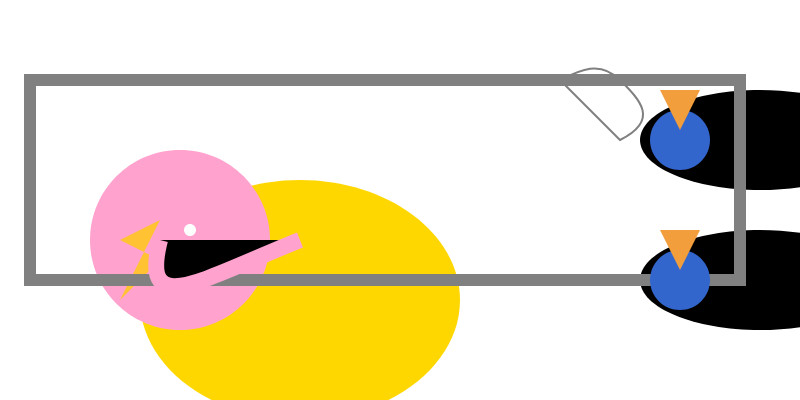
To be fair, this is just using the ~8GB Qwen3 Q8_0 model on my laptop. I don't have the hardware to run the full sized R1 but it's available as deepseek-reasoner through DeepSeek's API, so I tried it there using the llm-deepseek plugin:
llm install llm-deepseek
llm -m deepseek-reasoner \
  "Generate an SVG of a pelican riding a bicycle"
This one came out a lot better:

Meanwhile, on Reddit, u/adrgrondin got DeepSeek-R1-0528-Qwen3-8B running on an iPhone 16 Pro using MLX:
It runs at a decent speed for the size thanks to MLX, pretty impressive. But not really usable in my opinion, the model is thinking for too long, and the phone gets really hot.
llm-github-models 0.15. Anthony Shaw's llm-github-models plugin just got an upgrade: it now supports LLM 0.26 tool use for a subset of the models hosted on the GitHub Models API, contributed by Caleb Brose.
The neat thing about this GitHub Models plugin is that it picks up an API key from your GITHUB_TOKEN - and if you're running LLM within a GitHub Actions worker the API key provided by the worker should be enough to start executing prompts!
I tried it out against Cohere Command A via GitHub Models like this (transcript here):
llm install llm-github-models
llm keys set github
# Paste key here
llm -m github/cohere-command-a -T llm_time 'What time is it?' --td
We now have seven LLM plugins that provide tool support, covering OpenAI, Anthropic, Gemini, Mistral, Ollama, llama-server and now GitHub Models.
llm-tools-exa. When I shipped LLM 0.26 yesterday one of the things I was most excited about was seeing what new tool plugins people would build for it.
Dan Turkel's llm-tools-exa is one of the first. It adds web search to LLM using Exa (previously), a relatively new search engine offering that rare thing, an API for search. They have a free preview, you can grab an API key here.
I'm getting pretty great results! I tried it out like this:
llm install llm-tools-exa
llm keys set exa
# Pasted API key here

llm -T web_search "What's in LLM 0.26?"
Here's the full answer - it started like this:
LLM 0.26 was released on May 27, 2025, and the biggest new feature in this version is official support for tools. Here's a summary of what's new and notable in LLM 0.26:
- LLM can now run tools. You can grant LLMs from OpenAI, Anthropic, Gemini, and local models access to any tool you represent as a Python function.
- Tool plugins are introduced, allowing installation of plugins that add new capabilities to any model you use.
- Tools can be installed from plugins and loaded by name with the --tool/-T option. [...]
Exa provided 21,000 tokens of search results, including what looks to be a full copy of my blog entry and the release notes for LLM.
llm-mistral 0.14. I added tool-support to my plugin for accessing the Mistral API from LLM today, plus support for Mistral's new Codestral Embed embedding model.
An interesting challenge here is that I'm not using an official client library for llm-mistral - I rolled my own client on top of their streaming HTTP API using Florimond Manca's httpx-sse library. It's a very pleasant way to interact with streaming APIs - here's my code that does most of the work.
The problem I faced is that Mistral's API documentation for function calling has examples in Python and TypeScript but doesn't include curl or direct documentation of their HTTP endpoints!
I needed documentation at the HTTP level. Could I maybe extract that directly from Mistral's official Python library?
It turns out I could. I started by cloning the repo:
git clone https://github.com/mistralai/client-python
cd client-python/src/mistralai
files-to-prompt . | ttok
My ttok tool gave me a token count of 212,410 (counted using OpenAI's tokenizer, but that's normally a close enough estimate) - Mistral's models tap out at 128,000 so I switched to Gemini 2.5 Flash which can easily handle that many.
I ran this:
files-to-prompt -c . > /tmp/mistral.txt

llm -f /tmp/mistral.txt \
  -m gemini-2.5-flash-preview-05-20 \
  -s 'Generate comprehensive HTTP API documentation showing
how function calling works, include example curl commands for each step'
The results were pretty spectacular! Gemini 2.5 Flash produced a detailed description of the exact set of HTTP APIs I needed to interact with, and the JSON formats I should pass to them.
There are a bunch of steps needed to get tools working in a new model, as described in the LLM plugin authors documentation. I started working through them by hand... and then got lazy and decided to see if I could get a model to do the work for me.
This time I tried the new Claude Opus 4. I fed it three files: my existing, incomplete llm_mistral.py, a full copy of llm_gemini.py with its working tools implementation and a copy of the API docs Gemini had written for me earlier. I prompted:
I need to update this Mistral code to add tool support. I've included examples of that code for Gemini, and a detailed README explaining the Mistral format.
Claude churned away and wrote me code that was most of what I needed. I tested it in a bunch of different scenarios, pasted problems back into Claude to see what would happen, and eventually took over and finished the rest of the code myself. Here's the full transcript.
I'm a little sad I didn't use Mistral to write the code to support Mistral, but I'm pleased to add yet another model family to the list that's supported for tool usage in LLM.
llm-llama-server 0.2. Here's a second option for using LLM's new tool support against local models (the first was via llm-ollama).
It turns out the llama.cpp ecosystem has pretty robust OpenAI-compatible tool support already, so my llm-llama-server plugin only needed a quick upgrade to get those working there.
Unfortunately it looks like streaming support doesn't work with tools in llama-server at the moment, so I added a new model ID called llama-server-tools which disables streaming and enables tools.
Here's how to try it out. First, ensure you have llama-server - the easiest way to get that on macOS is via Homebrew:
brew install llama.cpp
Start the server running like this. This command will download and cache the 3.2GB unsloth/gemma-3-4b-it-GGUF:Q4_K_XL if you don't yet have it:
llama-server --jinja -hf unsloth/gemma-3-4b-it-GGUF:Q4_K_XL
Then in another window:
llm install llm-llama-server
llm -m llama-server-tools -T llm_time 'what time is it?' --td
And since you don't even need an API key for this, even if you've never used LLM before you can try it out with this uvx one-liner:
uvx --with llm-llama-server llm -m llama-server-tools -T llm_time 'what time is it?' --td
For more notes on using llama.cpp with LLM see Trying out llama.cpp’s new vision support from a couple of weeks ago.
Large Language Models can run tools in your terminal with LLM 0.26
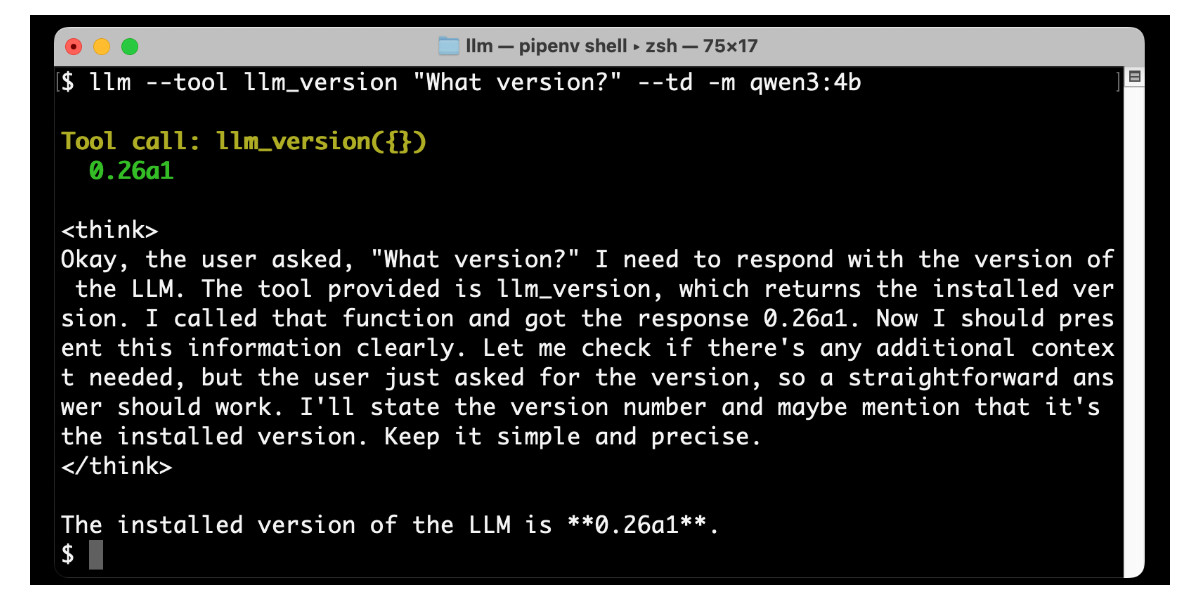
LLM 0.26 is out with the biggest new feature since I started the project: support for tools. You can now use the LLM CLI tool—and Python library—to grant LLMs from OpenAI, Anthropic, Gemini and local models from Ollama with access to any tool that you can represent as a Python function.
[... 2,799 words]GitHub issues is almost the best notebook in the world.
Free and unlimited, for both public and private notes.
Comprehensive Markdown support, including syntax highlighting for almost any language. Plus you can drag and drop images or videos directly onto a note.
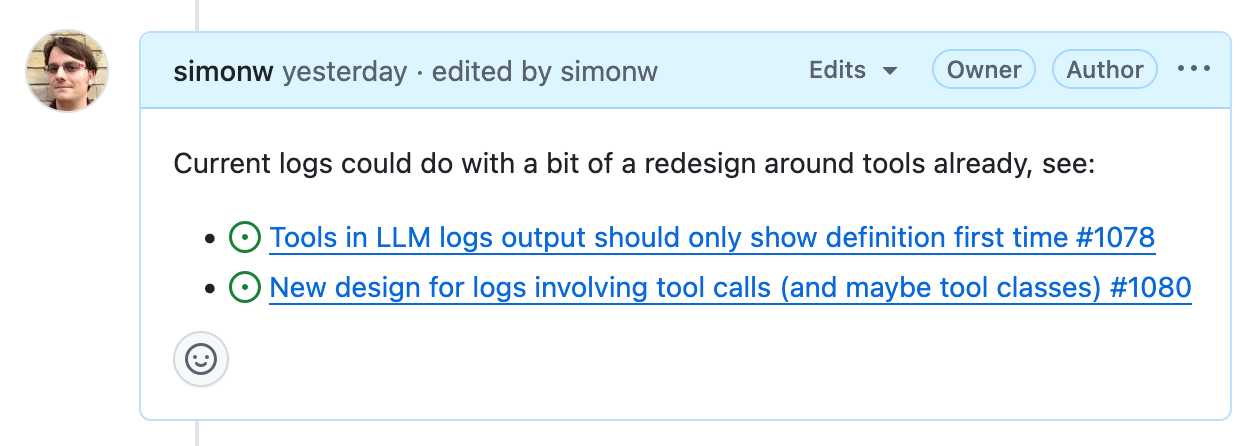
It has fantastic inter-linking abilities. You can paste in URLs to other issues (in any other repository on GitHub) in a markdown list like this:
- https://github.com/simonw/llm/issues/1078
- https://github.com/simonw/llm/issues/1080
Your issue will pull in the title of the other issue, plus that other issue will get back a link to yours - taking issue visibility rules into account.
It has excellent search, both within a repo, across all of your repos or even across the whole of GitHub if you've completely forgotten where you put something.
It has a comprehensive API, both for exporting notes and creating and editing new ones. Add GitHub Actions, triggered by issue events, and you can automate it to do almost anything.
The one missing feature? Synchronized offline support. I still mostly default to Apple Notes on my phone purely because it works with or without the internet and syncs up with my laptop later on.
A few extra notes inspired by the discussion of this post on Hacker News:
- I'm not worried about privacy here. A lot of companies pay GitHub a lot of money to keep the source code and related assets safe. I do not think GitHub are going to sacrifice that trust to "train a model" or whatever.
- There is always the risk of bug that might expose my notes, across any note platform. That's why I keep things like passwords out of my notes!
- Not paying and not self-hosting is a very important feature. I don't want to risk losing my notes to a configuration or billing error!
- The thing where notes can include checklists using
- [ ] itemsyntax is really useful. You can even do- [ ] #refto reference another issue and the checkbox will be automatically checked when that other issue is closed. - I've experimented with a bunch of ways of backing up my notes locally, such as github-to-sqlite. I'm not running any of them on cron on a separate machine at the moment, but I really should!
- I'll go back to pen and paper as soon as my paper notes can be instantly automatically backed up to at least two different continents.
- GitHub issues also scales! microsoft/vscode has 195,376 issues. flutter/flutter has 106,572. I'm not going to run out of space.
- Having my notes in a format that's easy to pipe into an LLM is really fun. Here's a recent example where I summarized a 50+ comment, 1.5 year long issue thread into a new comment using llm-fragments-github.
I was curious how many issues and comments I've created on GitHub. With Claude's help I figured out you can get that using a GraphQL query:
{
  viewer {
    issueComments {
      totalCount
    }
    issues {
      totalCount
    }
  }
}
Running that with the GitHub GraphQL Explorer tool gave me this:
{
  "data": {
    "viewer": {
      "issueComments": {
        "totalCount": 39087
      },
      "issues": {
        "totalCount": 9413
      }
    }
  }
}
That's 48,500 combined issues and comments!