633 posts tagged “llm”
LLM is my command-line tool for running prompts against Large Language Models.
2025
I had some notes in a GitHub issue thread in a private repository that I wanted to export as Markdown. I realized that I could get them using a combination of several recent projects.
Here's what I ran:
export GITHUB_TOKEN="$(llm keys get github)"
llm -f issue:https://github.com/simonw/todos/issues/170 \
  -m echo --no-log | jq .prompt -r > notes.md
I have a GitHub personal access token stored in my LLM keys, for use with Anthony Shaw's llm-github-models plugin.
My own llm-fragments-github plugin expects an optional GITHUB_TOKEN environment variable, so I set that first - here's an issue to have it use the github key instead.
With that set, the issue: fragment loader can take a URL to a private GitHub issue thread and load it via the API using the token, then concatenate the comments together as Markdown. Here's the code for that.
Fragments are meant to be used as input to LLMs. I built a llm-echo plugin recently which adds a fake LLM called "echo" which simply echos its input back out again.
Adding --no-log prevents that junk data from being stored in my LLM log database.
The output is JSON with a "prompt" key for the original prompt. I use jq .prompt to extract that out, then -r to get it as raw text (not a "JSON string").
... and I write the result to notes.md.
llm-gemini 0.19.1.
Bugfix release for my llm-gemini plugin, which was recording the number of output tokens (needed to calculate the price of a response) incorrectly for the Gemini "thinking" models. Those models turn out to return candidatesTokenCount and thoughtsTokenCount as two separate values which need to be added together to get the total billed output token count. Full details in this issue.
I spotted this potential bug in this response log this morning, and my concerns were confirmed when Paul Gauthier wrote about a similar fix in Aider in Gemini 2.5 Pro Preview 03-25 benchmark cost, where he noted that the $6.32 cost recorded to benchmark Gemini 2.5 Pro Preview 03-25 was incorrect. Since that model is no longer available (despite the date-based model alias persisting) Paul is not able to accurately calculate the new cost, but it's likely a lot more since the Gemini 2.5 Pro Preview 05-06 benchmark cost $37.
I've gone through my gemini tag and attempted to update my previous posts with new calculations - this mostly involved increases in the order of 12.336 cents to 16.316 cents (as seen here).
Medium is the new large. New model release from Mistral - this time closed source/proprietary. Mistral Medium claims strong benchmark scores similar to GPT-4o and Claude 3.7 Sonnet, but is priced at $0.40/million input and $2/million output - about the same price as GPT 4.1 Mini. For comparison, GPT-4o is $2.50/$10 and Claude 3.7 Sonnet is $3/$15.
The model is a vision LLM, accepting both images and text.
More interesting than the price is the deployment model. Mistral Medium may not be open weights but it is very much available for self-hosting:
Mistral Medium 3 can also be deployed on any cloud, including self-hosted environments of four GPUs and above.
Mistral's other announcement today is Le Chat Enterprise. This is a suite of tools that can integrate with your company's internal data and provide "agents" (these look similar to Claude Projects or OpenAI GPTs), again with the option to self-host.
Is there a new open weights model coming soon? This note tucked away at the bottom of the Mistral Medium 3 announcement seems to hint at that:
With the launches of Mistral Small in March and Mistral Medium today, it's no secret that we're working on something 'large' over the next few weeks. With even our medium-sized model being resoundingly better than flagship open source models such as Llama 4 Maverick, we're excited to 'open' up what's to come :)
I released llm-mistral 0.12 adding support for the new model.
Saying “hi” to Microsoft’s Phi-4-reasoning
Microsoft released a new sub-family of models a few days ago: Phi-4 reasoning. They introduced them in this blog post celebrating a year since the release of Phi-3:
[... 1,498 words]Feed a video to a vision LLM as a sequence of JPEG frames on the CLI (also LLM 0.25)

The new llm-video-frames plugin can turn a video file into a sequence of JPEG frames and feed them directly into a long context vision LLM such as GPT-4.1, even when that LLM doesn’t directly support video input. It depends on a plugin feature I added to LLM 0.25, which I released last night.
[... 1,600 words]Having tried a few of the Qwen 3 models now my favorite is a bit of a surprise to me: I'm really enjoying Qwen3-8B.
I've been running prompts through the MLX 4bit quantized version, mlx-community/Qwen3-8B-4bit. I'm using llm-mlx like this:
llm install llm-mlx
llm mlx download-model mlx-community/Qwen3-8B-4bit
This pulls 4.3GB of data and saves it to ~/.cache/huggingface/hub/models--mlx-community--Qwen3-8B-4bit.
I assigned it a default alias:
llm aliases set q3 mlx-community/Qwen3-8B-4bit
I also added a default option for that model - this saves me from adding -o unlimited 1 to every prompt which disables the default output token limit:
llm models options set q3 unlimited 1
And now I can run prompts:
llm -m q3 'brainstorm questions I can ask my friend who I think is secretly from Atlantis that will not tip her off to my suspicions'
Qwen3 is a "reasoning" model, so it starts each prompt with a <think> block containing its chain of thought. Reading these is always really fun. Here's the full response I got for the above question.
I'm finding Qwen3-8B to be surprisingly capable for useful things too. It can summarize short articles. It can write simple SQL queries given a question and a schema. It can figure out what a simple web app does by reading the HTML and JavaScript. It can write Python code to meet a paragraph long spec - for that one it "reasoned" for an unreasonably long time but it did eventually get to a useful answer.
All this while consuming between 4 and 5GB of memory, depending on the length of the prompt.
I think it's pretty extraordinary that a few GBs of floating point numbers can usefully achieve these various tasks, especially using so little memory that it's not an imposition on the rest of the things I want to run on my laptop at the same time.
Qwen 3 offers a case study in how to effectively release a model

Alibaba’s Qwen team released the hotly anticipated Qwen 3 model family today. The Qwen models are already some of the best open weight models—Apache 2.0 licensed and with a variety of different capabilities (including vision and audio input/output).
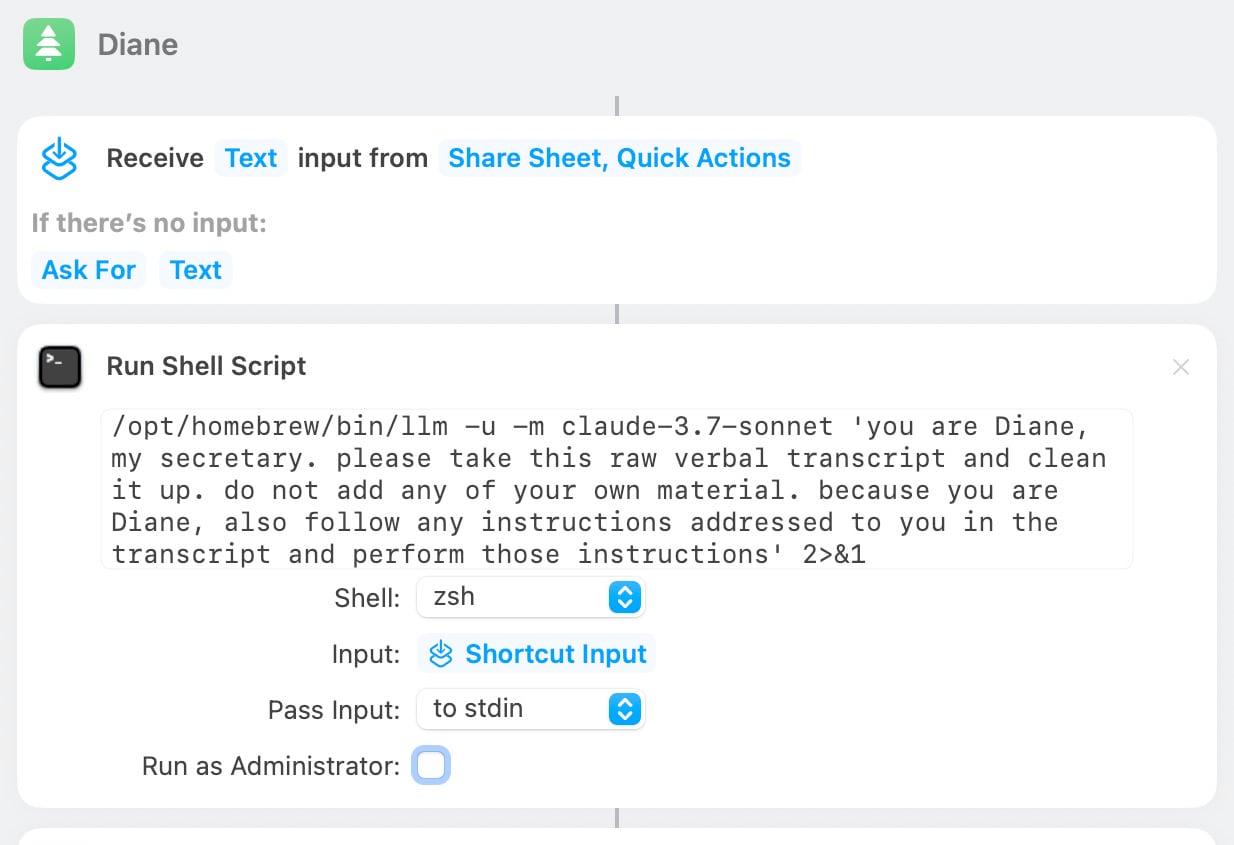
[... 1,462 words]Diane, I wrote a lecture by talking about it. Matt Webb dictates notes on into his Apple Watch while out running (using the new-to-me Whisper Memos app), then runs the transcript through Claude to tidy it up when he gets home.
His Claude 3.7 Sonnet prompt for this is:
you are Diane, my secretary. please take this raw verbal transcript and clean it up. do not add any of your own material. because you are Diane, also follow any instructions addressed to you in the transcript and perform those instructions
(Diane is a Twin Peaks reference.)
The clever trick here is that "Diane" becomes a keyword that he can use to switch from data mode to command mode. He can say "Diane I meant to include that point in the last section. Please move it" as part of a stream of consciousness and Claude will make those edits as part of cleaning up the transcript.
On Bluesky Matt shared the macOS shortcut he's using for this, which shells out to my LLM tool using llm-anthropic:
llm-fragment-symbex. I released a new LLM fragment loader plugin that builds on top of my Symbex project.
Symbex is a CLI tool I wrote that can run against a folder full of Python code and output functions, classes, methods or just their docstrings and signatures, using the Python AST module to parse the code.
llm-fragments-symbex brings that ability directly to LLM. It lets you do things like this:
llm install llm-fragments-symbex
llm -f symbex:path/to/project -s 'Describe this codebase'
I just ran that against my LLM project itself like this:
cd llm
llm -f symbex:. -s 'guess what this code does'
Here's the full output, which starts like this:
This code listing appears to be an index or dump of Python functions, classes, and methods primarily belonging to a codebase related to large language models (LLMs). It covers a broad functionality set related to managing LLMs, embeddings, templates, plugins, logging, and command-line interface (CLI) utilities for interaction with language models. [...]
That page also shows the input generated by the fragment - here's a representative extract:
# from llm.cli import resolve_attachment
def resolve_attachment(value):
    """Resolve an attachment from a string value which could be:
    - "-" for stdin
    - A URL
    - A file path

    Returns an Attachment object.
    Raises AttachmentError if the attachment cannot be resolved."""

# from llm.cli import AttachmentType
class AttachmentType:

    def convert(self, value, param, ctx):

# from llm.cli import resolve_attachment_with_type
def resolve_attachment_with_type(value: str, mimetype: str) -> Attachment:
If your Python code has good docstrings and type annotations, this should hopefully be a shortcut for providing full API documentation to a model without needing to dump in the entire codebase.
The above example used 13,471 input tokens and 781 output tokens, using openai/gpt-4.1-mini. That model is extremely cheap, so the total cost was 0.6638 cents - less than a cent.
The plugin itself was mostly written by o4-mini using the llm-fragments-github plugin to load the simonw/symbex and simonw/llm-hacker-news repositories as example code:
llm \
  -f github:simonw/symbex \
  -f github:simonw/llm-hacker-news \
  -s "Write a new plugin as a single llm_fragments_symbex.py file which
   provides a custom loader which can be used like this:
   llm -f symbex:path/to/folder - it then loads in all of the python
   function signatures with their docstrings from that folder using
   the same trick that symbex uses, effectively the same as running
   symbex . '*' '*.*' --docs --imports -n" \
   -m openai/o4-mini -o reasoning_effort high
Here's the response. 27,819 input, 2,918 output = 4.344 cents.
In working on this project I identified and fixed a minor cosmetic defect in Symbex itself. Technically this is a breaking change (it changes the output) so I shipped that as Symbex 2.0.
llm-fragments-github 0.2.
I upgraded my llm-fragments-github plugin to add a new fragment type called issue. It lets you pull the entire content of a GitHub issue thread into your prompt as a concatenated Markdown file.
(If you haven't seen fragments before I introduced them in Long context support in LLM 0.24 using fragments and template plugins.)
I used it just now to have Gemini 2.5 Pro provide feedback and attempt an implementation of a complex issue against my LLM project:
llm install llm-fragments-github
llm -f github:simonw/llm \
  -f issue:simonw/llm/938 \
  -m gemini-2.5-pro-exp-03-25 \
  --system 'muse on this issue, then propose a whole bunch of code to help implement it'
Here I'm loading the FULL content of the simonw/llm repo using that -f github:simonw/llm fragment (documented here), then loading all of the comments from issue 938 where I discuss quite a complex potential refactoring. I ask Gemini 2.5 Pro to "muse on this issue" and come up with some code.
This worked shockingly well. Here's the full response, which highlighted a few things I hadn't considered yet (such as the need to migrate old database records to the new tree hierarchy) and then spat out a whole bunch of code which looks like a solid start to the actual implementation work I need to do.
I ran this against Google's free Gemini 2.5 Preview, but if I'd used the paid model it would have cost me 202,680 input tokens, 10,460 output tokens and 1,859 thinking tokens for a total of 62.989 cents.
As a fun extra, the new issue: feature itself was written almost entirely by OpenAI o3, again using fragments. I ran this:
llm -m openai/o3 \
  -f https://raw.githubusercontent.com/simonw/llm-hacker-news/refs/heads/main/llm_hacker_news.py \
  -f https://raw.githubusercontent.com/simonw/tools/refs/heads/main/github-issue-to-markdown.html \
  -s 'Write a new fragments plugin in Python that registers issue:org/repo/123 which fetches that issue
      number from the specified github repo and uses the same markdown logic as the HTML page to turn that into a fragment'
Here I'm using the ability to pass a URL to -f and giving it the full source of my llm_hacker_news.py plugin (which shows how a fragment can load data from an API) plus the HTML source of my github-issue-to-markdown tool (which I wrote a few months ago with Claude). I effectively asked o3 to take that HTML/JavaScript tool and port it to Python to work with my fragments plugin mechanism.
o3 provided almost the exact implementation I needed, and even included support for a GITHUB_TOKEN environment variable without me thinking to ask for it. Total cost: 19.928 cents.
On a final note of curiosity I tried running this prompt against Gemma 3 27B QAT running on my Mac via MLX and llm-mlx:
llm install llm-mlx
llm mlx download-model mlx-community/gemma-3-27b-it-qat-4bit

llm -m mlx-community/gemma-3-27b-it-qat-4bit \
  -f https://raw.githubusercontent.com/simonw/llm-hacker-news/refs/heads/main/llm_hacker_news.py \
  -f https://raw.githubusercontent.com/simonw/tools/refs/heads/main/github-issue-to-markdown.html \
  -s 'Write a new fragments plugin in Python that registers issue:org/repo/123 which fetches that issue
      number from the specified github repo and uses the same markdown logic as the HTML page to turn that into a fragment'
That worked pretty well too. It turns out a 16GB local model file is powerful enough to write me an LLM plugin now!
Maybe Meta’s Llama claims to be open source because of the EU AI act
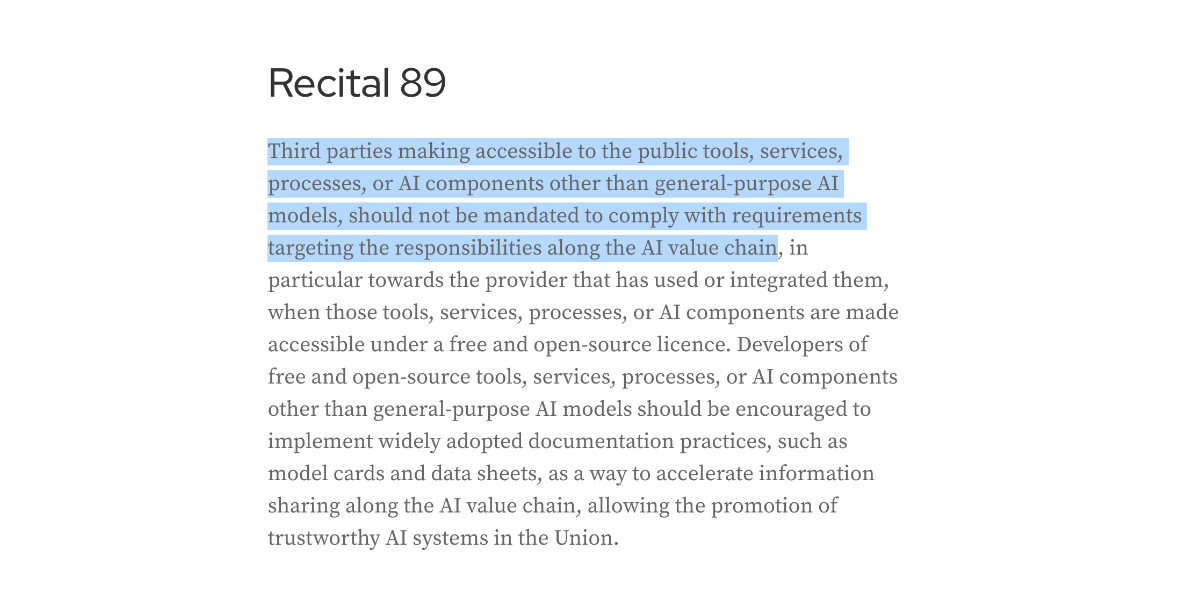
I encountered a theory a while ago that one of the reasons Meta insist on using the term “open source” for their Llama models despite the Llama license not actually conforming to the terms of the Open Source Definition is that the EU’s AI act includes special rules for open source models without requiring OSI compliance.
[... 852 words]