Releases
Filters: Sorted by date
I added four player online mode to Battledrones - previous maps were limited to two.
Here's the initial prompt I used:
Add a new map for a four player battle - four way rotational symmetry, up to four AI players, works with the WebSocket non-audio based multiplayer mode so up to four human players can join (any spare slots use AI)
Claude Opus 5.5 added a new map called "Compass Rose" and modified the WebSockets multiplayer network code to support up to four players for that map, joining via share links or QR codes.
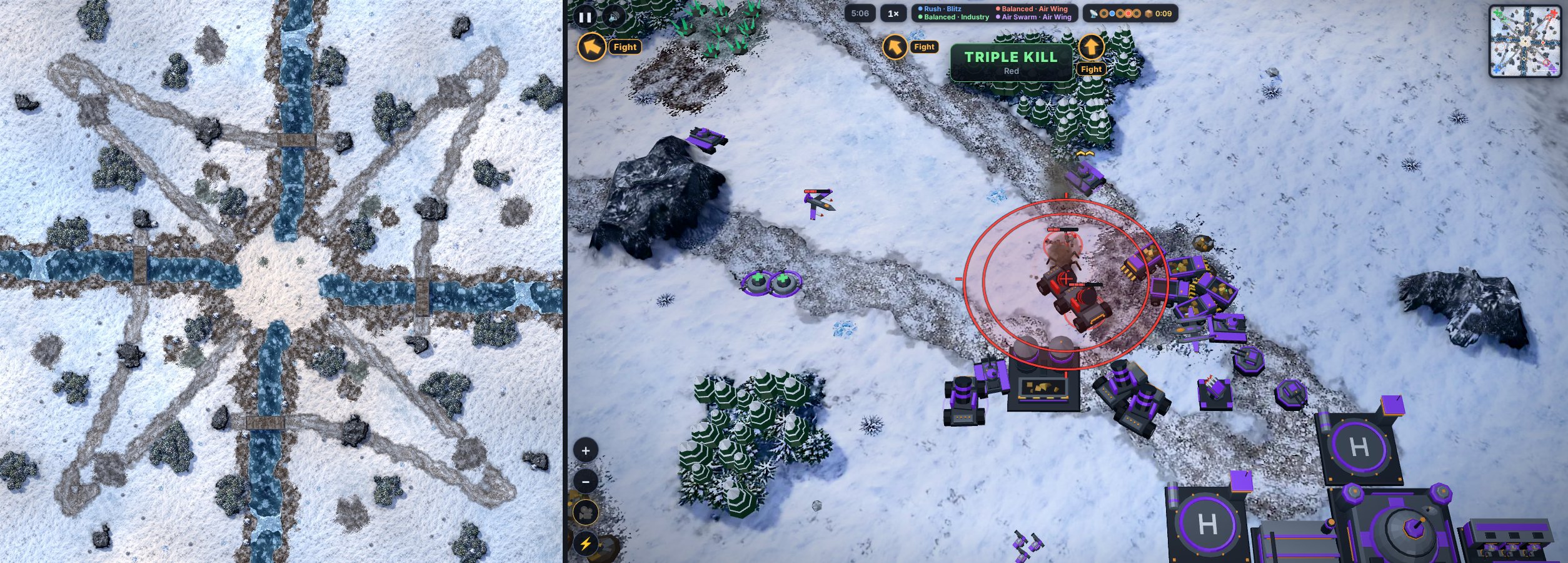
The new teams use robots themed in purple and green, joining the existing blue and red designs. You can preview those colors in the updated model browser.
Here's a replay link to watch a four way AI battle with the "Goliath Armada" mutator turned on, where each side starts with four giant Goliath mech units.
I'm working towards a new LLM release, and testing PRs caused me to revisit the llm-echo debug plugin. This plugin provides a "model" which doesn't involve an LLM at all - it just repeats back the prompts that have been fed to it. The new release now updates the simulated token usage counts to take tool calls, system prompts, and reasoning tokens into account.
Example usage:
uvx --with llm-echo llm -m echo 'hi there' -o thinking 1 --usage
Outputs:
First I consider the prompt, then I decide what to say.
{
  "prompt": "hi there",
  "system": "",
  "attachments": [],
  "stream": true,
  "previous": []
}
Token usage: 2 input, 24 output
web-edit (previously) is my tiny web app for browsing and editing files in a folder. I mainly built it for editing files on different machines via Tailscale.
I added a "copy to clipboard" option for both text and image data. I needed this because I was running pelican prompts on a laptop from my phone (here's DeepSeek 4.1 Flash 1017) and I wanted an easy way to copy the resulting logs into a Gist.
I added support to llm-gemini for the new Gemini 4 Argon model, made available today via the Gemini API and for customers of their $100/month subscription plan.
Here are the low, medium and high pelicans. As expected, they are all excellent: Gemini has a track record of producing great SVGs, and are the only lab where I know their staff have invested in SVG specifically (and who have boasted about their pelicans before.)
Here's the "high" illustration, which cost me 17.166 cents:

The pricing is interesting. At launch, Argon is $2/million input and $10/million output - the same price as GPT-6 Sol, half the price of Claude Opus 5.5 and 1/5th the price of Claude Fable 5.1 and GPT-6 Astra.
But on December 1st Argon is set to double in price - so it will be the same price as Opus 5.5.
Prices like this aren't really comparable these days since what really matters is how many tokens a model takes to achieve a goal within an agentic harness.
One useful clue for that comes from Artificial Analysis, who publish the total cost to run their benchmark using each model. Argon is looking very good there - costing $2,407 to run the benchmark, putting it close to GLM-5.3 and significantly cheaper than OpenAI, Anthropic, and Meta's latest models.
When the price doubles it will still be a little cheaper than GPT-6 Astra.
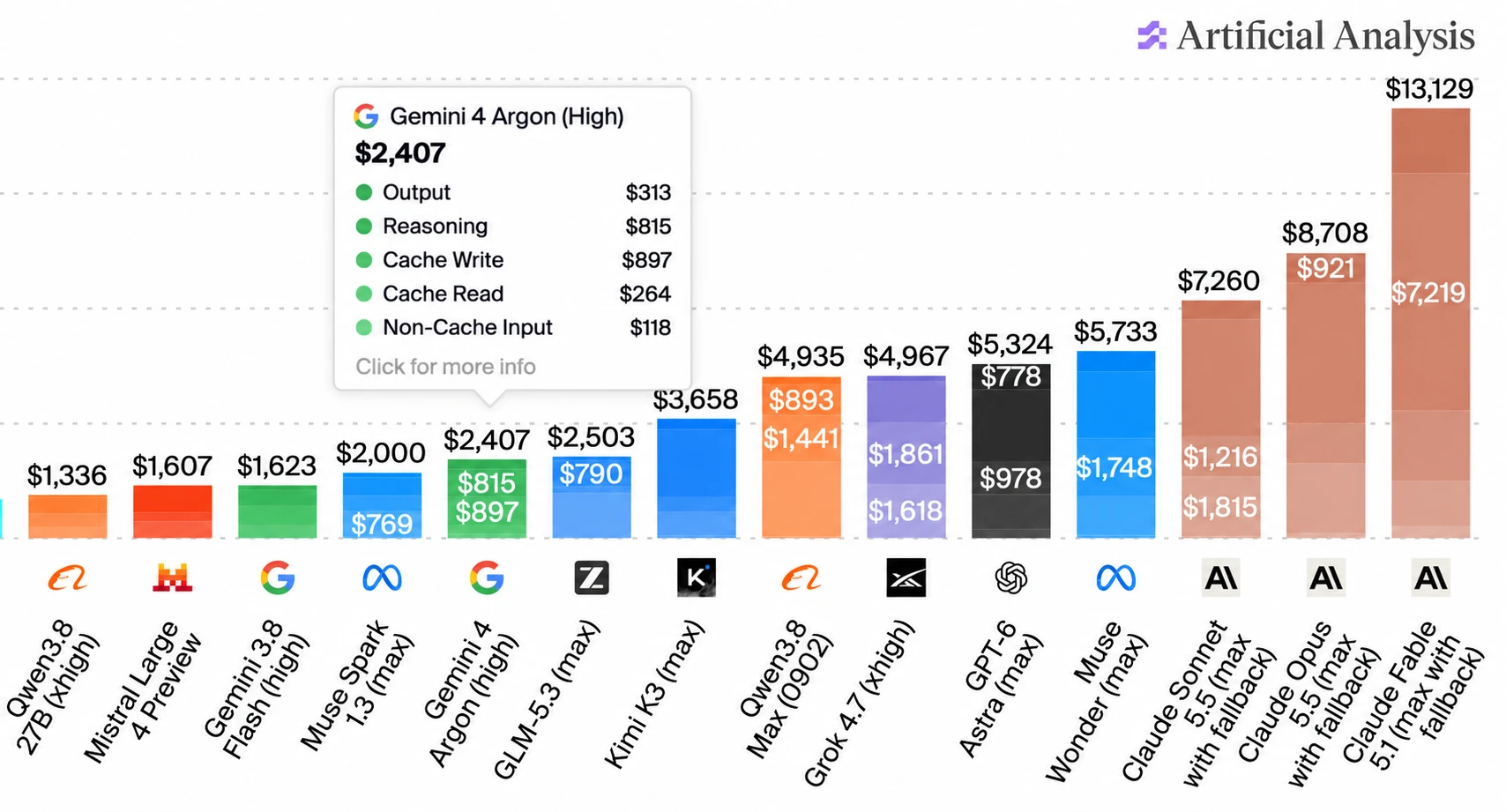
(I used ChatGPT to edit that chart! The data is all correct, I checked - I needed to get that Gemini 4 Argon info box to display without overlapping the other numbers.)
Some bonus examples using Gemini 4 Argon: here's Generate an SVG of an armadillo in fishnet tights jaywalking on Mars, here's a Fabergé egg it created for me using Blender, and DeepMind staffer @fofrAI shared a video of a pelican riding a bike, using fourier epicycles. That's a fun new twist!
Includes performance optimizations written by Claude Opus 5.5 after I fed it this Python 3.15 profiling report generated by GPT-6 Astra.
Meta AI release Muse Wonder (and Muse Wonder Full), their new "most capable models". These look like they may be Meta's first Fable class models - Artificial Analysis scores Muse Wonder (Max) as equivalent to GPT-6.1 Sol.

I updated my llm-meta-ai plugin for the new model. Here are pelicans for Muse Wonder for the six reasoning levels: minimal, low, medium, high, xhigh, max. This is the max one:

For comparison, here are pelicans for Muse 1.3 (released September 2nd) and Muse 1.2 (released August 5th). Meta AI are putting out a new model a month, and the improvements between each model (at least in terms of drawing pelicans) are material.
I was working on a project from my phone using Codex Remote when I found myself wanting to edit a credentials file without round-tripping those credentials through the LLM itself.
So... I had Codex and GPT-6 Astra Extra High build this Python web app which provides a web UI for viewing and editing files in a folder. It's intended to be run over Tailscale, so I can have an agent start this running and then edit files via my Tailscale network directly from my phone.
Here's the interface for browsing files in a folder:
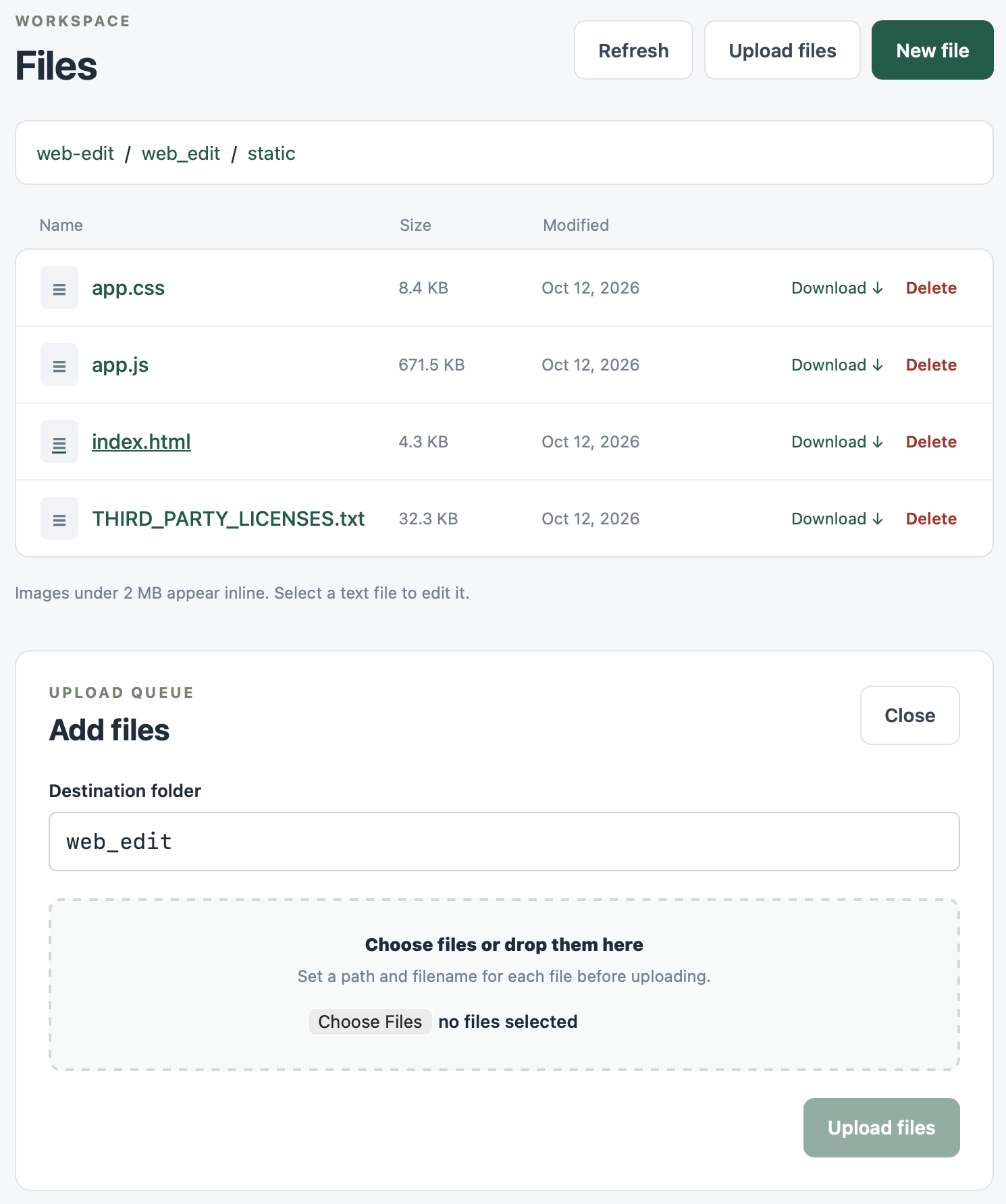
Editing uses CodeMirror 6 - I was going to use Monaco but that still doesn't have a great mobile experience yet.
My plugin for detecting and listing all Datasette instances on the current machine now works with the latest version, and displays the detected PID as well. Knowing the PID makes it easier to attach the new Python 3.15 profiler.
I released ttok 0.4, ran uv tool upgrade ttok, piped a file into the new version... and realized that it was defaulting to the GPT-4 tokenizer when it should very clearly default to GPT-5/GPT-6 instead!
I figured switching the default was a reasonable excuse to finally ship a 1.0.
OpenAI haven't actually confirmed that GPT-6 uses the same tokenizer as the GPT-5 family yet - there's an angry issue about it - but I found this commit by William Liu which reports on an experiment he ran confirming that the tokenizers are likely the same:
All seven GPT models (5.5, 5.6 Sol/Terra/Luna, 6 Astra/Sol/Luna) report 44,794 tokens and match each other on every one of the 31 fixtures. GPT-6 introduces no input-count change on this corpus.
ttok is my CLI tool for counting tokens, using OpenAI's open source tiktoken library.
It hasn't been in updated in a couple of years, but I finally fixed a Click warning, updated CI, and added a --list-models command to list available models.
It works with uvx, so you can count tokens in anything like this:
cat file.txt | uvx ttok
OpenAI released their new Jev-style Decisions API, as previously announced at last week's DevDay.
Since I already have an llm-typesafe plugin for talking to Jev, I had GPT-6 Astra read the new OpenAI API documentation and build an llm-openai-decisions plugin inspired by llm-typesafe.
Unlike Jev, the new gpt-6-luna decision model supports image input in addition to text. Both models charge for input it and not for output: OpenAI's is 10 cents per million input tokens, Jev's is 4.2 cents per million.
Otherwise the API shape is very similar to Jev, at least conceptually. Jev supports three question types for yes/no, choices, or scores. OpenAI Decisions supports the same three types.
Install the plugin like this:
llm install llm-openai-decisions
Here's an example query against an image attachment:
llm -m openai-decisions/gpt-6-luna \
  -a https://static.simonwillison.net/static/2025/two-pelicans.jpg \
  -s 'Does this image contain any mammals?'
And example output:
{"type": "predicate", "name": "evaluation", "probability": 0.0}Consult the README for full details of how to run the other types of questions.
Adds support for reasoning models, such as the newly released Mistral Large 4.
A minor fix for compatibility with the latest Datasette alphas. This meant we could upgrade the datasette.io site to Datasette 1.0a41.
pwasm is one of my folly projects - an entirely vibe-coded pure Python WebAssembly engine that I built in January during my first bout of AI mania.

I hadn't touched it since January, so I decided to let Claude Opus 5.5 loose on it and see if it could make any significant improvements:
Evaluate current state of pwasm - then consider what it would take to get the MicroPython and micro JavaScript experiments from the research repo working under it - and what it would take to speed it up
42 commits later (with minimal follow-up prompting) it now handles almost all of the WASM specification, and the wheel from PyPI bundles working WASM builds of MicroPython, QuickJS and Micro QuickJS.
I wouldn't trust this thing at all - hence the alpha version tag - but it's interesting seeing how today's models can improve on the work of models from 10 months ago.
In addition to Claude Sonnet 5.5, this release adds the ability to run llm anthropic refresh to refresh the list of Anthropic models directly from their API - which means I don't need to push a new release just to add support for a newly released model.
I also added an llm anthropic count command which can use their free token counting API to return a count of tokens that will be used by any prompt, before you send that prompt.
Support for branches other than the default branch. Use
uvx commit-rewriter --branch otherto run against another branch. #3
Alec Garcia added support for OpenTelemetry to Datasette in this release.
I've also refactored all of Datasette's modal dialogs to a single Web Component, which is now documented for other plugins to use.
- New OpenAI models:
gpt-6-solfor GPT-6 Sol andgpt-6-lunafor GPT-6 Luna. #1702- Model plugins can now declare
supports_conversation = Falsefor models that only accept single-turn prompts. LLM raisesllm.ConversationNotSupportedwhen these models receive assistant or tool history, andllm chatrejects them before starting a session. See Models that do not support conversations. The first plugin to use this is llm-typesafe. #1692- Reasoning traces in the Markdown output of
llm logsare now wrapped in<details><summary>tags. #1701
Adds support for Claude Opus 5.5:
llm -m claude-opus-5.5 "prompt goes here"
I built this new plugin for LLM to add support for TypeSafe AI's new Jev model. Install it like this:
llm install llm-typesafe
Then set an API key (get one here, the waitlist seems to move pretty fast):
llm keys set typesafe
# Paste key
And now you can ask yes/no "noul" questions like this:
llm -m jev 'Please refund my last payment.' \
  -s 'Does this message explicitly request a refund?'
Output:
{"type": "noul", "noul": 0.99}
Or choice questions like this:
cat message.txt | llm -m jev \
  -s 'Which team should handle this message? If billing and technical issues both occur, choose billing.' \
  -o answer_type choice \
  -o criteria '{
    "billing":"Charges, invoices, payments, or refunds",
    "technical":"Problems installing or using the product",
    "other":"Neither category fits"
  }'
Or scoring questions like this:
cat report.txt | llm -m jev \
  -s 'How reproducible is the problem described in this report?' \
  -o answer_type score \
  -o criteria '[
    "No reproduction instructions",
    "Some instructions, but important steps are missing",
    "Complete steps with expected and actual results"
  ]'
See the README for more details.
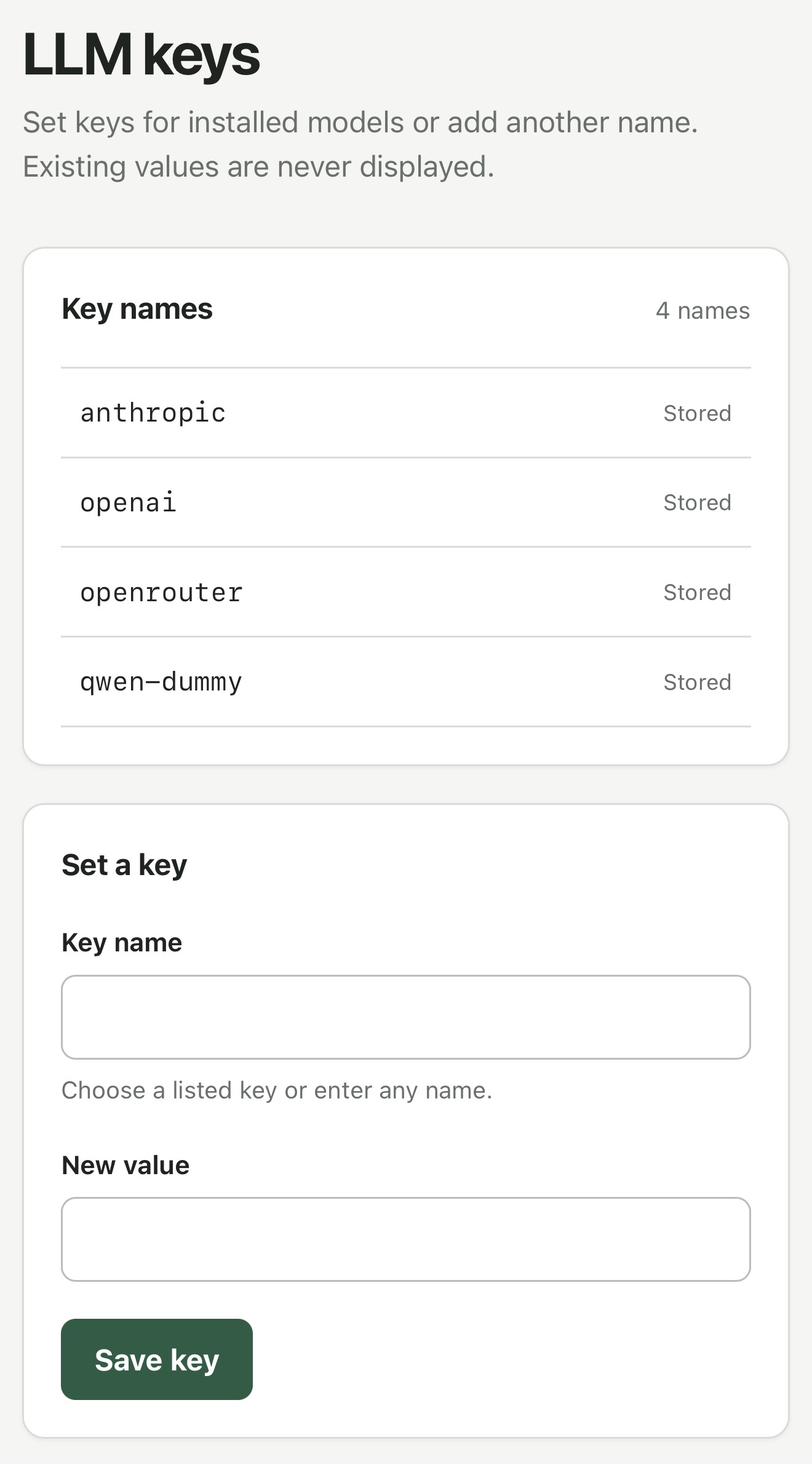
This plugin solves a very specific problem.
I've started using Codex Remote to run coding agents on various machines while controlling them from my phone.
Sometimes I use those machines to hack on LLM projects, and occasionally that means I need to configure an API key.
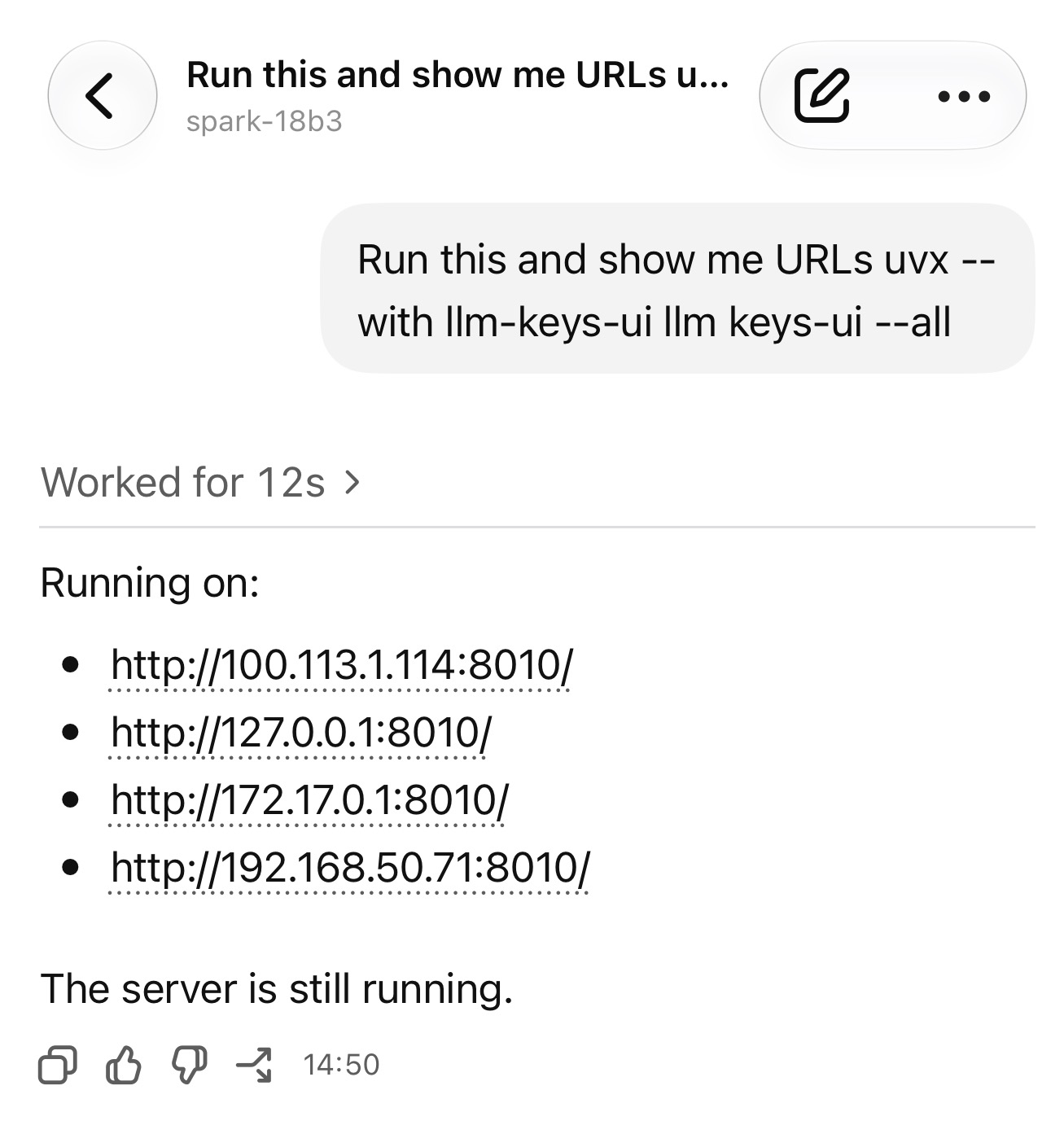
I don't like pasting API keys into agent sessions, so I wanted a way to get those keys onto a machine without pasting them into the ChatGPT app directly.
With this plugin, I can tell Codex to run:
uvx --with llm-keys-ui llm keys-ui --all
Then have it tell me the URL - including local network or Tailscale device IPs - for an interface to save additional API keys.
Then later it can use a command like llm keys get anthropic as part of a shell command when it needs to use a key.
- Explain plans now work on read-only stored-query pages.
I upgraded datasette.simonwillison.net to Datasette 1.0a40, which inspired me to ship a new version of this explain plugin.
I run this GitHub login plugin on the agent.datasette.io demo site and I noticed that my authenticated sessions weren't lasting very long. It turned out that the plugin was setting cookies without a Max-Age parameter, so they were expiring at the end of a browser session (which in Mobile Safari seems to happen pretty often, independently of how you are using the app.)
I fixed that in #80 and, since this plugin has been around for quite a while and is tested against both Datasette 0.65.x and Datasette 1.0ax, I decided to bump it up to a 1.0 release. I'm trying to get better at promoting stable plugins to 1.0.
Same security fix as 0.65.5, plus some neat new features and bug fixes:
- Plugins can now launch and manage background tasks using the new datasette.add_background_task() method. Thanks, Alex Garcia.
- I've migrated Datasette to httpx2 for features like the internal
datasette.client.get()method. - A whole lot of bug fixes, many of them stemming from a recent effort to triage issues for a 1.0 stable release.
Security fix for an issue where a trailing newline in a requested table name could bypass table permissions and expose private rows, reported by dpfkdlemtp in GHSA-h547-rmjf-5m2m.
I built this little web app the other day to help edit the commit messages for the Datasette security releases. The initial commits were full of coding agent cruft and references to issue IDs from our private repository, so they weren't fit for publication.
If you want to edit the commit messages for a repository you can run it like this:
uvx commit-rewriter path/to/repo
Omit the path if you are already in the directory for that repo.
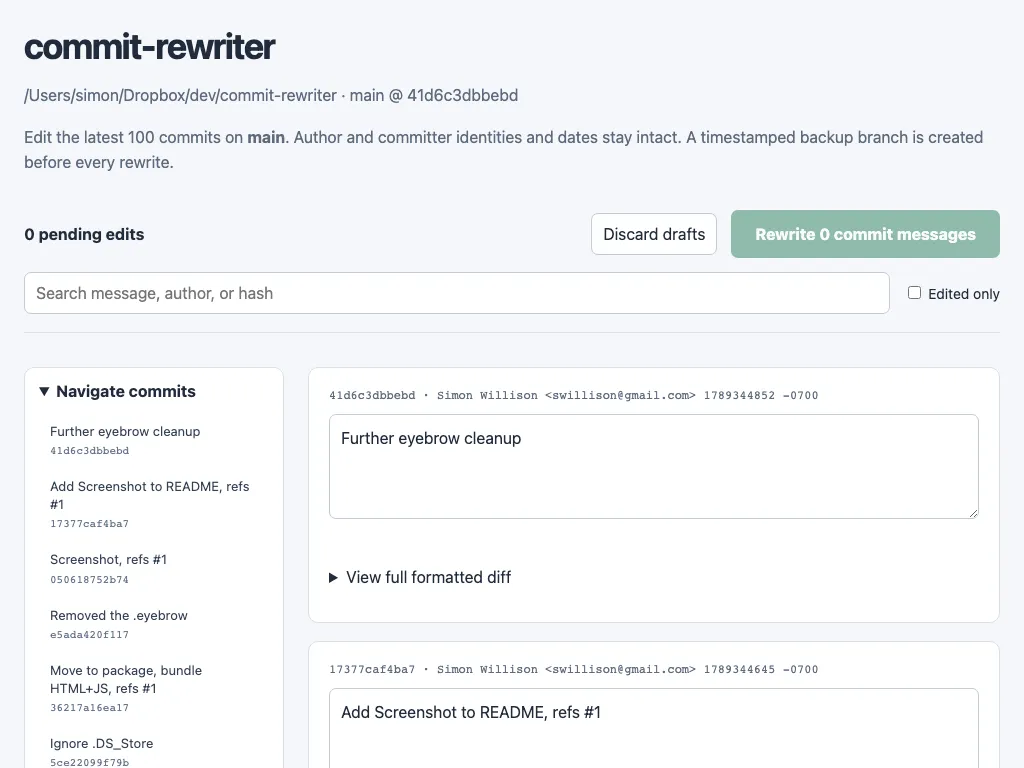
When you submit your edits the tool creates a timestamped branch of your current repo state - to allow you to revert if you need to - and then rewrites every commit from the first one you edited to the most recent.
I've added WebP support to my shot-scraper screenshot automation tool. You can now take a WebP screenshot of a web page like this:
shot-scraper https://simonwillison.net -o screenshot.webp --quality 80
The --quality option sets the quality - without that option the WebP file will be lossless.
In my experience WebP screenshots are almost always significantly smaller in file size than their JPEG or PNG equivalents. See the PR for some examples.
I shipped this feature so I could use it to generate the screenshot for my new commit-rewriter tool.
- Fix for compatibility with sqlite-utils 4.x. #85