12 posts tagged “http-range-requests”
Fun tricks with the HTTP Range header.
2026
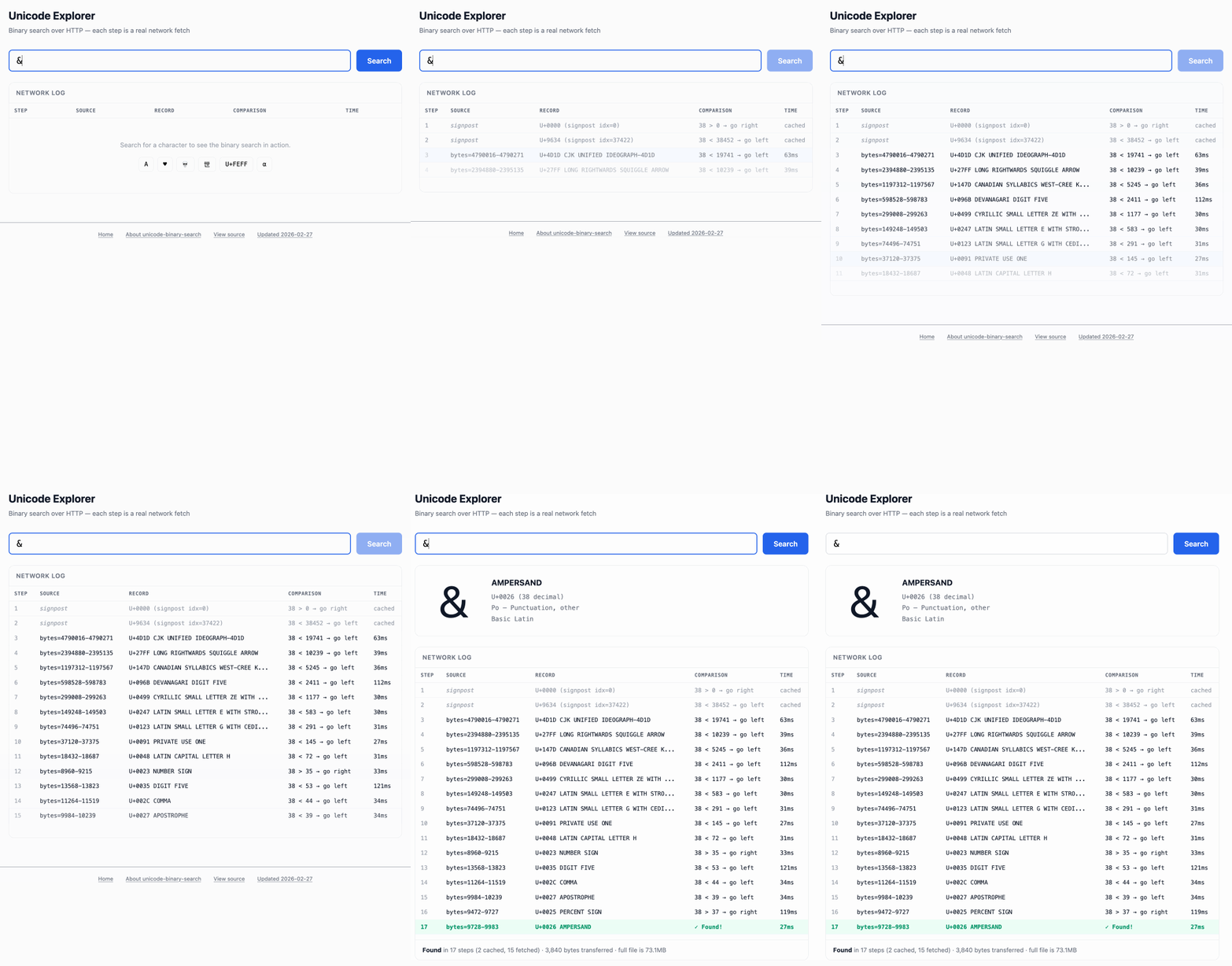
Unicode Explorer using binary search over fetch() HTTP range requests. Here's a little prototype I built this morning from my phone as an experiment in HTTP range requests, and a general example of using LLMs to satisfy curiosity.
I've been collecting HTTP range tricks for a while now, and I decided it would be fun to build something with them myself that used binary search against a large file to do something useful.
So I brainstormed with Claude. The challenge was coming up with a use case for binary search where the data could be naturally sorted in a way that would benefit from binary search.
One of Claude's suggestions was looking up information about unicode codepoints, which means searching through many MBs of metadata.
I had Claude write me a spec to feed to Claude Code - visible here - then kicked off an asynchronous research project with Claude Code for web against my simonw/research repo to turn that into working code.
Here's the resulting report and code. One interesting thing I learned is that Range request tricks aren't compatible with HTTP compression because they mess with the byte offset calculations. I added 'Accept-Encoding': 'identity' to the fetch() calls but this isn't actually necessary because Cloudflare and other CDNs automatically skip compression if a content-range header is present.
I deployed the result to my tools.simonwillison.net site, after first tweaking it to query the data via range requests against a CORS-enabled 76.6MB file in an S3 bucket fronted by Cloudflare.
The demo is fun to play with - type in a single character like ø or a hexadecimal codepoint indicator like 1F99C and it will binary search its way through the large file and show you the steps it takes along the way:
Gwtar: a static efficient single-file HTML format (via) Fascinating new project from Gwern Branwen and Said Achmiz that targets the challenge of combining large numbers of assets into a single archived HTML file without that file being inconvenient to view in a browser.
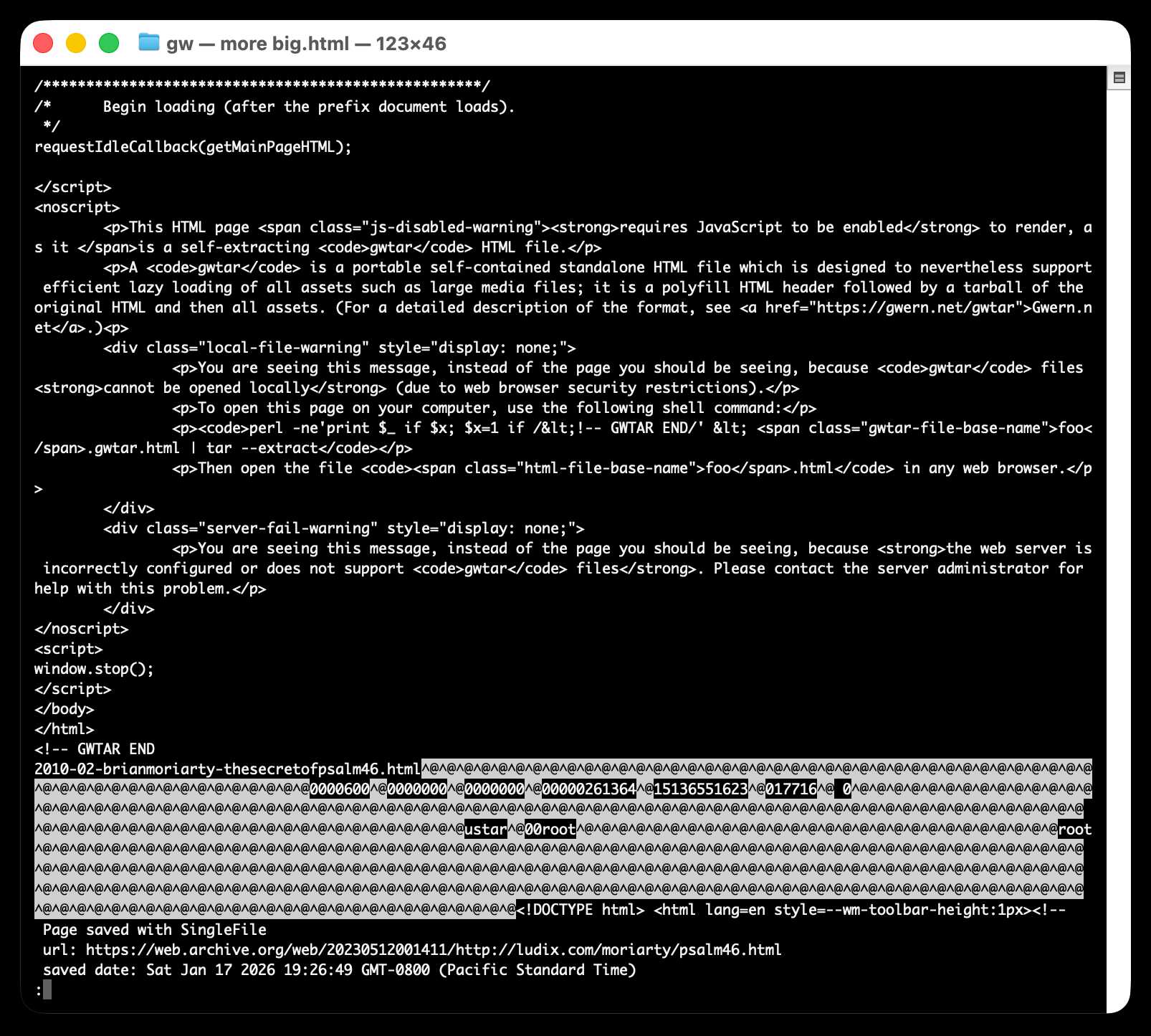
The key trick it uses is to fire window.stop() early in the page to prevent the browser from downloading the whole thing, then following that call with inline tar uncompressed content.
It can then make HTTP range requests to fetch content from that tar data on-demand when it is needed by the page.
The JavaScript that has already loaded rewrites asset URLs to point to https://localhost/ purely so that they will fail to load. Then it uses a PerformanceObserver to catch those attempted loads:
let perfObserver = new PerformanceObserver((entryList, observer) => {
    resourceURLStringsHandler(entryList.getEntries().map(entry => entry.name));
});
perfObserver.observe({ entryTypes: [ "resource" ] });
That resourceURLStringsHandler callback finds the resource if it is already loaded or fetches it with an HTTP range request otherwise and then inserts the resource in the right place using a blob: URL.
Here's what the window.stop() portion of the document looks like if you view the source:
Amusingly for an archive format it doesn't actually work if you open the file directly on your own computer. Here's what you see if you try to do that:
You are seeing this message, instead of the page you should be seeing, because
gwtarfiles cannot be opened locally (due to web browser security restrictions).To open this page on your computer, use the following shell command:
perl -ne'print $_ if $x; $x=1 if /<!-- GWTAR END/' < foo.gwtar.html | tar --extractThen open the file
foo.htmlin any web browser.
2025
How uv got so fast.
Andrew Nesbitt provides an insightful teardown of why uv is so much faster than pip. It's not nearly as simple as just "they rewrote it in Rust" - uv gets to skip a huge amount of Python packaging history (which pip needs to implement for backwards compatibility) and benefits enormously from work over recent years that makes it possible to resolve dependencies across most packages without having to execute the code in setup.py using a Python interpreter.
Two notes that caught my eye that I hadn't understood before:
HTTP range requests for metadata. Wheel files are zip archives, and zip archives put their file listing at the end. uv tries PEP 658 metadata first, falls back to HTTP range requests for the zip central directory, then full wheel download, then building from source. Each step is slower and riskier. The design makes the fast path cover 99% of cases. None of this requires Rust.
[...]
Compact version representation. uv packs versions into u64 integers where possible, making comparison and hashing fast. Over 90% of versions fit in one u64. This is micro-optimization that compounds across millions of comparisons.
I wanted to learn more about these tricks, so I fired up an asynchronous research task and told it to checkout the astral-sh/uv repo, find the Rust code for both of those features and try porting it to Python to help me understand how it works.
Here's the report that it wrote for me, the prompts I used and the Claude Code transcript.
You can try the script it wrote for extracting metadata from a wheel using HTTP range requests like this:
uv run --with httpx https://raw.githubusercontent.com/simonw/research/refs/heads/main/http-range-wheel-metadata/wheel_metadata.py https://files.pythonhosted.org/packages/8b/04/ef95b67e1ff59c080b2effd1a9a96984d6953f667c91dfe9d77c838fc956/playwright-1.57.0-py3-none-macosx_11_0_arm64.whl -v
The Playwright wheel there is ~40MB. Adding -v at the end causes the script to spit out verbose details of how it fetched the data - which looks like this.
Key extract from that output:
[1] HEAD request to get file size...
    File size: 40,775,575 bytes
[2] Fetching last 16,384 bytes (EOCD + central directory)...
    Received 16,384 bytes
[3] Parsed EOCD:
    Central directory offset: 40,731,572
    Central directory size: 43,981
    Total entries: 453
[4] Fetching complete central directory...
    ...
[6] Found METADATA: playwright-1.57.0.dist-info/METADATA
    Offset: 40,706,744
    Compressed size: 1,286
    Compression method: 8
[7] Fetching METADATA content (2,376 bytes)...
[8] Decompressed METADATA: 3,453 bytes

Total bytes fetched: 18,760 / 40,775,575 (100.0% savings)
The section of the report on compact version representation is interesting too. Here's how it illustrates sorting version numbers correctly based on their custom u64 representation:
Sorted order (by integer comparison of packed u64):
  1.0.0a1 (repr=0x0001000000200001)
  1.0.0b1 (repr=0x0001000000300001)
  1.0.0rc1 (repr=0x0001000000400001)
  1.0.0 (repr=0x0001000000500000)
  1.0.0.post1 (repr=0x0001000000700001)
  1.0.1 (repr=0x0001000100500000)
  2.0.0.dev1 (repr=0x0002000000100001)
  2.0.0 (repr=0x0002000000500000)
OpenTimes (via) Spectacular new open geospatial project by Dan Snow:
OpenTimes is a database of pre-computed, point-to-point travel times between United States Census geographies. It lets you download bulk travel time data for free and with no limits.
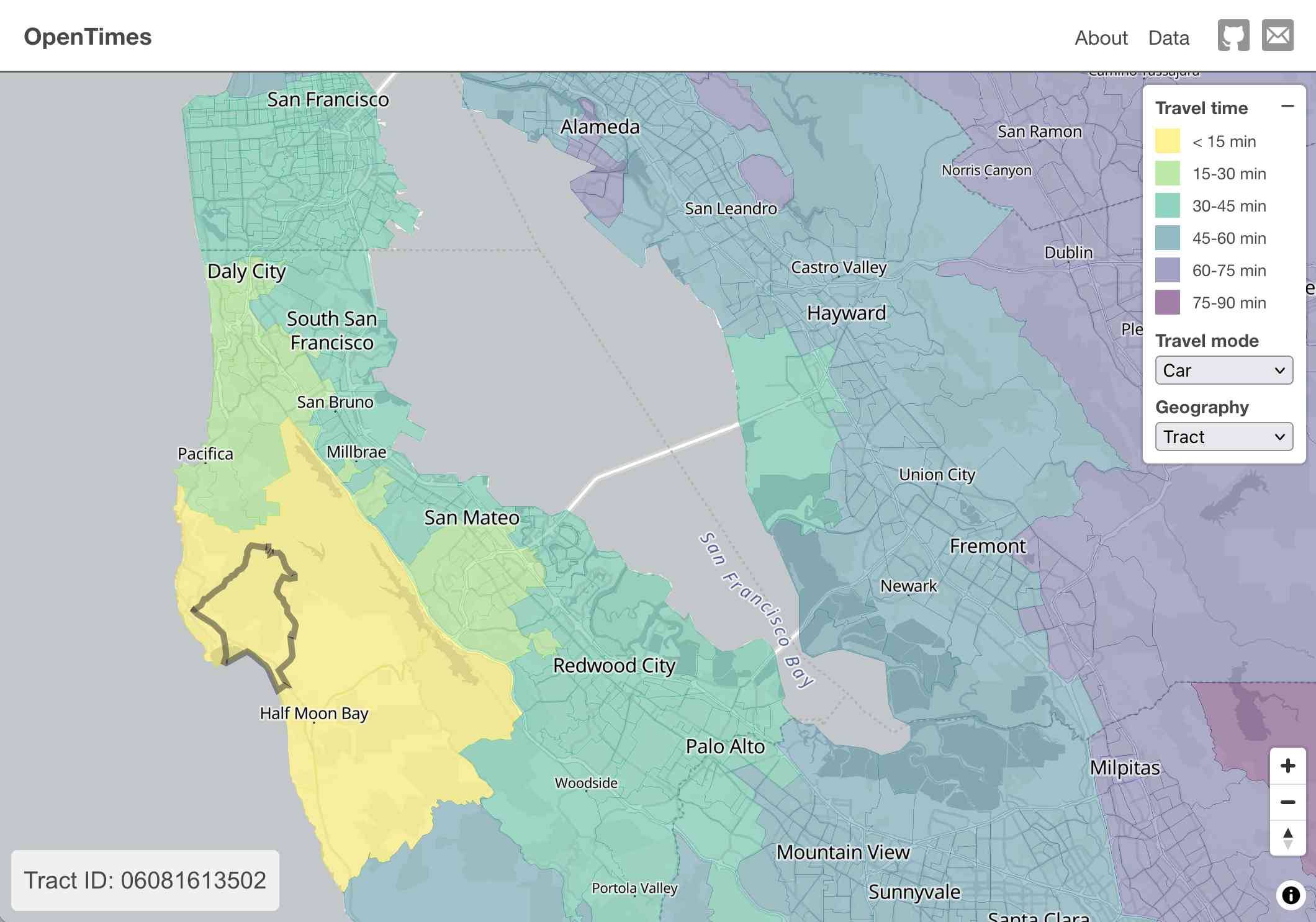
Here's what I get for travel times by car from El Granada, California:
The technical details are fascinating:
- The entire OpenTimes backend is just static Parquet files on Cloudflare's R2. There's no RDBMS or running service, just files and a CDN. The whole thing costs about $10/month to host and costs nothing to serve. In my opinion, this is a great way to serve infrequently updated, large public datasets at low cost (as long as you partition the files correctly).
Sure enough, R2 pricing charges "based on the total volume of data stored" - $0.015 / GB-month for standard storage, then $0.36 / million requests for "Class B" operations which include reads. They charge nothing for outbound bandwidth.
- All travel times were calculated by pre-building the inputs (OSM, OSRM networks) and then distributing the compute over hundreds of GitHub Actions jobs. This worked shockingly well for this specific workload (and was also completely free).
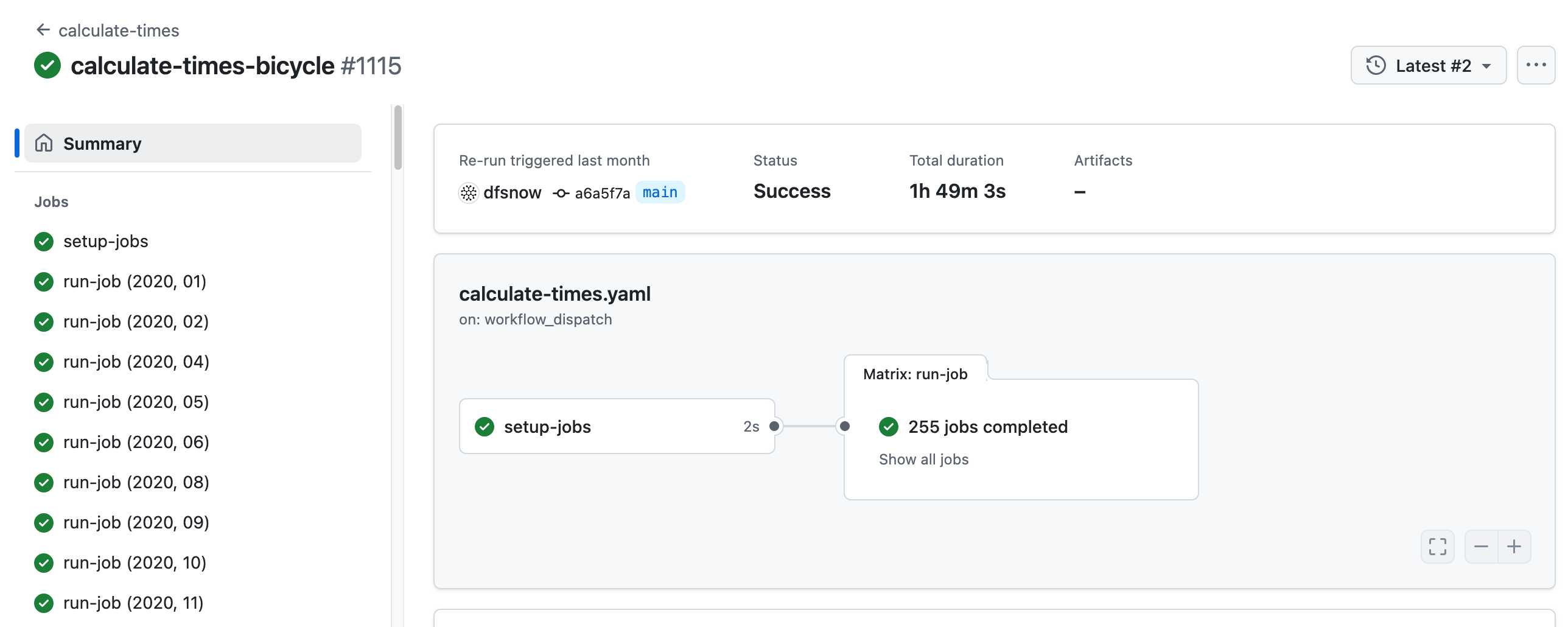
Here's a GitHub Actions run of the calculate-times.yaml workflow which uses a matrix to run 255 jobs!
Relevant YAML:
  matrix:
    year: ${{ fromJSON(needs.setup-jobs.outputs.years) }}
    state: ${{ fromJSON(needs.setup-jobs.outputs.states) }}
Where those JSON files were created by the previous step, which reads in the year and state values from this params.yaml file.
- The query layer uses a single DuckDB database file with views that point to static Parquet files via HTTP. This lets you query a table with hundreds of billions of records after downloading just the ~5MB pointer file.
This is a really creative use of DuckDB's feature that lets you run queries against large data from a laptop using HTTP range queries to avoid downloading the whole thing.
The README shows how to use that from R and Python - I got this working in the duckdb client (brew install duckdb):
INSTALL httpfs;
LOAD httpfs;
ATTACH 'https://data.opentimes.org/databases/0.0.1.duckdb' AS opentimes;

SELECT origin_id, destination_id, duration_sec
  FROM opentimes.public.times
  WHERE version = '0.0.1'
      AND mode = 'car'
      AND year = '2024'
      AND geography = 'tract'
      AND state = '17'
      AND origin_id LIKE '17031%' limit 10;
In answer to a question about adding public transit times Dan said:
In the next year or so maybe. The biggest obstacles to adding public transit are:
- Collecting all the necessary scheduling data (e.g. GTFS feeds) for every transit system in the county. Not insurmountable since there are services that do this currently.
- Finding a routing engine that can compute nation-scale travel time matrices quickly. Currently, the two fastest open-source engines I've tried (OSRM and Valhalla) don't support public transit for matrix calculations and the engines that do support public transit (R5, OpenTripPlanner, etc.) are too slow.
GTFS is a popular CSV-based format for sharing transit schedules - here's an official list of available feed directories.
This whole project feels to me like a great example of the baked data architectural pattern in action.
2024
Amazon S3 Express One Zone now supports the ability to append data to an object. This is a first for Amazon S3: it is now possible to append data to an existing object in a bucket, where previously the only supported operation was to atomically replace the object with an updated version.
This is only available for S3 Express One Zone, a bucket class introduced a year ago which provides storage in just a single availability zone, providing significantly lower latency at the cost of reduced redundancy and a much higher price (16c/GB/month compared to 2.3c for S3 standard tier).
The fact that appends have never been supported for multi-availability zone S3 provides an interesting clue as to the underlying architecture. Guaranteeing that every copy of an object has received and applied an append is significantly harder than doing a distributed atomic swap to a new version.
More details from the documentation:
There is no minimum size requirement for the data you can append to an object. However, the maximum size of the data that you can append to an object in a single request is 5GB. This is the same limit as the largest request size when uploading data using any Amazon S3 API.
With each successful append operation, you create a part of the object and each object can have up to 10,000 parts. This means you can append data to an object up to 10,000 times. If an object is created using S3 multipart upload, each uploaded part is counted towards the total maximum of 10,000 parts. For example, you can append up to 9,000 times to an object created by multipart upload comprising of 1,000 parts.
That 10,000 limit means this won't quite work for constantly appending to a log file in a bucket.
Presumably it will be possible to "tail" an object that is receiving appended updates using the HTTP Range header.
2021
DuckDB-Wasm: Efficient Analytical SQL in the Browser (via) First SQLite, now DuckDB: options for running database engines in the browser using WebAssembly keep on growing. DuckDB means browsers now have a fast, intuitive mechanism for querying Parquet files too. This also supports the same HTTP Range header trick as the SQLite demo from a while back, meaning it can query large databases loaded over HTTP without downloading the whole file.
Notes on streaming large API responses
I started a Twitter conversation last week about API endpoints that stream large amounts of data as an alternative to APIs that return 100 results at a time and require clients to paginate through all of the pages in order to retrieve all of the data:
[... 1,692 words]Hosting SQLite databases on Github Pages (via) I've seen the trick of running SQLite compiled to WASM in the browser before, but here it comes with an incredibly clever bonus trick: it uses SQLite's page structure to fetch subsets of the database file via HTTP range requests, which means you can run indexed SQL queries against a 600MB database file while only fetching a few MBs of data over the wire. Absolutely brilliant. Tucked away at the end of the post is another neat trick: making the browser DOM available to SQLite as a virtual table, so you can query and update the DOM of the current page using SQL!
2004
Random access to Web audio. Standard MP3s can be randomly accessed using HTTP’s range header—without any extra server software.