August 2024
128 posts: 6 entries, 76 links, 22 quotes, 24 beats
Aug. 24, 2024
Musing about OAuth and LLMs on Mastodon. Lots of people are asking why Anthropic and OpenAI don't support OAuth, so you can bounce users through those providers to get a token that uses their API budget for your app.
My guess: they're worried malicious app developers would use it to trick people and obtain valid API keys.
Imagine a version of my dumb little write a haiku about a photo you take page which used OAuth, harvested API keys and then racked up hundreds of dollar bills against everyone who tried it out running illicit election interference campaigns or whatever.
I'm trying to think of an OAuth API that dishes out tokens which effectively let you spend money on behalf of your users and I can't think of any - OAuth is great for "grant this app access to data that I want to share", but "spend money on my behalf" is a whole other ball game.
I guess there's a version of this that could work: it's OAuth but users get to set a spending limit of e.g. $1 (maybe with the authenticating app suggesting what that limit should be).
Here's a counter-example from Mike Taylor of a category of applications that do use OAuth to authorize spend on behalf of users:
I used to work in advertising and plenty of applications use OAuth to connect your Facebook and Google ads accounts, and they could do things like spend all your budget on disinformation ads, but in practice I haven't heard of a single case. When you create a dev application there are stages of approval so you can only invite a handful of beta users directly until the organization and app gets approved.
In which case maybe the cost for providers here is in review and moderation: if you’re going to run an OAuth API that lets apps spend money on behalf of their users you need to actively monitor your developer community and review and approve their apps.
[...] here’s what we found when we integrated [Amazon Q, GenAI assistant for software development] into our internal systems and applied it to our needed Java upgrades:
- The average time to upgrade an application to Java 17 plummeted from what’s typically 50 developer-days to just a few hours. We estimate this has saved us the equivalent of 4,500 developer-years of work (yes, that number is crazy but, real).
- In under six months, we've been able to upgrade more than 50% of our production Java systems to modernized Java versions at a fraction of the usual time and effort. And, our developers shipped 79% of the auto-generated code reviews without any additional changes.
— Andy Jassy, Amazon CEO
SQL Has Problems. We Can Fix Them: Pipe Syntax In SQL (via) A new paper from Google Research describing custom syntax for analytical SQL queries that has been rolling out inside Google since February, reaching 1,600 "seven-day-active users" by August 2024.
A key idea is here is to fix one of the biggest usability problems with standard SQL: the order of the clauses in a query. Starting with SELECT instead of FROM has always been confusing, see SQL queries don't start with SELECT by Julia Evans.
Here's an example of the new alternative syntax, taken from the Pipe query syntax documentation that was added to Google's open source ZetaSQL project last week.
For this SQL query:
SELECT component_id, COUNT(*)
FROM ticketing_system_table
WHERE
  assignee_user.email = 'username@email.com'
  AND status IN ('NEW', 'ASSIGNED', 'ACCEPTED')
GROUP BY component_id
ORDER BY component_id DESC;
The Pipe query alternative would look like this:
FROM ticketing_system_table
|> WHERE
    assignee_user.email = 'username@email.com'
    AND status IN ('NEW', 'ASSIGNED', 'ACCEPTED')
|> AGGREGATE COUNT(*)
   GROUP AND ORDER BY component_id DESC;
The Google Research paper is released as a two-column PDF. I snarked about this on Hacker News:
Google: you are a web company. Please learn to publish your research papers as web pages.
This remains a long-standing pet peeve of mine. PDFs like this are horrible to read on mobile phones, hard to copy-and-paste from, have poor accessibility (see this Mastodon conversation) and are generally just bad citizens of the web.
Having complained about this I felt compelled to see if I could address it myself. Google's own Gemini Pro 1.5 model can process PDFs, so I uploaded the PDF to Google AI Studio and prompted the gemini-1.5-pro-exp-0801 model like this:
Convert this document to neatly styled semantic HTML
This worked surprisingly well. It output HTML for about half the document and then stopped, presumably hitting the output length limit, but a follow-up prompt of "and the rest" caused it to continue from where it stopped and run until the end.
Here's the result (with a banner I added at the top explaining that it's a conversion): Pipe-Syntax-In-SQL.html
I haven't compared the two completely, so I can't guarantee there are no omissions or mistakes.
The figures from the PDF aren't present - Gemini Pro output tags like <img src="figure1.png" alt="Figure 1: SQL syntactic clause order doesn't match semantic evaluation order. (From [25].)"> but did nothing to help me create those images.
Amusingly the document ends with <p>(A long list of references, which I won't reproduce here to save space.)</p> rather than actually including the references from the paper!
So this isn't a perfect solution, but considering it took just the first prompt I could think of it's a very promising start. I expect someone willing to spend more than the couple of minutes I invested in this could produce a very useful HTML alternative version of the paper with the assistance of Gemini Pro.
One last amusing note: I posted a link to this to Hacker News a few hours ago. Just now when I searched Google for the exact title of the paper my HTML version was already the third result!
I've now added a <meta name="robots" content="noindex, follow"> tag to the top of the HTML to keep this unverified AI slop out of their search index. This is a good reminder of how much better HTML is than PDF for sharing information on the web!
Aug. 25, 2024
My @covidsewage bot now includes useful alt text. I've been running a @covidsewage Mastodon bot for a while now, posting daily screenshots (taken with shot-scraper) of the Santa Clara County COVID in wastewater dashboard.
Prior to today the screenshot was accompanied by the decidedly unhelpful alt text "Screenshot of the latest Covid charts".
I finally fixed that today, closing issue #2 more than two years after I first opened it.
The screenshot is of a Microsoft Power BI dashboard. I hoped I could scrape the key information out of it using JavaScript, but the weirdness of their DOM proved insurmountable.
Instead, I'm using GPT-4o - specifically, this Python code (run using a python -c block in the GitHub Actions YAML file):
import base64, openai
client = openai.OpenAI()
with open('/tmp/covid.png', 'rb') as image_file:
    encoded_image = base64.b64encode(image_file.read()).decode('utf-8')
messages = [
    {'role': 'system',
     'content': 'Return the concentration levels in the sewersheds - single paragraph, no markdown'},
    {'role': 'user', 'content': [
        {'type': 'image_url', 'image_url': {
            'url': 'data:image/png;base64,' + encoded_image
        }}
    ]}
]
completion = client.chat.completions.create(model='gpt-4o', messages=messages)
print(completion.choices[0].message.content)
I'm base64 encoding the screenshot and sending it with this system prompt:
Return the concentration levels in the sewersheds - single paragraph, no markdown
Given this input image:
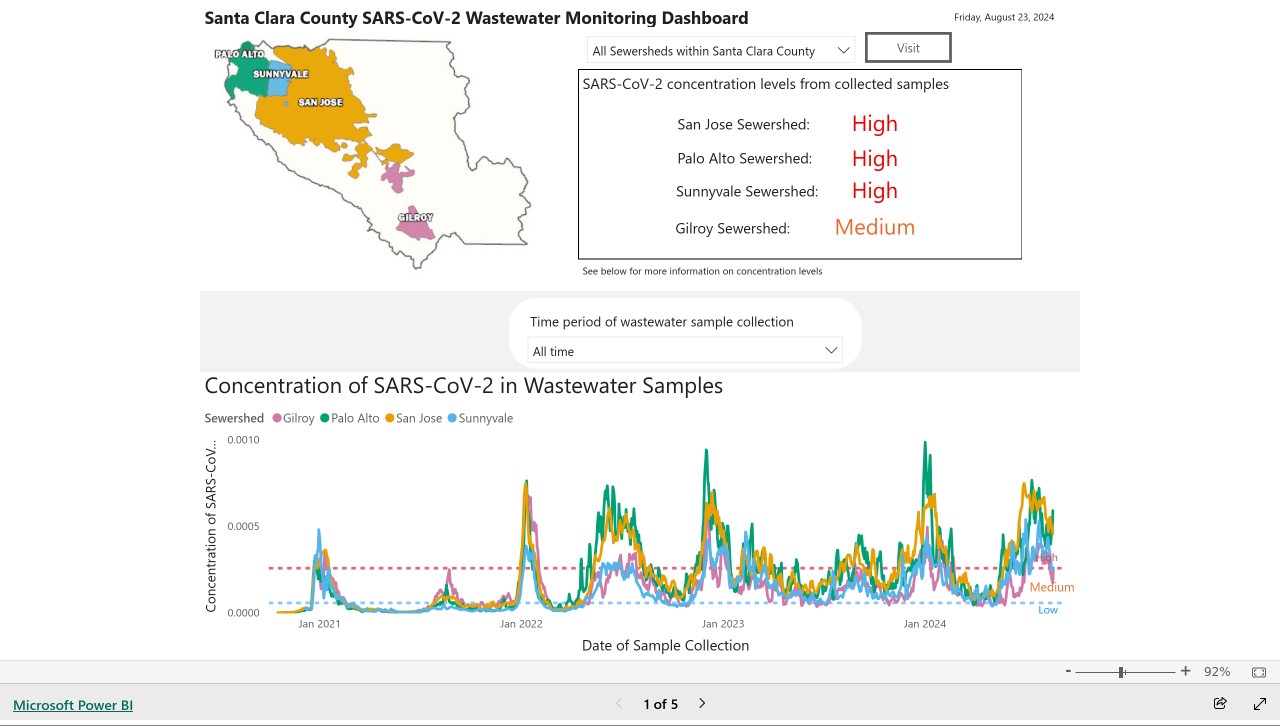
Here's the text that comes back:
The concentration levels of SARS-CoV-2 in the sewersheds from collected samples are as follows: San Jose Sewershed has a high concentration, Palo Alto Sewershed has a high concentration, Sunnyvale Sewershed has a high concentration, and Gilroy Sewershed has a medium concentration.
The full implementation can be found in the GitHub Actions workflow, which runs on a schedule at 7am Pacific time every day.
Aug. 26, 2024
AI-powered Git Commit Function
(via)
Andrej Karpathy built a shell alias, gcm, which passes your staged Git changes to an LLM via my LLM tool, generates a short commit message and then asks you if you want to "(a)ccept, (e)dit, (r)egenerate, or (c)ancel?".
Here's the incantation he's using to generate that commit message:
git diff --cached | llm "
Below is a diff of all staged changes, coming from the command:
\`\`\`
git diff --cached
\`\`\`
Please generate a concise, one-line commit message for these changes."
This pipes the data into LLM (using the default model, currently gpt-4o-mini unless you set it to something else) and then appends the prompt telling it what to do with that input.
Building a tool showing how Gemini Pro can return bounding boxes for objects in images
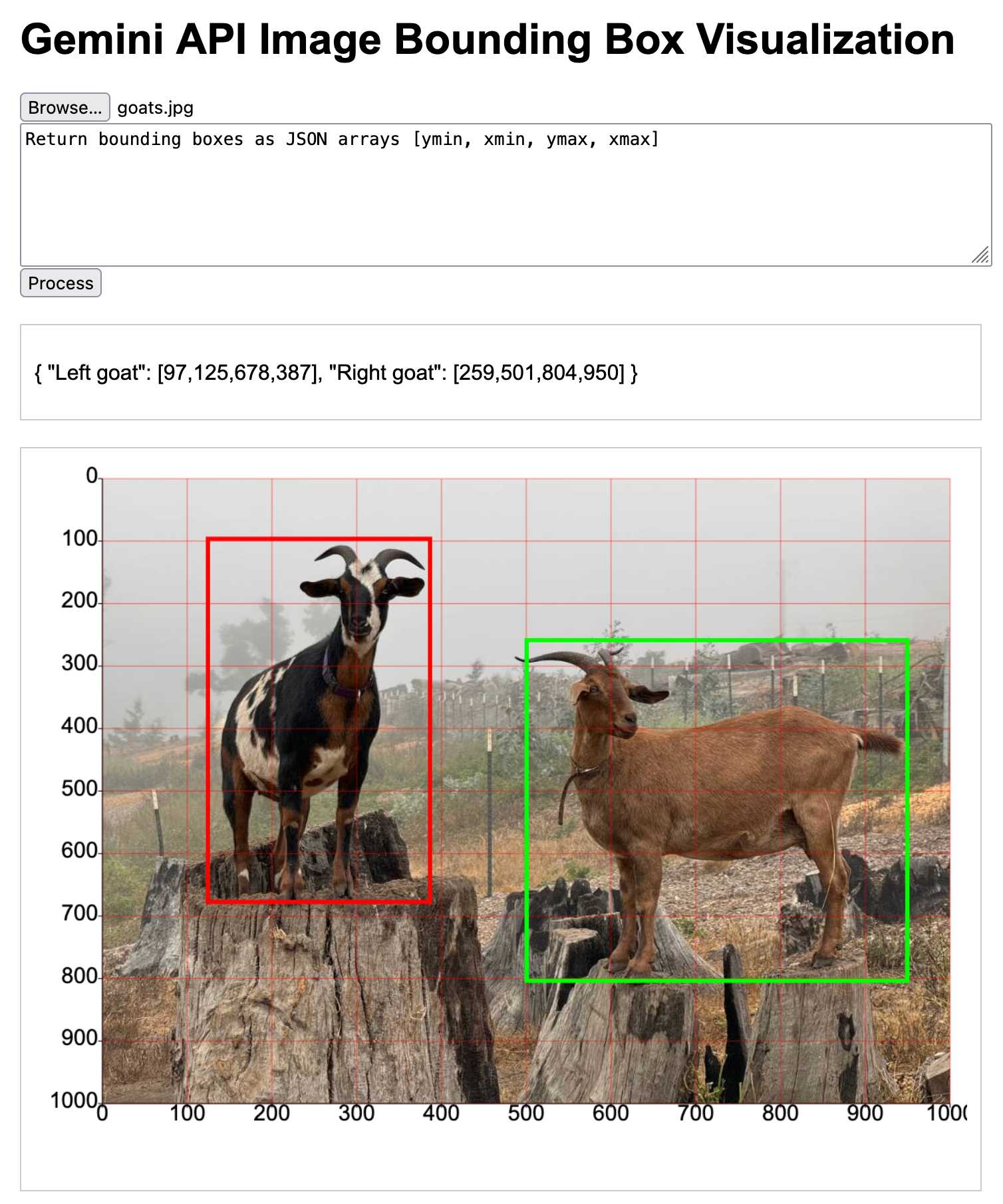
I was browsing through Google’s Gemini documentation while researching how different multi-model LLM APIs work when I stumbled across this note in the vision documentation:
[... 1,792 words]Long context prompting tips (via) Interesting tips here from Anthropic's documentation about how to best prompt Claude to work with longer documents.
Put longform data at the top: Place your long documents and inputs (~20K+ tokens) near the top of your prompt, above your query, instructions, and examples. This can significantly improve Claude’s performance across all models. Queries at the end can improve response quality by up to 30% in tests, especially with complex, multi-document inputs.
It recommends using not-quite-valid-XML to add those documents to those prompts, and using a prompt that asks Claude to extract direct quotes before replying to help it focus its attention on the most relevant information:
Find quotes from the patient records and appointment history that are relevant to diagnosing the patient's reported symptoms. Place these in <quotes> tags. Then, based on these quotes, list all information that would help the doctor diagnose the patient's symptoms. Place your diagnostic information in <info> tags.
Anthropic Release Notes: System Prompts (via) Anthropic now publish the system prompts for their user-facing chat-based LLM systems - Claude 3 Haiku, Claude 3 Opus and Claude 3.5 Sonnet - as part of their documentation, with a promise to update this to reflect future changes.
Currently covers just the initial release of the prompts, each of which is dated July 12th 2024.
Anthropic researcher Amanda Askell broke down their system prompt in detail back in March 2024. These new releases are a much appreciated extension of that transparency.
These prompts are always fascinating to read, because they can act a little bit like documentation that the providers never thought to publish elsewhere.
There are lots of interesting details in the Claude 3.5 Sonnet system prompt. Here's how they handle controversial topics:
If it is asked to assist with tasks involving the expression of views held by a significant number of people, Claude provides assistance with the task regardless of its own views. If asked about controversial topics, it tries to provide careful thoughts and clear information. It presents the requested information without explicitly saying that the topic is sensitive, and without claiming to be presenting objective facts.
Here's chain of thought "think step by step" processing baked into the system prompt itself:
When presented with a math problem, logic problem, or other problem benefiting from systematic thinking, Claude thinks through it step by step before giving its final answer.
Claude's face blindness is also part of the prompt, which makes me wonder if the API-accessed models might more capable of working with faces than I had previously thought:
Claude always responds as if it is completely face blind. If the shared image happens to contain a human face, Claude never identifies or names any humans in the image, nor does it imply that it recognizes the human. [...] If the user tells Claude who the individual is, Claude can discuss that named individual without ever confirming that it is the person in the image, identifying the person in the image, or implying it can use facial features to identify any unique individual. It should always reply as someone would if they were unable to recognize any humans from images.
It's always fun to see parts of these prompts that clearly hint at annoying behavior in the base model that they've tried to correct!
Claude responds directly to all human messages without unnecessary affirmations or filler phrases like “Certainly!”, “Of course!”, “Absolutely!”, “Great!”, “Sure!”, etc. Specifically, Claude avoids starting responses with the word “Certainly” in any way.
Anthropic note that these prompts are for their user-facing products only - they aren't used by the Claude models when accessed via their API.
In 2021 we [the Mozilla engineering team] found “samesite=lax by default” isn’t shippable without what you call the “two minute twist” - you risk breaking a lot of websites. If you have that kind of two-minute exception, a lot of exploits that were supposed to be prevented remain possible.
When we tried rolling it out, we had to deal with a lot of broken websites: Debugging cookie behavior in website backends is nontrivial from a browser.
Firefox also had a prototype of what I believe is a better protection (including additional privacy benefits) already underway (called total cookie protection).
Given all of this, we paused samesite lax by default development in favor of this.
We've read and heard that you'd appreciate more transparency as to when changes, if any, are made. We've also heard feedback that some users are finding Claude's responses are less helpful than usual. Our initial investigation does not show any widespread issues. We'd also like to confirm that we've made no changes to the 3.5 Sonnet model or inference pipeline.
Aug. 27, 2024
MiniJinja: Learnings from Building a Template Engine in Rust (via) Armin Ronacher's MiniJinja is his re-implemenation of the Python Jinja2 (originally built by Armin) templating language in Rust.
It's nearly three years old now and, in Armin's words, "it's at almost feature parity with Jinja2 and quite enjoyable to use".
The WebAssembly compiled demo in the MiniJinja Playground is fun to try out. It includes the ability to output instructions, so you can see how this:
<ul>
  {%- for item in nav %}
    <li>{{ item.title }}</a>
  {%- endfor %}
</ul>
Becomes this:
0   EmitRaw "<ul>"
1   Lookup  "nav"
2   PushLoop    1
3   Iterate 11
4   StoreLocal  "item"
5   EmitRaw "\n <li>"
6   Lookup  "item"
7   GetAttr "title"
8   Emit
9   EmitRaw "</a>"
10  Jump    3
11  PopFrame
12 EmitRaw "\n</ul>"Everyone alive today has grown up in a world where you can’t believe everything you read. Now we need to adapt to a world where that applies just as equally to photos and videos. Trusting the sources of what we believe is becoming more important than ever.
NousResearch/DisTrO. DisTrO stands for Distributed Training Over-The-Internet - it's "a family of low latency distributed optimizers that reduce inter-GPU communication requirements by three to four orders of magnitude".
This tweet from @NousResearch helps explain why this could be a big deal:
DisTrO can increase the resilience and robustness of training LLMs by minimizing dependency on a single entity for computation. DisTrO is one step towards a more secure and equitable environment for all participants involved in building LLMs.
Without relying on a single company to manage and control the training process, researchers and institutions can have more freedom to collaborate and experiment with new techniques, algorithms, and models.
Training large models is notoriously expensive in terms of GPUs, and most training techniques require those GPUs to be collocated due to the huge amount of information that needs to be exchanged between them during the training runs.
If DisTrO works as advertised it could enable SETI@home style collaborative training projects, where thousands of home users contribute their GPUs to a larger project.
There are more technical details in the PDF preliminary report shared by Nous Research on GitHub.
I continue to hate reading PDFs on a mobile phone, so I converted that report into GitHub Flavored Markdown (to ensure support for tables) and shared that as a Gist. I used Gemini 1.5 Pro (gemini-1.5-pro-exp-0801) in Google AI Studio with the following prompt:
Convert this PDF to github-flavored markdown, including using markdown for the tables. Leave a bold note for any figures saying they should be inserted separately.
Gemini Chat App. Google released three new Gemini models today: improved versions of Gemini 1.5 Pro and Gemini 1.5 Flash plus a new model, Gemini 1.5 Flash-8B, which is significantly faster (and will presumably be cheaper) than the regular Flash model.
The Flash-8B model is described in the Gemini 1.5 family of models paper in section 8:
By inheriting the same core architecture, optimizations, and data mixture refinements as its larger counterpart, Flash-8B demonstrates multimodal capabilities with support for context window exceeding 1 million tokens. This unique combination of speed, quality, and capabilities represents a step function leap in the domain of single-digit billion parameter models.
While Flash-8B’s smaller form factor necessarily leads to a reduction in quality compared to Flash and 1.5 Pro, it unlocks substantial benefits, particularly in terms of high throughput and extremely low latency. This translates to affordable and timely large-scale multimodal deployments, facilitating novel use cases previously deemed infeasible due to resource constraints.
The new models are available in AI Studio, but since I built my own custom prompting tool against the Gemini CORS-enabled API the other day I figured I'd build a quick UI for these new models as well.
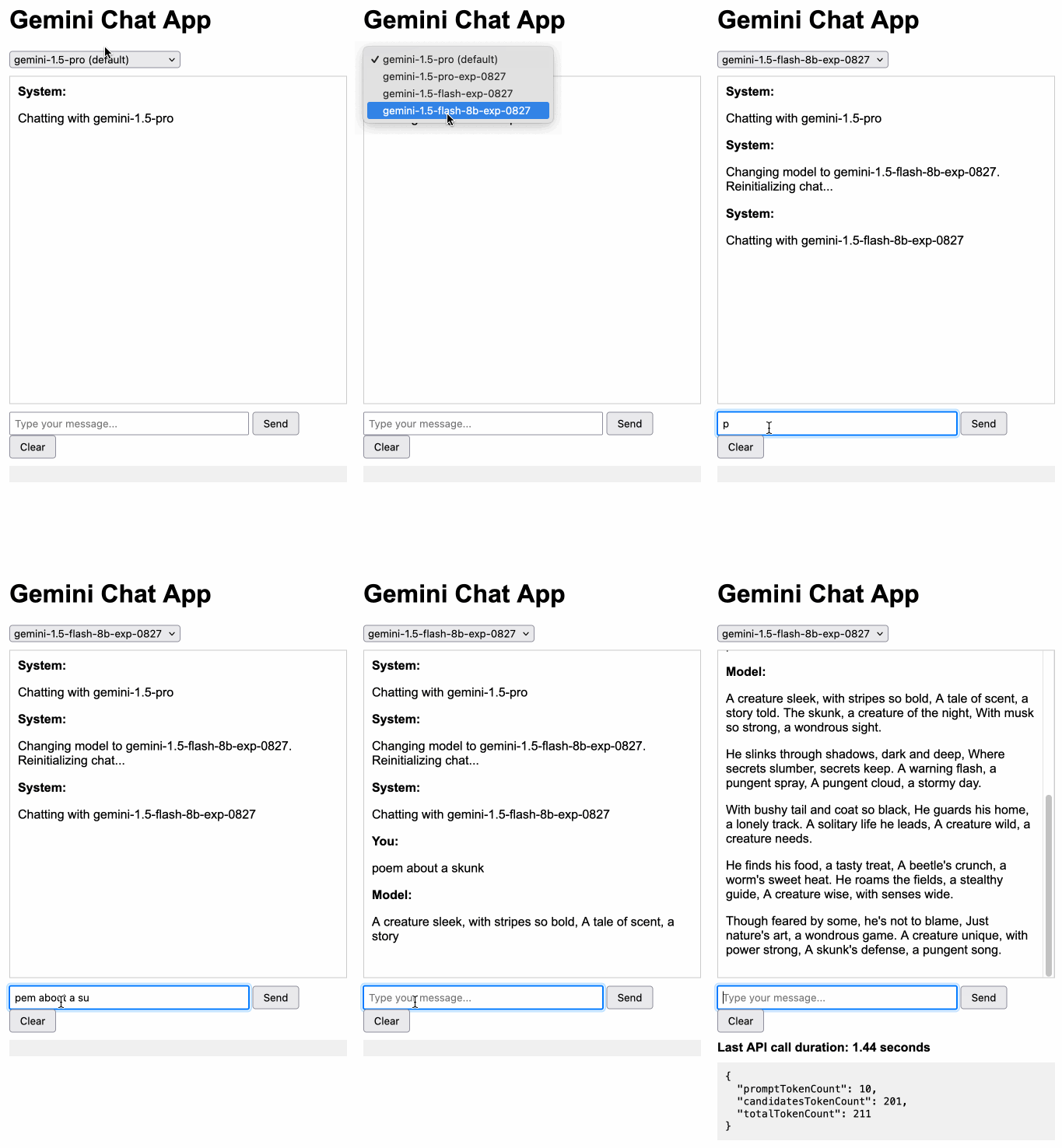
Building this with Claude 3.5 Sonnet took literally ten minutes from start to finish - you can see that from the timestamps in the conversation. Here's the deployed app and the finished code.
The feature I really wanted to build was streaming support. I started with this example code showing how to run streaming prompts in a Node.js application, then told Claude to figure out what the client-side code for that should look like based on a snippet from my bounding box interface hack. My starting prompt:
Build me a JavaScript app (no react) that I can use to chat with the Gemini model, using the above strategy for API key usage
I still keep hearing from people who are skeptical that AI-assisted programming like this has any value. It's honestly getting a little frustrating at this point - the gains for things like rapid prototyping are so self-evident now.
Debate over “open source AI” term brings new push to formalize definition. Benj Edwards reports on the latest draft (v0.0.9) of a definition for "Open Source AI" from the Open Source Initiative.
It's been under active development for around a year now, and I think the definition is looking pretty solid. It starts by emphasizing the key values that make an AI system "open source":
An Open Source AI is an AI system made available under terms and in a way that grant the freedoms to:
- Use the system for any purpose and without having to ask for permission.
- Study how the system works and inspect its components.
- Modify the system for any purpose, including to change its output.
- Share the system for others to use with or without modifications, for any purpose.
These freedoms apply both to a fully functional system and to discrete elements of a system. A precondition to exercising these freedoms is to have access to the preferred form to make modifications to the system.
There is one very notable absence from the definition: while it requires the code and weights be released under an OSI-approved license, the training data itself is exempt from that requirement.
At first impression this is disappointing, but I think it's a pragmatic decision. We still haven't seen a model trained entirely on openly licensed data that's anywhere near the same class as the current batch of open weight models, all of which incorporate crawled web data or other proprietary sources.
For the OSI definition to be relevant, it needs to acknowledge this unfortunate reality of how these models are trained. Without that, we risk having a definition of "Open Source AI" that none of the currently popular models can use!
From a personal perspective, I most value the term "open source" as a label that helps me understand exactly what my rights are for using and building on the software. This OSI definition captures that information.
Instead of requiring the training information, the definition calls for "data information" described like this:
Data information: Sufficiently detailed information about the data used to train the system, so that a skilled person can recreate a substantially equivalent system using the same or similar data. Data information shall be made available with licenses that comply with the Open Source Definition.
The OSI's FAQ that accompanies the draft further expands on their reasoning:
Training data is valuable to study AI systems: to understand the biases that have been learned and that can impact system behavior. But training data is not part of the preferred form for making modifications to an existing AI system. The insights and correlations in that data have already been learned.
Data can be hard to share. Laws that permit training on data often limit the resharing of that same data to protect copyright or other interests. Privacy rules also give a person the rightful ability to control their most sensitive information – like decisions about their health. Similarly, much of the world’s Indigenous knowledge is protected through mechanisms that are not compatible with later-developed frameworks for rights exclusivity and sharing.
Aug. 28, 2024
System prompt for val.town/townie (via) Val Town (previously) provides hosting and a web-based coding environment for Vals - snippets of JavaScript/TypeScript that can run server-side as scripts, on a schedule or hosting a web service.
Townie is Val's new AI bot, providing a conversational chat interface for creating fullstack web apps (with blob or SQLite persistence) as Vals.
In the most recent release of Townie Val added the ability to inspect and edit its system prompt!
I've archived a copy in this Gist, as a snapshot of how Townie works today. It's surprisingly short, relying heavily on the model's existing knowledge of Deno and TypeScript.
I enjoyed the use of "tastefully" in this bit:
Tastefully add a view source link back to the user's val if there's a natural spot for it and it fits in the context of what they're building. You can generate the val source url via import.meta.url.replace("esm.town", "val.town").
The prompt includes a few code samples, like this one demonstrating how to use Val's SQLite package:
import { sqlite } from "https://esm.town/v/stevekrouse/sqlite";
let KEY = new URL(import.meta.url).pathname.split("/").at(-1);
(await sqlite.execute(`select * from ${KEY}_users where id = ?`, [1])).rows[0].id
It also reveals the existence of Val's very own delightfully simple image generation endpoint Val, currently powered by Stable Diffusion XL Lightning on fal.ai.
If you want an AI generated image, use https://maxm-imggenurl.web.val.run/the-description-of-your-image to dynamically generate one.
Here's a fun colorful raccoon with a wildly inappropriate hat.
Val are also running their own gpt-4o-mini proxy, free to users of their platform:
import { OpenAI } from "https://esm.town/v/std/openai";
const openai = new OpenAI();
const completion = await openai.chat.completions.create({
  messages: [
    { role: "user", content: "Say hello in a creative way" },
  ],
  model: "gpt-4o-mini",
  max_tokens: 30,
});
Val developer JP Posma wrote a lot more about Townie in How we built Townie – an app that generates fullstack apps, describing their prototyping process and revealing that the current model it's using is Claude 3.5 Sonnet.
Their current system prompt was refined over many different versions - initially they were including 50 example Vals at quite a high token cost, but they were able to reduce that down to the linked system prompt which includes condensed documentation and just one templated example.
Cerebras Inference: AI at Instant Speed (via) New hosted API for Llama running at absurdly high speeds: "1,800 tokens per second for Llama3.1 8B and 450 tokens per second for Llama3.1 70B".
How are they running so fast? Custom hardware. Their WSE-3 is 57x physically larger than an NVIDIA H100, and has 4 trillion transistors, 900,000 cores and 44GB of memory all on one enormous chip.
Their live chat demo just returned me a response at 1,833 tokens/second. Their API currently has a waitlist.
My goal is to keep SQLite relevant and viable through the year 2050. That's a long time from now. If I knew that standard SQL was not going to change any between now and then, I'd go ahead and make non-standard extensions that allowed for FROM-clause-first queries, as that seems like a useful extension. The problem is that standard SQL will not remain static. Probably some future version of "standard SQL" will support some kind of FROM-clause-first query format. I need to ensure that whatever SQLite supports will be compatible with the standard, whenever it drops. And the only way to do that is to support nothing until after the standard appears.
When will that happen? A month? A year? Ten years? Who knows.
I'll probably take my cue from PostgreSQL. If PostgreSQL adds support for FROM-clause-first queries, then I'll do the same with SQLite, copying the PostgreSQL syntax. Until then, I'm afraid you are stuck with only traditional SELECT-first queries in SQLite.
How Anthropic built Artifacts. Gergely Orosz interviews five members of Anthropic about how they built Artifacts on top of Claude with a small team in just three months.
The initial prototype used Streamlit, and the biggest challenge was building a robust sandbox to run the LLM-generated code in:
We use iFrame sandboxes with full-site process isolation. This approach has gotten robust over the years. This protects users' main Claude.ai browsing session from malicious artifacts. We also use strict Content Security Policies (CSPs) to enforce limited and controlled network access.
Artifacts were launched in general availability yesterday - previously you had to turn them on as a preview feature. Alex Albert has a 14 minute demo video up on Twitter showing the different forms of content they can create, including interactive HTML apps, Markdown, HTML, SVG, Mermaid diagrams and React Components.
Aug. 29, 2024
Elasticsearch is open source, again (via) Three and a half years ago, Elastic relicensed their core products from Apache 2.0 to dual-license under the Server Side Public License (SSPL) and the new Elastic License, neither of which were OSI-compliant open source licenses. They explained this change as a reaction to AWS, who were offering a paid hosted search product that directly competed with Elastic's commercial offering.
AWS were also sponsoring an "open distribution" alternative packaging of Elasticsearch, created in 2019 in response to Elastic releasing components of their package as the "x-pack" under alternative licenses. Stephen O'Grady wrote about that at the time.
AWS subsequently forked Elasticsearch entirely, creating the OpenSearch project in April 2021.
Now Elastic have made another change: they're triple-licensing their core products, adding the OSI-complaint AGPL as the third option.
This announcement of the change from Elastic creator Shay Banon directly addresses the most obvious conclusion we can make from this:
“Changing the license was a mistake, and Elastic now backtracks from it”. We removed a lot of market confusion when we changed our license 3 years ago. And because of our actions, a lot has changed. It’s an entirely different landscape now. We aren’t living in the past. We want to build a better future for our users. It’s because we took action then, that we are in a position to take action now.
By "market confusion" I think he means the trademark disagreement (later resolved) with AWS, who no longer sell their own Elasticsearch but sell OpenSearch instead.
I'm not entirely convinced by this explanation, but if it kicks off a trend of other no-longer-open-source companies returning to the fold I'm all for it!
Aug. 30, 2024
Anthropic’s Prompt Engineering Interactive Tutorial (via) Anthropic continue their trend of offering the best documentation of any of the leading LLM vendors. This tutorial is delivered as a set of Jupyter notebooks - I used it as an excuse to try uvx like this:
git clone https://github.com/anthropics/courses
uvx --from jupyter-core jupyter notebook courses
This installed a working Jupyter system, started the server and launched my browser within a few seconds.
The first few chapters are pretty basic, demonstrating simple prompts run through the Anthropic API. I used %pip install anthropic instead of !pip install anthropic to make sure the package was installed in the correct virtual environment, then filed an issue and a PR.
One new-to-me trick: in the first chapter the tutorial suggests running this:
API_KEY = "your_api_key_here"
%store API_KEY
This stashes your Anthropic API key in the IPython store. In subsequent notebooks you can restore the API_KEY variable like this:
%store -r API_KEY
I poked around and on macOS those variables are stored in files of the same name in ~/.ipython/profile_default/db/autorestore.
Chapter 4: Separating Data and Instructions included some interesting notes on Claude's support for content wrapped in XML-tag-style delimiters:
Note: While Claude can recognize and work with a wide range of separators and delimeters, we recommend that you use specifically XML tags as separators for Claude, as Claude was trained specifically to recognize XML tags as a prompt organizing mechanism. Outside of function calling, there are no special sauce XML tags that Claude has been trained on that you should use to maximally boost your performance. We have purposefully made Claude very malleable and customizable this way.
Plus this note on the importance of avoiding typos, with a nod back to the problem of sandbagging where models match their intelligence and tone to that of their prompts:
This is an important lesson about prompting: small details matter! It's always worth it to scrub your prompts for typos and grammatical errors. Claude is sensitive to patterns (in its early years, before finetuning, it was a raw text-prediction tool), and it's more likely to make mistakes when you make mistakes, smarter when you sound smart, sillier when you sound silly, and so on.
Chapter 5: Formatting Output and Speaking for Claude includes notes on one of Claude's most interesting features: prefill, where you can tell it how to start its response:
client.messages.create(
    model="claude-3-haiku-20240307",
    max_tokens=100,
    messages=[
        {"role": "user", "content": "JSON facts about cats"},
        {"role": "assistant", "content": "{"}
    ]
)
Things start to get really interesting in Chapter 6: Precognition (Thinking Step by Step), which suggests using XML tags to help the model consider different arguments prior to generating a final answer:
Is this review sentiment positive or negative? First, write the best arguments for each side in <positive-argument> and <negative-argument> XML tags, then answer.
The tags make it easy to strip out the "thinking out loud" portions of the response.
It also warns about Claude's sensitivity to ordering. If you give Claude two options (e.g. for sentiment analysis):
In most situations (but not all, confusingly enough), Claude is more likely to choose the second of two options, possibly because in its training data from the web, second options were more likely to be correct.
This effect can be reduced using the thinking out loud / brainstorming prompting techniques.
A related tip is proposed in Chapter 8: Avoiding Hallucinations:
How do we fix this? Well, a great way to reduce hallucinations on long documents is to make Claude gather evidence first.
In this case, we tell Claude to first extract relevant quotes, then base its answer on those quotes. Telling Claude to do so here makes it correctly notice that the quote does not answer the question.
I really like the example prompt they provide here, for answering complex questions against a long document:
<question>What was Matterport's subscriber base on the precise date of May 31, 2020?</question>
Please read the below document. Then, in <scratchpad> tags, pull the most relevant quote from the document and consider whether it answers the user's question or whether it lacks sufficient detail. Then write a brief numerical answer in <answer> tags.
We have recently trained our first 100M token context model: LTM-2-mini. 100M tokens equals ~10 million lines of code or ~750 novels.
For each decoded token, LTM-2-mini's sequence-dimension algorithm is roughly 1000x cheaper than the attention mechanism in Llama 3.1 405B for a 100M token context window.
The contrast in memory requirements is even larger -- running Llama 3.1 405B with a 100M token context requires 638 H100s per user just to store a single 100M token KV cache. In contrast, LTM requires a small fraction of a single H100's HBM per user for the same context.
— Magic AI
OpenAI: Improve file search result relevance with chunk ranking (via) I've mostly been ignoring OpenAI's Assistants API. It provides an alternative to their standard messages API where you construct "assistants", chatbots with optional access to additional tools and that store full conversation threads on the server so you don't need to pass the previous conversation with every call to their API.
I'm pretty comfortable with their existing API and I found the assistants API to be quite a bit more complicated. So far the only thing I've used it for is a script to scrape OpenAI Code Interpreter to keep track of updates to their enviroment's Python packages.
Code Interpreter aside, the other interesting assistants feature is File Search. You can upload files in a wide variety of formats and OpenAI will chunk them, store the chunks in a vector store and make them available to help answer questions posed to your assistant - it's their version of hosted RAG.
Prior to today OpenAI had kept the details of how this worked undocumented. I found this infuriating, because when I'm building a RAG system the details of how files are chunked and scored for relevance is the whole game - without understanding that I can't make effective decisions about what kind of documents to use and how to build on top of the tool.
This has finally changed! You can now run a "step" (a round of conversation in the chat) and then retrieve details of exactly which chunks of the file were used in the response and how they were scored using the following incantation:
run_step = client.beta.threads.runs.steps.retrieve(
    thread_id="thread_abc123",
    run_id="run_abc123",
    step_id="step_abc123",
    include=[
        "step_details.tool_calls[*].file_search.results[*].content"
    ]
)
(See what I mean about the API being a little obtuse?)
I tried this out today and the results were very promising. Here's a chat transcript with an assistant I created against an old PDF copy of the Datasette documentation - I used the above new API to dump out the full list of snippets used to answer the question "tell me about ways to use spatialite".
It pulled in a lot of content! 57,017 characters by my count, spread across 20 search results (customizable), for a total of 15,021 tokens as measured by ttok. At current GPT-4o-mini prices that would cost 0.225 cents (less than a quarter of a cent), but with regular GPT-4o it would cost 7.5 cents.
OpenAI provide up to 1GB of vector storage for free, then charge $0.10/GB/day for vector storage beyond that. My 173 page PDF seems to have taken up 728KB after being chunked and stored, so that GB should stretch a pretty long way.
Confession: I couldn't be bothered to work through the OpenAI code examples myself, so I hit Ctrl+A on that web page and copied the whole lot into Claude 3.5 Sonnet, then prompted it:
Based on this documentation, write me a Python CLI app (using the Click CLi library) with the following features:
openai-file-chat add-files name-of-vector-store *.pdf *.txt
This creates a new vector store called name-of-vector-store and adds all the files passed to the command to that store.
openai-file-chat name-of-vector-store1 name-of-vector-store2 ...
This starts an interactive chat with the user, where any time they hit enter the question is answered by a chat assistant using the specified vector stores.
We iterated on this a few times to build me a one-off CLI app for trying out the new features. It's got a few bugs that I haven't fixed yet, but it was a very productive way of prototyping against the new API.