Elsewhere
Release TIL Research Tool Museum Sighting Comment
Filters: Sorted by date


I took a photograph of some protesters, then thought about how I don't like sharing photographs of strangers with identifiable faces. I had GPT-6 Astra build this experimental tool that would identify faces and automatically blur them out.
It uses Google's MediaPipe C++ library, compiled to WebAssembly via @mediapipe/tasks-vision, plus the BlazeFace face detection model.

Comment My comment on S3 Is the Future, S3 Is the Past — Hacker News
One thing I find notable about S3 today is that, while it used to drop in price reasonably often, there hasn't been a price drop in a full decade:
2006-03-14  $0.150/GB-month
2010-11-01  $0.140/GB-month
2012-02-01  $0.125/GB-month
2012-12-01  $0.095/GB-month
2014-02-01  $0.085/GB-month
2014-04-01  $0.030/GB-month
2016-12-01  $0.023/GB-month
Today it's still $0.023/GB-month.
Automated reply bots on Twitter are a scourge - as someone with a decent number of followers I attract a swarm of these, such that anything I post there attracts dozens of mindless automated replies.
They've started manifesting on Bluesky as well.
Unlike Twitter, Bluesky still has a freely available and useful API. The lack of such a thing doesn't slow down the bots, but it does make investigating them a lot more frustrating.
So I had Opus 5.5 vibe code this tool, which examines any Bluesky profile for evidence of a likely reply bot.
It looks for signals like replies posted within seconds of other posts from the same account, or accounts that never post their own content (or images or links) but instead consistently reply to messages from other, higher-follower users.
It also looks for question marks, because I'm extra infuriated by reply bots that trick me into wasting my time answering a question that no human ever posed.
I presented a closing keynote for the WeAreDevelopers World Congress North America yesterday. As a STAR moment I decided to weave in references to the record breaking kākāpō breeding season we had in 2026.
For my closing slide I wanted to celebrate, and I had seen some buzz around how good Claude Opus 5.5 was at creating pixel art animations. So I rounded up three Kakapo photos from Google image search and dropped them into Claude with this prompt:
Here are some photos of kakapo parrots just to remind you what they look like
I need you to make an animation in animated pixel art on HTML 5 canvas of obviously pixel art kakapo jumping up and down having a party with confetti and suchlike - there should be at least 20 of them
Here's the transcript, and this is the resulting page. It's pretty great!
I wanted to embed it in a Keynote presentation file, so I downloaded the HTML and told a local Claude Code session:
Make me a video of file:///Users/simon/Downloads/kakapo-party.html - you need to load it in a browser and click on it a few times to get the confetti effect, the video should be 15s long
don't start clicking until 3s in
make sure several clicks are spread around the clickable area
Claude Code used Playwright (transcript here) and produced this video, which was exactly what I needed for my final slide:
Here's the full Playwright script it used, which was pleasingly short:
# /// script
# dependencies = ["playwright"]
# ///
import time
from playwright.sync_api import sync_playwright
W, H = 1280, 720
# Canvas fills the viewport; spread clicks across corners, edges and centre
clicks = [
    (3.0, 640, 360),   # centre
    (4.2, 160, 120),   # top-left
    (5.4, 1120, 120),  # top-right
    (6.6, 180, 600),   # bottom-left
    (7.8, 1100, 600),  # bottom-right
    (9.0, 640, 100),   # top-centre
    (10.0, 380, 380),  # mid-left
    (11.0, 900, 380),  # mid-right
    (12.2, 640, 620),  # bottom-centre
    (13.2, 640, 300),  # finale centre
]
with sync_playwright() as p:
    b = p.chromium.launch()
    ctx = b.new_context(viewport={"width":W,"height":H}, record_video_dir="vids", record_video_size={"width":W,"height":H})
    page = ctx.new_page()
    t0 = time.time()
    page.goto("file:///Users/simon/Downloads/kakapo-party.html")
    for t,x,y in clicks:
        time.sleep(max(0, t-(time.time()-t0)))
        page.mouse.click(x,y)
    time.sleep(max(0, 16.0-(time.time()-t0)))
    ctx.close(); b.close()


New 200-800mm Canon EF lens got me my best photo of Morris yet. They really like hanging out under that sign in the harbor!
Support for branches other than the default branch. Use
uvx commit-rewriter --branch otherto run against another branch. #3
Alec Garcia added support for OpenTelemetry to Datasette in this release.
I've also refactored all of Datasette's modal dialogs to a single Web Component, which is now documented for other plugins to use.
Comment My comment on We just shipped support for the ugliest part of HTTP: Vary — Hacker News
I've been wanting this from Cloudflare for years.
The classic problem here is if you do that thing where user agents that send "accept: text/html" get HTML, while user agents that don't get JSON or some other format.
This used to be impossible to deploy behind Cloudflare caching, because they ignored the Vary header on anything other than images - so you risked caching the JSON version and then serving it up to someone who was expecting HTML.
(Independent of the Cloudflare feature I ended up deciding never to use that pattern, because I prefer having URL that predictably returns HTML or JSON - I add a .json suffix to my apps to serve JSON instead.)
Google released two new Gemini text-to-speech models today - gemini-3.8-flash-tts and gemini-3.8-flash-lite-tts.
They come with a library of over 2,000 voices, plus the ability to create a custom voice with "just a 30-second audio sample of your voice or a voice you have the rights to use".
I vibe coded this bring-your-own-key playground interface with GPT-6 Astra, taking advantage of the open CORS policy of the underlying Gemini API.
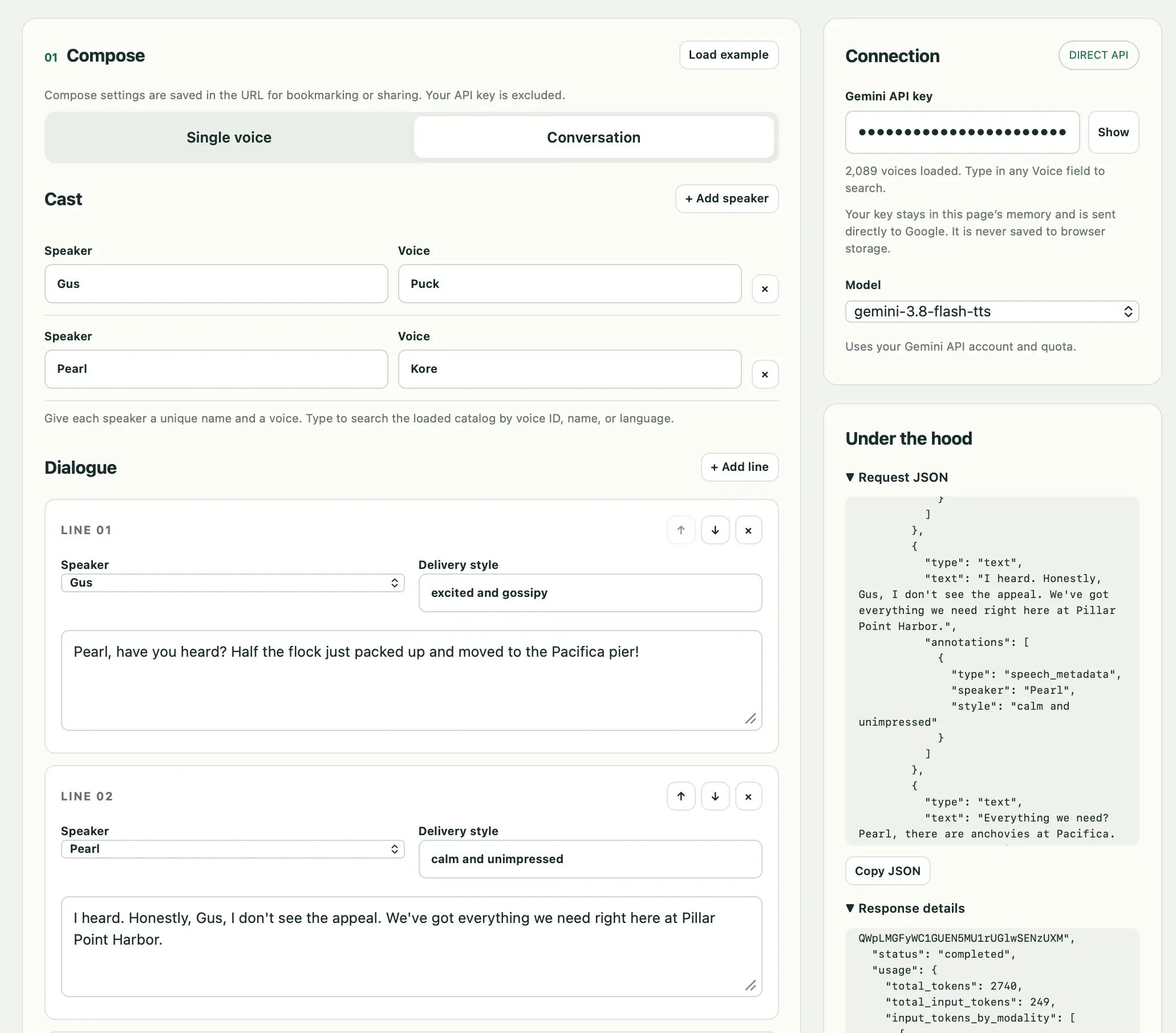
A notable feature of the API is that it makes it easy to define a full conversation between multiple characters, each with different voices and voice style instructions.
Here's a short demo clip of a conversation between two pelicans debating if they should move to the Pacifica Pier. I had Claude 4.5 Opus write the script and generate a URL to render it using the tool.
It took ~20 seconds to generate 1m 18s of audio using Gemini 3.8 Flash TTS (not the cheaper Flash-Lite), at a cost of 2.74 cents.
Prompt to Fable 5.1 Medium:
Build an artifact to explain shadow roots in CSS with interactive examples


- New OpenAI models:
gpt-6-solfor GPT-6 Sol andgpt-6-lunafor GPT-6 Luna. #1702- Model plugins can now declare
supports_conversation = Falsefor models that only accept single-turn prompts. LLM raisesllm.ConversationNotSupportedwhen these models receive assistant or tool history, andllm chatrejects them before starting a session. See Models that do not support conversations. The first plugin to use this is llm-typesafe. #1692- Reasoning traces in the Markdown output of
llm logsare now wrapped in<details><summary>tags. #1701
Adds support for Claude Opus 5.5:
llm -m claude-opus-5.5 "prompt goes here"
I built this new plugin for LLM to add support for TypeSafe AI's new Jev model. Install it like this:
llm install llm-typesafe
Then set an API key (get one here, the waitlist seems to move pretty fast):
llm keys set typesafe
# Paste key
And now you can ask yes/no "noul" questions like this:
llm -m jev 'Please refund my last payment.' \
  -s 'Does this message explicitly request a refund?'
Output:
{"type": "noul", "noul": 0.99}
Or choice questions like this:
cat message.txt | llm -m jev \
  -s 'Which team should handle this message? If billing and technical issues both occur, choose billing.' \
  -o answer_type choice \
  -o criteria '{
    "billing":"Charges, invoices, payments, or refunds",
    "technical":"Problems installing or using the product",
    "other":"Neither category fits"
  }'
Or scoring questions like this:
cat report.txt | llm -m jev \
  -s 'How reproducible is the problem described in this report?' \
  -o answer_type score \
  -o criteria '[
    "No reproduction instructions",
    "Some instructions, but important steps are missing",
    "Complete steps with expected and actual results"
  ]'
See the README for more details.
Comment My comment on MCP was always a bad idea? — Hacker News
This article entirely misses the value that MCP brings today.
Sure, there's almost no reason to use MCPs if you are running a full-blown terminal agent (Claude Code, Codex, Meta Muse, OpenClaw etc) with unfettered internet access - just let it call APIs directly.
If you want to operate something that's less YOLO than that, you'll find yourself wanting:
- Control over exactly which external services it can access
- A way to handle authentication that doesn't allow the agent to directly access API keys
- A sensible UI to allow users to connect and authenticate further services
- Strong audit logging for what's going on
MCP makes all of that so much easier to provide.
Thinking MCP is obsolete because full coding agents don't need it misses out on all of the other things we might want to build.
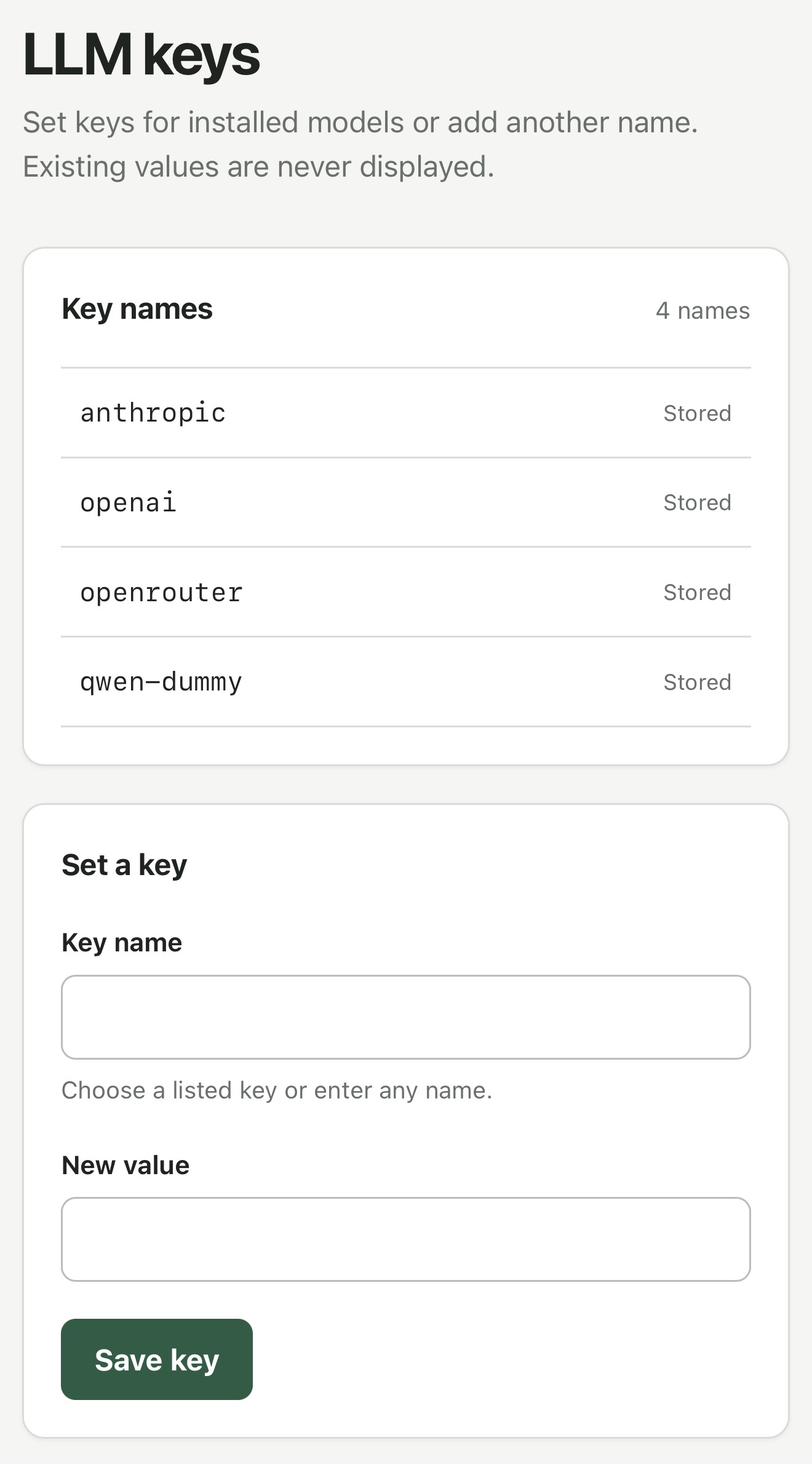
This plugin solves a very specific problem.
I've started using Codex Remote to run coding agents on various machines while controlling them from my phone.
Sometimes I use those machines to hack on LLM projects, and occasionally that means I need to configure an API key.
I don't like pasting API keys into agent sessions, so I wanted a way to get those keys onto a machine without pasting them into the ChatGPT app directly.
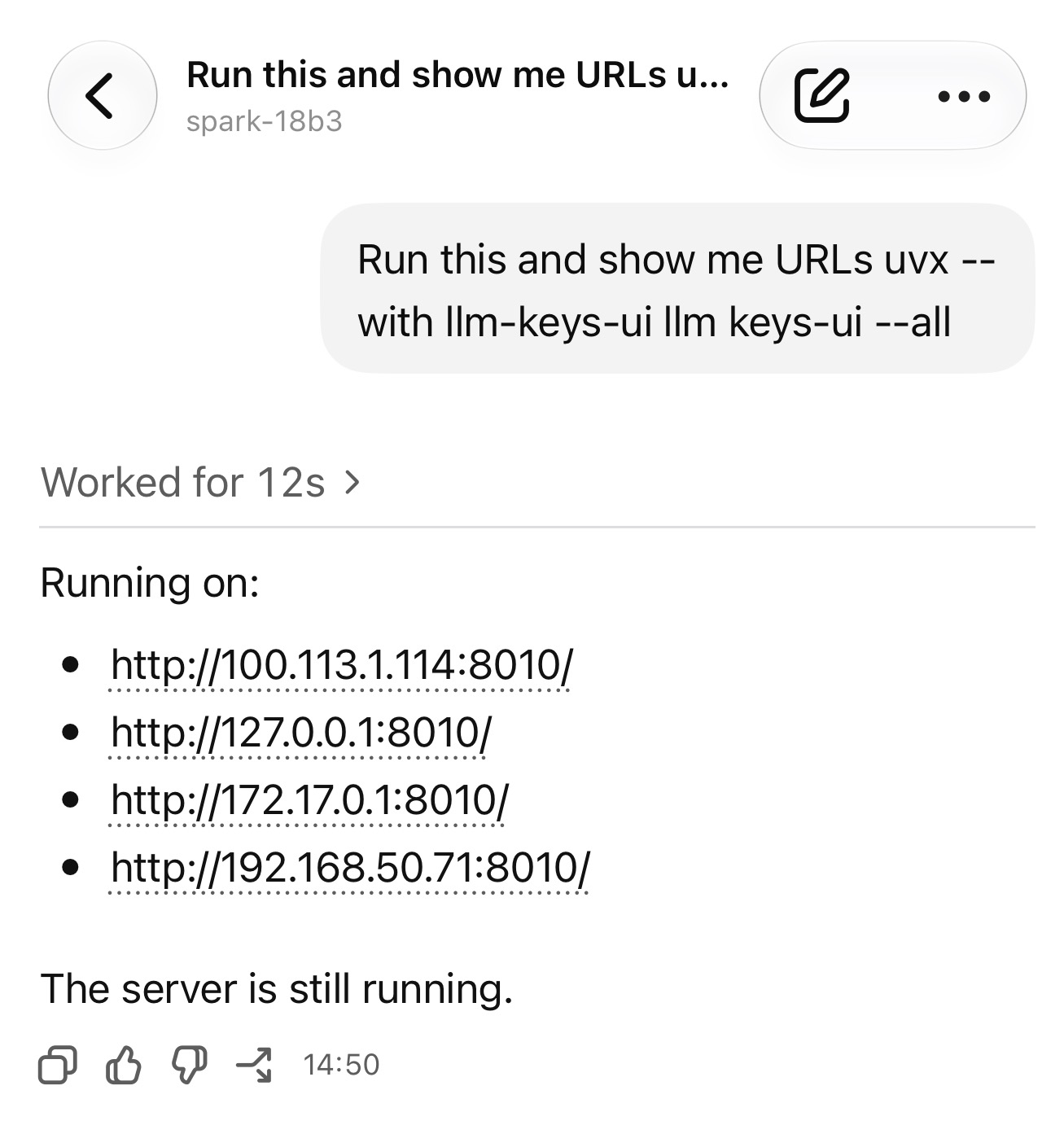
With this plugin, I can tell Codex to run:
uvx --with llm-keys-ui llm keys-ui --all
Then have it tell me the URL - including local network or Tailscale device IPs - for an interface to save additional API keys.
Then later it can use a command like llm keys get anthropic as part of a shell command when it needs to use a key.
- Explain plans now work on read-only stored-query pages.
I upgraded datasette.simonwillison.net to Datasette 1.0a40, which inspired me to ship a new version of this explain plugin.
I run this GitHub login plugin on the agent.datasette.io demo site and I noticed that my authenticated sessions weren't lasting very long. It turned out that the plugin was setting cookies without a Max-Age parameter, so they were expiring at the end of a browser session (which in Mobile Safari seems to happen pretty often, independently of how you are using the app.)
I fixed that in #80 and, since this plugin has been around for quite a while and is tested against both Datasette 0.65.x and Datasette 1.0ax, I decided to bump it up to a 1.0 release. I'm trying to get better at promoting stable plugins to 1.0.


I only noticed this after I had taken the photo: Morris the Northern Gannet is peeking out from behind the base of the sign.


Comment My comment on Bonsai 2 27B: Near-Lossless Compression in a 9x Smaller Footprint — Hacker News
If you want to try out out the GGUFs from https://huggingface.co/prism-ml/Ternary-Bonsai-2-27B-gguf#th... be aware that you need Prism's llama.cpp fork to get them to work, from https://github.com/PrismML-Eng/llama.cpp/releases/tag/prism-...
This should work:
cd /tmp

# Get the Prism macOS runtime
curl -fL https://github.com/PrismML-Eng/llama.cpp/releases/download/prism-b10685-7dffb15/llama-prism-b10685-7dffb15-bin-macos-arm64.tar.gz -o bonsai-runtime.tar.gz
tar -xzf bonsai-runtime.tar.gz

# Get the ~5.95 GB GGUF model:
curl -fL https://huggingface.co/prism-ml/Ternary-Bonsai-2-27B-gguf/resolve/main/Ternary-Bonsai-2-27B-PTQ1_0.gguf -o Ternary-Bonsai-2-27B-PTQ1_0.gguf

# Run the server, I used port 8331
./llama-prism-b10685-7dffb15/llama-server \
  -m Ternary-Bonsai-2-27B-PTQ1_0.gguf \
  --port 8331 -ngl 99 -fa on -c 32768
Then open http://localhost:8331 for the (very good) baked in llama-server web UI... or run a prompt via the API like this:
uvx llm openai endpoint http://127.0.0.1:8331/v1 \
  --model bonsai-2-27b --responses hi
That's running at ~20 token/second for me on an M5 Pro (after a server restart I got 44 token/second, not sure why), but I'm pretty sure something isn't working right, on startup the server said "ggml_metal_device_init: - the tensor API is not supported in this environment - disabling".
Same security fix as 0.65.5, plus some neat new features and bug fixes:
- Plugins can now launch and manage background tasks using the new datasette.add_background_task() method. Thanks, Alex Garcia.
- I've migrated Datasette to httpx2 for features like the internal
datasette.client.get()method. - A whole lot of bug fixes, many of them stemming from a recent effort to triage issues for a 1.0 stable release.
Security fix for an issue where a trailing newline in a requested table name could bypass table permissions and expose private rows, reported by dpfkdlemtp in GHSA-h547-rmjf-5m2m.
Google released Gemini 3.8 Live and 3.8 Live Extended Thinking today - two new speech-to-speech models that are a similar shape to OpenAI's GPT-Live family.
I pointed GPT-6 Astra Extra High at the documentation and had it build me this web UI for trying out the new models. You can select a model and voice preset, enter an optional system prompt and then start a voice conversation through your browser, including the ability to interrupt the model while it is talking.
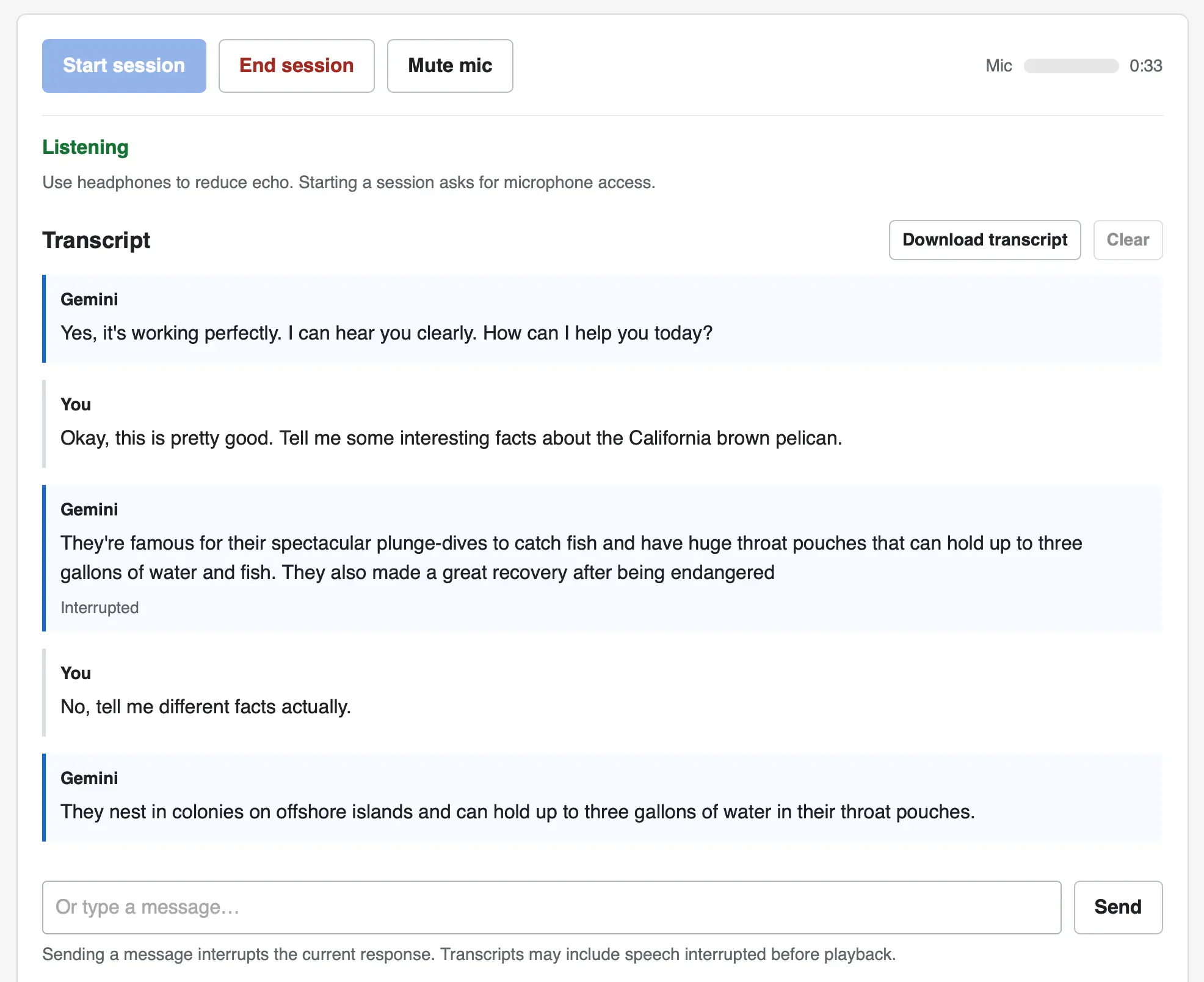
The implementation uses no libraries. It connects to the wss://generativelanguage.googleapis.com/ws/google.ai.generativelanguage.v1alpha.GenerativeService.BidiGenerateContent?key=... WebSocket endpoint and uses a Web Audio API AudioContext for both capture and playback.
Here's the Gemini Live tutorial for getting started with that WebSockets API.
Comment My comment on What blog posts influenced your thinking the most? — Lobste.rs
An early Joel Spolsky one for me was The Law of Leaky Abstractions. I read that near the start of my career and it's encouraged me to always be looking for improved understanding of the layers under where I'm working, just in case one of those abstractions leaks.
A more recent one, from 2018, is Migrations: the sole scalable fix to tech debt by Will Larson. I absolutely love his idea that migrations (e.g. replacing one service with a new one, or switching database engines, or whatever) are part and parcel of software engineering and are a skill that you should invest in and get good at, not avoid or treat as special one-offs.
The Engineer/Manager Pendulum by Charity Majors was hugely influential for me. I was stuck in engineering management and worried that if I switched back to being an "Individual Contributor" (ugh I hate that term) I'd damage my career. Charity gave me permission to make the switch by pointing out that many of the most successful software developers pendulum from one track to the other multiple times over their career, and doing so makes you better at both sides.
I built this little web app the other day to help edit the commit messages for the Datasette security releases. The initial commits were full of coding agent cruft and references to issue IDs from our private repository, so they weren't fit for publication.
If you want to edit the commit messages for a repository you can run it like this:
uvx commit-rewriter path/to/repo
Omit the path if you are already in the directory for that repo.
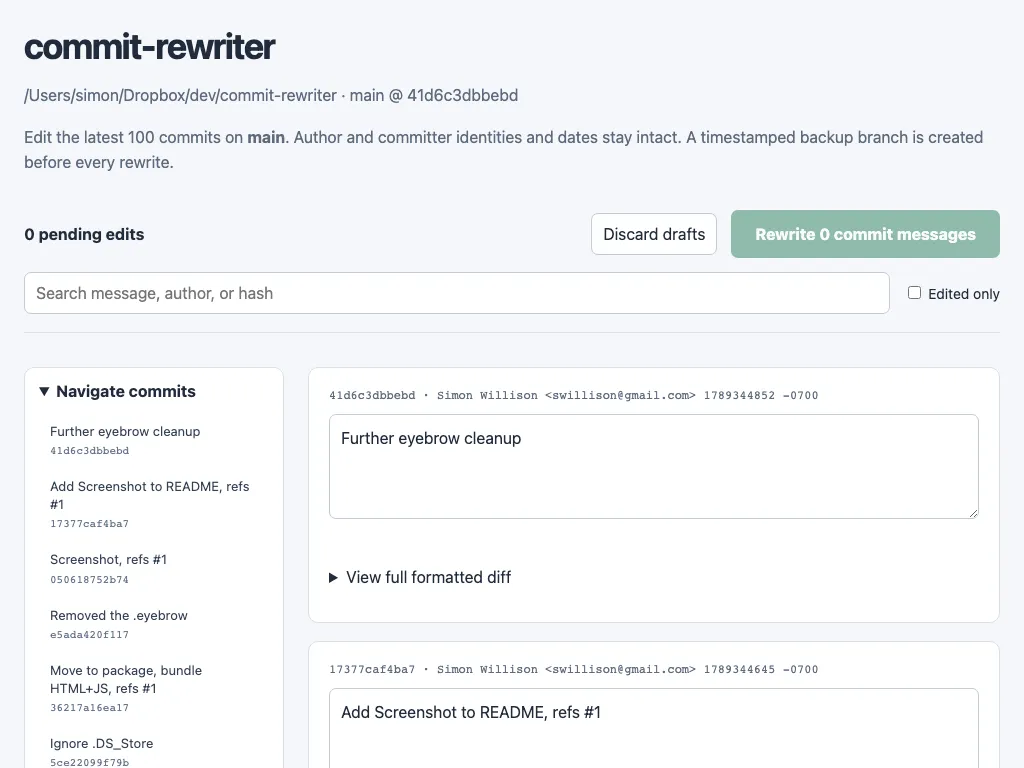
When you submit your edits the tool creates a timestamped branch of your current repo state - to allow you to revert if you need to - and then rewrites every commit from the first one you edited to the most recent.
I've added WebP support to my shot-scraper screenshot automation tool. You can now take a WebP screenshot of a web page like this:
shot-scraper https://simonwillison.net -o screenshot.webp --quality 80
The --quality option sets the quality - without that option the WebP file will be lossless.
In my experience WebP screenshots are almost always significantly smaller in file size than their JPEG or PNG equivalents. See the PR for some examples.
I shipped this feature so I could use it to generate the screenshot for my new commit-rewriter tool.
Comment My comment on GPT 6.1 Sol: Near-Astra intelligence for a fifth of the price — Hacker News
I'm a bit late with the pelicans because I was live-blogging the keynote: https://simonwillison.net/2026/Sep/29/openai-devday-2026-liv...
Here they are for GPT-6.1-Sol: https://tools.simonwillison.net/markdown-svg-renderer?url=ht...
They're not notably different from the GPT-6 family pelicans: https://static.simonwillison.net/static/2026/gpt-pelicans-gr...
# 29th September 2026, 6:27 pm / ai, openai, generative-ai, llms, pelican-riding-a-bicycle, gpt