Elsewhere
Release TIL Research Tool Museum Sighting Comment
Filters: Sorted by date


The Pacifica Pier shut down at the start of June after a crack in the concrete walkway made access to the pier unsafe.
It has since been entirely taken over by pelicans!
- Fix for compatibility with sqlite-utils 4.x. #85
See Datasette 1.0a39 and 0.65.4 security releases on the Datasette blog.
See Datasette 1.0a39 and 0.65.4 security releases on the Datasette blog.
I'm continuing to have a lot of fun with GPT-6 Astra and Blender (see my TIL).
As a big fan of the Imperial Fabergé Easter eggs, I've always thought it would be fun to make some new ones that celebrate popular culture.
Yesterday I decided to try out the new ChatGPT Images 2.5 by running this prompt:
Generate a photo of a faberge egg that's themed after the TV show Pluribus - research first
It gave me this - honestly not bad for a first attempt!

Then, just to see what would happen, I pasted that image into Codex running GPT-6 Astra (high) and prompted:
Use your blender local skill to create a blender model of this faverge egg
(Here's the skill file, which I created like this.)
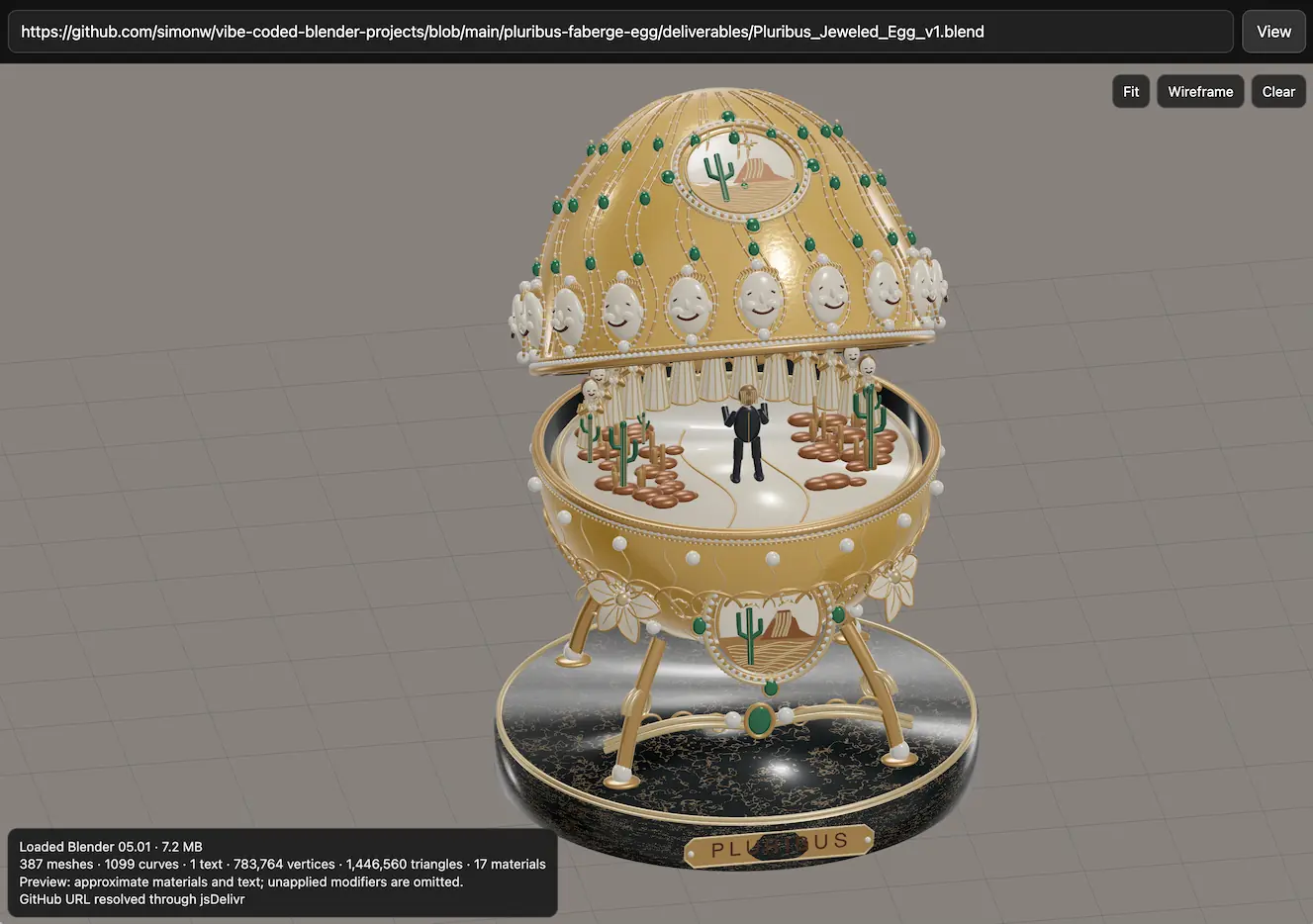
It churned away for 17m51s and built me several .blend files. I already had this vibe-coded Blender viewing experiment lying around, so I added that to my tools collection and now you can use it to see my Pluribus blender model in your browser:
- New OpenAI model:
gpt-6-astrafor GPT-6 Astra.
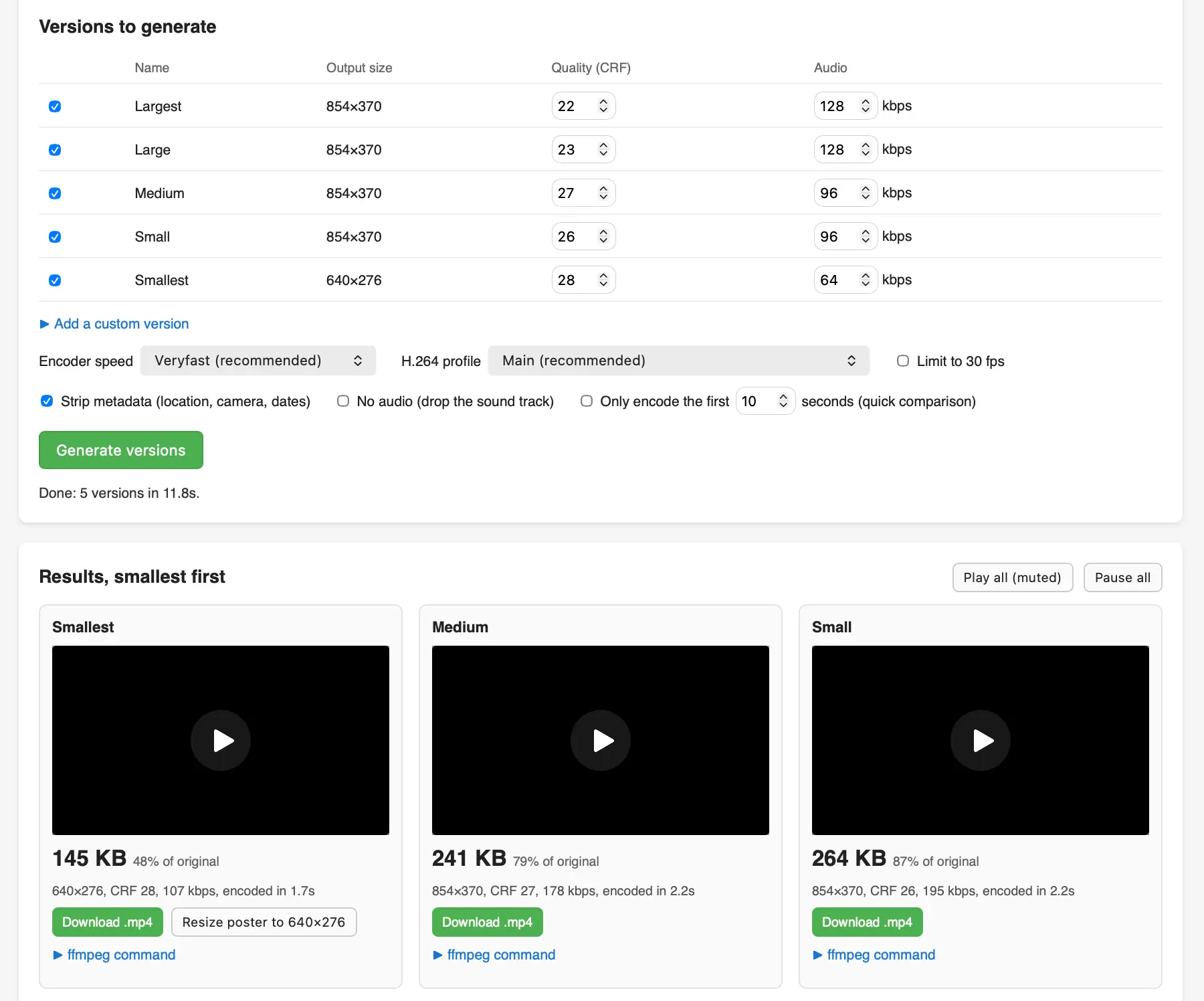
I recorded a short demo video of my Equal Earth animation on my phone and wanted to publish an optimized version of that video (using FFMPEG) on my blog, so I had Claude Fable 5.1 in Claude Code for web build me this tool using the WebAssembly build of FFMPEG.
I got curious about the Equal Earth map projection that was recently voted on at the UN so I had GPT-6 Astra (medium) in ChatGPT Work build me this animated transition between Mercator and Equal Earth using D3.
Comment My comment on There's No Limit to How Bad Code Can Get — Lobste.rs
[In reply to a comment about burning it down to start from scratch when technical debt becomes overwhelming]
In my experience it's so rare for that to work.
You announce the old thing is irrecoverably drowning in tech debt. You spin up a team to rewrite it from scratch. Work begins.
Meanwhile the old thing remains a moving target: it's running the core business, so changes are still necessary. The developers working on it know that it's going to be made obsolete by the new thing soon, so they don't have any incentive to go beyond the smallest effort possible to add the new features. Technical debt continues to mount.
Meanwhile, the team working on the new thing are ambitious and probably a little naive. They start out at a great pace - it's greenfield after all - but as time progresses it becomes apparent that nobody fully understands the behavior and scope of the thing they are replacing. If it was well documented and tested it wouldn't need to be replaced, after all...
After months (or even years) without delivering value, the pressure is on to "ship it", so the new system is launched to handle a subset of what the old system handled - or often for some new feature that was too hard to build with the now mostly unmaintained old system.
... so now you have TWO systems in production - the janky old system that nobody wants to touch, and a new system which handles just a few production features and is 80% inactive code that is meant to replace the old system, eventually.
If you're really lucky the company won't have lost patience with the new system and will allow that work to continue. The longer this all takes, and the longer the old system stays in production and stubbornly continues to work, the higher the risk that "priorities have changed" and the new system total replacement work is abandoned, leaving you with two systems where you used to have one.
The best article I've read about completing this process responsibly is Migrations: the sole scalable fix to tech debt by Will Larson.
If I run into a situation like this in the future, my strong recommendation will be to shore up the old system with as much automated testing as possible and then seeing if targeted refactors can get it to the desired shape. My hunch is that in many cases that will have a much higher chance of success than the siren call of a greenfield replacement.

I've been having fun with Blender in ChatGPT Codex on my Mac recently. Getting it to work with coding agents is really easy: install the full Mac application from blender.org and run a prompt like this:
Use the already install /Applications/Blender to render a scene of a pelican riding a bicycle
In this case I followed that up with these two prompts:
OK add a background and a lot of flair
Then:
OK make it a whole lot better
And got this image, generated using Blender's Python API:

This was covered by my existing Codex subscription, but according to AgentsView it would have cost $4.24 at API prices for gpt-6-astra.


One new feature:
llm logs --usageMarkdown output now includes the response duration in milliseconds and as a human-readable duration.llm logs --shortincludes a newduration_msfield. #1653
Plus several contributed bug fixes, and a significant performance improvement to llm logs thanks to waveplate on GitHub, see also llm-openrouter 0.7.1.
Claude Fable 5.1, reasoning traces are now displayed by default for models that support them, plus a new llm_anthropic.ClaudeRefusal exception for when Claude throws a refusal.
- New model
gemini-3.8-flashfor Gemini 3.8 Flash, with low, medium and high thinking levels. #146- Fixed async responses failing to record the resolved model version. Thanks, Charlie Tonneslan. #137
Google released Gemini 3.8 Flash (and 3.8 Flash Cyber, but that's available to "trusted defenders" only) today.
Here are the pelicans for high, medium, and low. This is high:

For comparison, here are the same pelicans generated using Gemini 3.7 Flash.
Something I appreciate about Gemini Flash is that it's fast, cheap, and competent at things like HTML and JavaScript. I was messing around with it and prompted "make me a cool thing in html" and it built this, which is certainly a cool thing in HTML! Took 13 seconds, cost 1.8 cents.
If you click through to the demo you'll see one more thing I built with Gemini 3.8 Flash.
My markdown-svg-renderer tool lets me feed in the URL to a Gist with Markdown in and renders that markdown with fenced code blocks for SVG correctly rendered.
I used Gemini 3.8 Flash (with my very basic llm-coding-agent coding agent plugin) to add support for HTML as well, so now any HTML blocks in the Markdown are rendered using a sandboxed iframe. Here's the transcript.
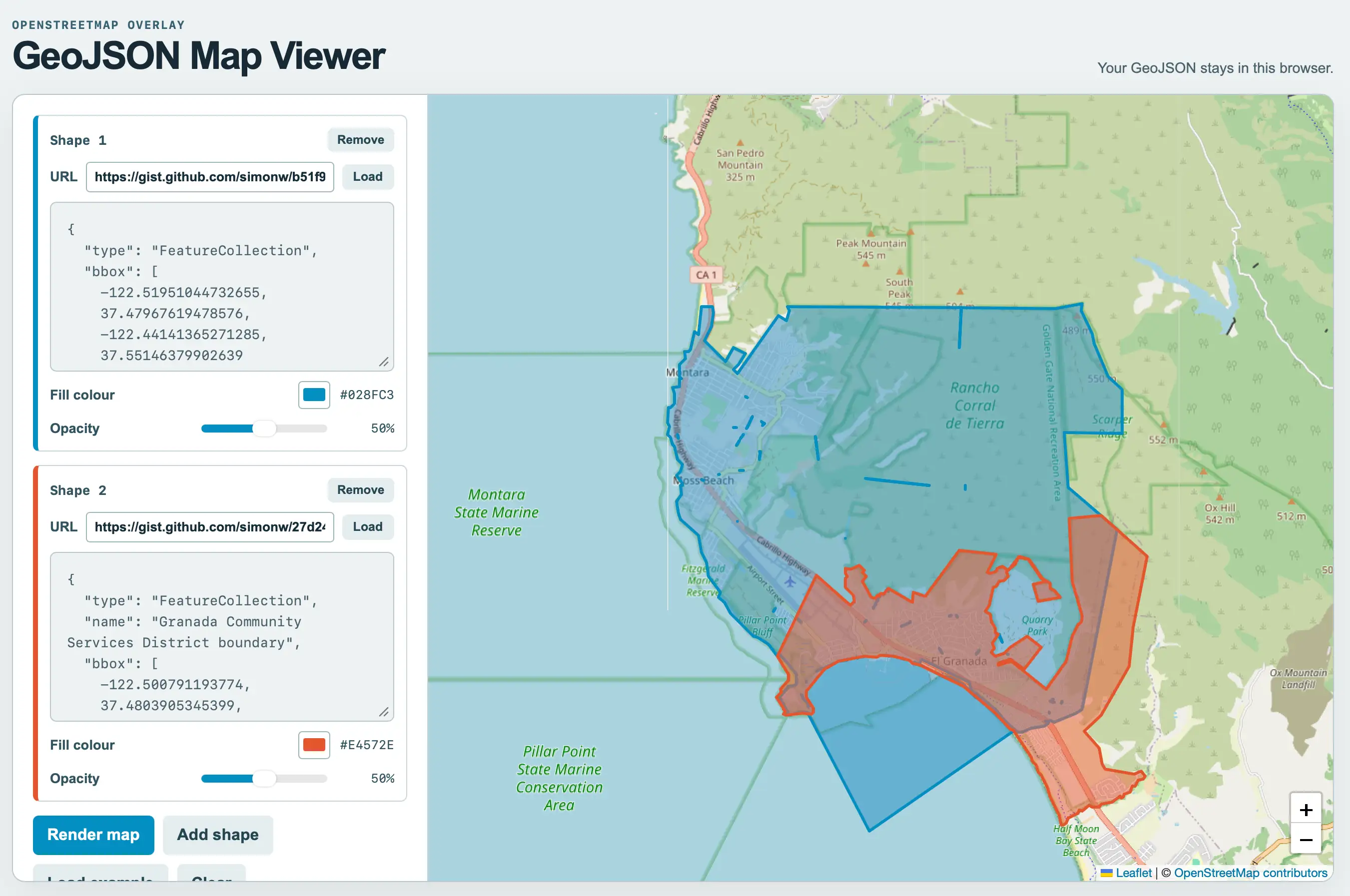
I was helping Natalie gather some maps of local political boundaries (for the Granada Community Services District and the Midcoast Community Council) and found a need to display some GeoJSON files on a map and export that as a PNG. I asked GPT-5.6-Sol for suggestions of tools and it proactively built one. After some iterations using Claude Code for web and Fable 5.1 we got to this finished tool.
As for the GeoJSON.. it turns out if you ask ChatGPT Work to provide boundaries for almost anything it will churn away extracting and combining files from different Government data sources and build exactly what you need.
I got this polygon from:
I want a polygon that represents the exact boundary of the El Granada GCSD
And this one from:
Get me a GeoJSON file for the boundary (or boundaries if that makes sense) for the MCC - Midcoast Community Council - that operates near Half Moon Bay CA
Here's a link that displays both of them at the same time on the new GeoJSON map viewing tool.
"rows"fromexecute_sqlis now an array of objects. Previously it was an array of arrays. This should help weaker models avoid losing track of which positional array element maps to which column. #1- Now depends on
mcp>=2.1.1.
This is the first non-alpha release of the plugin. I'm confident it's ready as I've been using it quite a bit myself.


This release of the Anthropic plugin for LLM mainly provides compatibility with the recently released anthropic v1.0.0 Python library, which switches from httpx to httpx2. OpenAI made the same change in their v3.0.0 release two weeks ago.
Anthropic provide this migration guide for upgrading to 1.0, so I prompted Fable 5 in Claude Code with:
Upgrade to anthropic>=1 - read https://raw.githubusercontent.com/anthropics/anthropic-sdk-python/refs/heads/main/MIGRATION.md and get the tests passing
Here's the resulting PR.


My highlights from this release:
I shipped a quick 0.32.1 fix for this yesterday, but this is the more comprehensive fix.
llm embedandllm embed-multinow accept--key. The PythonEmbeddingModel.embed(),EmbeddingModel.embed_multi(),Collection.embed()andCollection.embed_multi()methods acceptkey=too, passing the resolved per-call key to embedding plugins without changing shared model state. Existing plugins that readself.keycontinue to work through a compatibility fallback. Thanks, ChrisJr404. #757, #1620
The embedding models now use the same pattern for keys that regular LLM models do.
llm prompt -t/--templatecan now be repeated to combine templates in order. This allows model configuration and options from one template to be used with a prompt from another.
This unlocks a neat pattern where you can create templates that package a model with a set of default options:
llm -m gpt-5.6-luna -o reasoning_effort high --save lhigh
llm "Generate an SVG of a pelican riding a bicycle" --save pelican
# Combine and run the templates
llm -t lhigh -t pelican
- Reasoning-capable Responses API models now support a
reasoning_summaryoption withauto,concise, anddetailedvalues. This can be used with llm openai endpoint --responses. #1600
This is particularly useful for exercising different models that provide their own imitation of the OpenAI Responses API.
Fresh installs of LLM stopped working the other day because the OpenAI Python library dropped its usage of httpx, and it turned out LLM depended on that library but only installed it via a transitive openai dependency.
This dot-release fixes that for the moment by pinning to openai<3, and a soon-to-drop 0.33 release will switch from httpx to httpx2.
Now that this plugin is compatible with LLM 0.32 it can display the reasoning traces for LLMs available through OpenRouter.
- Updated for compatibility with LLM 0.32.
- Models now use OpenRouter's implementation of the Responses API.
- Three new server-side tools: Shell, WebFetch, and WebSearch. Enable these with options like
-T WebSearch.
Comment My comment on Feeling sad about AI — Hacker News
I'm not sure how useful it is to say this, but I think a lot of people (myself included, a few years ago now) have been through this moment of existential crisis and come out the other side.
The initial reaction, when some coding agent does a piece of work that would have taken you a week in an hour and does it well, is to be very disheartened by it.
Once you come to terms with the idea that translating an exact specification into decent code isn't a unique skill any more, you can start looking at the larger set of problems that you face as a software engineer and realize that there is so much left, and your existing skill and experience mean you can master these new tools, provide value, and execute at a level far greater than anyone who is just getting started building software using agents without any of your depth.
If you don't want your profession to change at all then you're going to have a tough time with this - but that's surely been true for the history of software engineering? Has there ever been any stability to the tools and language we use beyond about a five year time horizon?
These changes are happening a bit faster, but if you chose software development as a passion you've opted into pretty frequent radical change from the start.
# 11th September 2026, 5:28 pm / ai, generative-ai, llms, deep-blue