Elsewhere
Release TIL Research Tool Museum Sighting Comment
Filters: Sorted by date


I put the new Python 3.15 profiler through its paces by having GPT-6 Astra Extra High in Codex run it against my new web-edit app:
I need a Python 3.15 flame graph and heatmap demo of the "web-edit" app from PyPI - research first then make me those demos
Here's the resulting example flame graph and heatmap.
I was working on a project from my phone using Codex Remote when I found myself wanting to edit a credentials file without round-tripping those credentials through the LLM itself.
So... I had Codex and GPT-6 Astra Extra High build this Python web app which provides a web UI for viewing and editing files in a folder. It's intended to be run over Tailscale, so I can have an agent start this running and then edit files via my Tailscale network directly from my phone.
Here's the interface for browsing files in a folder:
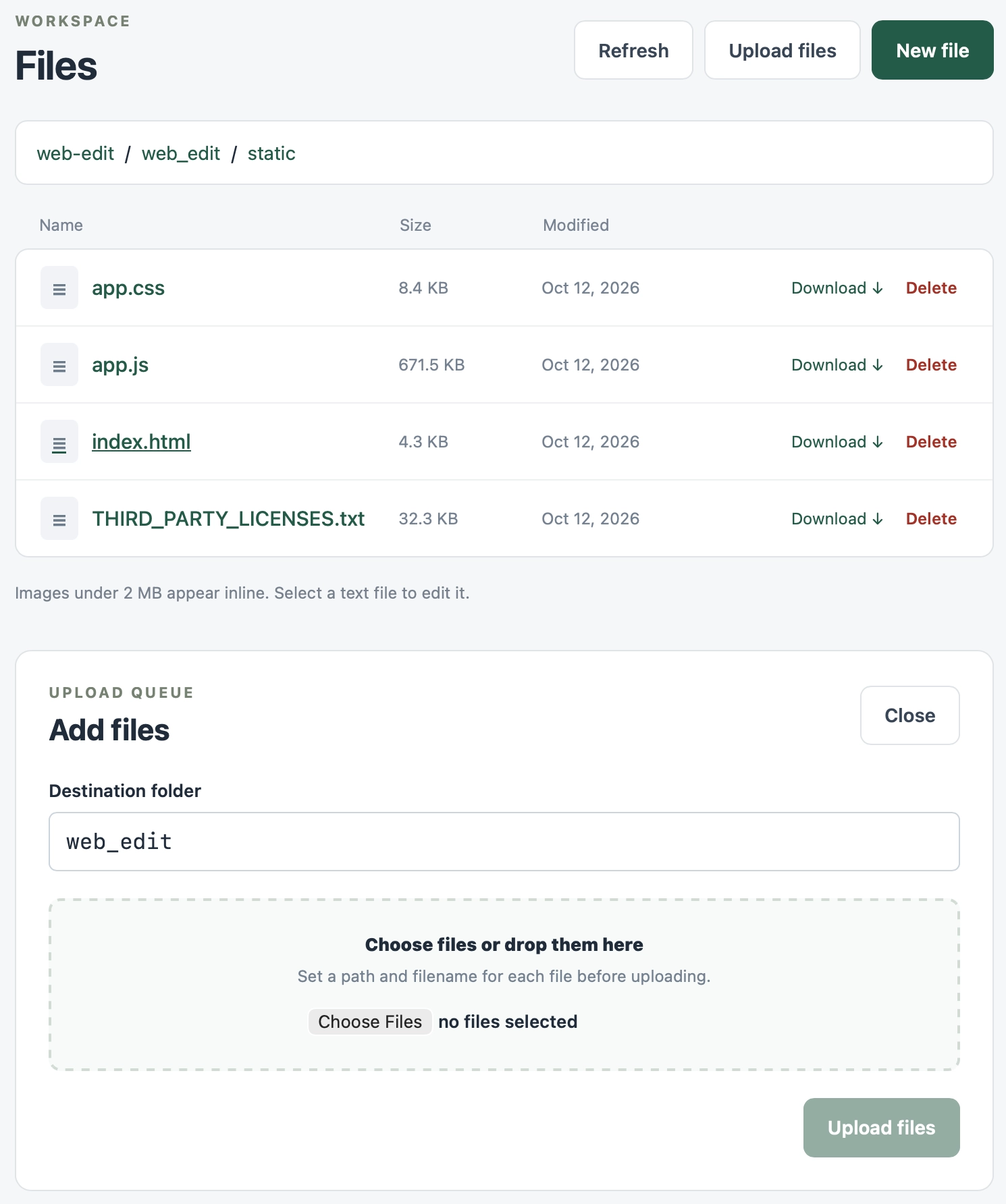
Editing uses CodeMirror 6 - I was going to use Monaco but that still doesn't have a great mobile experience yet.
My plugin for detecting and listing all Datasette instances on the current machine now works with the latest version, and displays the detected PID as well. Knowing the PID makes it easier to attach the new Python 3.15 profiler.


I released ttok 0.4, ran uv tool upgrade ttok, piped a file into the new version... and realized that it was defaulting to the GPT-4 tokenizer when it should very clearly default to GPT-5/GPT-6 instead!
I figured switching the default was a reasonable excuse to finally ship a 1.0.
OpenAI haven't actually confirmed that GPT-6 uses the same tokenizer as the GPT-5 family yet - there's an angry issue about it - but I found this commit by William Liu which reports on an experiment he ran confirming that the tokenizers are likely the same:
All seven GPT models (5.5, 5.6 Sol/Terra/Luna, 6 Astra/Sol/Luna) report 44,794 tokens and match each other on every one of the 31 fixtures. GPT-6 introduces no input-count change on this corpus.
ttok is my CLI tool for counting tokens, using OpenAI's open source tiktoken library.
It hasn't been in updated in a couple of years, but I finally fixed a Click warning, updated CI, and added a --list-models command to list available models.
It works with uvx, so you can count tokens in anything like this:
cat file.txt | uvx ttok


OpenAI released their new Jev-style Decisions API, as previously announced at last week's DevDay.
Since I already have an llm-typesafe plugin for talking to Jev, I had GPT-6 Astra read the new OpenAI API documentation and build an llm-openai-decisions plugin inspired by llm-typesafe.
Unlike Jev, the new gpt-6-luna decision model supports image input in addition to text. Both models charge for input it and not for output: OpenAI's is 10 cents per million input tokens, Jev's is 4.2 cents per million.
Otherwise the API shape is very similar to Jev, at least conceptually. Jev supports three question types for yes/no, choices, or scores. OpenAI Decisions supports the same three types.
Install the plugin like this:
llm install llm-openai-decisions
Here's an example query against an image attachment:
llm -m openai-decisions/gpt-6-luna \
  -a https://static.simonwillison.net/static/2025/two-pelicans.jpg \
  -s 'Does this image contain any mammals?'
And example output:
{"type": "predicate", "name": "evaluation", "probability": 0.0}Consult the README for full details of how to run the other types of questions.
Adds support for reasoning models, such as the newly released Mistral Large 4.
I saw Parseable in a Show HN today - it's a new observability platform with both an open source (AGPL) Rust implementation (a single ~180MB binary), an "Enterprise" version with extra features and a cloud hosted option.
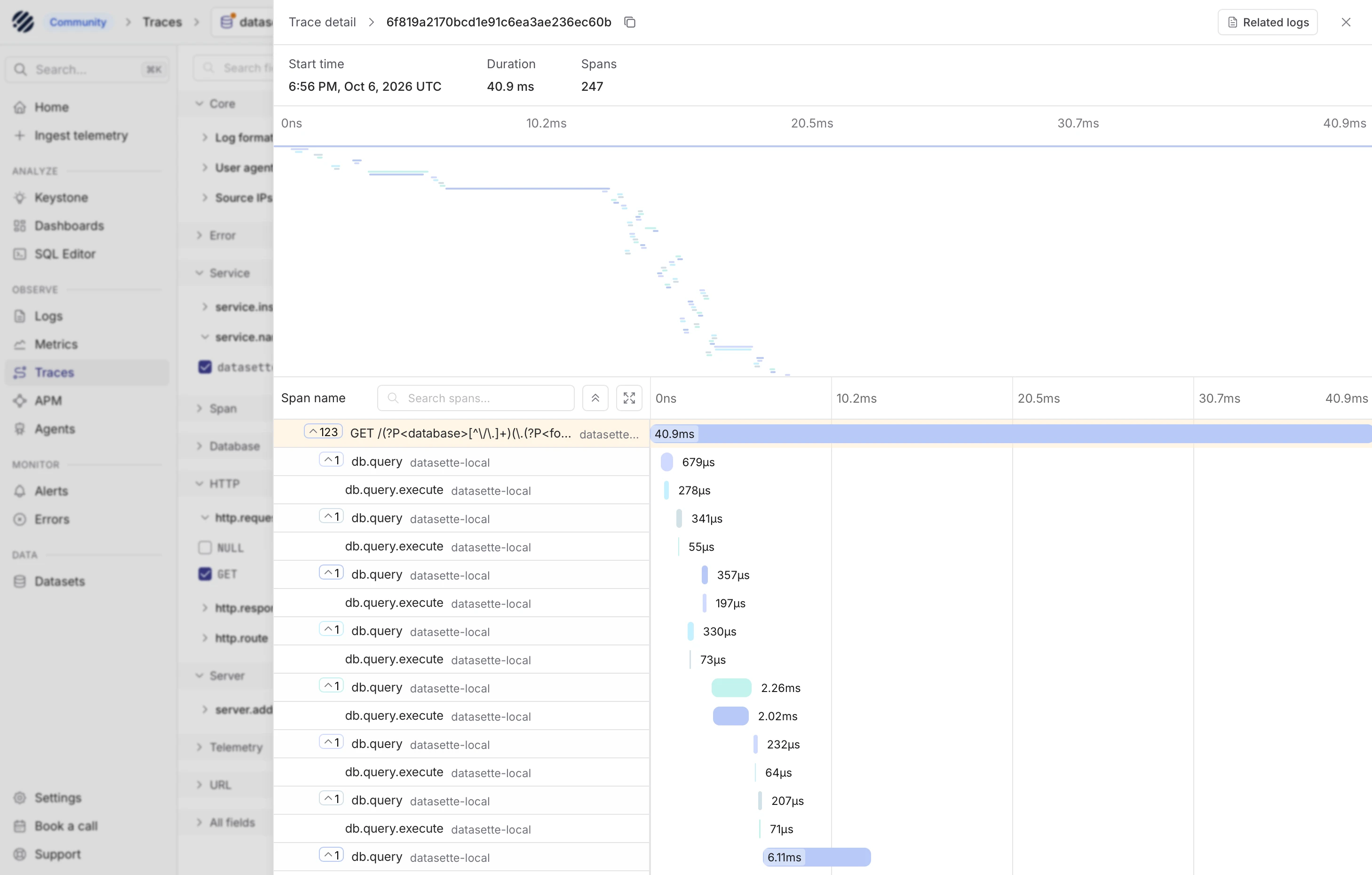
Since Datasette 1.0a41 added OpenTelemetry support (thanks, Alex Garcia), I decided to fire up Codex and have it figure out how to run Parseable and feed it traces from Datasette.
Here's my (human-written) TIL showing the patterns that worked, and here's a screenshot of a Datasette trace displayed within the Parseable localhost web application:
Comment My comment on Mistral Large 4 — Hacker News
wren6991: The benchmark is saturated. Frontier models are tested with an armadillo in fishnet tights jaywalking on Mars.
OK well I couldn't resist this one:
llm -m claude-opus-5.5 'Generate an SVG of an armadillo in fishnet tights jaywalking on Mars'
llm -m gpt-6.1-sol 'Generate an SVG of an armadillo in fishnet tights jaywalking on Mars'
llm -m gemini-3.8-flash 'Generate an SVG of an armadillo in fishnet tights jaywalking on Mars'
llm -m mistral/mistral-large-4 'Generate an SVG of an armadillo in fishnet tights jaywalking on Mars'
Default reasoning levels for each: https://tools.simonwillison.net/markdown-svg-renderer?url=ht...
A minor fix for compatibility with the latest Datasette alphas. This meant we could upgrade the datasette.io site to Datasette 1.0a41.
I wanted to see if Claude Opus 5.5 could compose music, so I tried this:
I want you to write some computer game music for me. First design simple text based format for the music and build an artifact that can play it out loud - include some example tracks in that artifact
I am looking for music of the quality of the original secret of Monkey Island
It leaned a lot harder into the Monkey Island theme than I had intended, but the results are surprisingly good.
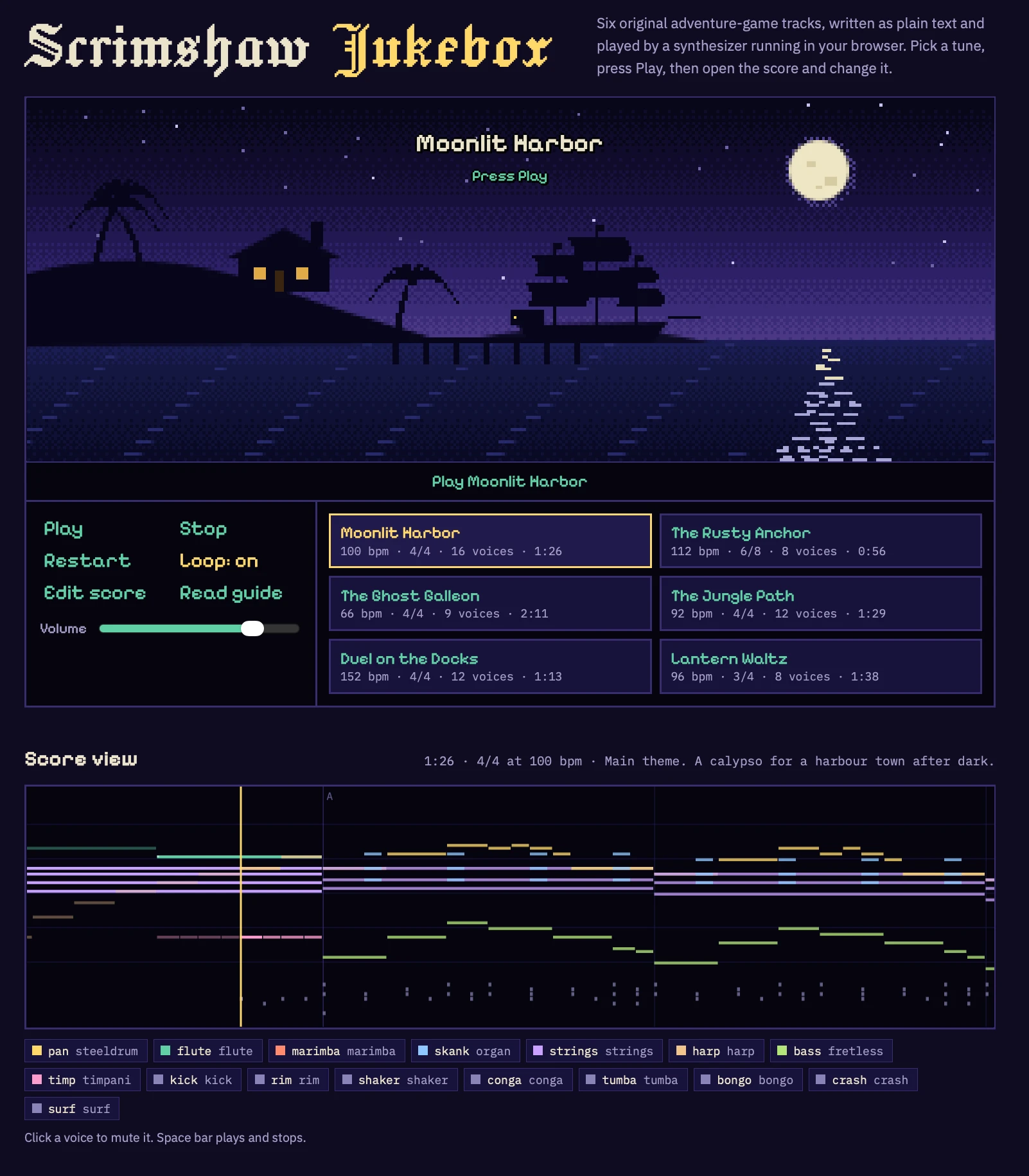
I wonder if the ability to compose competent music is similar to the 3D graphics thing - a new capability for text models that emerged in the past few months?
Would need some careful experiments with other recent and not-so-recent models to confirm if this is new or if they've been able to do this for a while.


Colin Frasier posted on Bluesky about an experiment he ran over two years ago using GPT-4o to see how well it could "compute the sum but return the answer in words" across increasingly large numbers. Here's the chart he shared of those results:
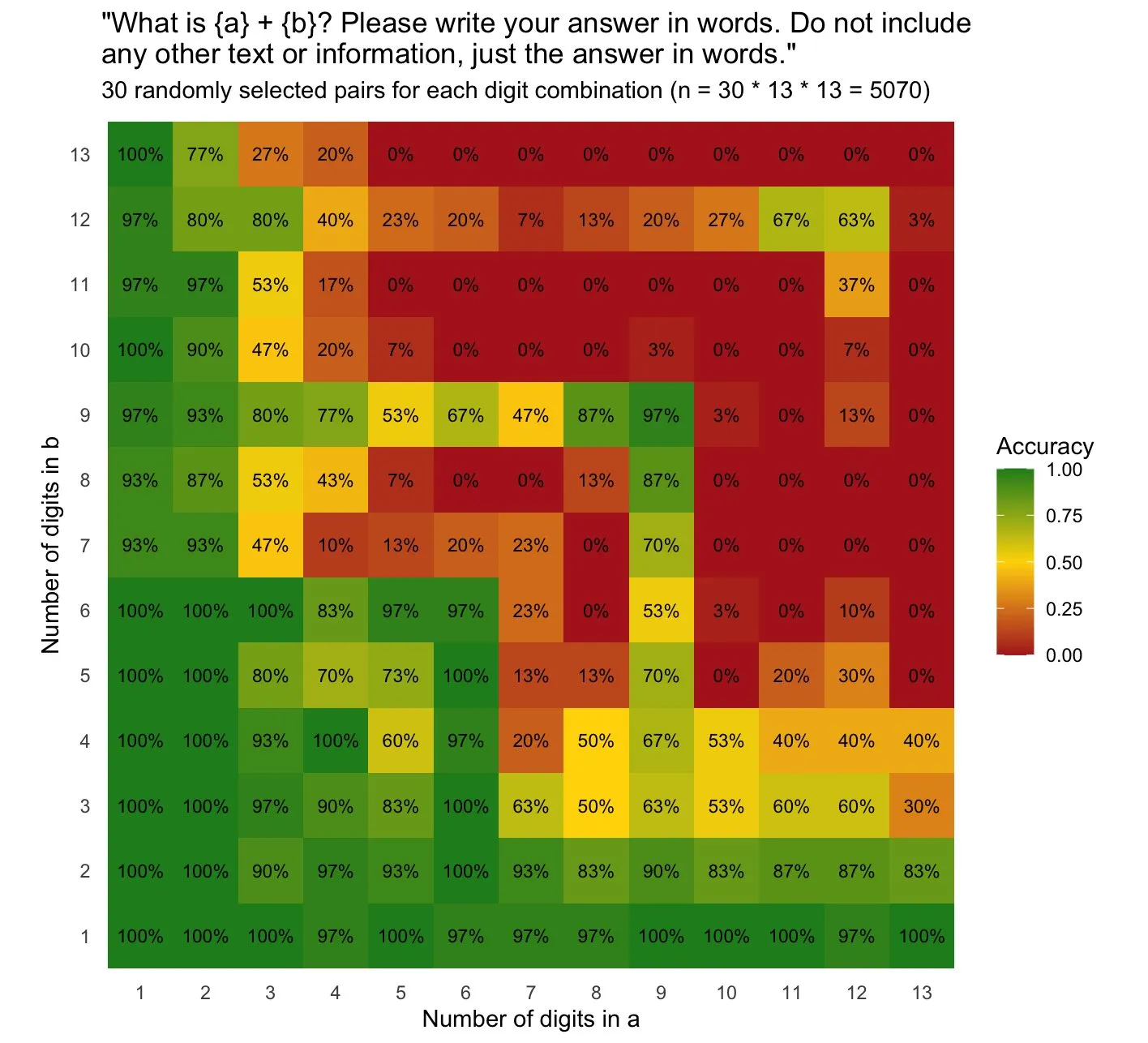
I'm confident GPT-4o didn't cheat and use a calculator, especially since it got so many of the calculations wrong, but I was inspired to run the experiment again on local hardware (a DGX Spark) to explore the effect in a fully controlled environment.
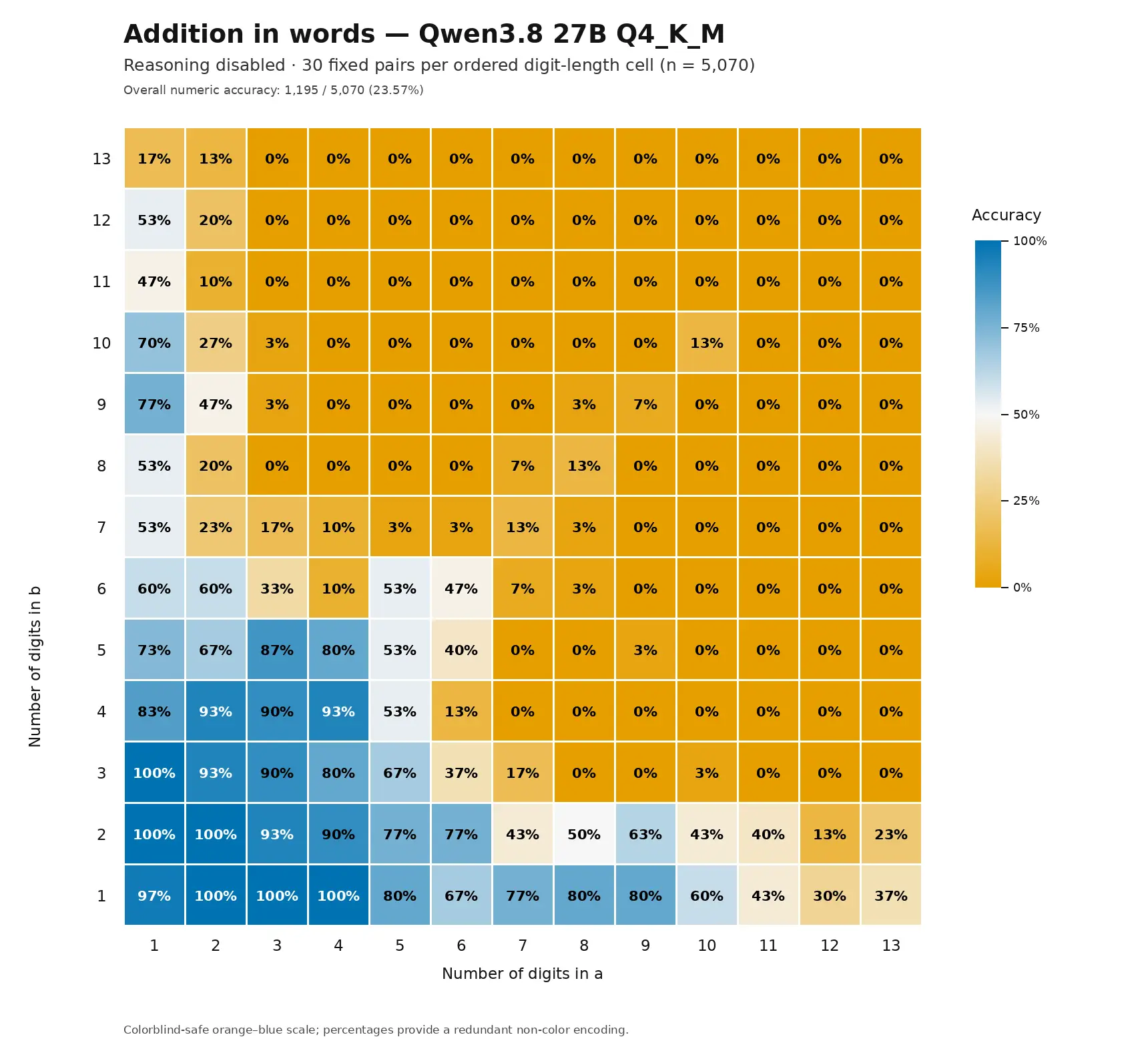
I pasted his image into a Codex Remote session (GPT-6 Astra) and had it run the same experiment using Qwen3.8-27B-Q4_K_M.gguf. Here's the result for a run of 30 attempts per combination with reasoning disabled:
Then I ran it again with reasoning enabled. This took a lot longer per pair, so instead of running 30 samples per square I ran just one - which results in a much less visually appealing heatmap since each square is either 100% or 0%:
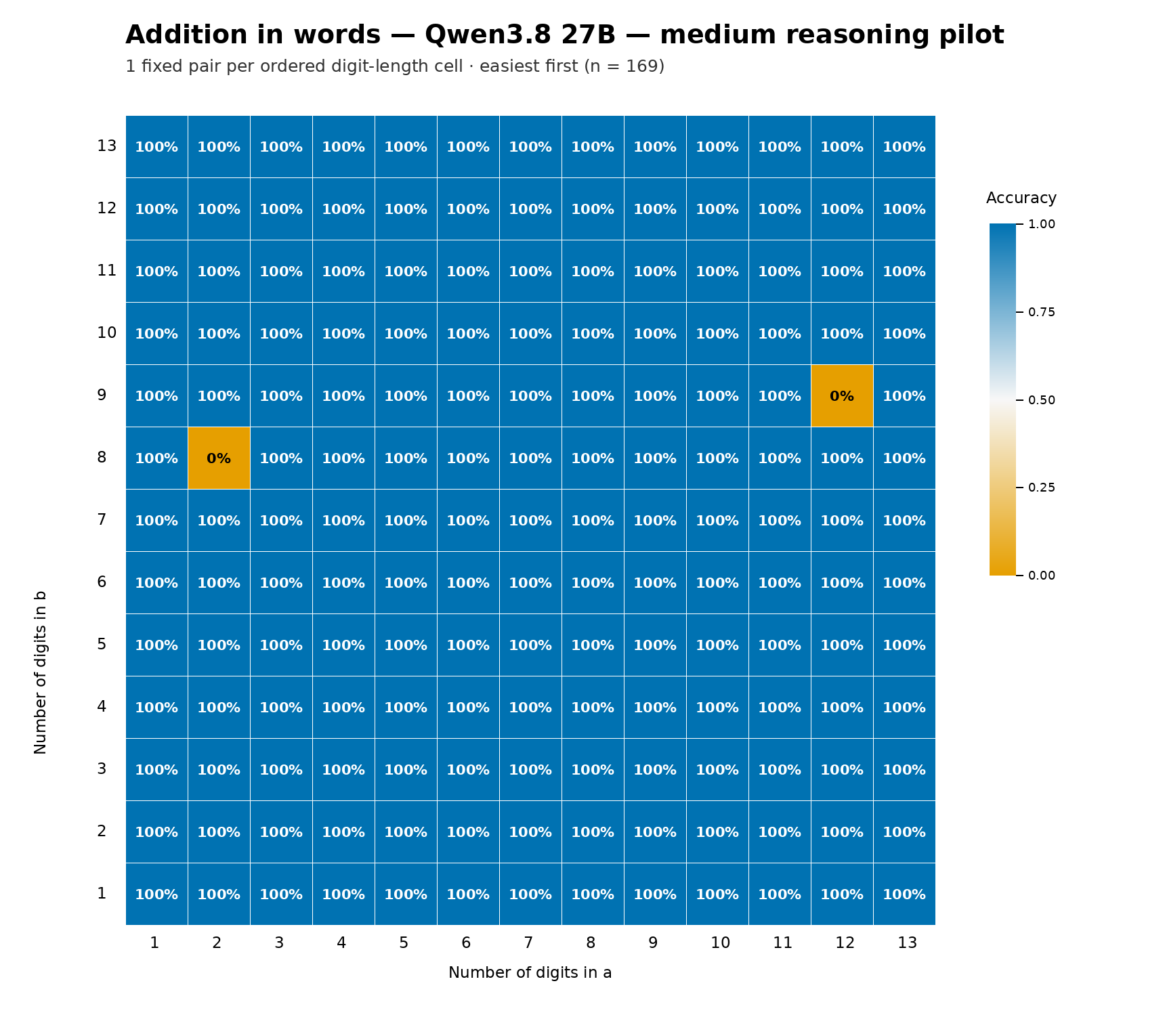
It got the right answer in 167 out of 169 attempts, and since these were one-shot I'm confident a second run would produce different results here.
Here's a version of the report that includes the reasoning traces from some of those larger calculations, which include text like this:
Wait, let me redo this more carefully.

4,299,366,105,622
6,088,794,067,970

Let me align them:
4 2 9 9 3 6 6 1 0 5 6 2 2
6 0 8 8 7 9 4 0 6 7 9 7 0

Adding from right to left:
Position 1 (units): 2 + 0 = 2
Position 2 (tens): 2 + 7 = 9
Position 3 (hundreds): 6 + 9 = 15, write 5, carry 1



Located just before the turnstiles in the Grand Army Plaza subway station at the north end of Brooklyn's Prospect Park is this former newsstand which is now operated by a dinosaur.
The density of dinosaur puns is exceptional.


pwasm is one of my folly projects - an entirely vibe-coded pure Python WebAssembly engine that I built in January during my first bout of AI mania.
I hadn't touched it since January, so I decided to let Claude Opus 5.5 loose on it and see if it could make any significant improvements:
Evaluate current state of pwasm - then consider what it would take to get the MicroPython and micro JavaScript experiments from the research repo working under it - and what it would take to speed it up
42 commits later (with minimal follow-up prompting) it now handles almost all of the WASM specification, and the wheel from PyPI bundles working WASM builds of MicroPython, QuickJS and Micro QuickJS.
I wouldn't trust this thing at all - hence the alpha version tag - but it's interesting seeing how today's models can improve on the work of models from 10 months ago.


Comment My comment on GPT 6.1 Sol: Near-Astra intelligence for a fifth of the price — Hacker News
I'm a bit late with the pelicans because I was live-blogging the keynote: https://simonwillison.net/2026/Sep/29/openai-devday-2026-liv...
Here they are for GPT-6.1-Sol: https://tools.simonwillison.net/markdown-svg-renderer?url=ht...
They're not notably different from the GPT-6 family pelicans: https://static.simonwillison.net/static/2026/gpt-pelicans-gr...
I took a photograph of some protesters, then thought about how I don't like sharing photographs of strangers with identifiable faces. I had GPT-6 Astra build this experimental tool that would identify faces and automatically blur them out.
It uses Google's MediaPipe C++ library, compiled to WebAssembly via @mediapipe/tasks-vision, plus the BlazeFace face detection model.
In addition to Claude Sonnet 5.5, this release adds the ability to run llm anthropic refresh to refresh the list of Anthropic models directly from their API - which means I don't need to push a new release just to add support for a newly released model.
I also added an llm anthropic count command which can use their free token counting API to return a count of tokens that will be used by any prompt, before you send that prompt.


Comment My comment on S3 Is the Future, S3 Is the Past — Hacker News
One thing I find notable about S3 today is that, while it used to drop in price reasonably often, there hasn't been a price drop in a full decade:
2006-03-14  $0.150/GB-month
2010-11-01  $0.140/GB-month
2012-02-01  $0.125/GB-month
2012-12-01  $0.095/GB-month
2014-02-01  $0.085/GB-month
2014-04-01  $0.030/GB-month
2016-12-01  $0.023/GB-month
Today it's still $0.023/GB-month.
Automated reply bots on Twitter are a scourge - as someone with a decent number of followers I attract a swarm of these, such that anything I post there attracts dozens of mindless automated replies.
They've started manifesting on Bluesky as well.
Unlike Twitter, Bluesky still has a freely available and useful API. The lack of such a thing doesn't slow down the bots, but it does make investigating them a lot more frustrating.
So I had Opus 5.5 vibe code this tool, which examines any Bluesky profile for evidence of a likely reply bot.
It looks for signals like replies posted within seconds of other posts from the same account, or accounts that never post their own content (or images or links) but instead consistently reply to messages from other, higher-follower users.
It also looks for question marks, because I'm extra infuriated by reply bots that trick me into wasting my time answering a question that no human ever posed.
Comment My comment on EmbeddingGemma 2 — Hacker News
I really appreciate that EmbeddingGemma 2 is under the Apache 2.0 license.
For embedding models in particular, I don't think it makes sense to use a closed, proprietary, hosted-only model.
Most applications of embedding models involve calculating thousands or even millions of embedding vectors and storing them for later comparison.
If your model is proprietary, the vendor is likely someday going to decide to stop offering that model. They'll have a better model to replace it, but you still need to pay to re-calculate those millions of stored existing vectors.
(In April 2024 OpenAI offered to "cover the financial cost of users re-embedding content with these new models" - https://openai.com/index/gpt-4-api-general-availability/ - but I don't think that's something we can rely on from every provider.)
Notably, I don't want to host the model myself. I'd much rather pay a provider for a hosted model while knowing that if they ever stop hosting it I can run the open weights version myself - or find another vendor who can do that for me.
# 6th October 2026, 8:37 pm / google, generative-ai, ai, gemma, embeddings