7 posts tagged “python” and “sandboxing”
The Python programming language.
2026
Running Pydantic’s Monty Rust sandboxed Python subset in WebAssembly
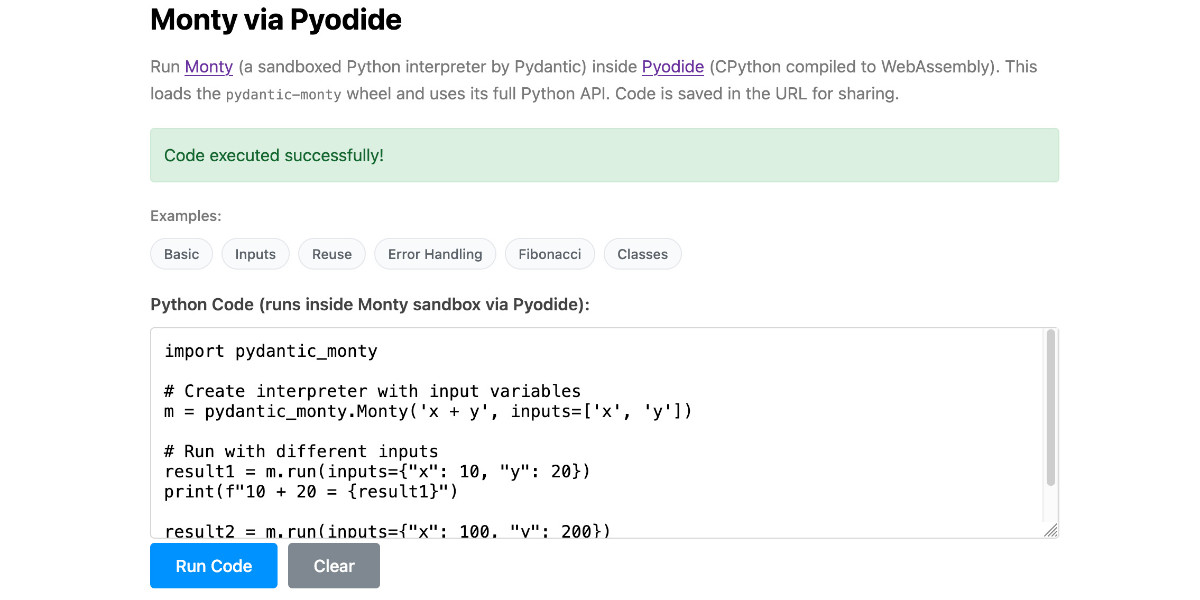
There’s a jargon-filled headline for you! Everyone’s building sandboxes for running untrusted code right now, and Pydantic’s latest attempt, Monty, provides a custom Python-like language (a subset of Python) in Rust and makes it available as both a Rust library and a Python package. I got it working in WebAssembly, providing a sandbox-in-a-sandbox.
[... 854 words]Introducing Deno Sandbox (via) Here's a new hosted sandbox product from the Deno team. It's actually unrelated to Deno itself - this is part of their Deno Deploy SaaS platform. As such, you don't even need to use JavaScript to access it - you can create and execute code in a hosted sandbox using their deno-sandbox Python library like this:
export DENO_DEPLOY_TOKEN="... API token ..."
uv run --with deno-sandbox python
Then:
from deno_sandbox import DenoDeploy

sdk = DenoDeploy()

with sdk.sandbox.create() as sb:
    # Run a shell command
    process = sb.spawn(
        "echo", args=["Hello from the sandbox!"]
    )
    process.wait()
    # Write and read files
    sb.fs.write_text_file(
        "/tmp/example.txt", "Hello, World!"
    )
    print(sb.fs.read_text_file(
        "/tmp/example.txt"
    ))
There’s a JavaScript client library as well. The underlying API isn’t documented yet but appears to use WebSockets.
There’s a lot to like about this system. Sandboxe instances can have up to 4GB of RAM, get 2 vCPUs, 10GB of ephemeral storage, can mount persistent volumes and can use snapshots to boot pre-configured custom images quickly. Sessions can last up to 30 minutes and are billed by CPU time, GB-h of memory and volume storage usage.
When you create a sandbox you can configure network domains it’s allowed to access.
My favorite feature is the way it handles API secrets.
with sdk.sandboxes.create(
    allowNet=["api.openai.com"],
    secrets={
        "OPENAI_API_KEY": {
            "hosts": ["api.openai.com"],
            "value": os.environ.get("OPENAI_API_KEY"),
        }
    },
) as sandbox:
    # ... $OPENAI_API_KEY is available
Within the container that $OPENAI_API_KEY value is set to something like this:
DENO_SECRET_PLACEHOLDER_b14043a2f578cba...
Outbound API calls to api.openai.com run through a proxy which is aware of those placeholders and replaces them with the original secret.
In this way the secret itself is not available to code within the sandbox, which limits the ability for malicious code (e.g. from a prompt injection) to exfiltrate those secrets.
From a comment on Hacker News I learned that Fly have a project called tokenizer that implements the same pattern. Adding this to my list of tricks to use with sandoxed environments!
2025
MicroQuickJS. New project from programming legend Fabrice Bellard, of ffmpeg and QEMU and QuickJS and so much more fame:
MicroQuickJS (aka. MQuickJS) is a Javascript engine targetted at embedded systems. It compiles and runs Javascript programs with as low as 10 kB of RAM. The whole engine requires about 100 kB of ROM (ARM Thumb-2 code) including the C library. The speed is comparable to QuickJS.
It supports a subset of full JavaScript, though it looks like a rich and full-featured subset to me.
One of my ongoing interests is sandboxing: mechanisms for executing untrusted code - from end users or generated by LLMs - in an environment that restricts memory usage and applies a strict time limit and restricts file or network access. Could MicroQuickJS be useful in that context?
I fired up Claude Code for web (on my iPhone) and kicked off an asynchronous research project to see explore that question:
My full prompt is here. It started like this:
Clone https://github.com/bellard/mquickjs to /tmp
Investigate this code as the basis for a safe sandboxing environment for running untrusted code such that it cannot exhaust memory or CPU or access files or the network
First try building python bindings for this using FFI - write a script that builds these by checking out the code to /tmp and building against that, to avoid copying the C code in this repo permanently. Write and execute tests with pytest to exercise it as a sandbox
Then build a "real" Python extension not using FFI and experiment with that
Then try compiling the C to WebAssembly and exercising it via both node.js and Deno, with a similar suite of tests [...]
I later added to the interactive session:
Does it have a regex engine that might allow a resource exhaustion attack from an expensive regex?
(The answer was no - the regex engine calls the interrupt handler even during pathological expression backtracking, meaning that any configured time limit should still hold.)
Here's the full transcript and the final report.
Some key observations:
- MicroQuickJS is very well suited to the sandbox problem. It has robust near and time limits baked in, it doesn't expose any dangerous primitive like filesystem of network access and even has a regular expression engine that protects against exhaustion attacks (provided you configure a time limit).
- Claude span up and tested a Python library that calls a MicroQuickJS shared library (involving a little bit of extra C), a compiled a Python binding and a library that uses the original MicroQuickJS CLI tool. All of those approaches work well.
- Compiling to WebAssembly was a little harder. It got a version working in Node.js and Deno and Pyodide, but the Python libraries wasmer and wasmtime proved harder, apparently because "mquickjs uses setjmp/longjmp for error handling". It managed to get to a working wasmtime version with a gross hack.
I'm really excited about this. MicroQuickJS is tiny, full featured, looks robust and comes from excellent pedigree. I think this makes for a very solid new entrant in the quest for a robust sandbox.
Update: I had Claude Code build tools.simonwillison.net/microquickjs, an interactive web playground for trying out the WebAssembly build of MicroQuickJS, adapted from my previous QuickJS plaground. My QuickJS page loads 2.28 MB (675 KB transferred). The MicroQuickJS one loads 303 KB (120 KB transferred).
Here are the prompts I used for that.
Build AI agents with the Mistral Agents API. Big upgrade to Mistral's API this morning: they've announced a new "Agents API". Mistral have been using the term "agents" for a while now. Here's how they describe them:
AI agents are autonomous systems powered by large language models (LLMs) that, given high-level instructions, can plan, use tools, carry out steps of processing, and take actions to achieve specific goals.
What that actually means is a system prompt plus a bundle of tools running in a loop.
Their new API looks similar to OpenAI's Responses API (March 2025), in that it now manages conversation state server-side for you, allowing you to send new messages to a thread without having to maintain that local conversation history yourself and transfer it every time.
Mistral's announcement captures the essential features that all of the LLM vendors have started to converge on for these "agentic" systems:
- Code execution, using Mistral's new Code Interpreter mechanism. It's Python in a server-side sandbox - OpenAI have had this for years and Anthropic launched theirs last week.
- Image generation - Mistral are using Black Forest Lab FLUX1.1 [pro] Ultra.
- Web search - this is an interesting variant, Mistral offer two versions:
web_searchis classic search, butweb_search_premium"enables access to both a search engine and two news agencies: AFP and AP". Mistral don't mention which underlying search engine they use but Brave is the only search vendor listed in the subprocessors on their Trust Center so I'm assuming it's Brave Search. I wonder if that news agency integration is handled by Brave or Mistral themselves? - Document library is Mistral's version of hosted RAG over "user-uploaded documents". Their documentation doesn't mention if it's vector-based or FTS or which embedding model it uses, which is a disappointing omission.
- Model Context Protocol support: you can now include details of MCP servers in your API calls and Mistral will call them when it needs to. It's pretty amazing to see the same new feature roll out across OpenAI (May 21st), Anthropic (May 22nd) and now Mistral (May 27th) within eight days of each other!
They also implement "agent handoffs":
Once agents are created, define which agents can hand off tasks to others. For example, a finance agent might delegate tasks to a web search agent or a calculator agent based on the conversation's needs.
Handoffs enable a seamless chain of actions. A single request can trigger tasks across multiple agents, each handling specific parts of the request.
This pattern always sounds impressive on paper but I'm yet to be convinced that it's worth using frequently. OpenAI have a similar mechanism in their OpenAI Agents SDK.
MCP Run Python (via) Pydantic AI's MCP server for running LLM-generated Python code in a sandbox. They ended up using a trick I explored two years ago: using a Deno process to run Pyodide in a WebAssembly sandbox.
Here's a bit of a wild trick: since Deno loads code on-demand from JSR, and uv run can install Python dependencies on demand via the --with option... here's a one-liner you can paste into a macOS shell (provided you have Deno and uv installed already) which will run the example from their README - calculating the number of days between two dates in the most complex way imaginable:
ANTHROPIC_API_KEY="sk-ant-..." \
uv run --with pydantic-ai python -c '
import asyncio
from pydantic_ai import Agent
from pydantic_ai.mcp import MCPServerStdio

server = MCPServerStdio(
    "deno",
    args=[
        "run",
        "-N",
        "-R=node_modules",
        "-W=node_modules",
        "--node-modules-dir=auto",
        "jsr:@pydantic/mcp-run-python",
        "stdio",
    ],
)
agent = Agent("claude-3-5-haiku-latest", mcp_servers=[server])

async def main():
    async with agent.run_mcp_servers():
        result = await agent.run("How many days between 2000-01-01 and 2025-03-18?")
    print(result.output)

asyncio.run(main())'
I ran that just now and got:
The number of days between January 1st, 2000 and March 18th, 2025 is 9,208 days.
I thoroughly enjoy how tools like uv and Deno enable throwing together shell one-liner demos like this one.
Here's an extended version of this example which adds pretty-printed logging of the messages exchanged with the LLM to illustrate exactly what happened. The most important piece is this tool call where Claude 3.5 Haiku asks for Python code to be executed my the MCP server:
ToolCallPart(
    tool_name='run_python_code',
    args={
        'python_code': (
            'from datetime import date\n'
            '\n'
            'date1 = date(2000, 1, 1)\n'
            'date2 = date(2025, 3, 18)\n'
            '\n'
            'days_between = (date2 - date1).days\n'
            'print(f"Number of days between {date1} and {date2}: {days_between}")'
        ),
    },
    tool_call_id='toolu_01TXXnQ5mC4ry42DrM1jPaza',
    part_kind='tool-call',
)
I also managed to run it against Mistral Small 3.1 (15GB) running locally using Ollama (I had to add "Use your python tool" to the prompt to get it to work):
ollama pull mistral-small3.1:24b

uv run --with devtools --with pydantic-ai python -c '
import asyncio
from devtools import pprint
from pydantic_ai import Agent, capture_run_messages
from pydantic_ai.models.openai import OpenAIModel
from pydantic_ai.providers.openai import OpenAIProvider
from pydantic_ai.mcp import MCPServerStdio

server = MCPServerStdio(
    "deno",
    args=[
        "run",
        "-N",
        "-R=node_modules",
        "-W=node_modules",
        "--node-modules-dir=auto",
        "jsr:@pydantic/mcp-run-python",
        "stdio",
    ],
)

agent = Agent(
    OpenAIModel(
        model_name="mistral-small3.1:latest",
        provider=OpenAIProvider(base_url="http://localhost:11434/v1"),
    ),
    mcp_servers=[server],
)

async def main():
    with capture_run_messages() as messages:
        async with agent.run_mcp_servers():
            result = await agent.run("How many days between 2000-01-01 and 2025-03-18? Use your python tool.")
    pprint(messages)
    print(result.output)

asyncio.run(main())'
Here's the full output including the debug logs.
2024
open-interpreter (via) This "natural language interface for computers" open source ChatGPT Code Interpreter alternative has been around for a while, but today I finally got around to trying it out.
Here's how I ran it (without first installing anything) using uv:
uvx --from open-interpreter interpreter
The default mode asks you for an OpenAI API key so it can use gpt-4o - there are a multitude of other options, including the ability to use local models with interpreter --local.
It runs in your terminal and works by generating Python code to help answer your questions, asking your permission to run it and then executing it directly on your computer.
I pasted in an API key and then prompted it with this:
find largest files on my desktop
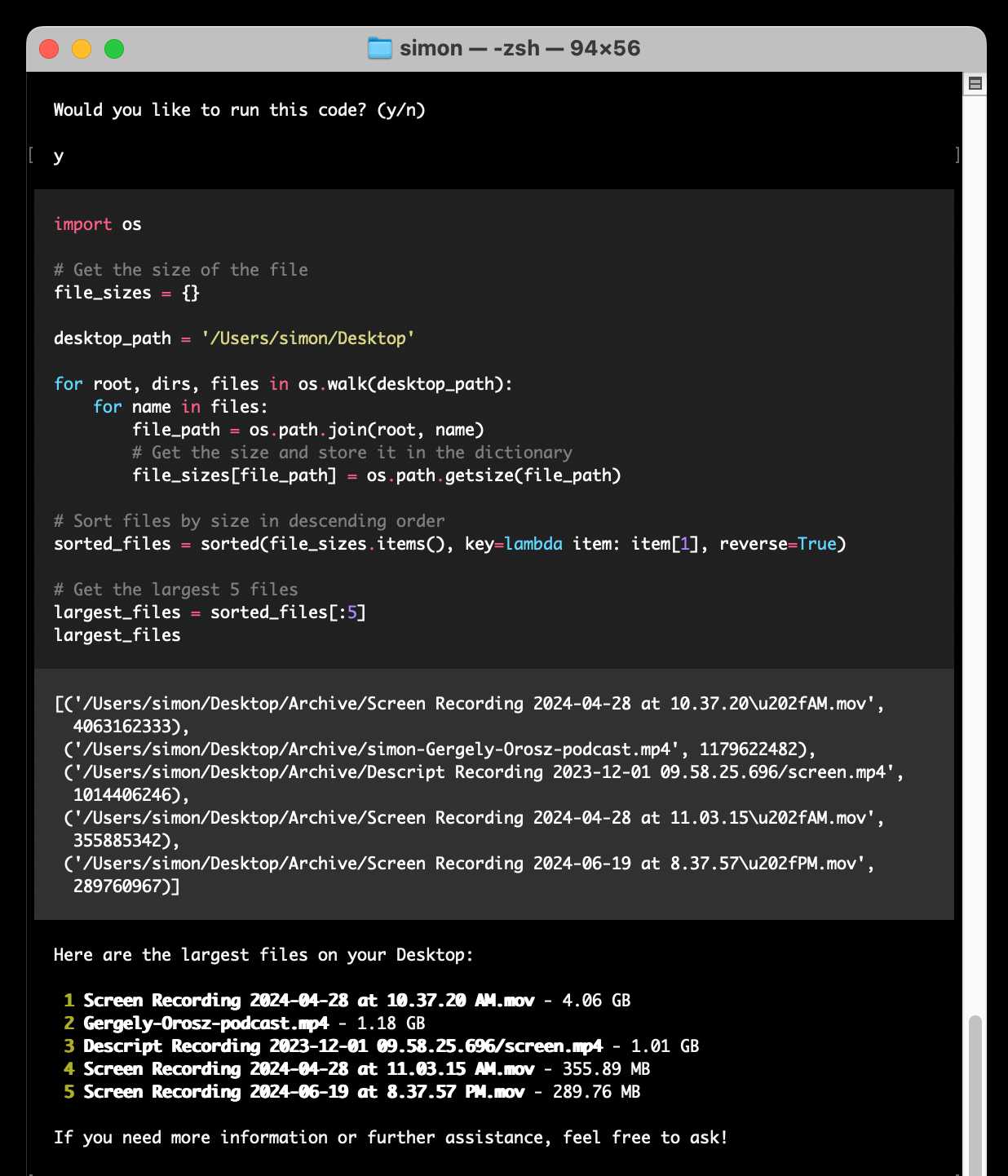
Here's the full transcript.
Since code is run directly on your machine there are all sorts of ways things could go wrong if you don't carefully review the generated code before hitting "y". The team have an experimental safe mode in development which works by scanning generated code with semgrep. I'm not convinced by that approach, I think executing code in a sandbox would be a much more robust solution here - but sandboxing Python is still a very difficult problem.
They do at least have an experimental Docker integration.
2023
Python Sandbox in Web Assembly (via) Jim Kring responded to my questions on Mastodon about running Python in a WASM sandbox by building this repo, which demonstrates using wasmer-python to run a build of Python 3.6 compiled to WebAssembly, complete with protected access to a sandbox directory.