Elsewhere
Release TIL Research Tool Museum Sighting Comment
Filters: Sorted by date


Let's LLM run prompts against the new muse-spark-1.1 model.
- Fix for a bug with OpenAI Chat Completion endpoints where a tool call with empty arguments could result in a JSON error from some providers. #1521
This bug came up when I was testing llm-meta-ai.
The signature features of this alpha are new UIs for inserting multiple rows at once (from TSV, CSV or JSON) and for creating a table from rows, plus a large number of small JSON API consistency fixes in preparation for a 1.0 stable release.
The version that retires the library, instead implementing a compatibility shim against the new sqlite-utils 4.0 dependency.
An experimental Web Component built using GPT-5.5 and the following prompt:
let's build a Web Component for embedding code from GitHub
<github-code href="https://github.com/simonw/sqlite-ast/blob/437c759129154f05296324a7f82aa1246340dd14/sqlite_ast/parser.py#L9-L18"></github-code>
It takes URLs like that, converts them to https://raw.githubusercontent.com/simonw/sqlite-ast/437c759129154f05296324a7f82aa1246340dd14/sqlite_ast/parser.py, then uses fetch() to fetch them and displays the specified range of lines - with line numbers, no syntax highlighting though
Show me a preview web browser so I can see your work
Here's what it looks like embedded on this page:
See sqlite-utils 4.0, now with database schema migrations for details.
The last RC before the 4.0 stable release. Mainly implements feedback from a detailed review by Claude Fable 5.
I hoped to release sqlite-utils 4.0 stable this weekend, but as I worked through the backlog of issues and PRs with a combination of Claude Fable 5 and GPT-5.5 the changelog since rc2 kept getting bigger.
The biggest new feature is support for introspecting and creating compound foreign keys - a feature that involves a subtle breaking change to table.foreign_keys and hence needed to land for the 4.0 stable release.
sqlite-utils also now follows SQLite's convention for case insensitive column names, which turned out to touch a bunch of different places at once.


- Pin to
sqlite-utils<4, in preparation for a release ofsqlite-utils 4that will obsolete this package. #18


Another Fable 5 experiment. Now that my LLM library has evolved into more of an agent framework it's time to see what a simple coding agent would look like built on it.
I started a new Python library using my python-lib-template-repository GitHub template repository, then ran these two prompts (here's the Claude Code for web transcript):
Write a spec.md for this project - it will depend on the latest “llm” alpha from PyPI and implement a Claude code style coding agent complete with tools for reading and editing files and executing commands
Then:
Commit the spec, then build it using red/green TDD in a series of sensible commits (each with passing tests and updated docs) - occasionally manually test it using the OpenAI API key in your environment
Here's the spec, the resulting README file, and the sequence of commits.
I've shipped a slop-alpha to PyPI, so you can run the new agent like this:
uvx --prerelease=allow --with llm-coding-agent llm code
It's pretty good for a first attempt! Here's the (Fable-authored) README, which lists recipes like llm code --yolo and llm code --allow "pytest*" --allow "git diff*".
It also presents a Python API based around a CodingAgent(model="gpt-5.5", root="/path", approve=True).run("Fix the failing test in tests/test_parser.py") class which I didn't ask for but I'm delighted to see implemented.
Here's the suite of tools it implemented, listed using uvx ... llm tools:
CodingTools_edit_file(path: str, old_string: str, new_string: str, replace_all: bool = False) -> strReplace an exact string in a file.
old_string must match the file contents exactly (including whitespace) and must identify a unique location unless replace_all is true. Returns a diff of the change so it can be verified.
CodingTools_execute_command(command: str, timeout: int = 120) -> strRun a shell command in the session root directory.
Returns combined stdout and stderr followed by an Exit code line. timeout is in seconds (maximum 600); on timeout the whole process tree is killed.
CodingTools_list_files(pattern: str = '**/*', path: str = '.') -> strList files matching a glob pattern, newest first.
Skips hidden directories, node_modules, __pycache__ and (in a git repository) anything covered by .gitignore. Returns at most 200 paths relative to the searched directory.
CodingTools_read_file(path: str, offset: int = 0, limit: int = 2000) -> strRead a text file, returning numbered lines like cat -n.
Paths are relative to the session root. Use offset (0-based first line) and limit (max lines) to page through files too large to read in one call.
CodingTools_search_files(pattern: str, path: str = '.', glob: str = None, max_results: int = 100) -> strSearch file contents for a regular expression.
Returns matches as path:line_number:line, capped at max_results. Use glob (e.g. "*.py") to restrict which files are searched.
CodingTools_write_file(path: str, content: str) -> strCreate or overwrite a file with the given content.
Parent directories are created as needed. Prefer edit_file for modifying existing files.
I tried it out by running llm code --yolo and then prompting:
mkdir /tmp/demo and then in that folder create a simple swiftui CLI app for telling the time in ascii art
Here's the transcript, in which GPT-5.5 reasoning notes that "SwiftUI isn't suitable for a true CLI" and then builds an app that outputs this on swift run AsciiTime:
      █    █████         ████     █             █     ███
     ██    █        █        █   ██      █     ██    █   █
      █    ████           ███     █             █       █
      █        █    █        █    █      █      █      █
     ███   ████          ████    ███           ███   █████
One of this morning's AIE keynotes covered dspy, which reminded me I've been meaning to see if it could help me improve the system prompt used by Datasette Agent - so I fired off an asynchronous research task in Claude Code for web using Claude Fable 5:
Pip install the latest Datasette alpha and datasette-agent and dspy - then figure out how to use dspy to evaluate and improve the main system prompts used by Datasette Agent for the feature where it can execute read only SQL queries to answer user questions about data.
Fable chose to test using GPT 4.1 mini and nano, and identified several promising looking directions for improvements. I particularly like this one:
The schema listing gives only table names; the "don't call describe_table if you already have the information" advice caused column-name guessing (page_count, o.order_id, first_name) and error-retry loops in baseline traces. Either include column names in the prompt's schema listing or soften that advice.


The big new feature is shot-scraper video storyboard.yml, described in detail in Have your agent record video demos of its work with shot-scraper video.
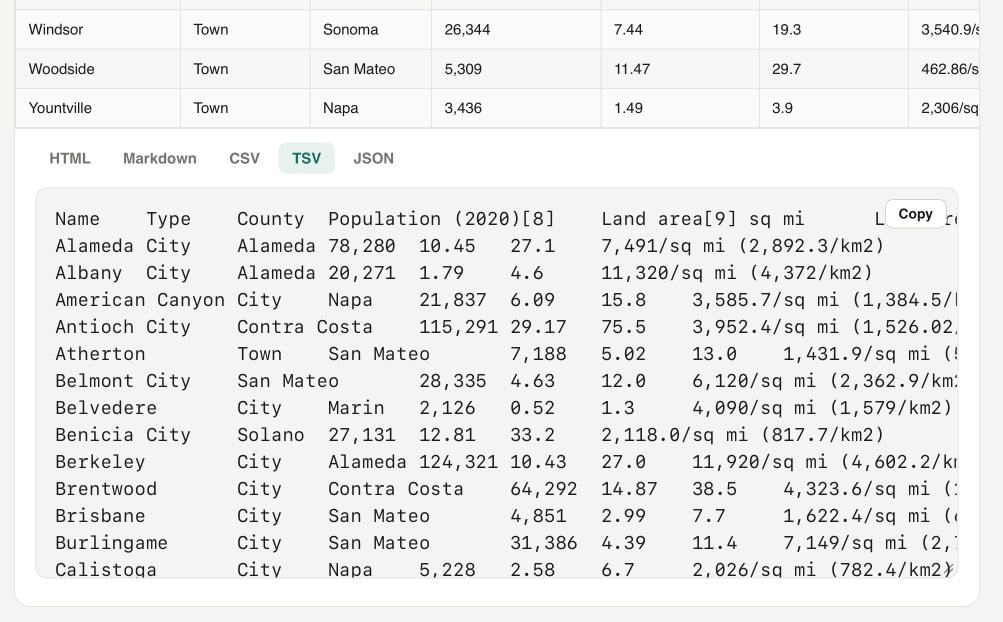
Yet another in my growing collection of paste-conversion tools. This one accepts pasted rich text from browsers (with embedded HTML tables) and converts every detected table into HTML, Markdown, CSV, TSV, or JSON.
Try it out by selecting everything on the Wikipedia List of cities and towns in the San Francisco Bay Area page and pasting it directly into the tool:
On a similar note, I recently rebuilt my Rich text to markdown tool to add support for tables and generally improve the UI.
Update: It turns out Wikipedia has an open CORS API for retrieving the full rendered HTML content of any page - demo here - so I had Codex add the ability to search Wikipedia for a page and then automatically import and display any tables from that page.


An embarrassingly tiny release. The pyproject.toml had pinned to datasette==1.0a27, inadvertently making this plugin incompatible with all other Datasette versions. It's now datasette>=1.0a27 instead.


I'll write more about this one soon, but it's a big release. Three highlights from the release notes:
- New "Create table" interface in the database actions menu, backed by the
/<database>/-/createJSON API. It can define columns, primary keys, custom column types,NOT NULLconstraints, literal defaults, expression defaults and single-column foreign keys. (#2787)- New "Alter table" table action and
/<database>/<table>/-/alterJSON API for changing existing tables: add, rename, reorder and drop columns; change column types, defaults,NOT NULLconstraints, primary keys and foreign keys; and rename the table. The alter table dialog also includes a "Drop table" button. (#2788)- New Template context documentation listing the variables available to custom templates for Datasette's core pages. Variables documented there are treated as a stable API for custom templates until Datasette 2.0. The documentation is generated from dataclass definitions next to the view code, with tests that compare the documented fields against the actual contexts rendered by the database, table, query and row pages. (#1510, #2127, #1477, #2803)
Here's a rough video demo I made of the new create/alter table feature as part of reviewing the PR:
I've been pondering if Datasette Lite - the Python Datasette application run entirely in the browser using Pyodide and WebAssembly - might be able to edit persistent SQLite files stored on the user's computer.
That's what OFPS (Origin Private File System) is for, so I had Claude Code for web build me this playground UI to try it out in different browsers.


