Weeknotes: Datasette Studio and a whole lot of blogging
19th June 2024
I’m still spinning back up after my trip back to the UK, so actual time spent building things has been less than I’d like. I presented an hour long workshop on command-line LLM usage, wrote five full blog entries (since my last weeknotes) and I’ve also been leaning more into short-form link blogging—a lot more prominent on this site now since my homepage redesign last week.
Datasette Studio
I ran a workshop for a data journalism class recently which included having students try running structured data extraction using datasette-extract. I didn’t want to talk them through installing Python etc on their own machines, so I instead took advantage of a project I’ve been tinkering with for a little while called Datasette Studio.
Datasette Studio is actually two things. The first is a distribution of Datasette which bundles the core application along with a selection of plugins that greatly increase its capabilities as a tool for cleaning and analyzing data. You can install that like this:
pipx install datasette-studioThen run datasette-studio to start the server or datasette-studio install xyz to install additional plugins.
Datasette Studio runs the latest Datasette 1.0 alpha, and will upgrade to 1.0 stable as soon as that is released.
Quoting the pyproject.toml file, the current list of plugins is this:
- datasette-edit-schema
- datasette-write-ui
- datasette-configure-fts
- datasette-write
- datasette-upload-csvs
- datasette-enrichments
- datasette-enrichments-quickjs
- datasette-enrichments-re2
- datasette-enrichments-jinja
- datasette-copyable
- datasette-export-database
- datasette-enrichments-gpt
- datasette-import
- datasette-extract
- datasette-secrets
I plan to grow this list over time. A neat thing about datasette-studio is that the entire application is defined by a single pyproject.toml that lists those dependecies and sets up the datasette-studio CLI console script, which is then published to PyPI.
The second part of Datasette Studio is a GitHub repository that’s designed to help run it in GitHub Codespaces, with a very pleasing URL:
https://github.com/datasette/studio
Visit that page, click the green “Code” button and click “Create codespace on main” to launch a virtual machine running in GitHub’s Azure environment, preconfigured to launch a private instance of Datasette as soon as the Codespace has started running.
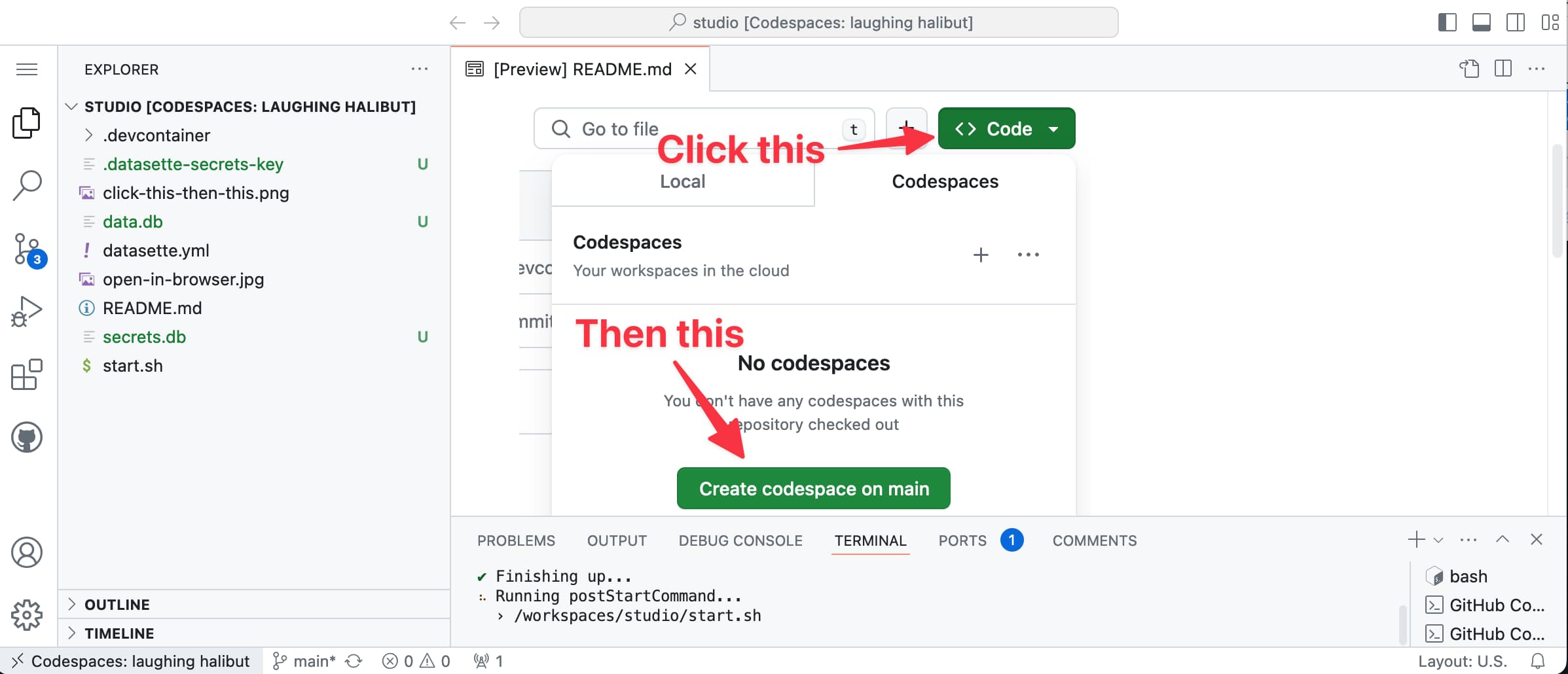
You can then start using it directly—uploading CSVs or JSON data, or even set your own OpenAI key (using the “Manage secrets” menu item) to enable OpenAI features such as GPT enrichments and structured data extraction.
I’m still fleshing out the idea, but I really like this as a starting point for a completely free Datasette trial environment that’s entirely hosted (and paid for) by Microsoft/GitHub!
More blog improvements
In addition to the redesign of the homepage—moving my linkblog and quotations out of the sidebar and into the main content, at least on desktop—I’ve made a couple of other tweaks.
- I added optional descriptions to my tags, so now pages like /tags/datasette/ or /tags/sqliteutils/ can clarify themselves and link to the relevant projects.
- I started displaying images in more places. I’ve been creating “social media card” images for many of my posts for a few years, to show up when those URLs are shared in places like Mastodon or Twitter or Discord or Slack. Those images now display in various places on my blog as well, including the homepage, search results and the tag pages. My annotatedtalks tag page looks a whole lot more interesting with accompanying presentation title slides.
Blog entries
- Language models on the command-line
- A homepage redesign for my blog’s 22nd birthday
- Thoughts on the WWDC 2024 keynote on Apple Intelligence
- Accidental prompt injection against RAG applications
- Training is not the same as chatting: ChatGPT and other LLMs don’t remember everything you say
Releases
-
datasette-faiss 0.2.1—2024-06-17
Maintain a FAISS index for specified Datasette tables -
datasette-cluster-map 0.18.2—2024-06-13
Datasette plugin that shows a map for any data with latitude/longitude columns -
datasette 0.64.7—2024-06-12
An open source multi-tool for exploring and publishing data -
datasette-studio 0.1a4—2024-06-05
Datasette pre-configured with useful plugins. Experimental alpha.
TILs
- Upgrade Postgres.app on macOS—2024-06-16
- Cloudflare redirect rules with dynamic expressions—2024-05-29
More recent articles
- Mr. Chatterbox is a (weak) Victorian-era ethically trained model you can run on your own computer - 30th March 2026
- Vibe coding SwiftUI apps is a lot of fun - 27th March 2026
- Experimenting with Starlette 1.0 with Claude skills - 22nd March 2026