Extract PDF text in your browser with LiteParse for the web
23rd April 2026
LlamaIndex have a most excellent open source project called LiteParse, which provides a Node.js CLI tool for extracting text from PDFs. I got a version of LiteParse working entirely in the browser, using most of the same libraries that LiteParse uses to run in Node.js.
Spatial text parsing
Refreshingly, LiteParse doesn’t use AI models to do what it does: it’s good old-fashioned PDF parsing, falling back to Tesseract OCR (or other pluggable OCR engines) for PDFs that contain images of text rather than the text itself.
The hard problem that LiteParse solves is extracting text in a sensible order despite the infuriating vagaries of PDF layouts. They describe this as “spatial text parsing”—they use some very clever heuristics to detect things like multi-column layouts and group and return the text in a sensible linear flow.
The LiteParse documentation describes a pattern for implementing Visual Citations with Bounding Boxes. I really like this idea: being able to answer questions from a PDF and accompany those answers with cropped, highlighted images feels like a great way of increasing the credibility of answers from RAG-style Q&A.
LiteParse is provided as a pure CLI tool, designed to be used by agents. You run it like this:
npm i -g @llamaindex/liteparse
lit parse document.pdf
I explored its capabilities with Claude and quickly determined that there was no real reason it had to stay a CLI app: it’s built on top of PDF.js and Tesseract.js, two libraries I’ve used for something similar in a browser in the past.
The only reason LiteParse didn’t have a pure browser-based version is that nobody had built one yet...
Introducing LiteParse for the web
Visit https://simonw.github.io/liteparse/ to try out LiteParse against any PDF file, running entirely in your browser. Here’s what that looks like:
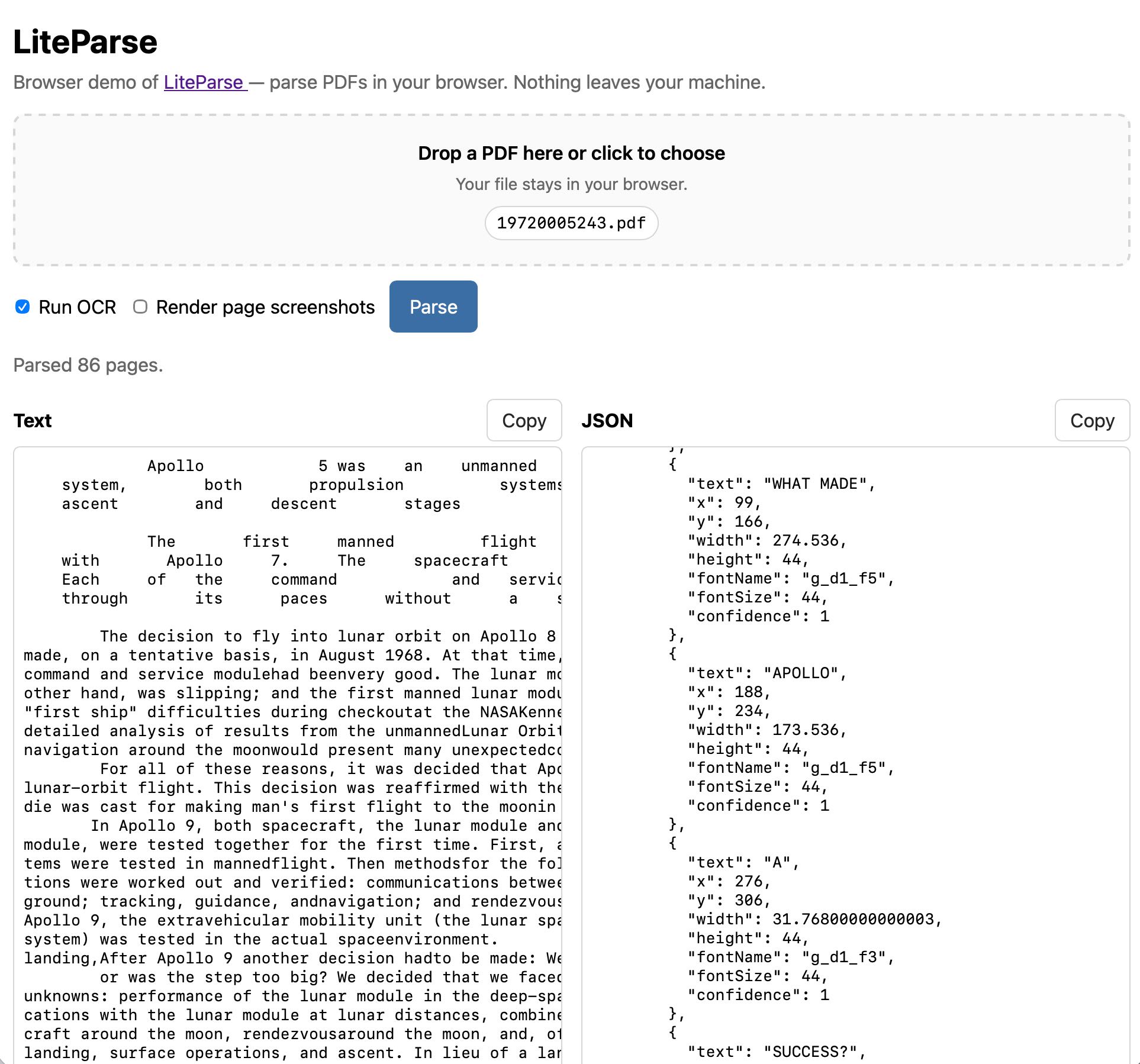
The tool can work with or without running OCR, and can optionally display images for every page in the PDF further down the page.
Building it with Claude Code and Opus 4.7
The process of building this started in the regular Claude app on my iPhone. I wanted to try out LiteParse myself, so I started by uploading a random PDF I happened to have on my phone along with this prompt:
Clone https://github.com/run-llama/liteparse and try it against this file
Regular Claude chat can clone directly from GitHub these days, and while by default it can’t access most of the internet from its container it can also install packages from PyPI and npm.
I often use this to try out new pieces of open source software on my phone—it’s a quick way to exercise something without having to sit down with my laptop.
You can follow my full conversation in this shared Claude transcript. I asked a few follow-up questions about how it worked, and then asked:
Does this library run in a browser? Could it?
This gave me a thorough enough answer that I was convinced it was worth trying getting that to work for real. I opened up my laptop and switched to Claude Code.
I forked the original repo on GitHub, cloned a local copy, started a new web branch and pasted that last reply from Claude into a new file called notes.md. Then I told Claude Code:
Get this working as a web app. index.html, when loaded, should render an app that lets users open a PDF in their browser and select OCR or non-OCR mode and have this run. Read notes.md for initial research on this problem, then write out plan.md with your detailed implementation plan
I always like to start with a plan for this kind of project. Sometimes I’ll use Claude’s “planning mode”, but in this case I knew I’d want the plan as an artifact in the repository so I told it to write plan.md directly.
This also means I can iterate on the plan with Claude. I noticed that Claude had decided to punt on generating screenshots of images in the PDF, and suggested we defer a “canvas-encode swap” to v2. I fixed that by prompting:
Update the plan to say we WILL do the canvas-encode swap so the screenshots thing works
After a few short follow-up prompts, here’s the plan.md I thought was strong enough to implement.
I prompted:
build it.
And then mostly left Claude Code to its own devices, tinkered with some other projects, caught up on Duolingo and occasionally checked in to see how it was doing.
I added a few prompts to the queue as I was working. Those don’t yet show up in my exported transcript, but it turns out running rg queue-operation --no-filename | grep enqueue | jq -r '.content' in the relevant ~/.claude/projects/ folder extracts them.
Here are the key follow-up prompts with some notes:
-
When you implement this use playwright and red/green TDD, plan that too—I’ve written more about red/green TDD here. -
let's use PDF.js's own renderer(it was messing around with pdfium) -
The final UI should include both the text and the pretty-printed JSON output, both of those in textareas and both with copy-to-clipboard buttons - it should also be mobile friendly—I had a new idea for how the UI should work -
small commits along the way—see below -
Make sure the index.html page includes a link back to https://github.com/run-llama/liteparse near the top of the page—it’s important to credit your dependencies in a project like this! View on GitHub → is bad copy because that's not the repo with this web app in, it's the web app for the underlying LiteParse libraryRun OCR should be unchecked by default-
When I try to parse a PDF in my browser I see 'Parse failed: undefined is not a function (near '...value of readableStream...')—it was testing with Playwright in Chrome, turned out there was a bug in Safari ... oh that is in safari but it works in chromeWhen "Copy" is clicked the text should change to "Copied!" for 1.5s-
[Image #1] Style the file input so that long filenames don't break things on Firefox like this - in fact add one of those drag-drop zone UIs which you can also click to select a file—dropping screenshots in of small UI glitches works surprisingly well Tweak the drop zone such that the text is vertically centered, right now it is a bit closer to the top-
it breaks in Safari on macOS, works in both Chrome and Firefox. On Safari I see "Parse failed: undefined is not a function (near '...value of readableStream...')" after I click the Parse button, when OCR is not checked—it still wasn’t working in Safari... -
works in safari now—but it fixed it pretty quickly once I pointed that out and it got Playwright working with that browser
I’ve started habitually asking for “small commits along the way” because it makes for code that’s easier to understand or review later on, and I have an unproven hunch that it helps the agent work more effectively too—it’s yet another encouragement towards planning and taking on one problem at a time.
While it was working I decided it would be nice to be able to interact with an in-progress version. I asked a separate Claude Code session against the same directory for tips on how to run it, and it told me to use npx vite. Running that started a development server with live-reloading, which meant I could instantly see the effect of each change it made on disk—and prompt with further requests for tweaks and fixes.
Towards the end I decided it was going to be good enough to publish. I started a fresh Claude Code instance and told it:
Look at the web/ folder - set up GitHub actions for this repo such that any push runs the tests, and if the tests pass it then does a GitHub Pages deploy of the built vite app such that the web/index.html page is the index.html page for the thing that is deployed and it works on GitHub Pages
After a bit more iteration here’s the GitHub Actions workflow that builds the app using Vite and deploys the result to https://simonw.github.io/liteparse/.
I love GitHub Pages for this kind of thing because it can be quickly configured (by Claude, in this case) to turn any repository into a deployed web-app, at zero cost and with whatever build step is necessary. It even works against private repos, if you don’t mind your only security being a secret URL.
With this kind of project there’s always a major risk that the model might “cheat”—mark key features as “TODO” and fake them, or take shortcuts that ignore the initial requirements.
The responsible way to prevent this is to review all of the code... but this wasn’t intended as that kind of project, so instead I fired up OpenAI Codex with GPT-5.5 (I had preview access) and told it:
Describe the difference between how the node.js CLI tool runs and how the web/ version runs
The answer I got back was enough to give me confidence that Claude hadn’t taken any project-threatening shortcuts.
... and that was about it. Total time in Claude Code for that “build it” step was 59 minutes. I used my claude-code-transcripts tool to export a readable version of the full transcript which you can view here, albeit without those additional queued prompts (here’s my issue to fix that).
Is this even vibe coding any more?
I’m a pedantic stickler when it comes to the original definition of vibe coding—vibe coding does not mean any time you use AI to help you write code, it’s when you use AI without reviewing or caring about the code that’s written at all.
By my own definition, this LiteParse for the web project is about as pure vibe coding as you can get! I have not looked at a single line of the HTML and TypeScript written for this project—in fact while writing this sentence I had to go and check if it had used JavaScript or TypeScript.
Yet somehow this one doesn’t feel as vibe coded to me as many of my other vibe coded projects:
- As a static in-browser web application hosted on GitHub Pages the blast radius for any bugs is almost non-existent: it either works for your PDF or doesn’t.
- No private data is transferred anywhere—all processing happens in your browser—so a security audit is unnecessary. I’ve glanced once at the network panel while it’s running and no additional requests are made when a PDF is being parsed.
- There was still a whole lot of engineering experience and knowledge required to use the models in this way. Identifying that porting LiteParse to run directly in a browser was critical to the rest of the project.
Most importantly, I’m happy to attach my reputation to this project and recommend that other people try it out. Unlike most of my vibe coded tools I’m not convinced that spending significant additional engineering time on this would have resulted in a meaningfully better initial release. It’s fine as it is!
I haven’t opened a PR against the origin repository because I’ve not discussed it with the LiteParse team. I’ve opened an issue, and if they want my vibe coded implementation as a starting point for something more official they’re welcome to take it.
More recent articles
- Battle Drones - a vibe coded RTS with audio-based multiplayer - 20th October 2026
- Hello Python 3.15, goodbye 3.10, and now I can use 3.11 - 12th October 2026
- A new feature for my blog, built using my voice - 9th October 2026
- Claude Haiku 5.5 - 7th October 2026