Simon Willison’s Weblog

Subscribe

The new ChatGPT Images is here. OpenAI shipped an update to their ChatGPT Images feature - the feature that gained them 100 million new users in a week when they first launched it back in March, but has since been eclipsed by Google's Nano Banana and then further by Nana Banana Pro in November.

The focus for the new ChatGPT Images is speed and instruction following:

It makes precise edits while keeping details intact, and generates images up to 4x faster

It's also a little cheaper: OpenAI say that the new gpt-image-1.5 API model makes image input and output "20% cheaper in GPT Image 1.5 as compared to GPT Image 1".

I tried a new test prompt against a photo I took of Natalie's ceramic stand at the farmers market a few weeks ago:

Add two kakapos inspecting the pots
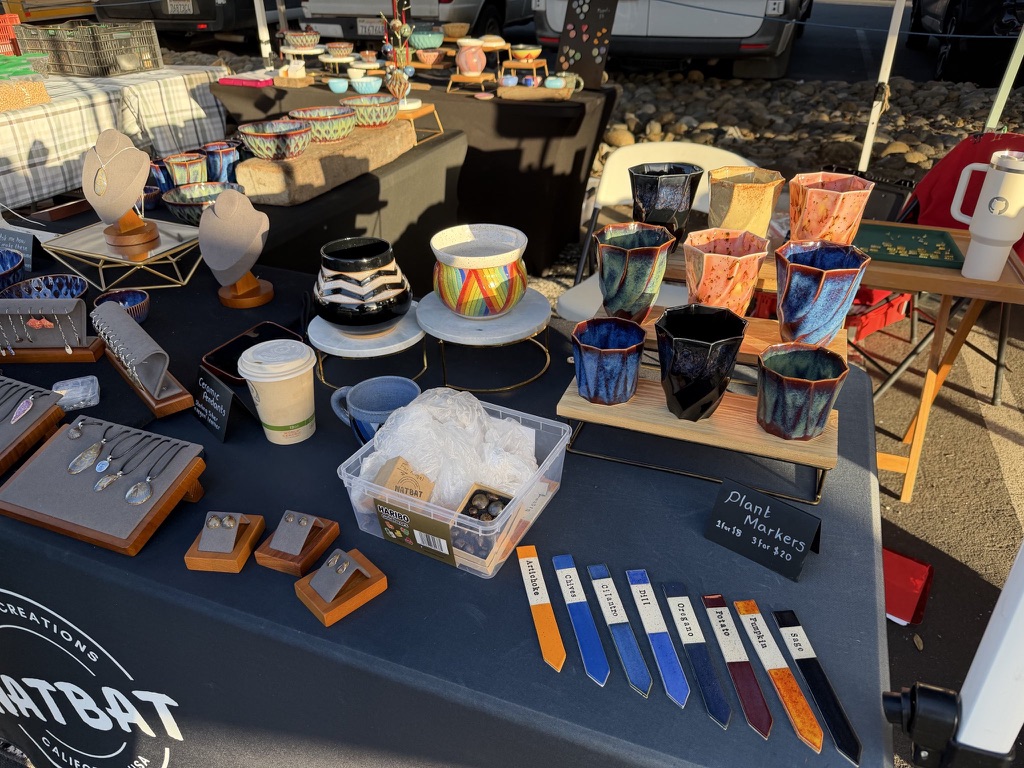
Outdoor craft market booth displaying handmade ceramics and jewelry on a navy tablecloth with "NATBAT CREATIONS CALIFORNIA USA" logo. Items include colorful glazed ceramic cups in blue, orange, and black; decorative bowls including a rainbow-striped piece; jewelry pendants and earrings on wooden display stands; ceramic plant markers in various colors labeled "Artichoke", "Cilantro", "Chili", "Oregano", "Potato", "Pumpkin", "Sage".

Here's the result from the new ChatGPT Images model:
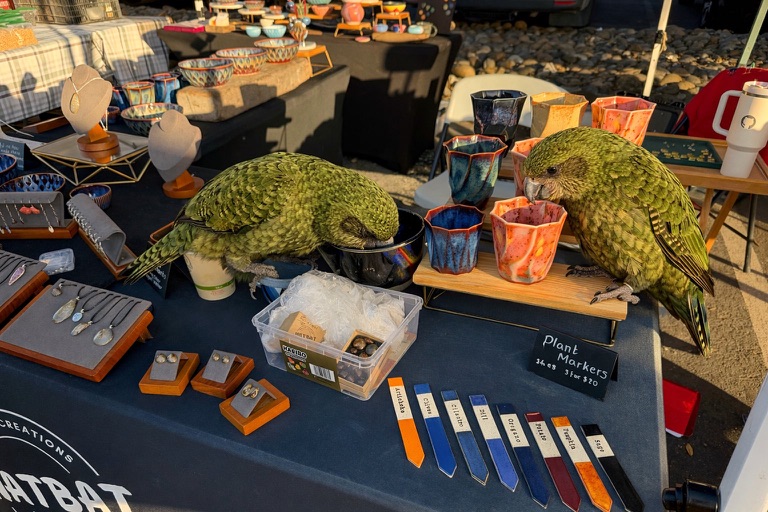
Same craft market booth as previous image, now with two large olive-green Kākāpō parrots perched on the table among the ceramics, one investigating the blue glazed cups and the other examining an orange cup.

And here's what I got from Nano Banana Pro:
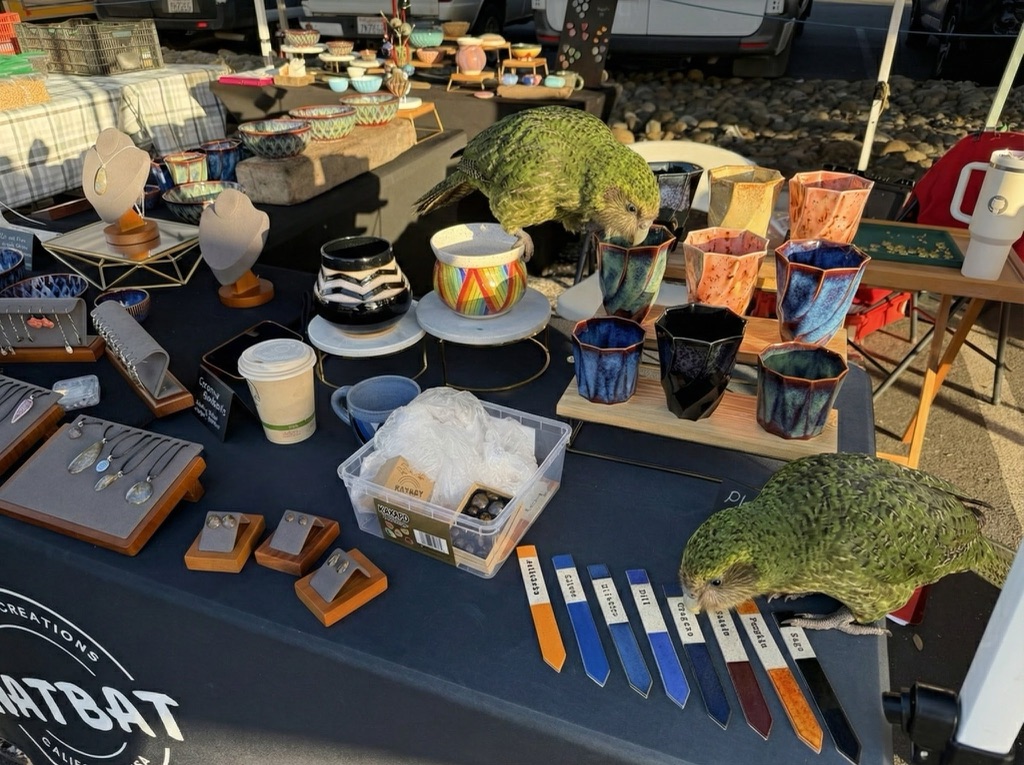
Same craft market booth with two Kākāpō now in different positions: one remains center-table peering into the ceramic cups near the rainbow pot, while the second has moved to the right edge of the table near the plant markers, appearing to examine or possibly chew on items at the table's corner. They are both a little smaller than in the first image.

The ChatGPT Kākāpō are a little chonkier, which I think counts as a win.

I was a little less impressed by the result I got for an infographic from the prompt "Infographic explaining how the Datasette open source project works" followed by "Run some extensive searches and gather a bunch of relevant information and then try again" (transcript):

Infographic titled "HOW DATASETTE WORKS" with subtitle "THE OPEN SOURCE DATA PLATFORM" showing a four-step workflow. STEP 1 (orange): "LOAD YOUR DATA" - "CSV, JSON, XLSX, SQLite, PostgreSQL, etc." with icons of file types flowing into a laptop. Below: "IMPORT DATASETS - Turn your structured data into SQLite databases and .db files." with checkmarks for "Datasette Desktop App for local deployment", "CLI tool for command-line imports", "Automatic CSV import tool". STEP 2 (green): "PUBLISH & DEPLOY" - "HOST DATASETS ONLINE" with cloud and server icons labeled "DEPLOY". Below: "SHARE ONLINE - Deploy your Datasette instance to a public server." with checkmarks for "Datasette Cloud - Free hosting service", "Deploy anywhere via plugins", "Configurable API tools". STEP 3 (purple): "EXPLORE & QUERY" - "BROWSE, SEARCH & VISUALIZE" with database and browser window icons. Below: "SQL QUERIES & SEARCH - Browse, filter, search, and visualize your data with an interactive web interface." with checkmarks for "Perform SQL queries directly from the browser", "Filter, sort, and facet data", "Generate custom visualizations and charts". STEP 4 (red): "BUILD & EXTEND" - "PLUGINS, APIS & INTEGRATIONS" with gear and wrench icons labeled "API". Below: "CUSTOMIZE & DEVELOP" with bullets "Develop custom plugins for added functionality", "Access JSON API for programmatic queries", "Embed and integrate Datasette into other applications". Bottom banner shows four features: "OPEN DATA PLATFORM - Widely used for visualizing, sharing and building applications with SQLite backed data", "EXTENSIBLE PLUGINS - 100+ plugins available, inc uding chaps, charts authentication, and more", "ACCESS CONTROL - Granular permissions for controlling who s an access and interact with your data", "OPEN SOURCE PROJECT - Actively developed open source project with a vibrant community of contributors".

See my Nano Banana Pro post for comparison.

Both models are clearly now usable for text-heavy graphics though, which makes them far more useful than previous generations of this technology.

Monthly briefing

Sponsor me for $10/month and get a curated email digest of the month's most important LLM developments.

Pay me to send you less!

Sponsor & subscribe