Entries Links Quotes Notes Guides Elsewhere
April 18, 2026
Adding a new content type to my blog-to-newsletter tool
Here's an example of a deceptively short prompt that got a lot of work done in a single shot.
First, some background. I send out a free Substack newsletter around once a week containing content copied-and-pasted from my blog. I'm effectively using Substack as a lightweight way to allow people to subscribe to my blog via email.
I generate the newsletter with my blog-to-newsletter tool - an HTML and JavaScript app that fetches my latest content from this Datasette instance and formats it as rich text HTML, which I can then copy to my clipboard and paste into the Substack editor. Here's a detailed explanation of how that works. [... 900 words]
April 17, 2026
Join us at PyCon US 2026 in Long Beach—we have new AI and security tracks this year

This year’s PyCon US is coming up next month from May 13th to May 19th, with the core conference talks from Friday 15th to Sunday 17th and tutorial and sprint days either side. It’s in Long Beach, California this year, the first time PyCon US has come to the West Coast since Portland, Oregon in 2017 and the first time in California since Santa Clara in 2013.
[... 606 words]I was upgrading Datasette Cloud to 1.0a27 and discovered a nasty collection of accidental breakages caused by changes in that alpha. This new alpha addresses those directly:
- Fixed a compatibility bug introduced in 1.0a27 where
execute_write_fn()callbacks with a parameter name other thanconnwere seeing errors. (#2691)- The database.close() method now also shuts down the write connection for that database.
- New datasette.close() method for closing down all databases and resources associated with a Datasette instance. This is called automatically when the server shuts down. (#2693)
- Datasette now includes a pytest plugin which automatically calls
datasette.close()on temporary instances created in function-scoped fixtures and during tests. See Automatic cleanup of Datasette instances for details. This helps avoid running out of file descriptors in plugin test suites that were written before theDatabase(is_temp_disk=True)feature introduced in Datasette 1.0a27. (#2692)
Most of the changes in this release were implemented using Claude Code and the newly released Claude Opus 4.7.
April 16, 2026
- New model:
claude-opus-4.7, which supportsthinking_effort:xhigh. #66- New
thinking_displayandthinking_adaptiveboolean options.thinking_displaysummarized output is currently only available in JSON output or JSON logs.- Increased default
max_tokensto the maximum allowed for each model.- No longer uses obsolete
structured-outputs-2025-11-13beta header for older models.
Qwen3.6-35B-A3B on my laptop drew me a better pelican than Claude Opus 4.7
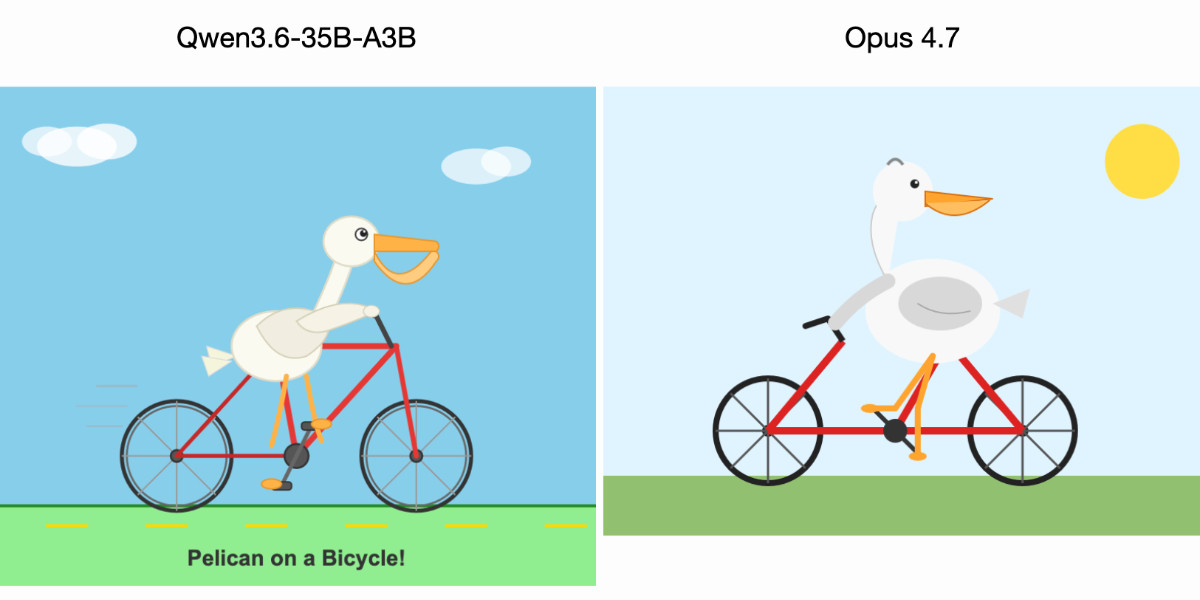
For anyone who has been (inadvisably) taking my pelican riding a bicycle benchmark seriously as a robust way to test models, here are pelicans from this morning’s two big model releases—Qwen3.6-35B-A3B from Alibaba and Claude Opus 4.7 from Anthropic.
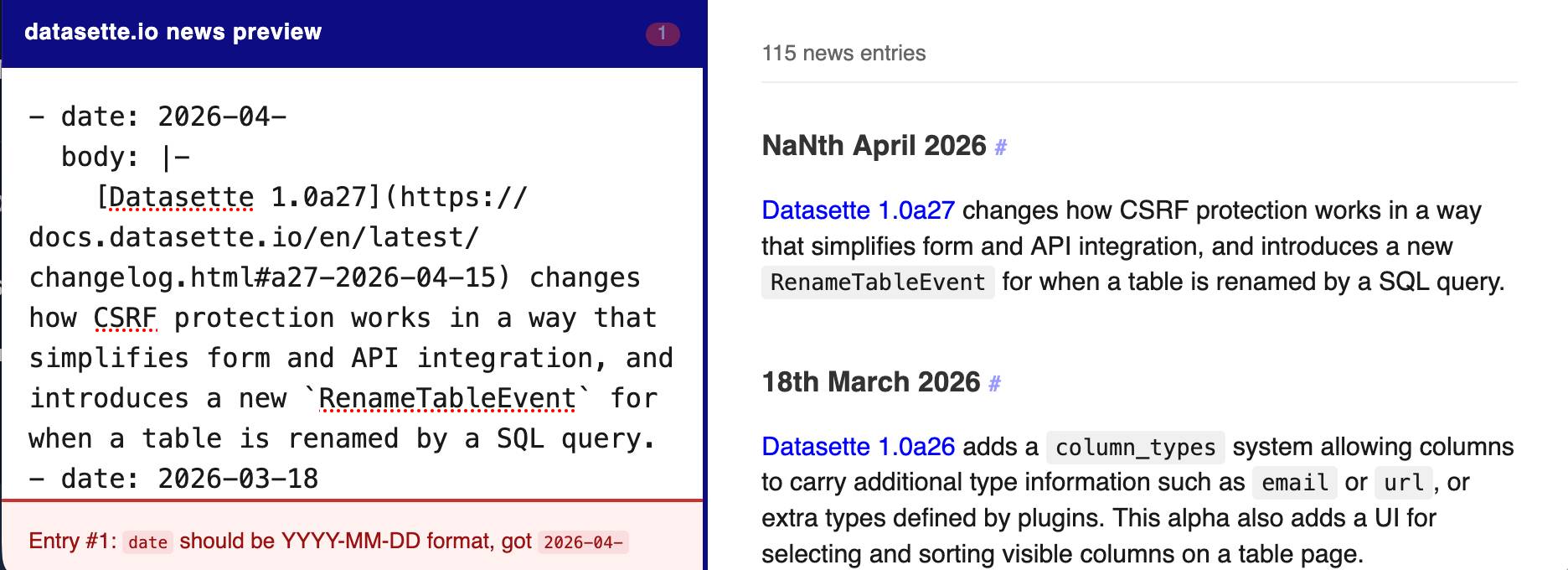
[... 602 words]The datasette.io website has a news section built from this news.yaml file in the underlying GitHub repository. The YAML format looks like this:
- date: 2026-04-15
  body: |-
    [Datasette 1.0a27](https://docs.datasette.io/en/latest/changelog.html#a27-2026-04-15) changes how CSRF protection works in a way that simplifies form and API integration, and introduces a new `RenameTableEvent` for when a table is renamed by a SQL query.
- date: 2026-03-18
  body: |-
    ...
This format is a little hard to edit, so I finally had Claude build a custom preview UI to make checking for errors have slightly less friction.
I built it using standard claude.ai and Claude Artifacts, taking advantage of Claude's ability to clone GitHub repos and look at their content as part of a regular chat:
Clone https://github.com/simonw/datasette.io and look at the news.yaml file and how it is rendered on the homepage. Build an artifact I can paste that YAML into which previews what it will look like, and highlights any markdown errors or YAML errors
April 15, 2026
This plugin was using the ds_csrftoken cookie as part of a custom signed URL, which needed upgrading now that Datasette 1.0a27 no longer sets that cookie.
Two major changes in this new Datasette alpha. I covered the first of those in detail yesterday - Datasette no longer uses Django-style CSRF form tokens, instead using modern browser headers as described by Filippo Valsorda.
The second big change is that Datasette now fires a new RenameTableEvent any time a table is renamed during a SQLite transaction. This is useful because some plugins (like datasette-comments) attach additional data to table records by name, so a renamed table requires them to react in appropriate ways.
Here are the rest of the changes in the alpha:
- New actor= parameter for
datasette.clientmethods, allowing internal requests to be made as a specific actor. This is particularly useful for writing automated tests. (#2688)- New
Database(is_temp_disk=True)option, used internally for the internal database. This helps resolve intermittent database locked errors caused by the internal database being in-memory as opposed to on-disk. (#2683) (#2684)- The
/<database>/<table>/-/upsertAPI (docs) now rejects rows withnullprimary key values. (#1936)- Improved example in the API explorer for the
/-/upsertendpoint (docs). (#1936)- The
/<database>.jsonendpoint now includes an"ok": truekey, for consistency with other JSON API responses.- call_with_supported_arguments() is now documented as a supported public API. (#2678)
The real goldmine isn’t that Apple gets a cut of every App Store transaction. It’s that Apple’s platforms have the best apps, and users who are drawn to the best apps are thus drawn to the iPhone, Mac, and iPad. That edge is waning. Not because software on other platforms is getting better, but because third-party software on iPhone, Mac, and iPad is regressing to the mean, to some extent, because fewer developers feel motivated — artistically, financially, or both — to create well-crafted idiomatic native apps exclusively for Apple’s platforms.
Gemini 3.1 Flash TTS. Google released Gemini 3.1 Flash TTS today, a new text-to-speech model that can be directed using prompts.
It's presented via the standard Gemini API using gemini-3.1-flash-tts-preview as the model ID, but can only output audio files.
The prompting guide is surprising, to say the least. Here's their example prompt to generate just a few short sentences of audio:
# AUDIO PROFILE: Jaz R.
## "The Morning Hype"

## THE SCENE: The London Studio
It is 10:00 PM in a glass-walled studio overlooking the moonlit London skyline, but inside, it is blindingly bright. The red "ON AIR" tally light is blazing. Jaz is standing up, not sitting, bouncing on the balls of their heels to the rhythm of a thumping backing track. Their hands fly across the faders on a massive mixing desk. It is a chaotic, caffeine-fueled cockpit designed to wake up an entire nation.

### DIRECTOR'S NOTES
Style:
* The "Vocal Smile": You must hear the grin in the audio. The soft palate is always raised to keep the tone bright, sunny, and explicitly inviting.
* Dynamics: High projection without shouting. Punchy consonants and elongated vowels on excitement words (e.g., "Beauuutiful morning").

Pace: Speaks at an energetic pace, keeping up with the fast music.  Speaks with A "bouncing" cadence. High-speed delivery with fluid transitions — no dead air, no gaps.

Accent: Jaz is from Brixton, London

### SAMPLE CONTEXT
Jaz is the industry standard for Top 40 radio, high-octane event promos, or any script that requires a charismatic Estuary accent and 11/10 infectious energy.

#### TRANSCRIPT
[excitedly] Yes, massive vibes in the studio! You are locked in and it is absolutely popping off in London right now. If you're stuck on the tube, or just sat there pretending to work... stop it. Seriously, I see you.
[shouting] Turn this up! We've got the project roadmap landing in three, two... let's go!
Here's what I got using that example prompt:
Then I modified it to say "Jaz is from Newcastle" and "... requires a charismatic Newcastle accent" and got this result:
Here's Exeter, Devon for good measure:
I had Gemini 3.1 Pro vibe code this UI for trying it out:
![Screenshot of a "Gemini 3.1 Flash TTS" web application interface. At the top is an "API Key" field with a masked password. Below is a "TTS Mode" section with a dropdown set to "Multi-Speaker (Conversation)". "Speaker 1 Name" is set to "Joe" with "Speaker 1 Voice" set to "Puck (Upbeat)". "Speaker 2 Name" is set to "Jane" with "Speaker 2 Voice" set to "Kore (Firm)". Under "Script / Prompt" is a tip reading "Tip: Format your text as a script using the Exact Speaker Names defined above." The script text area contains "TTS the following conversation between Joe and Jane:\n\nJoe: How's it going today Jane?\nJane: [yawn] Not too bad, how about you?" A blue "Generate Audio" button is below. At the bottom is a "Success!" message with an audio player showing 00:00 / 00:06 and a "Download WAV" link.](https://static.simonwillison.net/static/2026/gemini-flash-tts.jpg)
See my notes on Google's new Gemini 3.1 Flash TTS text-to-speech model.
I think we will see some people employed (though perhaps not explicitly) as meat shields: people who are accountable for ML systems under their supervision. The accountability may be purely internal, as when Meta hires human beings to review the decisions of automated moderation systems. It may be external, as when lawyers are penalized for submitting LLM lies to the court. It may involve formalized responsibility, like a Data Protection Officer. It may be convenient for a company to have third-party subcontractors, like Buscaglia, who can be thrown under the bus when the system as a whole misbehaves.
— Kyle Kingsbury, The Future of Everything is Lies, I Guess: New Jobs
A small update for my tool for helping me figure out what all of the Datasette instances on my laptop are up to.
- Show working directory derived from each PID
- Show the full path to each database file
Output now looks like this:
http://127.0.0.1:8007/ - v1.0a26
  Directory: /Users/simon/dev/blog
  Databases:
    simonwillisonblog: /Users/simon/dev/blog/simonwillisonblog.db
  Plugins:
    datasette-llm
    datasette-secrets
http://127.0.0.1:8001/ - v1.0a26
  Directory: /Users/simon/dev/creatures
  Databases:
    creatures: /tmp/creatures.db
Zig 0.16.0 release notes: “Juicy Main” (via) Zig has really good release notes - comprehensive, detailed, and with relevant usage examples for each of the new features.
Of particular note in the newly released Zig 0.16.0 is what they are calling "Juicy Main" - a dependency injection feature for your program's main() function where accepting a process.Init parameter grants access to a struct of useful properties:
const std = @import("std");

pub fn main(init: std.process.Init) !void {
    /// general purpose allocator for temporary heap allocations:
    const gpa = init.gpa;
    /// default Io implementation:
    const io = init.io;
    /// access to environment variables:
    std.log.info("{d} env vars", .{init.environ_map.count()});
    /// access to CLI arguments
    const args = try init.minimal.args.toSlice(
        init.arena.allocator()
    );
}April 14, 2026
datasette PR #2689: Replace token-based CSRF with Sec-Fetch-Site header protection.
Datasette has long protected against CSRF attacks using CSRF tokens, implemented using my asgi-csrf Python library. These are something of a pain to work with - you need to scatter forms in templates with <input type="hidden" name="csrftoken" value="{{ csrftoken() }}"> lines and then selectively disable CSRF protection for APIs that are intended to be called from outside the browser.
I've been following Filippo Valsorda's research here with interest, described in this detailed essay from August 2025 and shipped as part of Go 1.25 that same month.
I've now landed the same change in Datasette. Here's the PR description - Claude Code did much of the work (across 10 commits, closely guided by me and cross-reviewed by GPT-5.4) but I've decided to start writing these PR descriptions by hand, partly to make them more concise and also as an exercise in keeping myself honest.
- New CSRF protection middleware inspired by Go 1.25 and this research by Filippo Valsorda. This replaces the old CSRF token based protection.
- Removes all instances of
<input type="hidden" name="csrftoken" value="{{ csrftoken() }}">in the templates - they are no longer needed.- Removes the
def skip_csrf(datasette, scope):plugin hook defined indatasette/hookspecs.pyand its documentation and tests.- Updated CSRF protection documentation to describe the new approach.
- Upgrade guide now describes the CSRF change.
Trusted access for the next era of cyber defense (via) OpenAI's answer to Claude Mythos appears to be a new model called GPT-5.4-Cyber:
In preparation for increasingly more capable models from OpenAI over the next few months, we are fine-tuning our models specifically to enable defensive cybersecurity use cases, starting today with a variant of GPT‑5.4 trained to be cyber-permissive: GPT‑5.4‑Cyber.
They're also extending a program they launched in February (which I had missed) called Trusted Access for Cyber, where users can verify their identity (via a photo of a government-issued ID processed by Persona) to gain "reduced friction" access to OpenAI's models for cybersecurity work.
Honestly, this OpenAI announcement is difficult to follow. Unsurprisingly they don't mention Anthropic at all, but much of the piece emphasizes their many years of existing cybersecurity work and their goal to "democratize access" to these tools, hence the emphasis on that self-service verification flow from February.
If you want access to their best security tools you still need to go through an extra Google Form application process though, which doesn't feel particularly different to me from Anthropic's Project Glasswing.
Cybersecurity Looks Like Proof of Work Now. The UK's AI Safety Institute recently published Our evaluation of Claude Mythos Preview’s cyber capabilities, their own independent analysis of Claude Mythos which backs up Anthropic's claims that it is exceptionally effective at identifying security vulnerabilities.
Drew Breunig notes that AISI's report shows that the more tokens (and hence money) they spent the better the result they got, which leads to a strong economic incentive to spend as much as possible on security reviews:
If Mythos continues to find exploits so long as you keep throwing money at it, security is reduced to a brutally simple equation: to harden a system you need to spend more tokens discovering exploits than attackers will spend exploiting them.
An interesting result of this is that open source libraries become more valuable, since the tokens spent securing them can be shared across all of their users. This directly counters the idea that the low cost of vibe-coding up a replacement for an open source library makes those open source projects less attractive.
April 13, 2026
I was chatting with my buddy at Google, who's been a tech director there for about 20 years, about their AI adoption. Craziest convo I've had all year.
The TL;DR is that Google engineering appears to have the same AI adoption footprint as John Deere, the tractor company. Most of the industry has the same internal adoption curve: 20% agentic power users, 20% outright refusers, 60% still using Cursor or equivalent chat tool. It turns out Google has this curve too. [...]
There has been an industry-wide hiring freeze for 18+ months, during which time nobody has been moving jobs. So there are no clued-in people coming in from the outside to tell Google how far behind they are, how utterly mediocre they have become as an eng org.
On behalf of @Google, this post doesn't match the state of agentic coding at our company. Over 40K SWEs use agentic coding weekly here. Googlers have access to our own versions of @antigravity, @geminicli, custom models, skills, CLIs and MCPs for our daily work. Orchestrators, agent loops, virtual SWE teams and many other systems are actively available to folks. [...]
Maybe tell your buddy to do some actual work and to stop spreading absolute nonsense. This post is completely false and just pure clickbait.
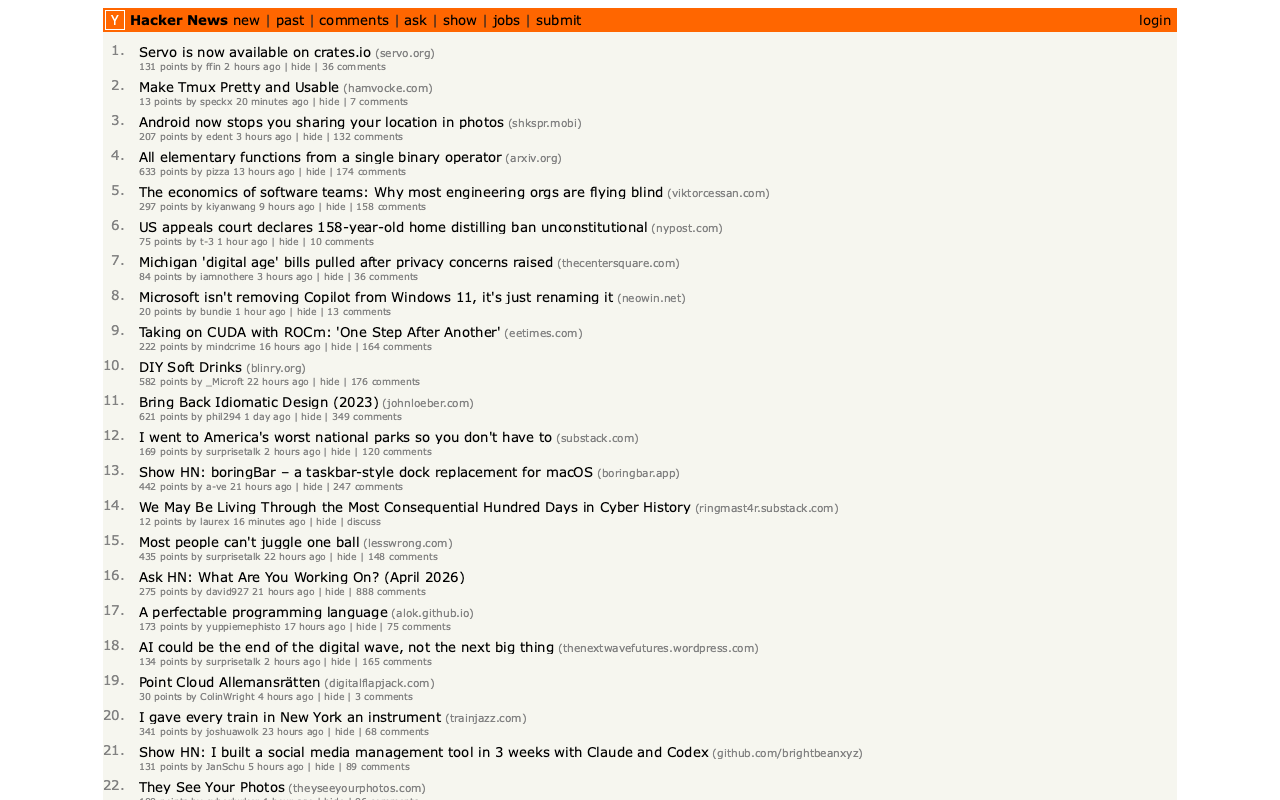
In Servo is now available on crates.io the Servo team announced the initial release of the servo crate, which packages their browser engine as an embeddable library.
I set Claude Code for web the task of figuring out what it can do, building a CLI tool for taking screenshots using it and working out if it could be compiled to WebAssembly.
The servo-shot Rust tool it built works pretty well:
git clone https://github.com/simonw/research
cd research/servo-crate-exploration/servo-shot
cargo build
./target/debug/servo-shot https://news.ycombinator.com/
Here's the result:
Compiling Servo itself to WebAssembly is not feasible due to its heavy use of threads and dependencies like SpiderMonkey, but Claude did build me this playground page for trying out a WebAssembly build of the html5ever and markup5ever_rcdom crates, providing a tool for turning fragments of HTML into a parse tree.
The problem is that LLMs inherently lack the virtue of laziness. Work costs nothing to an LLM. LLMs do not feel a need to optimize for their own (or anyone's) future time, and will happily dump more and more onto a layercake of garbage. Left unchecked, LLMs will make systems larger, not better — appealing to perverse vanity metrics, perhaps, but at the cost of everything that matters.
As such, LLMs highlight how essential our human laziness is: our finite time forces us to develop crisp abstractions in part because we don't want to waste our (human!) time on the consequences of clunky ones.
— Bryan Cantrill, The peril of laziness lost
April 12, 2026
Thanks to a tip from Rahim Nathwani, here's a uv run recipe for transcribing an audio file on macOS using the 10.28 GB Gemma 4 E2B model with MLX and mlx-vlm:
uv run --python 3.13 --with mlx_vlm --with torchvision --with gradio \
  mlx_vlm.generate \
  --model google/gemma-4-e2b-it \
  --audio file.wav \
  --prompt "Transcribe this audio" \
  --max-tokens 500 \
  --temperature 1.0
I tried it on this 14 second .wav file and it output the following:
This front here is a quick voice memo. I want to try it out with MLX VLM. Just going to see if it can be transcribed by Gemma and how that works.
(That was supposed to be "This right here..." and "... how well that works" but I can hear why it misinterpreted that as "front" and "how that works".)
April 11, 2026
SQLite 3.53.0 (via) SQLite 3.52.0 was withdrawn so this is a pretty big release with a whole lot of accumulated user-facing and internal improvements. Some that stood out to me:
ALTER TABLEcan now add and removeNOT NULLandCHECKconstraints - I've previously used my own sqlite-utils transform() method for this.- New json_array_insert() function and its
jsonbequivalent. - Significant improvements to CLI mode, including result formatting.
The result formatting improvements come from a new library, the Query Results Formatter. I had Claude Code (on my phone) compile that to WebAssembly and build this playground interface for trying that out.
See my notes on SQLite 3.53.0. This playground provides a UI for trying out the various rendering options for SQL result tables from the new Query Result Formatter library, compiled to WebAssembly.
April 10, 2026
Lenny posted another snippet from our 1 hour 40 minute podcast recording and it's about kākāpō parrots!
I think it's non-obvious to many people that the OpenAI voice mode runs on a much older, much weaker model - it feels like the AI that you can talk to should be the smartest AI but it really isn't.
If you ask ChatGPT voice mode for its knowledge cutoff date it tells you April 2024 - it's a GPT-4o era model.
This thought inspired by this Andrej Karpathy tweet about the growing gap in understanding of AI capability based on the access points and domains people are using the models with:
[...] It really is simultaneously the case that OpenAI's free and I think slightly orphaned (?) "Advanced Voice Mode" will fumble the dumbest questions in your Instagram's reels and at the same time, OpenAI's highest-tier and paid Codex model will go off for 1 hour to coherently restructure an entire code base, or find and exploit vulnerabilities in computer systems.
This part really works and has made dramatic strides because 2 properties:
- these domains offer explicit reward functions that are verifiable meaning they are easily amenable to reinforcement learning training (e.g. unit tests passed yes or no, in contrast to writing, which is much harder to explicitly judge), but also
- they are a lot more valuable in b2b settings, meaning that the biggest fraction of the team is focused on improving them.
April 9, 2026
GitHub doesn't tell you the repo size in the UI, but it's available in the CORS-friendly API. Paste a repo into this tool to see the size, for example for simonw/datasette (8.1MB).
I ran into trouble deploying a new feature using SSE to a production Datasette instance, and it turned out that instance was using datasette-gzip which uses asgi-gzip which was incorrectly compressing event/text-stream responses.
asgi-gzip was extracted from Starlette, and has a GitHub Actions scheduled workflow to check Starlette for updates that need to be ported to the library... but that action had stopped running and hence had missed Starlette's own fix for this issue.
I ran the workflow and integrated the new fix, and now datasette-gzip and asgi-gzip both correctly handle text/event-stream in SSE responses.
April 8, 2026
Meta’s new model is Muse Spark, and meta.ai chat has some interesting tools
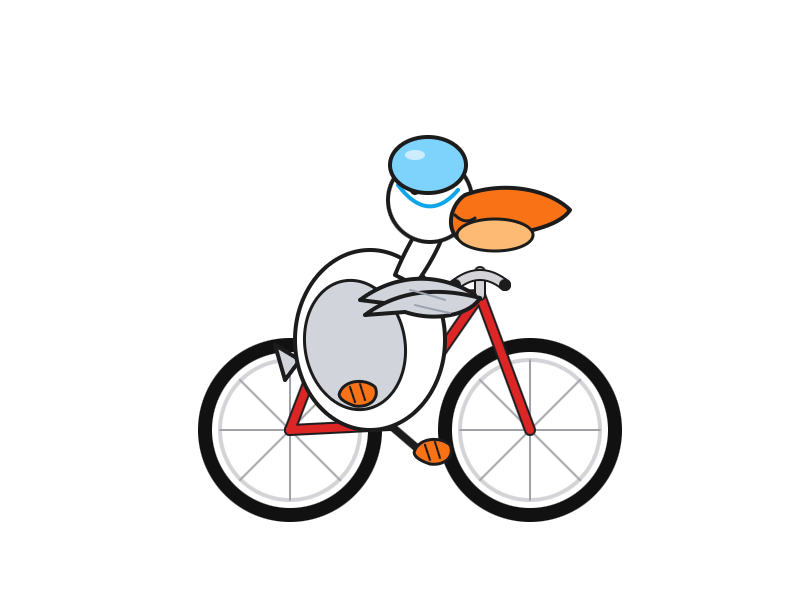
Meta announced Muse Spark today, their first model release since Llama 4 almost exactly a year ago. It’s hosted, not open weights, and the API is currently “a private API preview to select users”, but you can try it out today on meta.ai (Facebook or Instagram login required).
[... 2,607 words]I have a feeling that everyone likes using AI tools to try doing someone else’s profession. They’re much less keen when someone else uses it for their profession.
— Giles Turnbull, AI and the human voice
April 7, 2026
GLM-5.1: Towards Long-Horizon Tasks. Chinese AI lab Z.ai's latest model is a giant 754B parameter 1.51TB (on Hugging Face) MIT-licensed monster - the same size as their previous GLM-5 release, and sharing the same paper.
It's available via OpenRouter so I asked it to draw me a pelican:
llm install llm-openrouter
llm -m openrouter/z-ai/glm-5.1 'Generate an SVG of a pelican on a bicycle'
And something new happened... unprompted, the model decided to give me an HTML page that included both the SVG and a separate set of CSS animations!
The SVG was excellent, and might be my new favorite from an open weights model:

But the animation broke it:

That's the pelican, floating up in the top left corner.
I usually don't do follow-up prompts for the pelican test, but in this case I made an exception:
llm -c 'the animation is a bit broken, the pelican ends up positioned off the screen at the top right'
GLM 5.1 replied:
The issue is that CSS
transformanimations on SVG elements override the SVGtransformattribute used for positioning, causing the pelican to lose its placement and fly off to the top-right. The fix is to separate positioning (SVG attribute) from animation (inner group) and use<animateTransform>for SVG rotations since it handles coordinate systems correctly.
And spat out fresh HTML which fixed the problem!
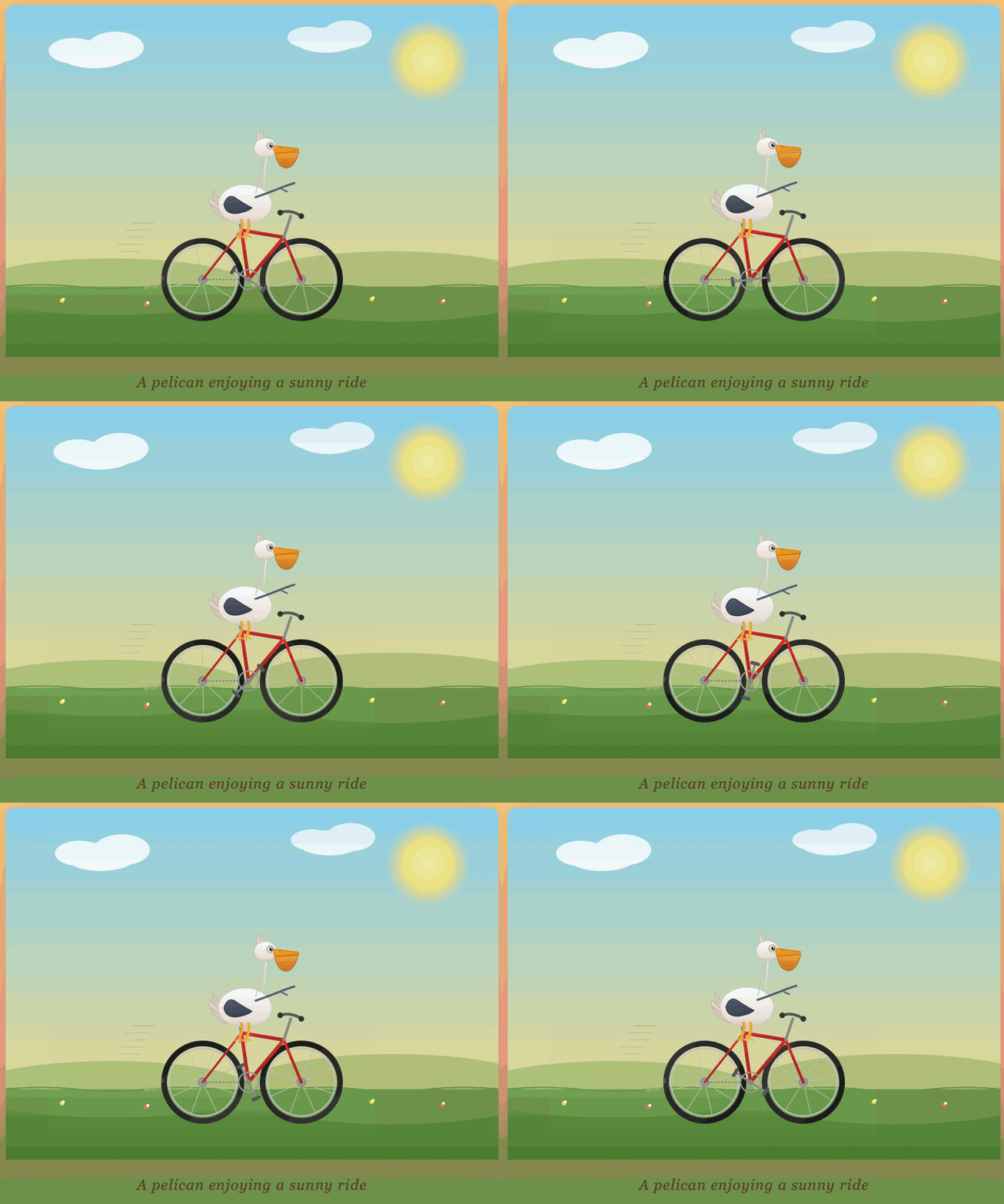
I particularly like the animation of the beak, which is described in the SVG comments like so:
<!-- Pouch (lower beak) with wobble -->
<g>
    <path d="M42,-58 Q43,-50 48,-42 Q55,-35 62,-38 Q70,-42 75,-60 L42,-58 Z" fill="url(#pouchGrad)" stroke="#b06008" stroke-width="1" opacity="0.9"/>
    <path d="M48,-50 Q55,-46 60,-52" fill="none" stroke="#c06a08" stroke-width="0.8" opacity="0.6"/>
    <animateTransform attributeName="transform" type="scale"
    values="1,1; 1.03,0.97; 1,1" dur="0.75s" repeatCount="indefinite"
    additive="sum"/>
</g>Update: On Bluesky @charles.capps.me suggested a "NORTH VIRGINIA OPOSSUM ON AN E-SCOOTER" and...
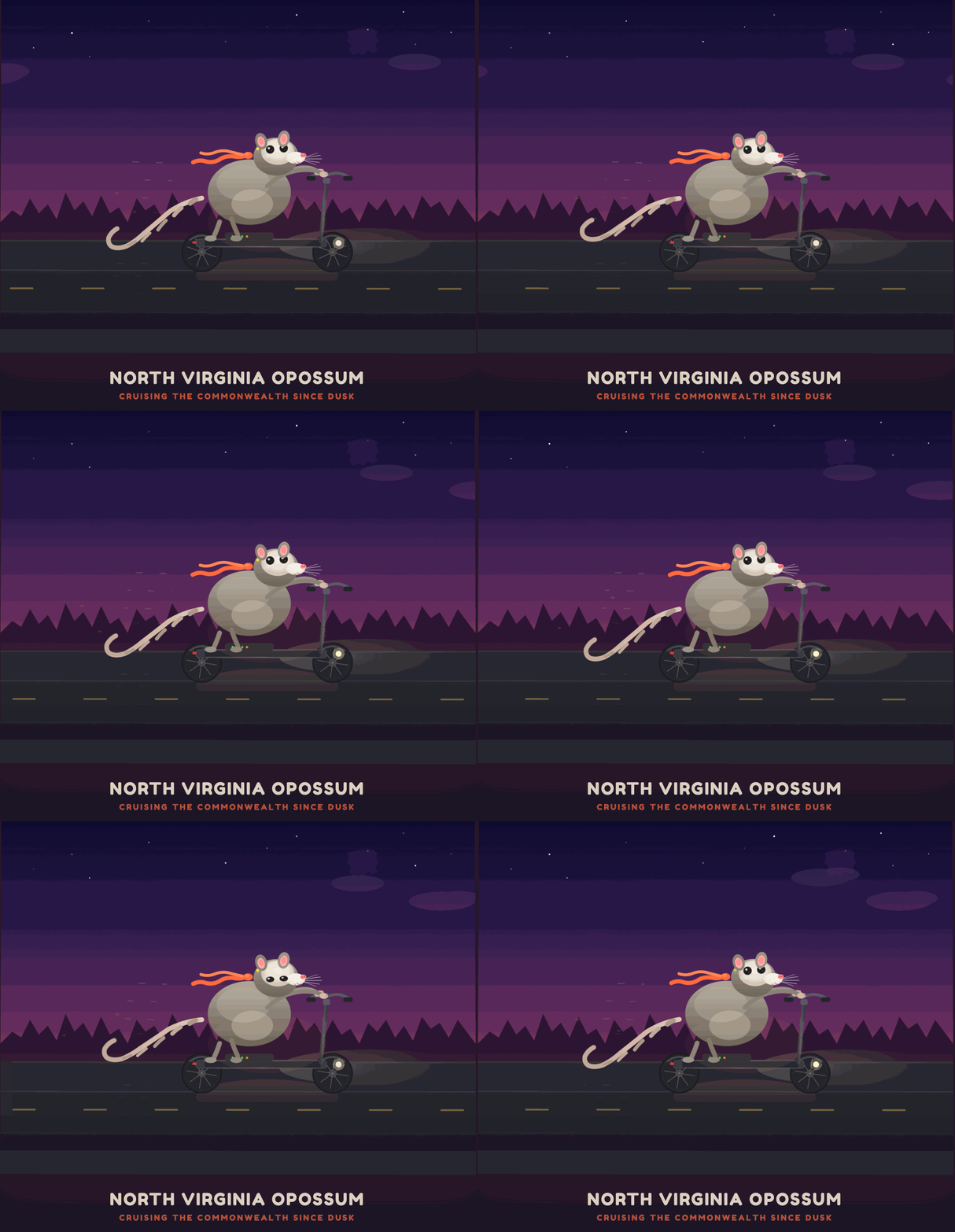
The HTML+SVG comments on that one include /* Earring sparkle */, <!-- Opossum fur gradient -->, <!-- Distant treeline silhouette - Virginia pines -->, <!-- Front paw on handlebar --> - here's the transcript and the HTML result.